
Generic CT211 Dual Lens WiFi Security Camera User Manual
Model: CT211
1. Introduction
Welcome to the user manual for your Generic CT211 Dual Lens WiFi Security Camera. This manual provides detailed instructions for the installation, operation, and maintenance of your new security camera. Please read this manual thoroughly before using the product to ensure proper setup and functionality. Keep this manual for future reference.
2. Package Contents
Before proceeding with installation, please verify that all items listed below are present in your package:
- Generic CT211 Dual Lens WiFi Security Camera (2 units)
- Instruction Manual
- Mounting Screws
- Power Cable

3. Product Overview
The Generic CT211 is a versatile dual-lens security camera designed for both indoor and outdoor surveillance. It offers advanced features to enhance your property's security.
Key Features:
- 2K HD Resolution & 360° Field of View: Provides clear images and comprehensive coverage.
- Dual Lens System: Features one fixed lens for specific areas and one rotating lens for broader surveillance.
- Motion Tracking: Automatically tracks detected movement.
- Human Detection & Alerts: Identifies human figures and sends real-time notifications to your smartphone.
- Two-Way Audio: Allows for communication through the camera via a mobile device.
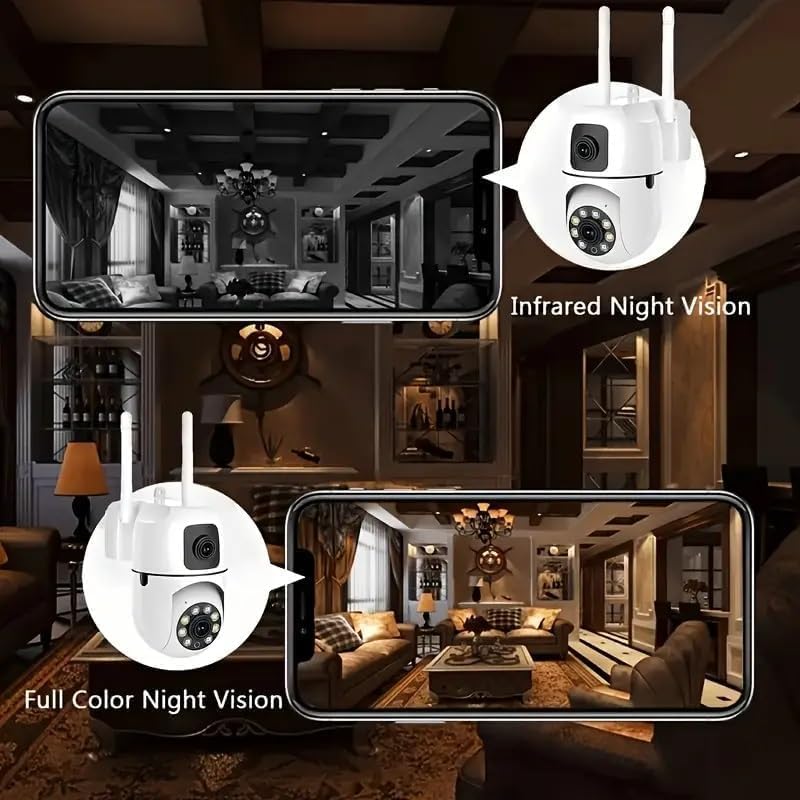
- Full-Color Night Vision: Offers three night vision modes for clear visibility up to 33 feet in low light.
- Flexible Storage: Supports Micro SD card (up to 128GB) and cloud storage options.
- Wireless Connectivity: Built-in Wi-Fi for easy connection to your home network.


3.1 Dual Lens Technology and 360° Coverage
The CT211 camera incorporates a unique dual-lens system. One lens is fixed to monitor a specific, critical area, while the other is a rotating lens that provides a broader, 360-degree field of view. This combination ensures comprehensive surveillance without blind spots.


3.2 Smart Detection and Two-Way Audio
Equipped with human detection, the camera can distinguish human figures from other moving objects, reducing false alarms. Upon detection, the YiloT app sends instant notifications to your smartphone, including images or video of the activity. The built-in microphone and speaker enable two-way audio communication, allowing you to speak and listen remotely through your mobile device.

3.3 Night Vision Modes and Storage Options
The camera offers three distinct night vision modes: Full-color, Infrared, and Smart Vision. These modes ensure clear and detailed images even in complete darkness, with an effective range of up to 33 feet. For video storage, you can choose between a Micro SD card (up to 128GB, not included) or a secure cloud storage service.
3.4 Wireless Connectivity
The CT211 camera features built-in Wi-Fi connectivity, eliminating the need for complex wiring. It supports connection via Wi-Fi, personal hotspot, or an Ethernet cable, providing flexible installation options.
4. Setup Guide
4.1 Unboxing and Initial Inspection
- Carefully remove all components from the packaging.
- Inspect the camera and accessories for any signs of damage.
4.2 App Installation
- Download the 'YiloT' app from your smartphone's app store (iOS or Android).
- Register for a new account or log in if you already have one.
4.3 Camera Mounting
- Choose a suitable location for installation, ensuring a clear view and access to a power source. The camera is designed for wall mounting.
- Use the provided mounting screws to securely attach the camera to the desired surface.
4.4 Power Connection
- Connect the power cable to the camera's power input port.
- Plug the other end of the power cable into a standard electrical outlet. The camera will power on and initiate its startup sequence.
4.5 Network Configuration
- Open the YiloT app and follow the on-screen instructions to add a new device.
- Select your preferred connection method: Wi-Fi, personal hotspot, or Ethernet cable.
- For Wi-Fi connection, enter your Wi-Fi network name (SSID) and password when prompted.
- Ensure your camera is within range of your Wi-Fi router for a stable connection.
5. Operating Instructions
5.1 Live View and Remote Control
Once connected, open the YiloT app to access the live video feed from your camera. You can view both fixed and rotating lens feeds simultaneously or switch between them.

5.2 Pan, Tilt, and Zoom (PTZ)
Use the controls within the YiloT app to remotely adjust the camera's viewing angle. The rotating lens supports 355° pan and 90° tilt movements, allowing you to cover a wide area.
5.3 Using Two-Way Audio
Tap the microphone icon in the app to speak through the camera's speaker. Tap the speaker icon to listen to audio from the camera's vicinity.
5.4 Recording and Playback
Recordings are automatically saved to your Micro SD card or cloud storage based on your settings. Access recorded footage through the app's playback feature, selecting specific dates and times.
5.5 Managing Alerts and Notifications
Configure alert settings in the YiloT app. You can enable human detection, set sensitivity levels, and choose to receive push notifications to your smartphone when activity is detected.
5.6 Switching Night Vision Modes
Within the app, you can manually switch between Full-color, Infrared, and Smart Vision night modes to optimize visibility based on environmental conditions.
6. Maintenance
6.1 Cleaning the Camera
Periodically clean the camera lens and housing with a soft, dry cloth. Avoid using harsh chemicals or abrasive materials that could damage the lens or finish.
6.2 Firmware Updates
Check the YiloT app regularly for available firmware updates. Keeping your camera's firmware up-to-date ensures optimal performance, security, and access to new features.
6.3 Storage Management
If using a Micro SD card, periodically review and manage stored footage to ensure sufficient space. For cloud storage, monitor your subscription status and storage limits.
7. Troubleshooting
- Camera not connecting to Wi-Fi: Ensure the camera is within range of your router. Verify the Wi-Fi password is correct. Try restarting both the camera and your router.
- No video feed: Check the power connection. Ensure the camera is online in the YiloT app. Restart the camera.
- Poor image quality: Clean the camera lens. Ensure there is adequate lighting. Adjust night vision settings if applicable.
- Motion detection not working: Check sensitivity settings in the app. Ensure human detection is enabled. Verify the camera's field of view is clear.
- Two-way audio issues: Check volume settings on your phone and in the app. Ensure microphone and speaker permissions are granted to the app.
- SD card not recording: Ensure the SD card is properly inserted and formatted. Check the card's capacity and health.
8. Technical Specifications
| Feature | Specification |
|---|---|
| Model Number | CT211 |
| Indoor/Outdoor Usage | Indoor, Outdoor |
| Connectivity Technology | Wireless (Wi-Fi, Bluetooth) |
| Power Source | Corded Electric |
| Controller Type | YiIoT App |
| Mounting Type | Wall Mount |
| Video Capture Resolution | 2048p (2K HD) |
| Viewing Angle | 360 Degrees |
| Special Features | 2-Way Audio, HD Resolution, Motion Sensor, Night Vision, PTZ Technology |
| Storage Options | Micro SD Card (up to 128GB), Cloud Storage |
| Product Dimensions (L x W x H) | 2.67 x 4.72 x 4.72 inches |
| Item Weight | 1.17 pounds |

9. Warranty and Support
For warranty information and technical support, please refer to the documentation provided at the time of purchase or contact the seller/manufacturer directly. Keep your purchase receipt as proof of purchase for warranty claims.