
1. Product Overview
The SONGMICS Electric Standing Desk LSD138BZ01 is designed to provide a versatile and ergonomic workspace. It features electric height adjustment, memory presets, and integrated cable management solutions to enhance productivity and comfort.

Image 1.1: The SONGMICS Electric Standing Desk LSD138BZ01, showcasing its spacious black tabletop and sturdy frame, equipped with a laptop, multiple monitors, and organizational accessories.
Key Features:
- Electric Height Adjustment: Smooth and quiet adjustment from 72 cm to 120 cm.
- Memory Presets: Store up to 4 preferred height settings for quick transitions.
- Integrated USB-C Port: 20W fast charging for mobile devices.
- Cable Management: Two cable openings and a fabric pocket for organization.
- Headphone Hook: Convenient storage for headphones or bags.
- Robust Construction: Steel frame and particleboard tabletop supporting up to 70 kg.
2. Safety Information
Please read and understand all safety instructions before assembly and use. Failure to follow these instructions may result in injury or damage to the product.
- Maximum Load Capacity: Do not exceed the maximum load of 70 kg (154 lbs) on the desktop. Exceeding this limit can compromise the desk's stability and safety.
- Clearance: Ensure there are no obstructions above or below the desk during height adjustment to prevent damage or injury.
- Children and Pets: Keep children and pets away from the desk during operation.
- Power Supply: Use only the provided power adapter. Do not expose the control unit or motor to moisture.
- Assembly: Assemble the desk on a soft, clean surface to prevent scratches. It is recommended to have two people for assembly due to the weight of the components.
3. Setup and Assembly
The SONGMICS Electric Standing Desk is designed for straightforward assembly. Follow the numbered instructions provided in the separate assembly manual. The tabletop consists of four individual panels that are joined during assembly.
Assembly Steps Overview:
- Prepare the Surface: Lay out all components on a clean, soft surface to prevent damage.
- Assemble the Tabletop: Join the four individual tabletop panels according to the instructions.
- Attach Legs and Crossbar: Secure the desk legs and crossbar to the assembled tabletop.
- Install Accessories: Attach the control panel, cable management tray, and headphone hook.
- Connect Power: Plug in the power cable to the control unit and a wall outlet.

Image 3.1: Visual guide illustrating the four main stages of desk assembly, from preparing the tabletop to attaching all components.
For detailed, step-by-step instructions, refer to the dedicated assembly manual included with your product.
4. Operating Instructions
This section details how to use the electric height adjustment and other features of your SONGMICS standing desk.
4.1 Height Adjustment
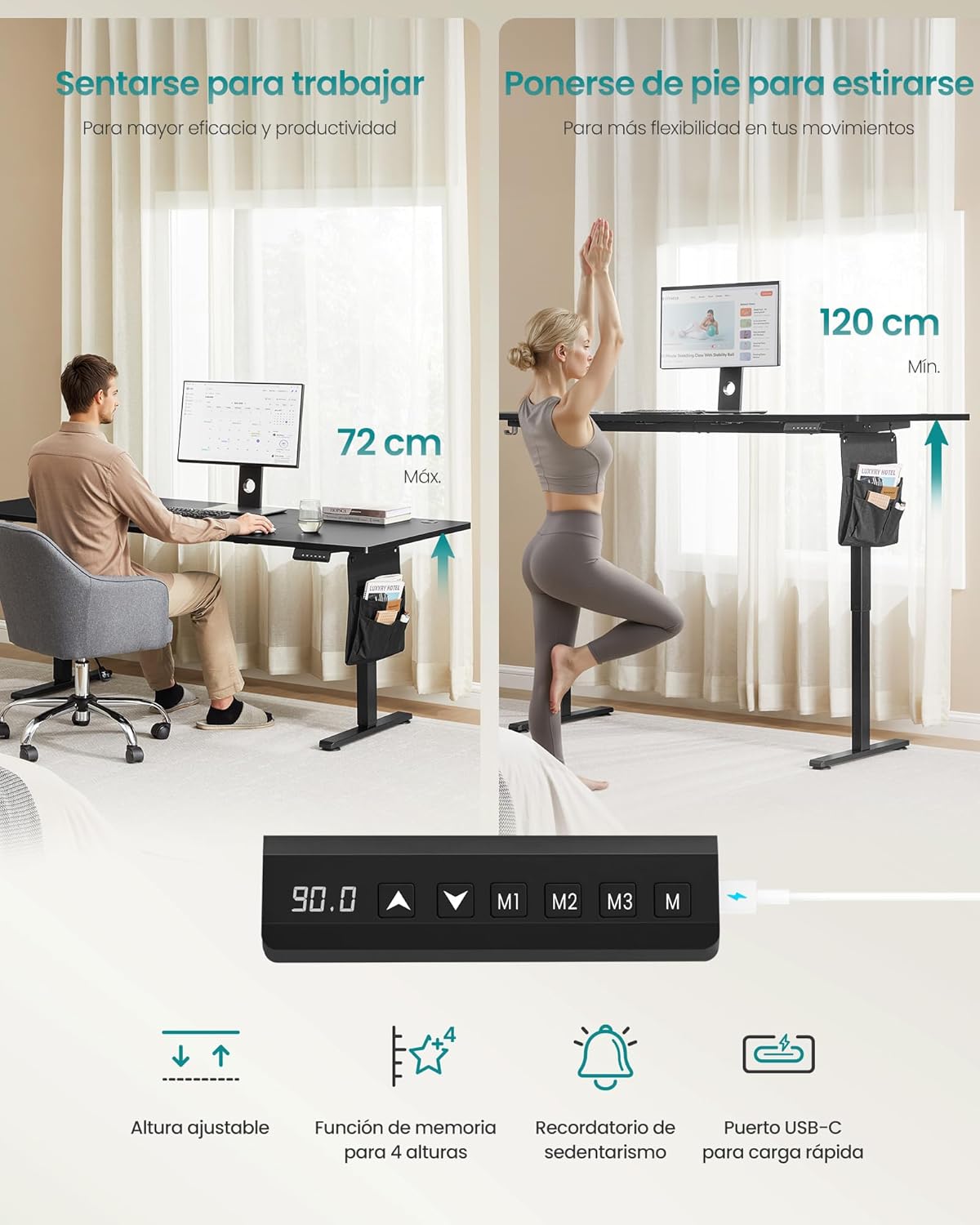
Image 4.1: Illustration of the desk's height adjustment range, showing comfortable sitting (72 cm) and standing (120 cm) positions, along with a close-up of the control panel.
- Adjusting Height: Use the Up (▲) and Down (▼) buttons on the control panel to raise or lower the desk to your desired height. The current height is displayed on the digital screen.
- Memory Presets: The desk allows you to save up to 4 preferred height settings. To save a height:
- Adjust the desk to the desired height.
- Press the M button. The display will flash.
- Press one of the memory buttons (M1, M2, M3, M4) within 3 seconds. The height is now saved to that preset.
- Recalling Presets: Press the corresponding memory button (M1, M2, M3, M4) to automatically move the desk to the saved height.

Image 4.2: Detail of the control panel, highlighting the memory function buttons for storing up to four different height settings.
4.2 USB-C Charging Port
The control panel includes a 20W USB-C port for convenient fast charging of compatible mobile phones and tablets.
- Simply connect your device to the USB-C port using a compatible cable.
- The port provides 20W fast charging output.

Image 4.3: The integrated USB-C port on the control panel, demonstrating its fast-charging capability for electronic devices.
4.3 Sedentary Reminder
The desk features a sedentary reminder function to encourage movement and promote a healthier work routine. This function can be activated or deactivated via the control panel (refer to the full assembly manual for specific instructions).

Image 4.4: Visual representation of the sedentary reminder feature, designed to prompt users to change posture.
4.4 Energy Saving
To conserve energy, the desk's control unit automatically turns off after one minute of inactivity.
5. Maintenance
Proper maintenance ensures the longevity and optimal performance of your standing desk.
- Cleaning: Wipe the desktop and frame with a soft, damp cloth. Avoid abrasive cleaners or harsh chemicals that could damage the finish.
- Inspection: Periodically check all screws and connections to ensure they are tight. Retighten if necessary.
- Cable Management: Ensure cables are neatly organized and not pinched during height adjustments.
- Motor Care: The electric motor is maintenance-free. Do not attempt to open or lubricate it.
6. Troubleshooting
If you encounter any issues with your SONGMICS Electric Standing Desk, refer to the following common troubleshooting steps.
| Problem | Possible Cause | Solution |
|---|---|---|
| Desk does not move | Power cable disconnected; Overload; Motor error. | Check power connections. Reduce weight on desk. Refer to the full manual for error codes and reset procedures. |
| Desk movement is uneven or noisy | Uneven load; Loose connections; Obstruction. | Distribute weight evenly. Check all assembly screws. Ensure no objects are interfering with the legs. |
| Memory presets not working | Incorrect saving procedure; Power cycle needed. | Re-save the desired height settings (see Section 4.1). Unplug the desk for 30 seconds and plug it back in. |
| Desk wobbles at maximum height | Normal for some height-adjustable desks; Loose connections. | Ensure all fasteners are securely tightened. While some minimal movement may occur at extreme heights, excessive wobbling indicates a potential assembly issue. |
| USB-C port not charging | Cable issue; Device incompatibility; Desk not powered. | Try a different USB-C cable and device. Ensure the desk is powered on. |
If the problem persists after attempting these solutions, please contact SONGMICS customer support.
7. Specifications
Detailed technical specifications for the SONGMICS Electric Standing Desk LSD138BZ01.

Image 7.1: Dimensional overview of the desk, including length, width, height range, and maximum load capacity.
| Feature | Specification |
|---|---|
| Model Number | LSD138BZ01 |
| Dimensions (L x W) | 180 x 80 cm |
| Height Adjustment Range | 72 - 120 cm |
| Maximum Load Capacity | 70 kg (154 lbs) |
| Material | Particleboard, Steel, Oxford Fabric |
| Color | Ink Black |
| Noise Level (Operation) | < 48 dB |
| USB-C Output | 20W Fast Charging |
| Included Components | Cable management tray, Headphone hook |
| Product Weight | 29.1 kg (64.15 lbs) |
8. Warranty and Support
SONGMICS is committed to providing high-quality products and customer satisfaction.
Warranty Information:
Please refer to the warranty card included with your product or visit the official SONGMICS website for detailed warranty terms and conditions.
Customer Support:
If you have any questions, require assistance with assembly, or need troubleshooting support, please contact our customer service team:
- Website: www.songmics.com
- Email: support@songmics.com (Example, please verify actual contact information)
- Phone: [Insert Customer Service Phone Number Here] (Example, please verify actual contact information)
Please have your model number (LSD138BZ01) and purchase information ready when contacting support.