1. Introduction
Thank you for choosing the Kepswin PS25K 49800mAh Solar Power Bank. This device is designed to provide reliable portable power for your electronic devices, featuring both USB and solar charging capabilities, a built-in LED flashlight, and a rugged, waterproof design. Please read this manual carefully to ensure proper use and maintenance of your power bank.
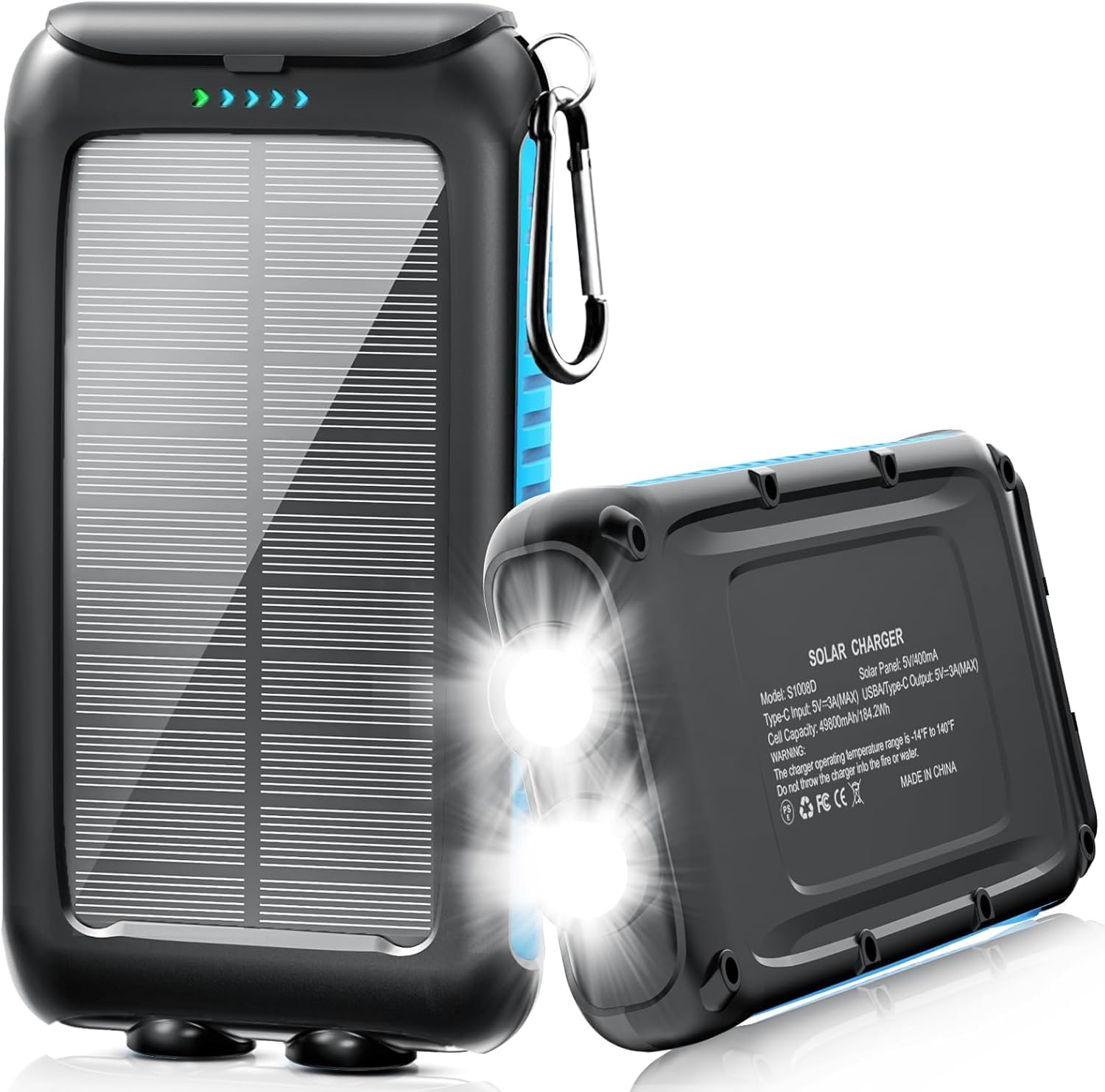
Image: The Kepswin PS25K Solar Power Bank, showcasing its solar panel and dual LED flashlight.
2. Safety Precautions
To ensure safe operation and prolong the lifespan of your power bank, please observe the following safety guidelines:
- Do not disassemble, open, or attempt to repair the power bank.
- Keep the power bank away from fire, high temperatures, and direct sunlight for extended periods.
- Avoid exposure to extreme cold.
- Do not immerse the power bank in water. While it is waterproof, prolonged submersion can cause damage.
- Do not drop, hit, or subject the power bank to strong impacts.
- Keep out of reach of children.
- Use only certified charging cables and adapters.
- This power bank features multiple safety protections including temperature protection, over-voltage protection, over-current protection, and short-circuit protection.

Image: Visual representation of the power bank's integrated safety features, including protection against overcharging, over-discharging, short circuits, overvoltage, overheating, and overcurrent.
3. Package Contents
Upon unpacking, please verify that all items are present:
- 1 x Kepswin PS25K 49800mAh Solar Power Bank
- 1 x USB Type-C Charging Cable
- 1 x Carabiner Clip
- 1 x User Manual (this document)

Image: Contents of the product package, including the solar power bank, USB cable, carabiner, and user manual.
4. Product Overview
Familiarize yourself with the components of your Kepswin PS25K Solar Power Bank:
- Power Button: Used to check battery level and control the flashlight.
- Solar Panel: For emergency solar charging.
- USB Output Ports: For charging external devices.
- Type-C Input/Output Port: For charging the power bank or external devices.
- Battery Level Indicators: Blue LEDs showing remaining power.
- Solar Charging Indicator: Green LED indicating solar charging activity.
- Dual LED Flashlight: Provides illumination with multiple modes.
- Carabiner Clip: For easy attachment to bags or gear.
- Protection Cover: Covers charging/discharging ports for water and dust resistance.

Image: Labeled diagram illustrating the various parts and features of the Kepswin PS25K Solar Power Bank.
5. Charging the Power Bank
Your Kepswin PS25K Solar Power Bank can be charged via two methods: USB-C or solar energy.
5.1. USB-C Charging (Recommended)
For the fastest and most efficient charging, use the provided USB Type-C cable and a 5V/3A USB adapter (not included).
- Connect the USB Type-C cable to the power bank's Type-C input/output port.
- Connect the other end of the cable to a USB wall adapter or computer USB port.
- The blue LED indicators will illuminate to show the charging progress. A blue light indicates USB charging.
- All four blue LEDs will be solid when the power bank is fully charged.
5.2. Solar Charging
The solar panel provides an emergency charging option. Due to its size and the power bank's large capacity, solar charging is significantly slower than USB charging and is intended for emergency use or to maintain charge, not for primary full recharging.
- Place the solar panel of the power bank in direct sunlight.
- A green LED light will illuminate, indicating that solar charging is active.
- Ensure the solar panel is clean and unobstructed for optimal performance.

Image: Illustration of the two charging methods: USB charging from a wall outlet and solar charging under sunlight.
6. Charging External Devices
The power bank features multiple output ports for charging various devices simultaneously.
- Open the protection cover to access the USB output ports and the Type-C input/output port.
- Connect your device's charging cable to one of the power bank's USB output ports or the Type-C port.
- Connect the other end of the cable to your electronic device (e.g., smartphone, tablet).
- The power bank will automatically begin charging your device. If not, press the power button once to initiate charging.
- The blue LED indicators will show the remaining battery level of the power bank.

Image: The power bank connected and charging three different devices concurrently, demonstrating its multi-device charging capability.
7. LED Flashlight Operation
The built-in dual LED flashlight offers three modes for various situations.
- Turn On (Steady Mode): Press and hold the power button for approximately 3 seconds. The flashlight will turn on in a steady, continuous beam.
- Cycle Modes: While the flashlight is on, short-press the power button once to activate Strobe mode (rapid flashing). Short-press the button again to activate SOS mode (emergency beacon pattern).
- Turn Off: From any flashlight mode, press and hold the power button for approximately 3 seconds to turn off the flashlight. Alternatively, short-press the button a third time from SOS mode to turn it off.

Image: Illustration of the power button and the three flashlight modes (Steady, Strobe, SOS), with visual examples of their application in outdoor settings.
8. Power Status Indicators
The power bank features 5 LED indicators to keep you informed about its status:
- 4 Blue LEDs: These indicate the remaining battery capacity. Each LED typically represents 25% of the charge.
- 1 Green LED: This light signifies that solar charging is currently active.
- Blue Light (during charging): When charging the power bank via USB, the blue LEDs will flash to indicate charging progress and remain solid when fully charged.
Press the power button once to instantly display the current battery level.
9. Durability Features
The Kepswin PS25K is built for outdoor use and features enhanced durability:
- Waterproof (IPX5): The charging/discharging ports are protected by attached covers, offering resistance against splashes and light rain.
- Shockproof: Designed to withstand accidental drops and impacts.
- Dustproof: Protects internal components from dust and debris, making it suitable for rugged environments.

Image: Visual representation of the power bank's waterproof, shockproof, and dustproof features in various outdoor scenarios.
10. Specifications
| Feature | Specification |
|---|---|
| Model Number | PS25K |
| Battery Capacity | 49800mAh |
| Product Dimensions | 5.7 x 3 x 0.7 inches |
| Item Weight | 1.1 pounds |
| USB-C Input/Output | 5V/3A (Max) |
| USB-A Output | 5V/3A (Max) |
| Solar Panel Output | 5V/0.3A (Max) |
| Special Features | Digital Display, LED Flashlight, Waterproof, Dustproof, Shockproof |
| Certifications | UL, CE, FCC, RoHS, UN38.3 |
11. Troubleshooting
If you encounter issues with your power bank, please refer to the following common solutions:
- Power bank not charging: Ensure the USB-C cable is securely connected to both the power bank and the power source. Try a different cable or adapter. For solar charging, ensure the panel is in direct sunlight and clean.
- Device not charging from power bank: Ensure the power bank has sufficient charge. Press the power button once to activate output. Try a different USB cable or output port.
- Flashlight not working: Ensure the power bank has charge. Press and hold the power button for 3 seconds to turn it on/off.
- Slow charging: For charging the power bank, use a 5V/3A adapter for optimal speed. Solar charging is inherently slower and intended for emergency use. For charging devices, ensure your cable supports fast charging and your device is compatible.
12. Warranty and Support
Kepswin provides a 365-day quality guarantee for this product. For any questions, concerns, or technical support, please contact Kepswin customer service. You can find contact information on the official Kepswin website or through your purchase platform.
Please note: Due to its high capacity (49800mAh), this power bank may exceed airline carry-on restrictions for lithium batteries. Always check with your specific airline before flying.

Image: Customer support information, highlighting 24-hour online response and a 365-day quality guarantee.