
1. Introduction
This manual provides essential information for the safe and efficient operation of your AVPLAY BDP-G5300 4K Ultra HD Blu-Ray Player. Please read it thoroughly before using the device and retain it for future reference.
The AVPLAY BDP-G5300 is a versatile media player designed to deliver high-quality audio and video experiences. It supports a wide range of disc formats and digital media, including True 4K Ultra HD Blu-Ray discs, with advanced decoding capabilities for various audio and video standards.
2. Important Safety Information
- Power Supply: Ensure the player is connected to a power source within the specified voltage range (AC100~240V 50/60Hz).
- Ventilation: Do not block ventilation openings. Allow adequate space around the player for proper airflow.
- Moisture: Keep the player away from water or excessive humidity. Do not expose it to rain or splashes.
- Cleaning: Disconnect the power cord before cleaning. Use a soft, dry cloth. Do not use liquid or aerosol cleaners.
- Servicing: Do not attempt to service this product yourself. Refer all servicing to qualified service personnel.
3. Package Contents
Please check that all items are present and in good condition upon unpacking.
- AVPLAY BDP-G5300 4K Ultra HD Blu-Ray Player
- Remote Control (with batteries)
- Power Cable
- HDMI Cable
- User Manual (this document)
- (Note: Specific accessories may vary by bundle.)
4. Setup
4.1 Unpacking and Placement
Carefully remove the player from its packaging. Place the player on a stable, level surface with adequate ventilation. Avoid placing it near heat sources or in direct sunlight.
4.2 Connecting to a Display Device
Use an HDMI cable to connect the player to your TV or projector. The BDP-G5300 features dual HDMI output interfaces:
- HDMI 2.0 (Video/Audio): For primary video and audio output to your display. Supports 4K resolution and HDCP2.2.
- HDMI 1.4 (Audio Only): For dedicated audio output to an AV receiver or sound system, supporting HDCP1.X.
For optimal 4K Ultra HD performance, ensure your display and HDMI cable support HDMI 2.0 and HDCP 2.2.
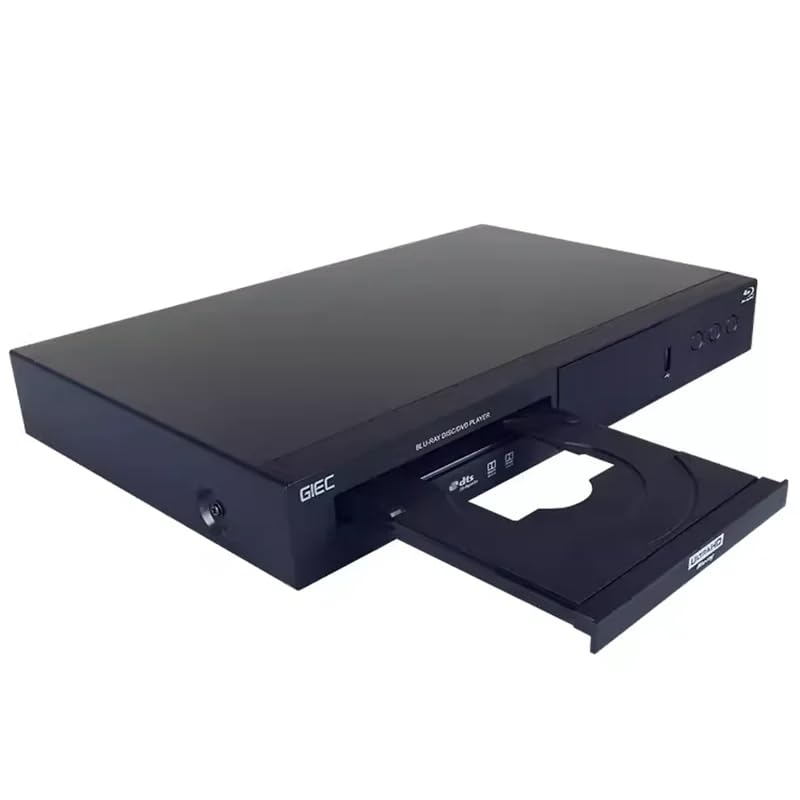
Image: Front view of the AVPLAY BDP-G5300 Blu-Ray Player, showing the disc tray and control buttons.
4.3 Connecting to Audio Equipment
In addition to HDMI audio, the player offers fiber optic and coaxial digital audio outputs for connection to digital power amplifier equipment or sound systems.
4.4 Network Connection
Connect an Ethernet cable to the 10/100/1000M Ethernet input port on the player to access network features like BD-LIVE and BD-J content.
4.5 Power Connection
Connect the power cable to the player's power input and then to a wall outlet. The player supports an ultra-wide voltage operating range of AC100~240V 50/60Hz.
5. Operating Instructions
5.1 Basic Disc Playback
- Power on the player and your display device.
- Select the correct HDMI input on your display.
- Press the OPEN/CLOSE button on the player or remote control to open the disc tray.
- Place a compatible disc (UHD Blu-ray, Blu-ray, DVD, CD, etc.) gently into the tray with the label side facing up.
- Press the OPEN/CLOSE button again to close the tray.
- The player will automatically detect and begin playback or display the disc menu.
- Use the remote control's navigation buttons and ENTER to control playback.
5.2 USB Media Playback
The player features dual USB input interfaces (USB 3.0 and USB 2.0) for playing media files from external storage devices.
- Connect your USB storage device to either USB port.
- Navigate to the USB input source using the remote control.
- Browse and select your desired media files (video, audio, images).
- The player supports various formats including HEVC, H.264, H.265, AVI, MKV, MOV, M2TS, TS, MPEG1, MPEG2, MPEG4 for video, and Dolby Digital, Dolby TrueHD, Dolby Atmos, Flac, DTS, DSD, ALAC, APE, WAV for audio.
- Supported file systems include FAT16, FAT32, NTFS, and EXT3.
5.3 Advanced Features
- 4K HDR & Dolby Vision: The player supports 4K HDR and Dolby Vision decoding for enhanced picture quality on compatible displays.
- Subtitle Support: Supports multiple soft subtitle formats such as SSA, SUB, SRT, TXT, and ASS.
- Multi-language Audio: Enjoy movies with multiple language audio tracks and text movie dialogues.
6. Maintenance
6.1 Cleaning the Player
To clean the exterior of the player, disconnect the power cord. Use a soft, dry, lint-free cloth. Do not use abrasive cleaners, waxes, or solvents as they can damage the finish.
6.2 Disc Care
Handle discs by their edges. Keep discs clean and free from scratches. Store discs in their cases when not in use to prevent dust and damage.
7. Troubleshooting
| Problem | Possible Cause | Solution |
|---|---|---|
| No power | Power cable not connected securely. | Check power cable connection to the player and wall outlet. Ensure the outlet has power. |
| No picture | Incorrect HDMI input selected on TV. HDMI cable loose or faulty. | Select the correct HDMI input on your TV. Check HDMI cable connections. Try a different HDMI cable. |
| No sound | Audio settings incorrect. Volume too low. | Check audio output settings on the player and your TV/receiver. Increase volume. Ensure audio cables are connected correctly. |
| Disc not playing | Disc is dirty, scratched, or incompatible. | Clean the disc. Try a different disc. Ensure the disc format is supported by the player. |
| USB media not recognized | USB device not formatted correctly. Incompatible file format. | Ensure USB device is formatted as FAT16, FAT32, NTFS, or EXT3. Check if media files are supported. |
8. Specifications
| Feature | Description |
|---|---|
| Model | BDP-G5300 |
| Decoding Chip | Professional UHD 4K decoding chip MT8581 |
| Optical Head | SONY481AAA (4K Blu-ray dedicated) |
| Video Output | 4K resolution output, 4K HDR, Dolby Vision |
| HDMI Output | Dual HDMI: HDMI 2.0 (Video/Audio, HDCP2.2/1.X), HDMI 1.4 (Audio only, HDCP2.2/1.X) |
| USB Input | Dual USB: High-speed USB 3.0, USB 2.0 |
| Digital Audio Output | Fiber optic, Coaxial |
| Supported Disc Formats | UHD Blu-ray, Blu-ray, Blu-ray 3D, DVD Video, DVD Audio, VCD, SVCD, CD, SACD, DTS CD, HDCD, Kodak Picture CD, CD-R/RW, DVD ± R/RW, BD-R/RE |
| Supported Audio Formats | Dolby Digital, Dolby Digital Plus, Dolby TrueHD, Dolby Atmos/X-DMAX, Flac, DTS (disc), DTS-HD (disc), DSD (DFF, DSF), ALAC, APE, WAV, WAC |
| Supported Video Encoding | HEVC, H.264, H.265, CV1, AVI, MKV, MOV, M2TS, TS, MPEG1, MPEG2, MPEG4 |
| Supported Subtitle Formats | SSA, SUB, SRT, TXT, ASS |
| Supported File Systems | FAT16, FAT32, NTFS, EXT3 |
| Ethernet | 10/100/1000M (for BD-LIVE, BD-J) |
| Power Supply | AC100~240V 50/60Hz |
| Dimensions (W x D x H) | 360mm x 224mm x 49mm |
| Weight | 2 kg (approx. 4.4 lbs) |
9. Warranty and Support
For warranty information and technical support, please refer to the documentation provided with your purchase or contact your retailer. Keep your proof of purchase for warranty claims.