
1. Introduction
This manual provides instructions for the ZYHKON SU9 Sleep Earbuds. These earbuds are designed for comfort during sleep, featuring a small, lightweight form factor and a smart touchscreen charging case. They offer Bluetooth 5.4 connectivity, multiple EQ modes, and extended battery life for audio playback and calls.
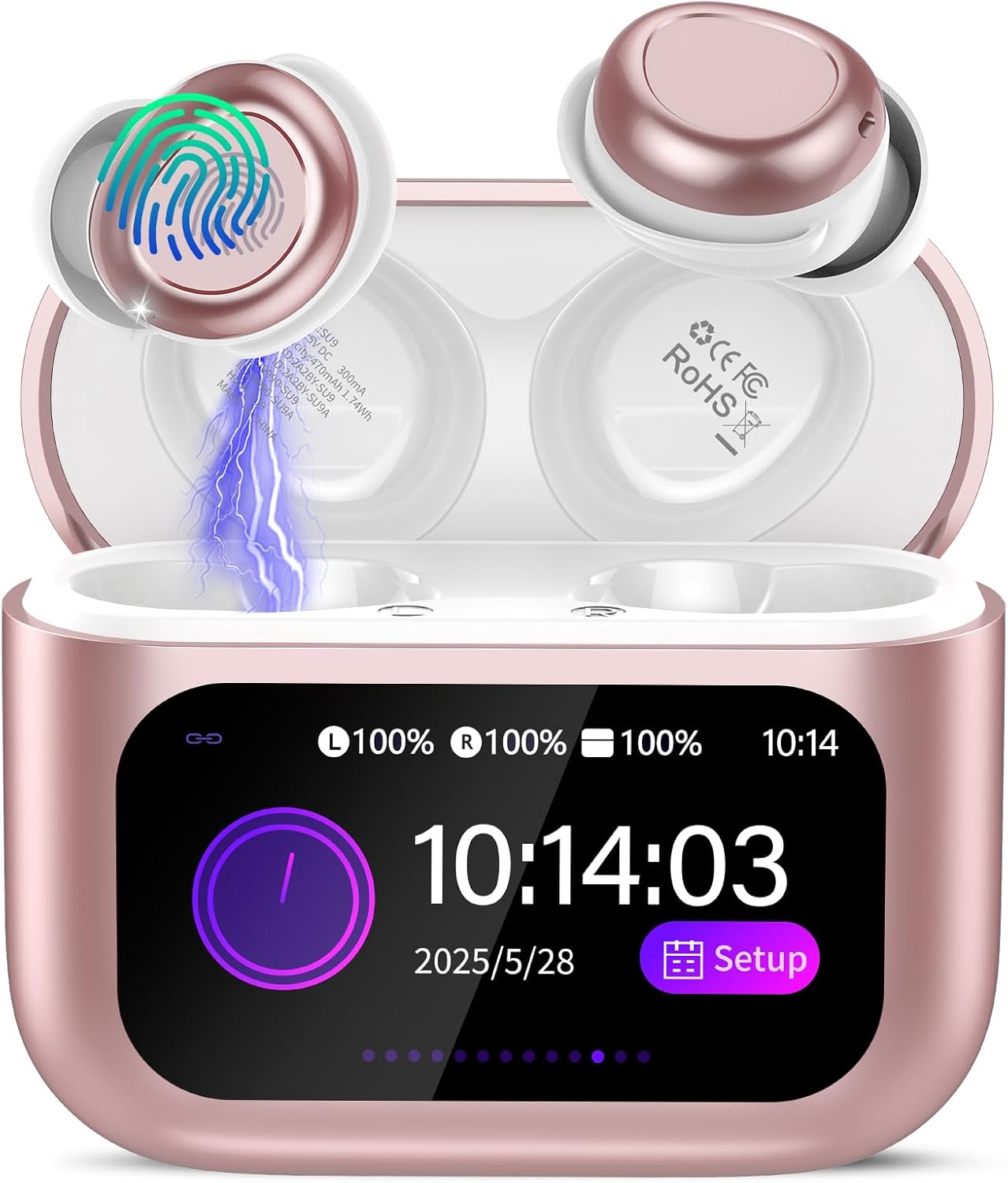
Image: The ZYHKON SU9 Sleep Earbuds in their rose gold charging case, displaying the touchscreen interface and an earbud being placed into the charging slot.
2. What's in the Box
Verify that all items are present in the package:
- 2 x SU9 Sleep Earbuds (Left and Right)
- 1 x Portable Charging Case with Touchscreen
- 1 x USB-C Charging Cable
- 1 x User Manual
- 2 x pairs of Earcaps (additional sizes)
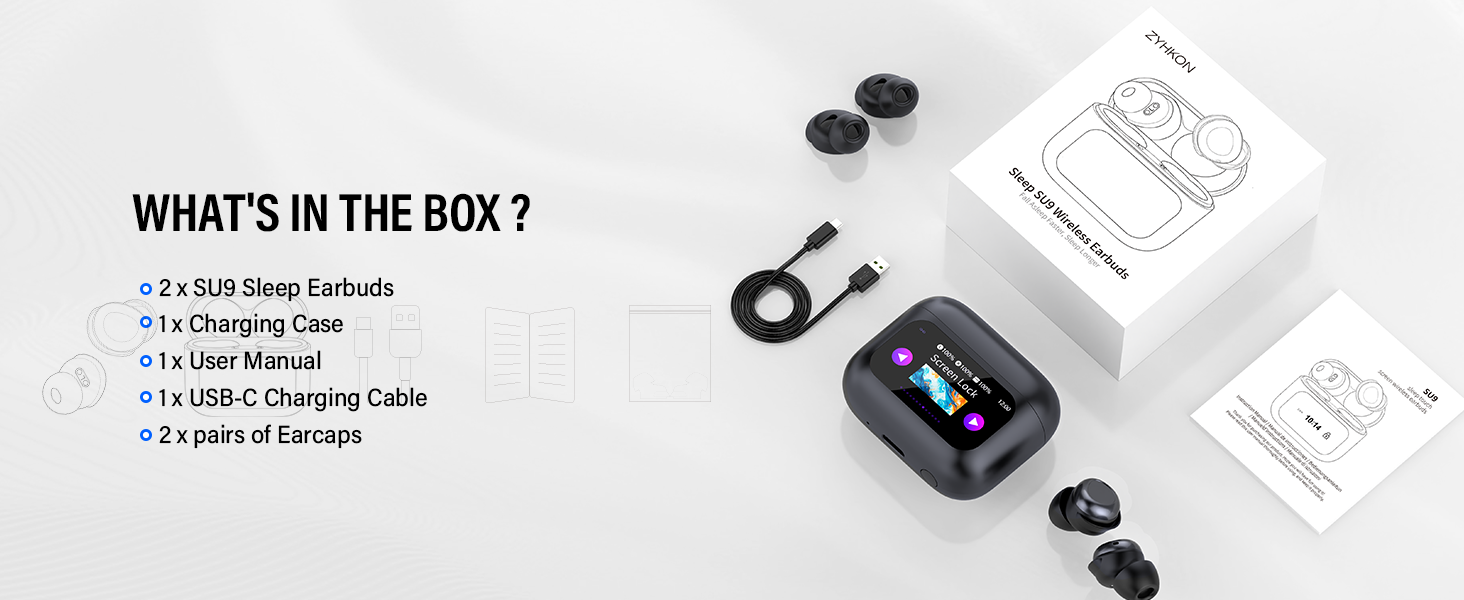
Image: An illustration showing the SU9 Sleep Earbuds, charging case, USB-C cable, user manual, and extra earcaps, representing the package contents.
3. Setup
3.1 Charging the Device
Before first use, fully charge the earbuds and the charging case. Connect the provided USB-C cable to the charging port on the case and to a compatible USB power source. The touchscreen on the case will display the charging status.
- Charging Time: Approximately 1.5 hours for a full charge.
- Battery Life: Up to 6-8 hours on a single earbud charge, and up to 48 hours total playtime with the charging case.

Image: A visual representation of the earbuds and charging case, highlighting the 48-hour total playtime and 1.5-hour charging time.
3.2 Pairing with a Bluetooth Device
- Ensure the earbuds are charged and placed inside the charging case.
- Open the charging case. The earbuds will automatically enter pairing mode.
- On your device (smartphone, tablet, etc.), enable Bluetooth and search for available devices.
- Select "SU9" from the list of detected devices to connect.
- Once connected, the earbuds will indicate successful pairing, and the charging case screen may show a connected status.

Image: A graphic illustrating the Bluetooth 5.4 technology and the one-step pairing process with various devices like smartphones and tablets.
3.3 Fitting the Earbuds
Proper fit is essential for comfort and sound quality, especially for sleep. The SU9 earbuds are designed to be small and lightweight (3.0g per earbud) for minimal pressure.
- Select the appropriate ear tips that provide a secure yet comfortable seal in your ear canal.
- Place the ear tip downwards and gently insert the earbud into your ear canal.
- Slightly rotate the earbud to ensure a secure and comfortable fit.
- Adjust until the earbud feels stable and does not cause discomfort, even when lying on your side.

Image: A four-step diagram demonstrating how to select ear tips, insert the earbud, rotate for a secure fit, and select a mode.

Image: A woman sleeping on her side, demonstrating the comfortable and low-profile design of the earbuds for side sleepers.
4. Operating Instructions
4.1 Touch Controls
The earbuds feature touch-sensitive controls for various functions. The charging case also has a touchscreen for advanced settings.
| Function | Action (L/R Earbud) |
|---|---|
| Play/Pause Music | Double-tap (x2) |
| Next Track | Long press (2s) Right earbud |
| Previous Track | Long press (2s) Left earbud |
| Volume Up | Single tap (x1) Right earbud |
| Volume Down | Single tap (x1) Left earbud |
| Answer/End Call | Single tap (x1) |
| Reject Call | Long press (2s) |
| Activate Voice Assistant | Triple-tap (x3) |
| Enable Sleep Mode | Quadruple-tap (x4) |
| Exit Sleep Mode | Quadruple-tap (x4) |
Note: Sleep mode is not available when using only one earbud. If the primary earbud is turned off, the secondary earbud will automatically exit sleep mode.
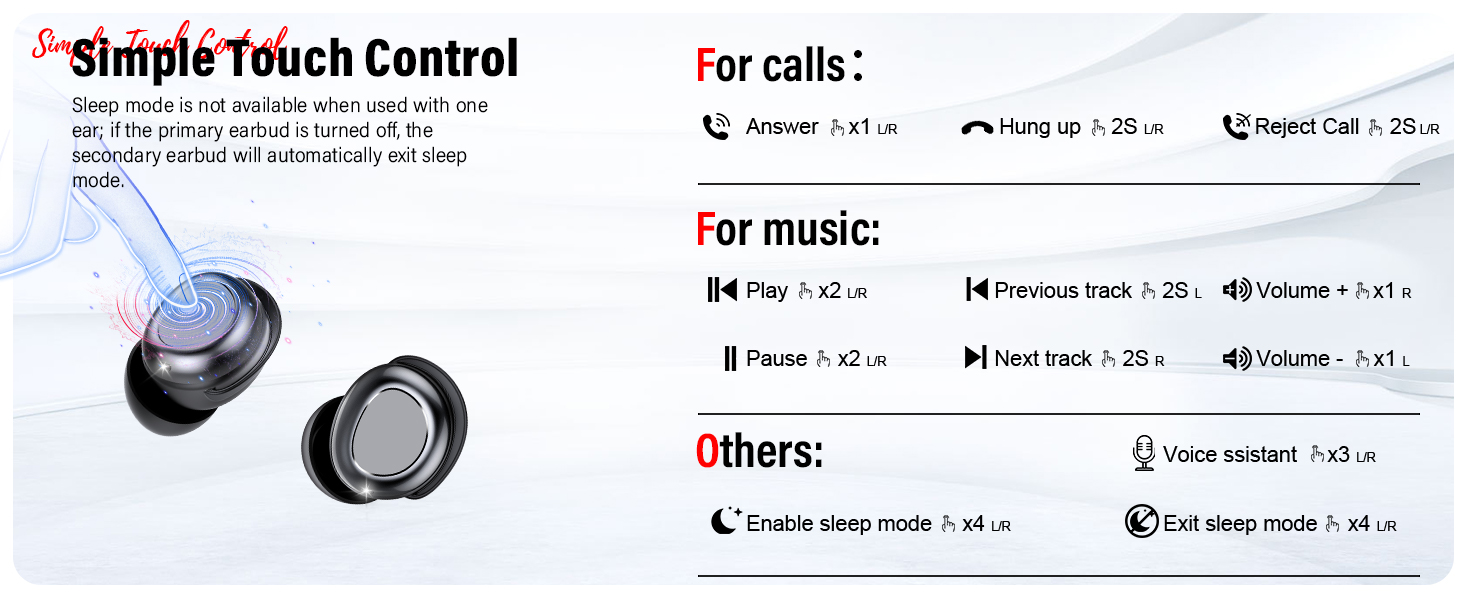
Image: A detailed diagram illustrating the various touch control gestures for managing calls, music playback, and activating/exiting sleep mode.
4.2 Touchscreen Charging Case Functions
The smart full-color LED touchscreen on the charging case provides access to additional features:
- Sleep Mode Activation: Directly activate sleep mode from the case.
- EQ Modes: Select from 5 preset EQ modes (Standard, Classic, Jazz, Rock, Pop) to customize your audio experience.
- Language Options: Choose from 7 different language settings.
- Wallpaper & Brightness Adjustment: Personalize the screen's appearance.
- Find My Earphone: Locate misplaced earbuds.
- Volume Control: Adjust volume directly from the case.
- Power Off/Reset/Factory Reset: Manage device power and settings.

Image: A collage of screenshots from the charging case touchscreen, displaying options for screen lock, language switch, music control, EQ modes (Classic, Jazz), sleep mode, and other settings.

Image: A visual showing the five distinct EQ modes (Normal, Jazz, Rock, Pop, Classics) available on the SU9 Sleep Earbuds, with the charging case displaying the "Jazz" mode selected.
4.3 Sleep Mode
The dedicated Sleep Mode is designed to enhance your sleep experience by disabling disruptive notifications and alarms.
- When Sleep Mode is active, low-battery and shutdown alarms are turned off.
- This mode helps ensure uninterrupted rest.
- Activate/Deactivate via earbud touch controls (quadruple-tap) or through the charging case touchscreen.

Image: A woman sleeping soundly with the earbuds, accompanied by icons indicating "Sleep mode," "No power off alarm," "No low battery alarm," and "Touch disabled" for an undisturbed sleep.
5. Maintenance
5.1 Cleaning
- Regularly clean the earbuds and charging case to maintain optimal performance and hygiene.
- Use a soft, dry, lint-free cloth to wipe the surfaces of the earbuds and case.
- For ear tips, remove them from the earbuds and clean with a mild soap solution, then rinse thoroughly and allow to dry completely before reattaching.
- Avoid using abrasive materials, alcohol, or chemical cleaners, as these can damage the device.
- Ensure charging contacts on both earbuds and case are clean and free of debris.
5.2 Storage
- When not in use, store the earbuds in their charging case to protect them and keep them charged.
- Store the device in a cool, dry place, away from direct sunlight, extreme temperatures, and humidity.
- Avoid placing heavy objects on the charging case.
6. Troubleshooting
If you encounter issues with your ZYHKON SU9 Sleep Earbuds, refer to the following common solutions:
| Problem | Possible Cause | Solution |
|---|---|---|
| Earbuds not pairing | Low battery, out of range, pairing mode not active, previous connection issue. | Ensure earbuds are charged. Place them in the case, close, then open to re-enter pairing mode. Move closer to your device. Forget "SU9" in your device's Bluetooth settings and try pairing again. |
| No sound or low volume | Volume too low on earbuds/device, improper fit, earbud obstruction. | Increase volume on both earbuds and connected device. Adjust earbuds for a secure fit. Clean ear tips and earbud mesh. |
| Intermittent connection/audio dropouts | Interference, distance from device, low battery. | Move closer to your connected device. Avoid areas with strong Wi-Fi or other Bluetooth signals. Ensure earbuds are fully charged. |
| Charging case touchscreen unresponsive | Low battery, temporary software glitch. | Charge the case. Perform a soft reset by holding the power button (if available) or allowing the battery to fully drain and then recharging. |
| Earbuds not charging | Poor contact, dirty charging pins, faulty cable/charger. | Ensure earbuds are correctly seated in the case. Clean charging pins on both earbuds and case. Try a different USB-C cable and power adapter. |
If the issue persists after trying these steps, please contact customer support.
7. Specifications
| Feature | Detail |
|---|---|
| Model Name | SU9 |
| Brand | ZYHKON |
| Connectivity Technology | Wireless (Bluetooth) |
| Bluetooth Version | 5.4 |
| Ear Placement | In Ear |
| Form Factor | In Ear |
| Control Type | Touch Control (Earbuds & Charging Case Touchscreen) |
| Audio Driver Type | Dynamic Driver (13mm) |
| Water Resistance Level | Waterproof (IPX7) |
| Earbud Weight | 3.0 grams per earbud |
| Charging Time | 1.5 Hours |
| Single Charge Playtime | 6-8 Hours |
| Total Playtime (with case) | Up to 48 Hours |
| Compatible Devices | iOS, Android, and all devices with Bluetooth connectivity. |
| EQ Modes | 5 (Standard, Classic, Jazz, Rock, Pop) |
8. Warranty & Support
ZYHKON products are designed for reliability and performance. For warranty information and customer support, please refer to the following:
- Warranty: Please refer to the warranty card included in your product packaging for specific warranty terms and conditions.
- Customer Support: For technical assistance, troubleshooting, or service inquiries, please contact ZYHKON customer support. Contact details can typically be found on the official ZYHKON website or on the packaging.
- Online Resources: Visit the official ZYHKON website for FAQs, updated manuals, and additional product information.
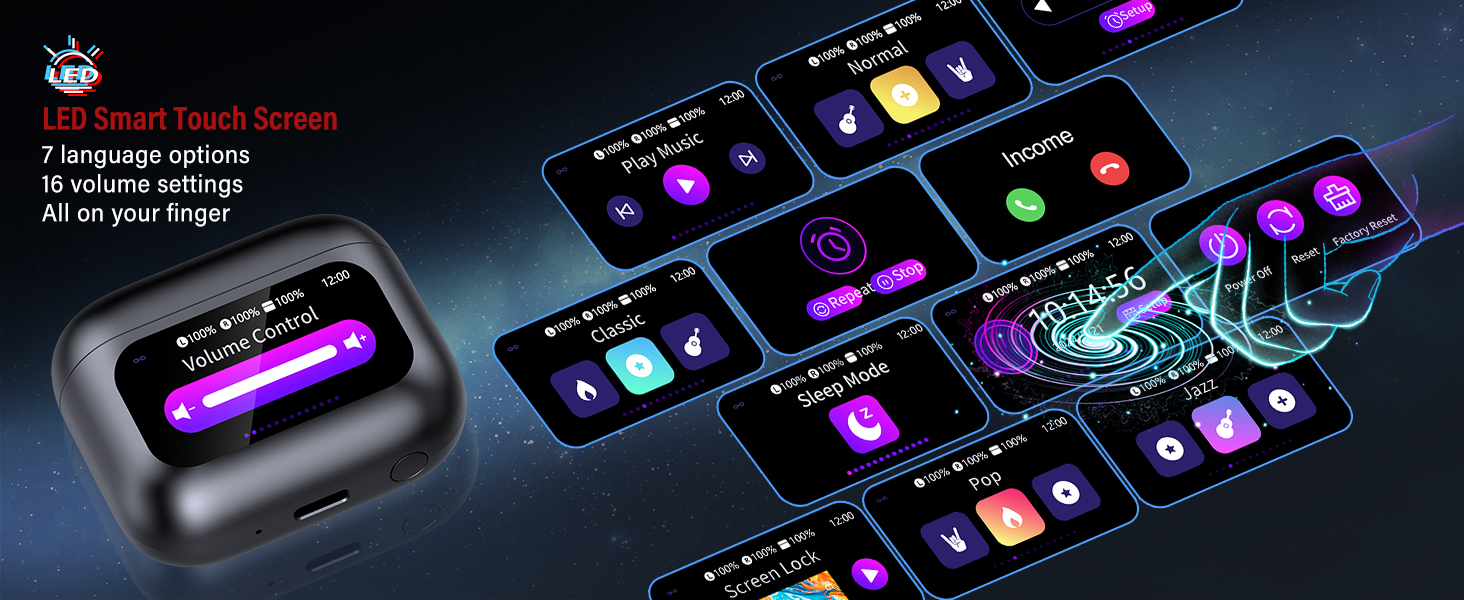
Image: A graphic detailing ZYHKON's brand services, including 24/7 quick reply, free replacement, faster delivery, and lifetime product quality support.