
Introduction
This manual provides essential instructions for the installation, operation, and maintenance of your Laticrete 0802-0403-T Non-WiFi Strata Heat Thermostat. This dual-voltage (120/220V) programmable digital thermostat is designed to control electric floor heating systems, offering comfort and energy efficiency. Please read this manual thoroughly before installation and use to ensure safe and optimal performance.
Safety Information
WARNING: Risk of Electric Shock. This device operates on high voltage. Installation must be performed by a qualified electrician in accordance with local electrical codes. Disconnect power at the circuit breaker before installing or servicing the thermostat.
- Ensure all wiring connections are secure and comply with local electrical codes.
- Do not operate the thermostat with wet hands.
- Do not immerse the thermostat or sensor in water.
- This thermostat is designed for indoor use only.
Package Contents
- Laticrete 0802-0403-T Non-WiFi Strata Heat Thermostat
- 15 ft. (4.5 m) Floor Sensor
- Mounting Screws
- User Manual (this document)
Product Features
- 15 A (resistive) 60 Hz Non-WiFi thermostat
- Dual-voltage compatibility: 120V/220V
- Programmable digital display
- Built-in Ground Fault Circuit Interrupter (GFCI) with test light
- User-friendly setup
- Easily accessible floor sensor connector
Setup and Installation
Proper installation is crucial for the safe and efficient operation of your thermostat. Consult a qualified electrician for installation if you are not familiar with electrical wiring.
- Power Disconnection: Before beginning any work, turn off the power to the heating circuit at the main electrical panel. Verify power is off using a voltage tester.
- Mounting: The thermostat is designed for floor mounting. Install it in a standard electrical box.
- Wiring Connections:
- Connect the power supply wires (Line and Neutral) to the designated terminals on the thermostat.
- Connect the heating cable wires to the load terminals on the thermostat.
- Connect the ground wire to the ground terminal.
- Ensure all connections are tight and secure.
- Floor Sensor Installation:
- Route the 15 ft. floor sensor cable to the desired location within the heated floor area. The sensor should be placed centrally between two heating cables for accurate temperature readings.
- Connect the sensor wires to the easily accessible floor sensor connector on the thermostat.
- GFCI Test: After installation and before turning on the main power, perform a GFCI test as per local electrical codes. The built-in GFCI test light will indicate its status.
- Power Restoration: Once all connections are secure and verified, restore power at the circuit breaker.
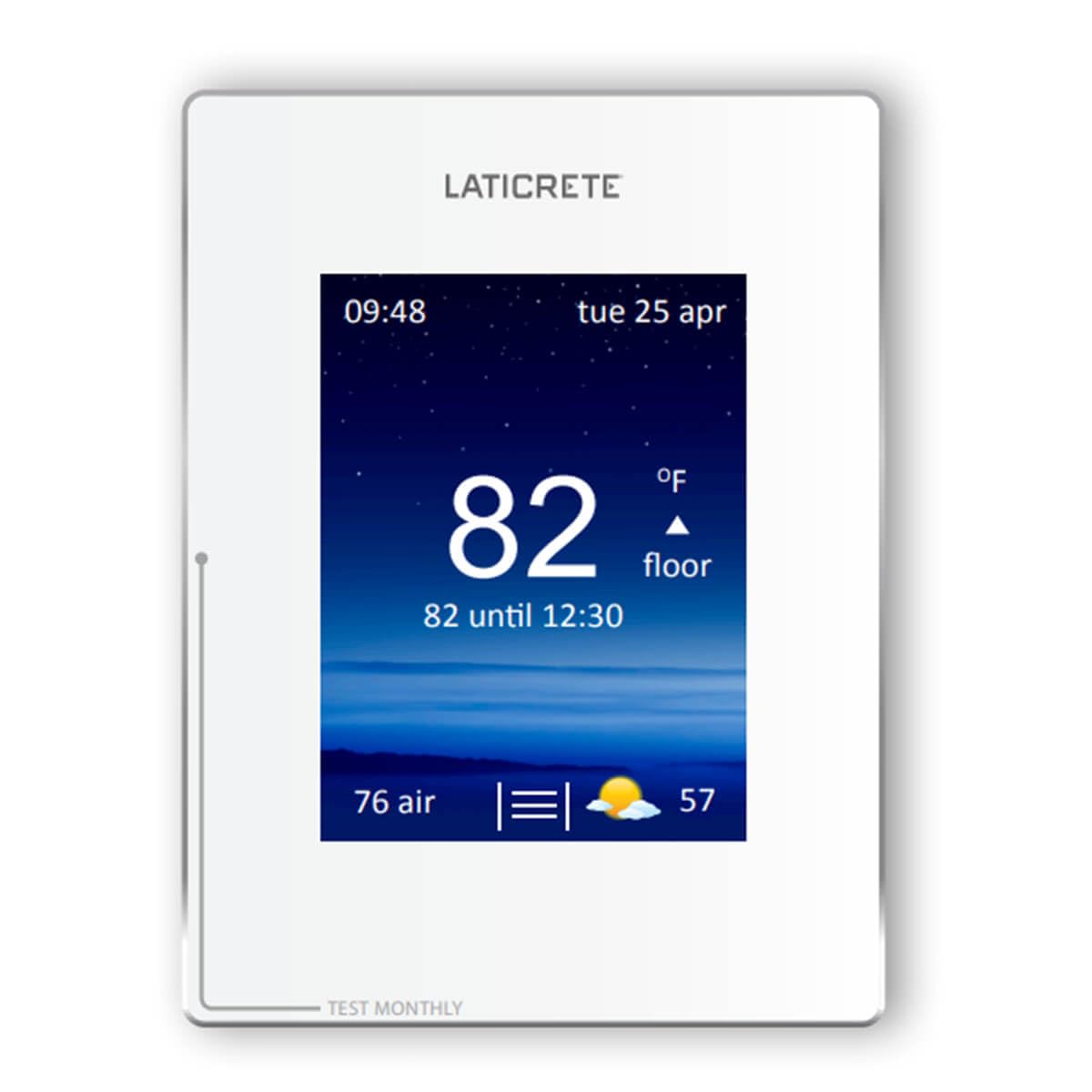
Image: Front view of the Laticrete 0802-0403-T Non-WiFi Strata Heat Thermostat, showing the digital display and control buttons.
Operating Instructions
The thermostat features a digital display and push-button controls for easy operation.
- Power On/Off: Use the designated power button to turn the thermostat on or off.
- Setting Time and Date: Access the menu to manually set the current time and date. Refer to the on-screen prompts for navigation.
- Adjusting Temperature: Use the Up/Down arrow buttons to adjust the desired floor temperature. The digital display will show the current and set temperatures.
- Programming Schedule: This thermostat is programmable. Access the programming menu to set daily or weekly heating schedules. This allows the thermostat to automatically adjust the temperature at specific times, optimizing comfort and energy savings. Follow the on-screen instructions to create and save your desired schedule.
- Mode Selection: Select between different operating modes, such as manual, programmed, or temporary override, using the mode button.
- GFCI Test: Periodically press the GFCI test button to ensure proper operation of the ground fault protection. The test light should illuminate, and the thermostat should trip. Reset the GFCI after testing.
Maintenance
- Cleaning: Clean the thermostat's digital display and casing with a soft, damp cloth. Do not use abrasive cleaners or solvents.
- Sensor Check: Ensure the floor sensor cable is not damaged or kinked. A damaged sensor may lead to inaccurate temperature readings.
- GFCI Testing: Test the GFCI monthly to ensure it is functioning correctly.
Troubleshooting
| Problem | Possible Cause | Solution |
|---|---|---|
| Thermostat display is blank. | No power to the thermostat. | Check the circuit breaker. Ensure all wiring connections are secure. |
| Floor not heating. | Thermostat is off, set temperature is too low, or GFCI tripped. | Turn thermostat on. Increase set temperature. Reset GFCI. Check heating cable for damage (consult electrician). |
| Inaccurate temperature reading. | Faulty or improperly placed floor sensor. | Ensure sensor is correctly installed and not damaged. Replace sensor if faulty. |
| GFCI trips frequently. | Ground fault detected in the heating system. | Immediately disconnect power and consult a qualified electrician to diagnose and repair the ground fault. Do not bypass the GFCI. |
Specifications
- Model: 0802-0403-T
- Brand: Laticrete (Manufactured by Laticrete, Distributed by CD Products)
- Power Source: Corded Electric
- Voltage: 120V/220V (Dual Voltage)
- Amperage: 15 A (resistive)
- Frequency: 60 Hz
- Connectivity: Non-WiFi
- Control Method: Push Button / Touch
- Display Type: Digital
- Special Feature: Programmable, Built-in GFCI
- Included Components: 15 ft. (4.5 m) sensor
- Mounting Type: Floor Mount
Warranty Information
Specific warranty details for the Laticrete 0802-0403-T Non-WiFi Strata Heat Thermostat are not provided in this document. Please refer to the product packaging or contact the manufacturer directly for warranty terms and conditions.
Customer Support
For technical assistance, troubleshooting beyond this manual, or inquiries regarding your Laticrete 0802-0403-T Non-WiFi Strata Heat Thermostat, please contact the manufacturer or your point of purchase. Contact information is typically available on the product packaging or the manufacturer's official website.