
1. Introduction
This manual provides essential instructions for the proper use, installation, and maintenance of your HIBRON EXTRASTAR V16 DGT Connected Emergency Beacon. This device is designed to enhance road safety by providing immediate and geolocated emergency signaling in case of a vehicle breakdown or accident.
Key Features:
- DGT Homologated: Officially certified (IDIADA PC25110045), complying with current regulations and mandatory by 2026.
- Automatic & Free Connectivity: Includes a pre-paid SIM card for real-time location transmission to the DGT 3.0 platform until December 2038, without additional costs.
- Maximum 360º Visibility: High-intensity amber LED lights, visible up to 1 km in adverse conditions like rain or fog.
- Durable & Stable Design: IP54 rated for water and dust resistance, anti-roll design, and an ultra-strong magnetic base for secure attachment to the vehicle roof.
- Simple Operation: One-button activation, no cables or apps required.
- Extended Autonomy: Operates for up to 2 continuous hours with the included alkaline battery.
2. Safety Information
The HIBRON EXTRASTAR V16 Emergency Beacon is a critical safety device. Always ensure it is in good working condition and accessible. This device is designed to be used without exiting the vehicle, minimizing exposure to traffic hazards during an emergency.
DGT Compliance: This beacon is officially homologated by the DGT (Dirección General de Tráfico) under certification IDIADA PC25110045. It is mandatory for all vehicles in Spain from January 1, 2026, replacing traditional warning triangles.
For detailed certification information, please refer to the official compliance certificates:

Image: Official DGT Compliance Certificate for V16 Emergency Beacon.
3. What's in the Box
- One (1) HIBRON EXTRASTAR V16 Emergency Beacon
- One (1) Alkaline Battery (pre-installed)
4. Setup
Before first use, ensure the pre-installed battery is properly connected. Follow these steps:
- Open the Base: Twist the base of the beacon counter-clockwise towards the unlock icon to open it.
- Insert/Check Battery: Verify that the alkaline battery is correctly inserted, aligning the positive (+) and negative (-) terminals. Remove any protective plastic film from the battery if present.
- Close the Base: Twist the base clockwise towards the lock icon until it is securely closed.
Image: Opening the beacon base by twisting.

Image: Battery compartment with alkaline battery.
5. Operating Instructions
The HIBRON EXTRASTAR V16 beacon is designed for quick and easy activation in emergency situations.
- Activation: Press the power button on the top of the device to activate it. The beacon will immediately emit an automatic amber light.
- Geolocation Signal: Approximately 100 seconds after activation, the device will begin transmitting periodic signals at 100-second intervals to the DGT 3.0 platform.
- Connection Indicator: A green light on the device will blink when transmitting signals and will remain constantly lit once a correct connection with DGT 3.0 has been established.
- Deactivation: Press the button again to turn off the device. It will transmit a data packet indicating that the event has concluded. No further numerical information will be displayed.

Image: Visual guide for activating and deactivating the emergency beacon.
Placement:
Once activated, place the beacon on the highest possible metallic surface of your vehicle, typically the roof. The ultra-strong magnetic base ensures secure attachment even in adverse weather conditions. This allows you to signal your position without leaving the safety of your vehicle.

Image: Beacon being placed on a car roof, highlighting magnetic attachment.
6. DGT 3.0 Connectivity and Geolocation
Your HIBRON EXTRASTAR V16 beacon is equipped with a pre-paid SIM card that ensures automatic and anonymous geolocation. This feature is crucial for road safety, as it communicates your exact position to the DGT 3.0 platform in real-time.
How it Works:
- Upon activation, the beacon's integrated SIM card transmits your location data.
- The DGT 3.0 platform receives this information and alerts other drivers and emergency services about your incident.
- This system helps prevent secondary accidents by providing timely warnings on variable message panels and navigation systems.
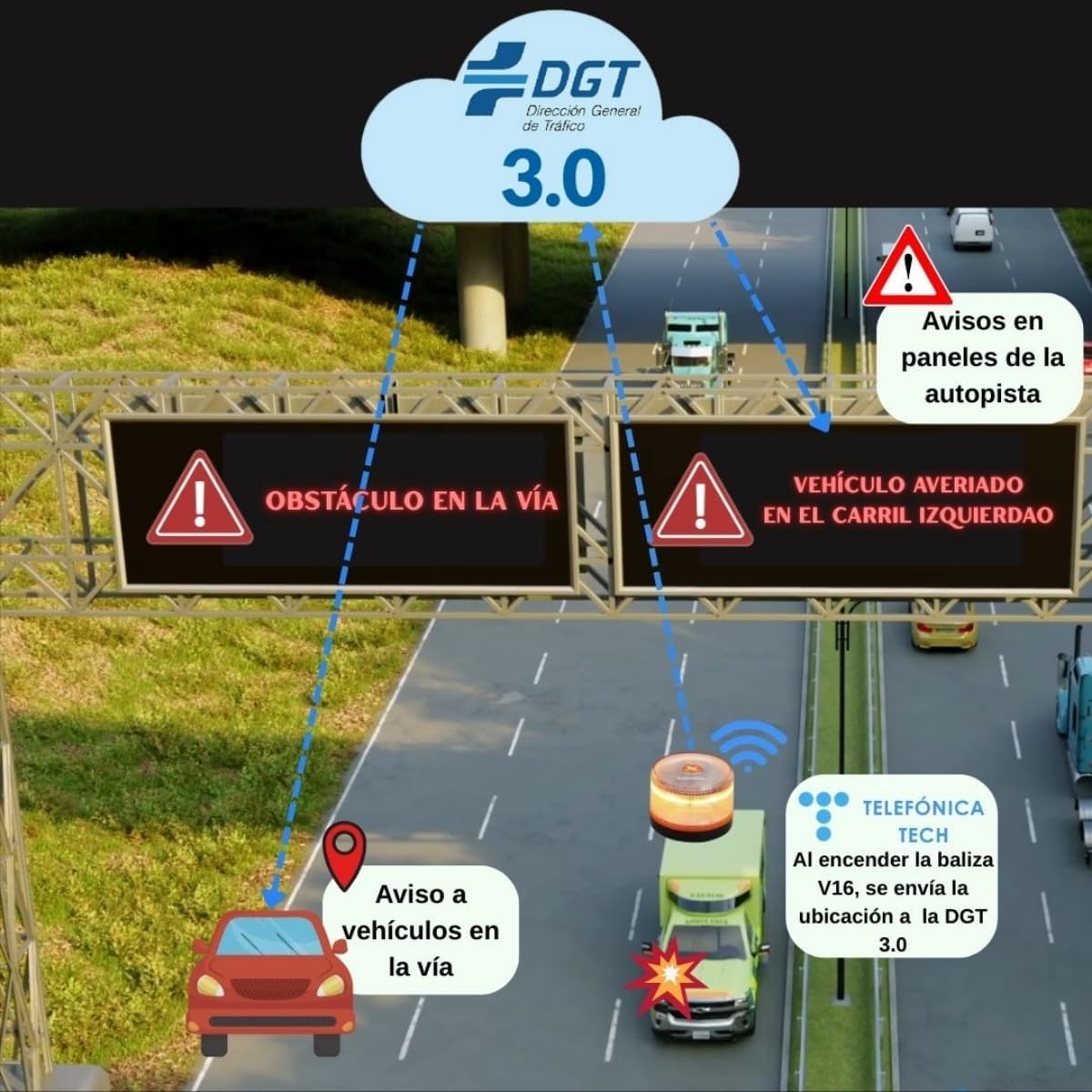
Image: Illustration of the DGT 3.0 system receiving beacon signals and alerting drivers.
Verify Geolocation:
You can verify the geolocation status of your device by scanning the QR code provided in the product packaging or on the device itself, which will direct you to the DGT's official platform.

Image: Instructions for checking geolocation via QR code and DGT website.
Link to DGT geolocation verification: https://dgt.mobytec.es
Official Product Video:
Video: Official demonstration of the V16 DGT Homologated Beacon with Geolocalization.
7. Maintenance
Battery Replacement:
The beacon uses an alkaline battery. While designed for long standby time, it is recommended to check the battery status periodically. If the beacon's light intensity diminishes or it fails to activate, replace the battery by following the 'Setup' instructions.
Cleaning and Storage:
- Clean the beacon with a soft, damp cloth. Do not use abrasive cleaners or solvents.
- Store the beacon in a cool, dry place, such as your vehicle's glove compartment, ensuring it is easily accessible in an emergency.
8. Specifications
| Feature | Detail |
|---|---|
| Brand | HIBRON |
| Model | MOD-V16 |
| DGT Homologation | IDIADA PC25110045 |
| Connectivity | DGT 3.0 (SIM card included until 12/2038) |
| Light Source | 16 Light Emitting Diodes (LED) |
| Visibility | 360º, up to 1 km |
| Power Source | Alkaline Battery (included) |
| Autonomy | Up to 2 hours continuous operation |
| Water & Dust Resistance | IP54 |
| Mounting | Magnetic (Roof Mount) |
| Material | Plastic |
| Dimensions | 11 x 10 x 10 cm (Package) |
| Weight | 436 g |
9. Troubleshooting
- Beacon does not activate: Ensure the battery is correctly inserted and has sufficient charge. Replace the battery if necessary.
- Green indicator light not solid: This may indicate a weak signal or no connection to the DGT 3.0 platform. Ensure the beacon is placed on a clear, metallic surface on the vehicle roof for optimal signal reception.
- Reduced light intensity: The battery may be low. Replace the battery.
10. Warranty and Support
For any issues or inquiries regarding your HIBRON EXTRASTAR V16 Emergency Beacon, please contact your retailer or the manufacturer's customer support. Keep your proof of purchase for warranty claims.
Ensure to register your device if required by the manufacturer to activate your warranty.