
Introduction
Thank you for choosing the Dejasound LA-40 Professional Audio Mixer. This device is designed to provide robust power and clear audio for various applications, including KTV, live shows, parties, and streaming. It features a 100W amplifier, 48V phantom power, and a 6-channel design for versatile connectivity. This manual will guide you through the setup, operation, and maintenance of your new audio mixer.
What's in the Box
Upon unpacking, please ensure all items listed below are present:
- 1 x Dejasound LA-40 Audio Mixer
- 2 x Professional UHF Wireless Microphones
- 2 x Sponge Microphone Covers
- 4 x 1.5V Batteries (for microphones)
- 2 x Microphone Non-Slip Rings
- 1 x User Manual
- 1 x Power Cable
- 1 x Switching Adapter

Image: All accessories included in the Dejasound LA-40 Audio Mixer package, showing the mixer, two wireless microphones, batteries, covers, non-slip rings, user manual, power cable, and adapter.
Product Features
- Robust Power & Clear Audio: Integrated 100W amplifier suitable for spaces up to 250 sq. ft. Features 48V phantom power to support professional condenser microphones, making it ideal for KTV, live shows, large parties, and family gatherings.
- 6-Channel Versatility & Bluetooth 5.0 Connectivity: The 6-channel design allows for simultaneous connection of multiple microphones, guitars, and speakers. Bluetooth 5.0 ensures stable wireless pairing with phones and tablets up to 10 meters.
- All-in-One Wireless Microphone System: Includes two professional UHF wireless microphones with a stable transmission range of 50 meters, minimizing signal interference. No additional purchases are required for microphone functionality.
- Complete Accessories Package: Comes with all necessary components to start using the mixer right out of the box, including the audio mixer, wireless microphones, batteries, covers, non-slip rings, user manual, power cable, and switching adapter.
Setup Guide
- Power Connection: Connect the provided power cable and switching adapter to the mixer and a suitable power outlet.
- Speaker Connection: Connect your speakers to the 'MAIN OUT' ports on the mixer using appropriate cables (XLR or 1/4-inch TRS).
- Microphone Setup: Insert the 1.5V batteries into the wireless microphones. The microphones are pre-paired with the mixer. For wired microphones, connect them to the XLR or 1/4-inch input jacks. Activate 48V phantom power if using condenser microphones.
- Bluetooth Pairing: Turn on the mixer. On your mobile device, search for 'LA-40' in the Bluetooth settings and pair. The mixer's display will indicate a successful connection.
- USB Device Connection: Insert a USB drive with MP3 files into the USB port for playback or connect a computer via USB for recording.

Image: The Dejasound LA-40 audio mixer set up with a speaker and a smartphone, demonstrating Bluetooth connectivity and the built-in amplifier.
Operating Instructions
Audio Mixer Controls
The LA-40 mixer features intuitive controls for each channel and master output:
- Gain Control: Adjusts the input sensitivity for each channel.
- EQ (High, Mid, Low): Three-band equalizer for tone shaping on individual channels.
- Effect Send: Controls the amount of effect applied to each channel.
- Pan: Adjusts the stereo position (left/right) of the channel.
- Volume Faders: Individual channel volume control.
- Main Output Fader: Controls the overall volume of the mixer.
- DSP Effects: Select from 16 digital signal processing effects (e.g., reverb, delay) using the dedicated knob and display.
Wireless Microphones
The included UHF wireless microphones offer freedom of movement:
- Power On/Off: Press and hold the power button on each microphone.
- Frequency Display: The microphone's display shows its operating frequency.
- Usage: Hold the microphone close to your mouth for optimal sound pickup. The system is designed to minimize feedback.

Image: Two Dejasound LA-40 wireless microphones, highlighting their wide range (160ft) and 30% improved sound quality. Also shows compatibility with various devices.
Bluetooth Connectivity
Stream audio wirelessly from your smartphone or tablet:
- Activate Bluetooth: On the mixer, select the Bluetooth input mode. The display will show 'BT'.
- Pairing: On your device, enable Bluetooth and select 'LA-40' from the list of available devices.
- Playback: Once paired, you can play audio from your device through the mixer. Adjust volume using your device and the mixer's main output fader.
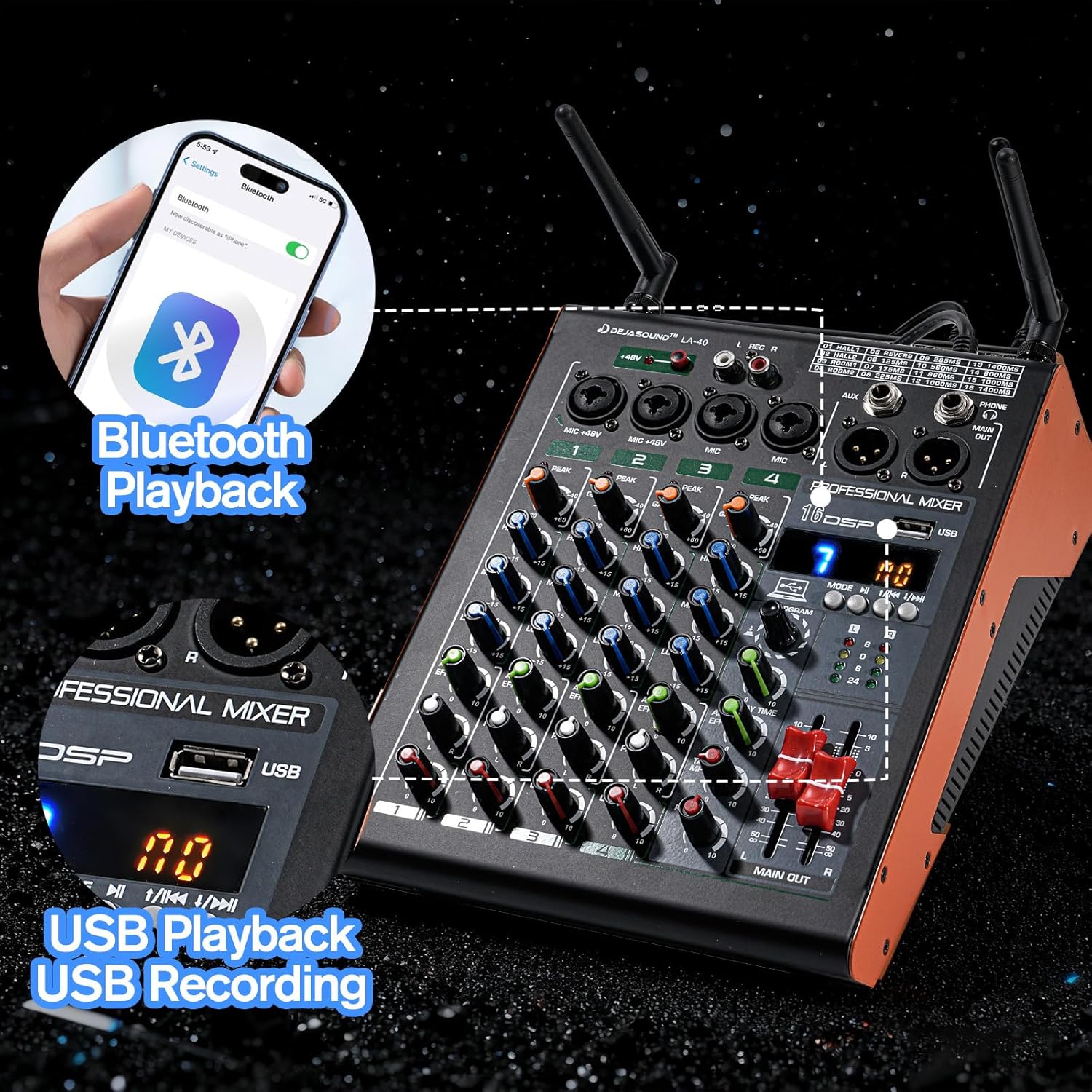
Image: The Dejasound LA-40 mixer with a smartphone connected via Bluetooth, illustrating the Bluetooth playback and USB playback/recording capabilities.
USB Playback and Recording
The USB port offers both audio playback and recording functionalities:
- Playback: Insert a USB drive containing MP3 files. Use the mixer's controls to navigate tracks and adjust playback volume.
- Recording: Connect the mixer to a computer via the USB Type B port. The mixer can function as an audio interface, allowing you to record your mix directly to your computer's recording software.
48V Phantom Power
The mixer provides 48V phantom power on its XLR inputs to power condenser microphones. Ensure phantom power is only activated when using microphones that require it, and always connect/disconnect microphones with phantom power off to prevent damage.
DSP Effects
Enhance your sound with the built-in 16 DSP effects. Use the 'PROGRAM' knob to select an effect and the 'EFFECT' knob to adjust its intensity. Individual channel effect sends allow precise control over which channels receive the effect.
Maintenance
- Cleaning: Use a soft, dry cloth to clean the mixer's surface. Avoid liquid cleaners or abrasive materials.
- Storage: Store the mixer in a cool, dry place away from direct sunlight and extreme temperatures.
- Battery Replacement: Replace microphone batteries when the low battery indicator appears on the microphone display.
- Cable Management: Ensure all cables are properly connected and not strained to prevent damage to ports and cables.
Troubleshooting
- No Sound Output:
- Check all cable connections (power, speakers, microphones).
- Ensure the main output fader and individual channel faders are raised.
- Verify that the correct input source (Bluetooth, USB, Mic) is selected.
- Check speaker power and volume.
- Microphone Not Working:
- For wireless microphones, ensure batteries are charged and correctly inserted.
- For wired microphones, check cable integrity and ensure 48V phantom power is on if required.
- Adjust the channel gain and volume.
- Bluetooth Pairing Issues:
- Ensure the mixer is in Bluetooth mode.
- Turn off and on Bluetooth on your device and the mixer.
- Move your device closer to the mixer.
- Feedback (High-pitched squeal):
- Reduce microphone gain or volume.
- Move microphones further away from speakers.
- Adjust EQ settings to cut problematic frequencies.
Specifications
| Brand | Dejasound |
| Number of Channels | 6 |
| Connectivity Technology | USB, Bluetooth 5.0 |
| Power Source | Battery Powered (for mics), AC Power (for mixer) |
| Output Connector Type | USB Type B, XLR |
| Audio Input | XLR, 1/4-inch TRS |
| Amplifier Output | 100W |
Warranty and Support
The Dejasound LA-40 Professional Audio Mixer comes with a 1-year warranty from the date of purchase. This warranty covers manufacturing defects and malfunctions under normal use. For technical support, troubleshooting assistance, or warranty claims, please contact Dejasound customer service through the retailer where the product was purchased or visit the official Dejasound website for contact information.
Please retain your proof of purchase for warranty validation.