
HUABAO A107
HUABAO Karaoke Machine A107 User Manual
Model: A107
1. Introduction
Welcome to your new HUABAO Karaoke Machine A107. This manual provides detailed instructions for setup, operation, and maintenance to ensure optimal performance and enjoyment of your device. Please read this manual thoroughly before using the product.
2. What's in the Box
Carefully unpack all items and verify that you have received the following components:
- Speaker with HD Screen (x1)
- Wireless Microphone (x2)
- Remote Control (x1)
- AUX Cable (x1)
- Type-C Charging Cable (x1)
- User Manual (x1)

If any items are missing or damaged, please contact customer support immediately.
3. Product Features
The HUABAO Karaoke Machine A107 offers a range of features designed for an enhanced entertainment experience:
- 10.1-inch HD Tilted Screen: A high-definition display with an adjustable tilt angle for comfortable viewing from various positions.
- Wireless Screen Mirroring: One-click mirroring for iOS and Android devices, allowing display of videos and lyrics without additional apps.
- 25W High-Power Three-Way Speaker System: Features a 6.5-inch subwoofer, tweeter, and midrange speaker for balanced audio output.
- Five Dynamic Lighting Modes: Built-in LED lights that synchronize with music, offering various ambiance settings.
- 5400mAh Long Battery Life: Provides 6-8 hours of continuous operation on a full charge for portable use.
- Easy-to-Use Controls with Remote: Intuitive control panel and a dedicated remote for convenient adjustments.
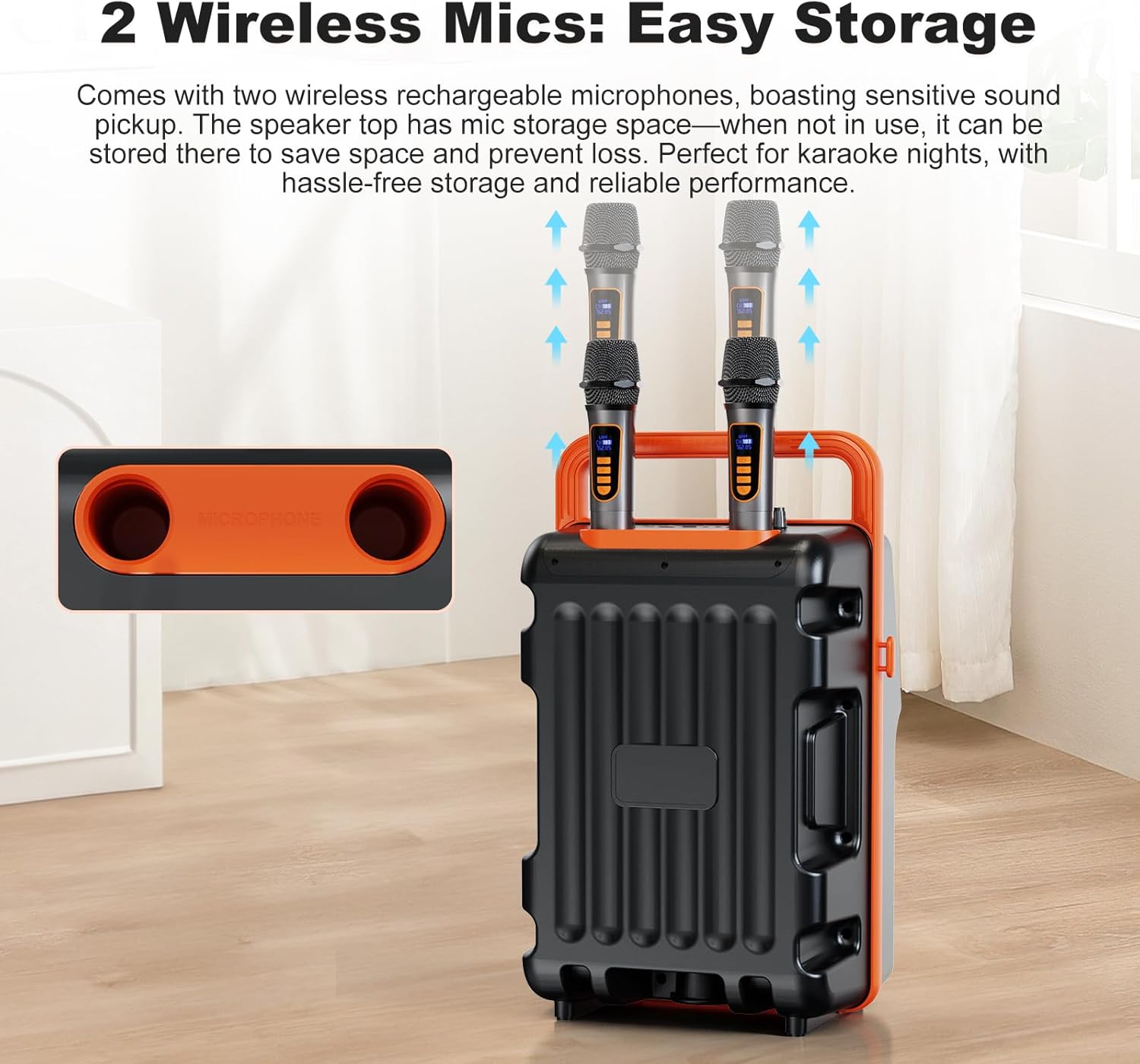
- Dual Wireless Microphones: Two rechargeable microphones for high-fidelity sound, with integrated storage on the speaker unit.
- Multiple Connection Modes: Supports Bluetooth, USB, TF card, and AUX input for broad device compatibility.


4. Setup
4.1 Unpacking and Placement
- Remove the karaoke machine and all accessories from the packaging.
- Place the unit on a stable, flat surface. Ensure adequate ventilation around the device.
4.2 Charging the Device
Before first use, fully charge the karaoke machine.
- Connect the Type-C charging cable to the DC IN port on the back of the unit.
- Connect the other end of the cable to a compatible USB power adapter (not included) or a powered USB port.
- The charging indicator will illuminate. A full charge typically takes 3-4 hours.
- Once fully charged, disconnect the charging cable.
4.3 Charging Microphones
The wireless microphones are rechargeable.
- Use the provided Type-C charging cable to charge the microphones. Each microphone has a Type-C charging port.
- The microphone display will show charging status.
- A full charge typically takes 2-3 hours.
5. Operating Instructions
5.1 Power On/Off
Locate the On/Off switch on the control panel. Slide it to the 'On' position to power on the device. Slide it to 'Off' to power down.
5.2 Wireless Screen Mirroring (iOS/Android)
This feature allows you to display content from your smartphone or tablet directly onto the karaoke machine's screen.
- On the karaoke machine's screen, select the 'Mirror' icon.
- For iOS devices: Open Control Center, tap 'Screen Mirroring', and select the device name (e.g., 'HUABAO-A107').
- For Android devices: Go to your phone's settings, find 'Wireless Display', 'Cast', or 'Smart View', and select the device name.
- Ensure both devices are connected to the same Wi-Fi network for optimal performance.
5.3 Bluetooth Connection
Connect your device wirelessly to play audio.
- On the karaoke machine's screen, select the 'Bluetooth' icon or press the 'BT' button on the control panel/remote. The device will enter pairing mode.
- On your smartphone or tablet, enable Bluetooth and search for available devices.
- Select 'HUABAO-A107' from the list to pair. A confirmation sound will indicate successful pairing.
5.4 USB/TF Card Playback
Play audio files directly from a USB drive or TF card.
- Insert a USB drive into the 'USB' port or a TF card into the 'TF' slot.
- The system will automatically detect the storage and display media files. Navigate and select files using the on-screen interface or remote control.
5.5 AUX Input
Connect external audio devices using the AUX cable.
- Connect one end of the AUX cable to the 'AUX' port on the karaoke machine.
- Connect the other end to the audio output of your external device (e.g., MP3 player, laptop).
- Select 'Line In' mode on the karaoke machine's screen or control panel.
5.6 Microphone Usage
The two wireless microphones are pre-paired with the unit.
- Power on the microphones using their respective power buttons.
- Adjust microphone volume using the 'Mic Vol' knob on the control panel.
- Adjust echo effect using the 'Reverb' knob.
- To activate voice canceling (vocal removal), press the dedicated button on the remote control.
5.7 Lighting Modes
Change the ambiance with dynamic LED lighting.
- Press the 'LED' button on the control panel or remote to cycle through the five available lighting modes.
- The lights will synchronize with the music rhythm.
5.8 Control Panel and Remote
The device can be controlled via the integrated panel or the included remote control.

Key controls include: Main Volume, Mic Volume, Reverb, AUX, TF, USB, DC IN, Power On/Off, Cast, Number Keys, Prev, Play, Next, LED, Back, Menu, and BT (Bluetooth).
6. Maintenance
6.1 Cleaning
- Wipe the exterior of the unit with a soft, dry cloth.
- Do not use abrasive cleaners, waxes, or solvents.
- Keep the screen clean using a microfiber cloth designed for electronics.
6.2 Storage
- Store the device in a cool, dry place away from direct sunlight and extreme temperatures.
- Ensure microphones are stored in their designated slots on top of the speaker to prevent loss.
6.3 Battery Care
- To prolong battery life, avoid fully discharging the battery frequently.
- Charge the device regularly, even if not in use, to maintain battery health.
7. Troubleshooting
Refer to the table below for common issues and their solutions.
| Problem | Possible Cause | Solution |
|---|---|---|
| Device does not power on | Low battery; Power switch off | Charge the device; Ensure power switch is in 'On' position |
| No sound output | Volume too low; Incorrect input mode; Device not paired | Increase main volume; Select correct input mode (Bluetooth, AUX, USB/TF); Re-pair Bluetooth device |
| Microphone not working | Microphone off; Low microphone battery; Mic volume too low | Power on microphone; Charge microphone; Increase 'Mic Vol' knob |
| Screen mirroring issues | Not on same Wi-Fi network; Device compatibility; Network interference | Ensure both devices are on the same Wi-Fi; Check device compatibility; Try restarting both devices and router |
| Bluetooth connection fails | Device too far; Interference; Pairing mode not active | Move devices closer; Avoid obstacles; Ensure karaoke machine is in Bluetooth pairing mode |
8. Specifications
Detailed technical specifications for the HUABAO Karaoke Machine A107:
| Feature | Specification |
|---|---|
| Model Number | A107 |
| Item Weight | 7 pounds |
| Product Dimensions | 11 x 8.9 x 18.5 inches |
| Screen Size | 10.1 inches (HD) |
| Speaker Count | 3 (6.5-inch Subwoofer, Midrange, Tweeter) |
| Power Output | 25W |
| Battery Capacity | 5400mAh |
| Battery Type | Lithium Ion |
| Operating Time | 6-8 hours (on full charge) |
| Connectivity | Bluetooth, USB, TF Card, AUX (3.5 mm Jack), Wireless Screen Mirroring |
| Compatible Devices | Android, iOS, Laptop, Tablet, Musical Instruments |
| Voltage | 12 Volts (DC) |
| Special Features | Built-In Handle, Echo Effect, Light Up Speaker, Lyric Display, Portable |
9. Warranty and Support
Your HUABAO Karaoke Machine A107 comes with a one-year warranty and lifetime technical support. Our dedicated customer service team is available to assist you with any inquiries, from product usage to after-sales support.
For assistance, please visit the HUABAO Store or contact our customer service directly. Please have your model number (A107) and purchase information ready when contacting support.
Ask a question about this manual
Ask about setup, troubleshooting, compatibility, parts, safety, or missing instructions. Manuals+ will review the question and use this page’s manual context to help answer it.