
1. Introduction
Thank you for choosing the SUNCOZE Hydroponics Growing System Kit. This indoor herb garden allows you to cultivate a variety of plants, including herbs, vegetables, and flowers, year-round without soil. Featuring a 10L water tank, adjustable LED grow light, and smart control panel, this system is designed for efficient and convenient plant growth. Please read this manual thoroughly before operation to ensure proper setup and optimal performance.
2. Safety Instructions
- Always unplug the system from the power outlet before cleaning or performing any maintenance.
- Do not immerse the electrical components (power adapter, LED light panel) in water.
- Ensure the system is placed on a stable, flat surface to prevent tipping and water spillage.
- Keep out of reach of children and pets.
- Use only the provided power adapter.
- Do not operate the system if any part is damaged. Contact customer support for assistance.
3. Package Contents
Verify that all components are present in your package:
- 1x Hydroponics Growing System Base with 10L Water Tank
- 1x Adjustable Height LED Grow Light Panel
- 1x Grow Deck (20 Pods)
- 20x Basket Kits
- 20x Grow Sponges
- 20x Grow Domes
- 6x Caps (for unused pods)
- 1x A & B Nutrients (100ml each)
- 20x Label Stickers
- 8x Supporting Feet
- 6x Support Stakes
- 1x Power Adapter
- 1x User Manual

4. Setup Instructions
Follow these steps to assemble your hydroponics system:
- Insert the Extension Pole: Insert the extension pole fully into the base of the water tank. Ensure the surface aligns with the edge of the water tank. If you need to remove it, press and hold the "PUSH" button before pulling.
- Attach the LED Grow Light: Attach the LED Grow Light panel to the top of the extension pole. Ensure the surface aligns with the edge of the light panel. Remove any protective film from the light panel.
- Attach Grow Deck Legs: Attach the provided legs to the underside of the grow deck.
- Place Grow Deck: Place the assembled grow deck onto the water tank base.
- Plug in Power: Plug the pump and power cord into the backside of the base. Connect the power adapter to a wall outlet.
- Add Water and Nutrients: Open the water inlet cover. Fill the water tank with fresh water up to the MAX line (approximately 10L). Add the recommended amount of A & B nutrients according to the plant food instructions. Close the water inlet cover.
- Prepare Pods: Place a grow sponge into each basket kit, then insert your seeds into the sponge. Place the prepared basket kits into the holes on the grow deck. Cover each pod with a grow dome to create a humid environment for germination. For unused pods, insert the provided caps.

Setup Video Guide
Video: A detailed guide on how to install and set up the SUNCOZE hydroponics growing system, including checking accessories, assembling components, and connecting power.
5. Operating Instructions
The SUNCOZE Hydroponics System features an easy-to-operate LCD control panel to manage your plant's growth environment.
Control Panel Functions

- Power Button: Press and hold for 3 seconds to turn the LED grow light on or off.
- Water Indicator: Illuminates when the water level in the tank is low, signaling a need for refill.
- Nutrition Indicator: Illuminates when it's time to add plant nutrients.
- Vegetable Mode (Veg): Select this mode for leafy greens. The 36W full-spectrum LED light operates on a 16-hour-on / 8-hour-off cycle, optimized for vegetative growth.
- Flower/Fruit Mode (Flower): Select this mode for blooming plants and fruits. The 36W full-spectrum LED light operates on a 16-hour-on / 8-hour-off cycle, optimized for flowering and fruiting.
- Automatic Light Cycle: The system automatically maintains a 16-hour-on / 8-hour-off light cycle once powered on. Changing modes or turning the light on/off will reset this timer.
Water Tank and Pump
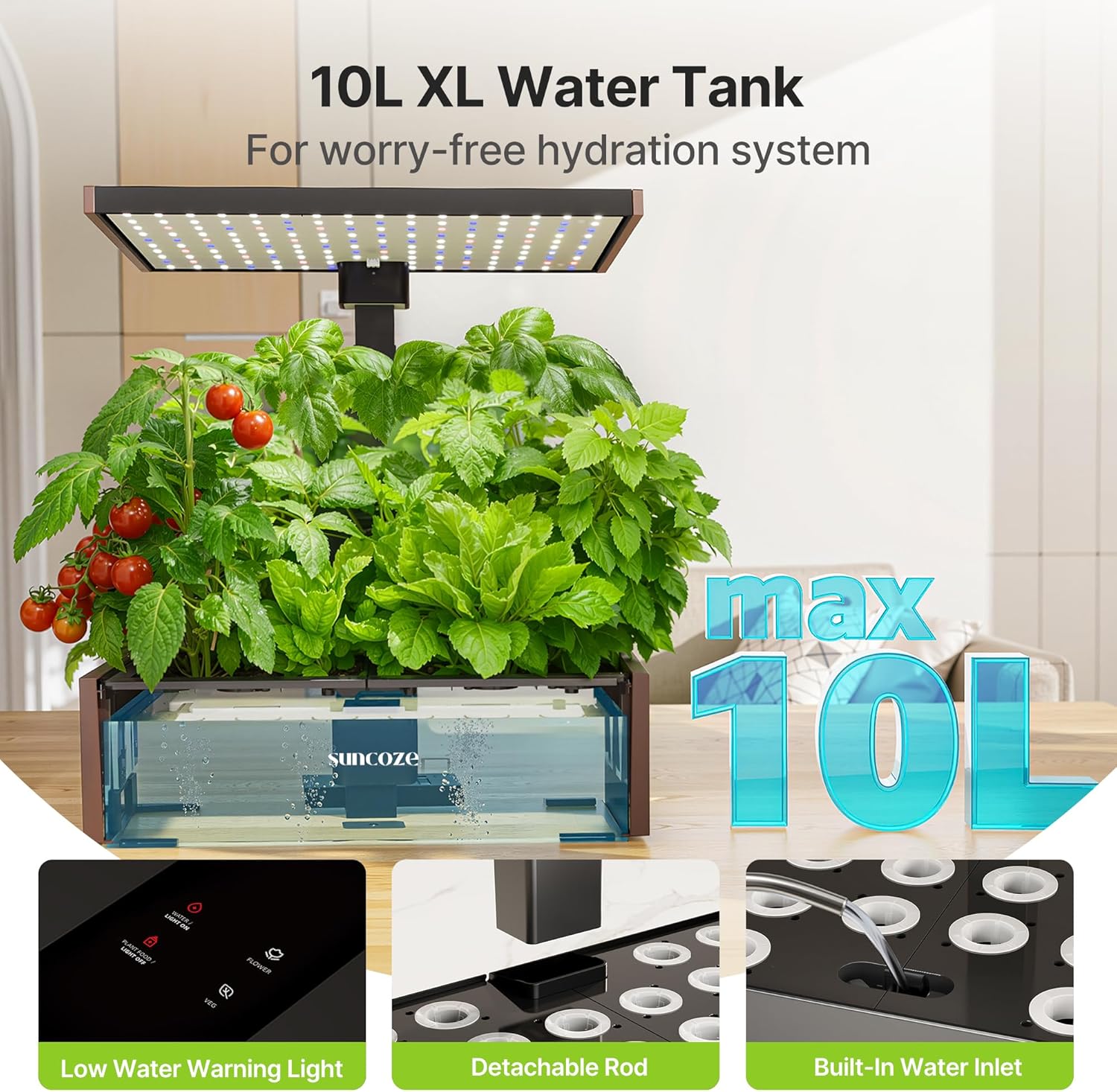
- The 10L water tank requires fewer refills.
- The built-in circulation pump operates on a 15-minute-on / 1-hour-45-minute-off cycle to keep water fresh, oxygen-rich, and nutrient-balanced.
- The low water reminder light on the LCD panel will alert you when the water level is low.
Adjustable Height LED Grow Light

- The LED grow light's height can be adjusted up to 25 inches to accommodate different plant growth stages.
- Adjust the light height as your plants grow to ensure they receive optimal light intensity without burning.
6. Maintenance
- Water Refill: Refill the water tank when the water indicator light illuminates. Always ensure the water level is above the minimum mark to prevent pump damage.
- Nutrient Refill: Add nutrients when the nutrition indicator light illuminates, or every 2-3 weeks, following the instructions on the nutrient bottles.
- Water Change: It is recommended to change the water in the tank completely every 2-4 weeks to prevent algae buildup and ensure fresh nutrient supply.
- Cleaning: Periodically clean the water tank and grow deck to remove any algae or mineral buildup. Use a soft cloth and mild soap, then rinse thoroughly.
7. Troubleshooting
- Lights/Pump Not Turning On: Ensure the system is filled with enough water. The light and pump will not activate if the water level is too low. Also, check that the power button is pressed and held for 3 seconds.
- Seeds Not Sprouting: Germination results can vary based on seed type, quality, and environmental conditions. Try a new batch of seeds if initial attempts fail. Ensure grow domes are used to maintain humidity during germination.
- Plants Wilting/Discolored: Check water levels and nutrient levels. Ensure the LED light height is appropriate for the plant's growth stage. Overcrowding can also stress plants; consider thinning if necessary.
- Algae Growth: Ensure unused pods are covered with caps to block light from the water. Regular water changes and cleaning will also help prevent algae.
8. Specifications
| Brand | SUNCOZE |
| Model Number | IG1006BK |
| Material | Plastic |
| Color | Black |
| Dimensions (L x W x H) | 15.98 x 14.13 x 10.24 inches |
| Item Weight | 9.42 pounds |
| Water Tank Capacity | 10 Liters |
| LED Grow Light Power | 36W |
| Adjustable Height | Up to 25 inches |
9. Warranty and Support
SUNCOZE offers a 2-year warranty on this product. For any questions regarding planting, seed selection, troubleshooting, or warranty claims, please contact our customer support team. We provide 7x24 hours service to ensure your satisfaction.
For further assistance, please visit the official SUNCOZE store or contact our support channels.

