
1. Introduction
This manual provides detailed instructions for the installation, operation, and maintenance of your Anssipo 8-Channel Wireless Home Security Camera System. This system includes an 8-channel Network Video Recorder (NVR) with a pre-installed 2TB hard drive and eight 3MP wireless cameras, designed for both indoor and outdoor surveillance.
Package Contents
- 8 x 3MP WiFi Cameras
- 1 x 8-Channel NVR Kit
- 9 x Power Supplies (one for NVR, eight for cameras)
- 1 x 1m Ethernet Cable
- 1 x 2TB Hard Drive (pre-installed in NVR)

Image 1.1: Overview of the Anssipo 8-Channel Wireless Home Security Camera System, showing the NVR, eight cameras, and a 2TB hard drive.
2. Setup Guide
2.1 Initial Power-Up and Connection
- Connect the NVR to a power outlet using its dedicated power supply.
- Connect the NVR to a monitor or TV via HDMI or VGA cable.
- Connect the NVR to your router using the provided Ethernet cable for internet access and remote viewing capabilities.
- Connect each camera to a power outlet using its dedicated 12V 2A power supply. Ensure all cameras receive continuous power for 24/7 recording.

Image 2.1: Illustration of the NVR connected to a power source and monitor, and a camera connected to its power source, demonstrating the simple setup process.
2.2 Automatic Camera Pairing
The cameras and NVR are pre-paired at the factory. Once both the NVR and cameras are powered on, the camera feeds should automatically appear on your connected monitor. No manual pairing is typically required for initial setup.

Image 2.2: Depiction of the auto-pairing functionality, where cameras wirelessly connect to the NVR upon power-up, simplifying the connection process.
2.3 Mobile App Configuration (XMEye)
For remote viewing and advanced features, download the free XMEye app on your smartphone or tablet. Follow the in-app instructions to add your NVR system. This typically involves scanning a QR code on the NVR or manually entering its device ID. Ensure your NVR is connected to the internet for remote access.
3. Operating Instructions
3.1 Video Monitoring and Recording
The system provides 3MP HD video resolution, capturing clear footage. With the pre-installed 2TB hard drive, the system supports continuous 24/7 recording. You can access live views and recorded footage directly from the NVR interface or remotely via the XMEye app.

Image 3.1: An overview of the Anssipo 8-channel system highlighting 24/7 recording, face detection, motion detection, two-way audio, color night vision, and the built-in 2TB HDD.
3.2 Night Vision Modes
Each camera is equipped with 4 IR LEDs and floodlights, offering two night vision modes:
- Automatic Black & White Night Vision: Engages in low-light conditions using infrared.
- Color Night Vision: Activates floodlights to provide full-color video in darkness, extending up to 100ft.

Image 3.2: A split image demonstrating the clarity and detail provided by 3MP HD Color Night Vision compared to traditional 3MP HD Infrared Night Vision in dark environments.
3.3 Smart Detection Features
- AI Human Detection: Distinguishes human shapes from other moving objects, significantly reducing false alarms caused by animals or environmental factors.
- Face Detection: Recognizes faces in the video feed and can send instant notifications to your mobile app.
- Smart Playback: Allows you to quickly review footage based on detected events, such as human or face detection, streamlining video search.

Image 3.3: A visual representation of the smart playback feature, showing how recorded events can be filtered and reviewed based on detected faces, both on a monitor and via the mobile app.
3.4 Two-Way Audio
Each camera features a built-in microphone and speaker, enabling two-way communication. This allows you to speak with visitors or deter intruders directly through the XMEye app from anywhere.

Image 3.4: An illustration of the two-way audio function, showing a user communicating with a delivery person at their door via the camera and mobile app.
3.5 Dual Warning System
Upon detection of human motion, the cameras can activate integrated spotlights and a siren, serving as an audible and visual deterrent. Notifications are also sent to your mobile device.
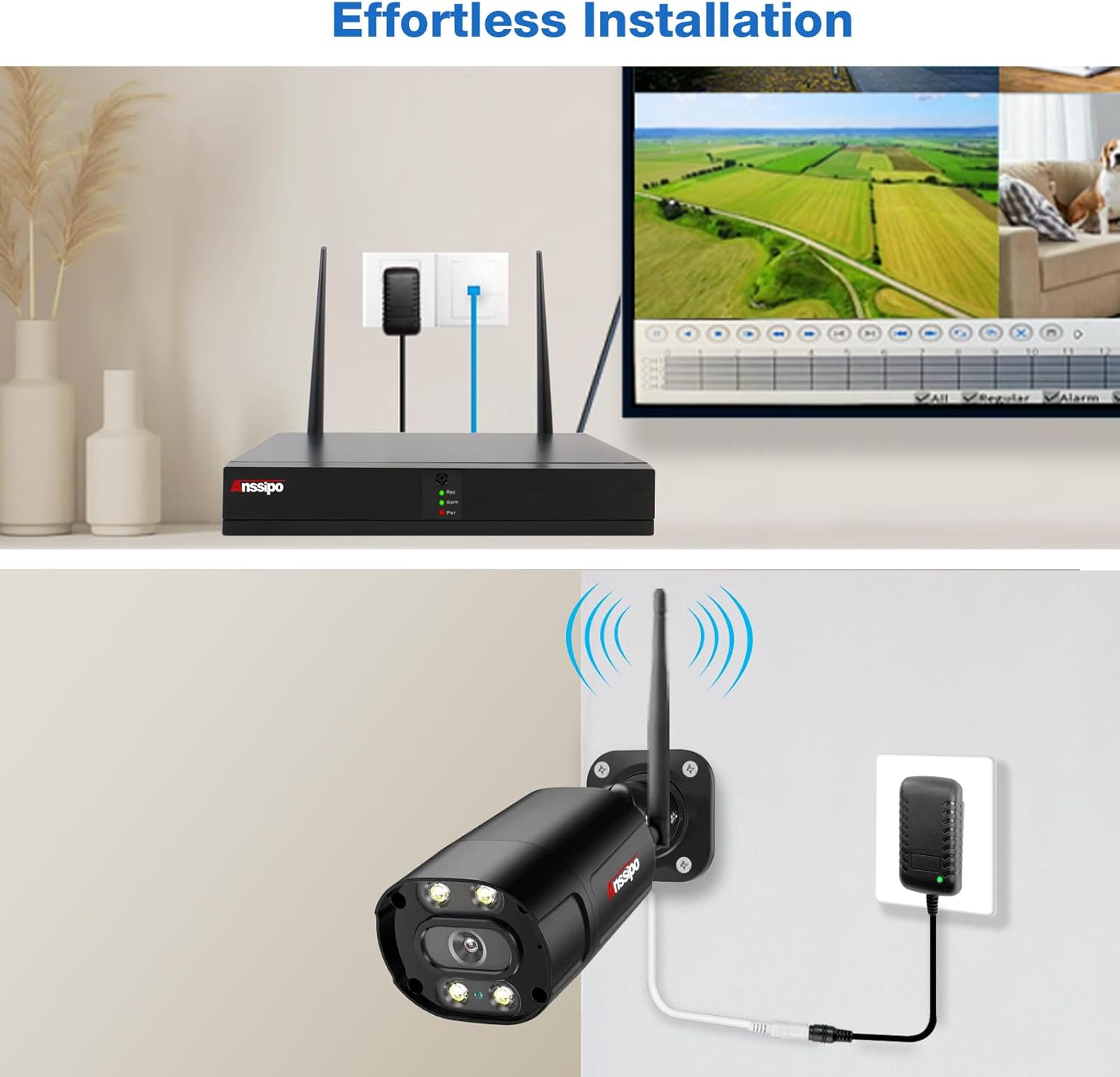
Image 3.5: A graphic demonstrating the dual warning system, where a camera detects an intruder and activates a built-in siren and motion-activated light alarm, while also sending a message push notification.
4. Maintenance
4.1 Hard Drive Management
The NVR comes with a 2TB hard drive pre-installed. The system utilizes advanced H.265 compression technology, which doubles data compression efficiency compared to H.264, saving approximately 50% storage space while maintaining video quality. The NVR supports hard drives up to 6TB, allowing for expanded recording capacity if needed.

Image 4.1: Diagram illustrating the benefits of H.265 compression for storage efficiency and the NVR's capability to expand storage up to 6TB, beyond the included 2TB HDD.
4.2 Weather Resistance
The cameras feature an IP67 weatherproof metal housing, making them suitable for outdoor installation and capable of withstanding various weather conditions, including rain and extreme temperatures ranging from -10°C (13°F) to 50°C (122°F).

Image 4.2: A close-up of an Anssipo camera, highlighting its durable metal housing and IP66 waterproof rating, suitable for both indoor and outdoor use across a wide temperature range.
5. Troubleshooting
- No Image on Monitor:
Ensure the NVR is powered on and connected correctly to the monitor via HDMI or VGA. Verify the monitor input source is set to the correct port. Check that all cameras are powered on and within range of the NVR's Wi-Fi signal. - "Wireless" System Requires Power:
Please note that while the cameras connect wirelessly to the NVR for video transmission, each camera requires a continuous 12V 2A power supply via a power adapter. This is standard for most wireless security camera systems to ensure reliable 24/7 operation. - No Recording:
Verify the 2TB hard drive is properly installed and recognized by the NVR. Check recording settings in the NVR menu to ensure continuous or motion-activated recording is enabled. The hard drive may be full; consider expanding storage or enabling overwrite functions. - Frequent False Alarms:
Adjust the sensitivity settings for motion detection in the NVR or app. Utilize the AI Human Detection feature to filter out non-human movements. Ensure cameras are positioned to minimize triggers from moving branches, pets, or vehicle headlights. - Remote Access Issues:
Confirm the NVR is connected to your router via Ethernet and has internet access. Check your router's firewall settings. Ensure the XMEye app is updated to the latest version and your mobile device has a stable internet connection.
6. Technical Specifications
| Brand | Anssipo |
| Model Number | 8029B |
| Connectivity Technology | Wi-Fi |
| Video Capture Resolution | 3MP (2K) |
| Number of Channels | 8 |
| Memory Storage Capacity | 2TB (included), expandable up to 6TB |
| Special Features | AI Human Detection, Face Detection, Night Vision (Color/IR), Siren Alarm, Two-Way Audio, Video Recording |
| Power Source | Corded Electric (12V 2A for cameras) |
| Item Dimensions (L x W x H) | 12 x 11 x 11 inches (Product Dimensions) |
| Weatherproof Rating | IP67 |
| Night Vision Range | Up to 100 Feet |
| Video Compression | H.265 |
| Hardware Interface | Ethernet, HDMI, USB, VGA |
| Compatible Devices | Cameras, Laptops, Personal Computers, Smartphones, TV |
7. Warranty and Customer Support
Anssipo products are designed for reliability and performance. For any technical assistance, troubleshooting, or warranty inquiries, please contact Anssipo customer support. Refer to the product packaging or the official Anssipo website for the most current contact information and warranty details.