
1. Introduction and Overview
This manual provides detailed instructions for the assembly, operation, and maintenance of your JOMEED 63" L Shaped Electric Standing Desk. Designed for ergonomic comfort and enhanced productivity, this desk features electric height adjustment, ample storage, and integrated power outlets. Please read this manual thoroughly before assembly and use to ensure safe and efficient operation.

Figure 1.1: The JOMEED 63" L Shaped Electric Standing Desk, showcasing its spacious design and integrated features in a home office environment.
2. Safety Information
- Ensure all components are present and undamaged before beginning assembly.
- Keep children and pets away from the desk during operation, especially during height adjustments.
- Do not overload the desk. The maximum weight capacity is 176 lbs (80 kg).
- Ensure all cables are properly managed and not pinched during height adjustments.
- Do not place liquids directly on the desk surface, especially near power outlets.
- Unplug the desk from the power source before cleaning or performing any maintenance.
- If the desk encounters an obstacle during adjustment, the anti-collision feature will stop movement. Remove the obstacle before resuming operation.
3. Package Contents
Your JOMEED L Shaped Electric Standing Desk will arrive in two separate packages. Please verify that all parts listed in the instruction manual included with the desk are present before starting assembly. Typical components include:
- Desktop panels (L-shaped sections)
- Electric lifting columns and motor assembly
- Control panel with memory presets
- Drawer units and privacy panel
- Built-in power outlet module (AC, USB, Type-C)
- Steel frame components and support beams
- All necessary hardware (screws, bolts, tools)
- Assembly instruction booklet
4. Assembly Instructions (Setup)
Assembly of the JOMEED L Shaped Electric Standing Desk requires careful attention to detail. Please follow the step-by-step instructions provided in the included assembly manual. It is recommended to assemble the desk gently to prevent damage.
- Unpack and Verify: Open both packages and carefully lay out all components. Cross-reference with the hardware/screws/boards list in the instruction booklet to ensure nothing is missing or damaged.
- Assemble Base Frame: Begin by assembling the heavy-duty steel frame components according to the diagrams. Ensure all connections are secure.
- Install Lifting Columns: Attach the electric lifting columns to the designated frame sections.
- Attach Desktop Panels: Carefully place and secure the L-shaped desktop panels onto the frame and lifting columns.
- Install Drawers and Storage Units: Assemble and integrate the built-in drawers and open storage shelves as indicated.
- Mount Privacy Panel: Secure the lower privacy panel to the desk structure. This panel helps conceal cables and provides a clean aesthetic.
- Connect Electrical Components: Connect the motor and control panel cables. Install the built-in power outlet module into its designated slot on the desktop.
- Final Checks: Ensure all screws are tightened, and the desk is stable. Plug the desk into a grounded power outlet.
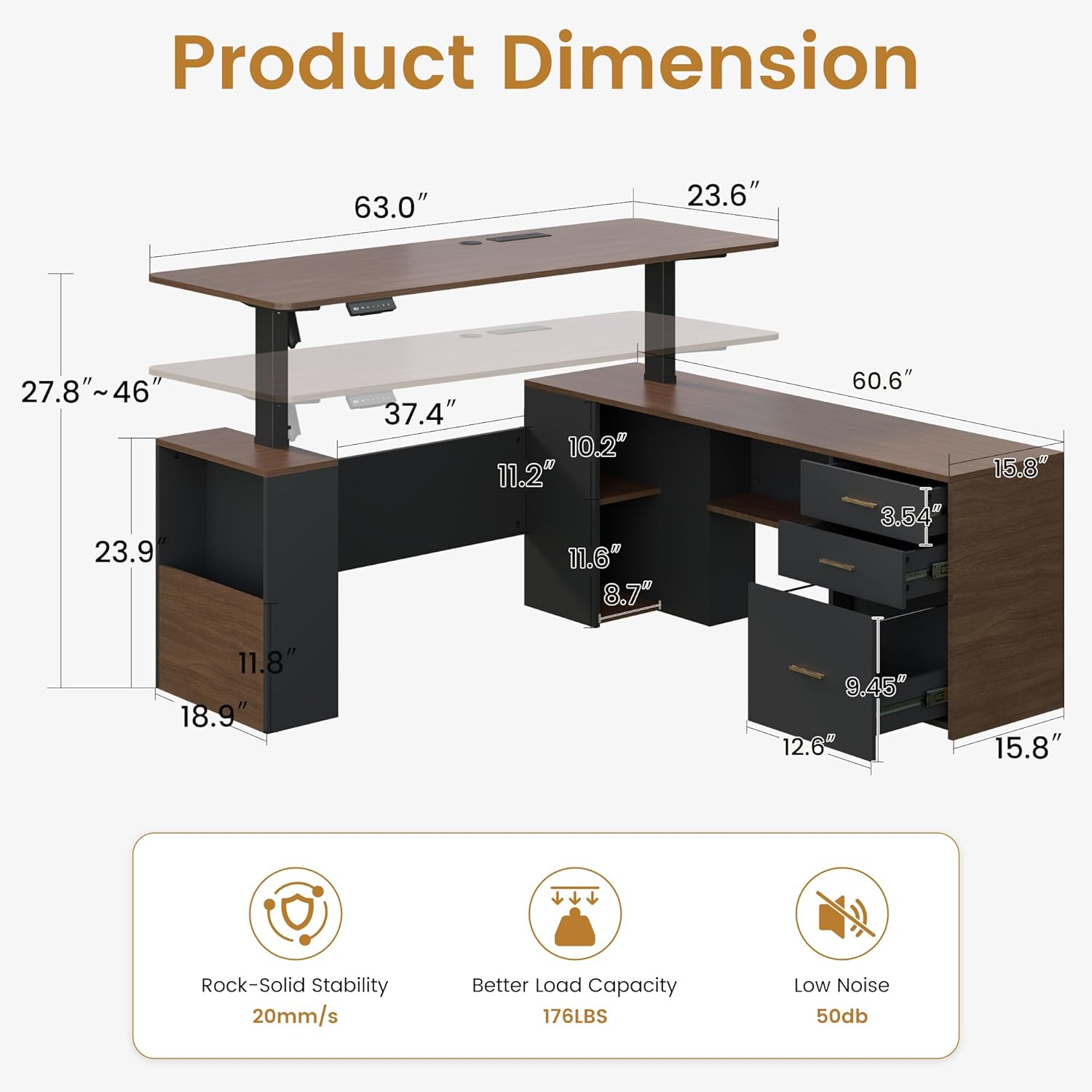
Figure 4.1: Product dimensions and key measurements for assembly planning.

Figure 4.2: Illustration of the expanded front privacy panel feature.
5. Operating Instructions
5.1 Height Adjustment
The JOMEED Electric Standing Desk allows for effortless height adjustment between 27.8 inches and 46 inches. Use the control panel located on the desktop to adjust the height.

Figure 5.1: Multi-functional lifting system control panel.
- Manual Adjustment: Press the "+" button to raise the desk and the "-" button to lower it. Release the button when the desired height is reached.
- Memory Presets: The desk features 3 programmable memory presets. To save a height:
- Adjust the desk to your desired height.
- Press the "M" button. The display will flash.
- Press one of the numbered preset buttons (1, 2, or 3) before the display stops flashing. The height is now saved to that preset.
- Recall Presets: Simply press the corresponding numbered preset button (1, 2, or 3) to automatically move the desk to the saved height.
5.2 Built-in Charging Hub
The desk is equipped with a convenient built-in charging hub to power your devices directly from your workstation.

Figure 5.2: Powerful motor and built-in power outlet module.
- The charging hub includes 2 standard AC outlets, 1 USB port, and 1 Type-C port.
- Plug your devices directly into these ports for charging.
- Ensure the desk is properly plugged into a wall outlet for the charging hub to function.
6. Features
6.1 Ergonomic Design
The electric height adjustment feature promotes a healthier work routine by allowing seamless transitions between sitting and standing positions, reducing the risks associated with prolonged sitting.

Figure 6.1: Ergonomic benefits of an adjustable height desk.
6.2 Spacious Storage System
The L-shaped design incorporates multiple storage solutions to keep your workspace organized and clutter-free.

Figure 6.2: Versatile storage system with drawers and shelves.
- Built-in Drawers: Multiple drawers provide concealed storage for office supplies, files, and personal items.
- Open Shelving: Integrated open shelves offer easy access storage for books, binders, or decorative items.
- Privacy Panel: The lower privacy panel not only enhances the desk's aesthetic but also helps to hide cables and maintain a tidy appearance.
6.3 Sturdy Construction and Smooth Operation
The desk is built with a heavy-duty steel frame and a powerful electric motor, ensuring stability and smooth height transitions.
- Weight Capacity: Supports up to 176 lbs (80 kg) of weight, accommodating multiple monitors and office equipment.
- Anti-Collision Feature: The desk automatically stops if it detects an obstacle during height adjustment, protecting both the desk and your belongings.
- Quiet Motor: The electric motor operates quietly, minimizing disruption in your workspace.
7. Maintenance
- Cleaning: Wipe the desk surfaces with a soft, damp cloth. Avoid harsh chemicals or abrasive cleaners. For the wood surfaces, use furniture polish as needed.
- Electrical Components: Keep the control panel and power outlets dry. Do not spray cleaning solutions directly onto electrical parts.
- Cable Management: Periodically check that all cables are securely connected and not tangled or pinched, especially those related to the motor and power outlets.
- Hardware Check: Every few months, check all screws and bolts to ensure they remain tight and secure.
8. Troubleshooting
| Problem | Possible Cause | Solution |
|---|---|---|
| Desk does not move when buttons are pressed. | Power cable disconnected; Motor cable disconnected; Overload; Reset needed. | Check power connection. Ensure motor cables are securely plugged in. Reduce weight on desk. Perform a reset (refer to specific reset instructions in your assembly manual, usually involves holding down a button). |
| Desk moves unevenly or makes unusual noises. | Loose connections; Obstruction; Uneven weight distribution. | Check all assembly connections. Remove any obstructions. Distribute weight evenly on the desktop. |
| Power outlets not working. | Desk not plugged in; Outlet module cable disconnected; Overloaded circuit. | Ensure the desk's main power cable is securely plugged into a working wall outlet. Check the connection of the outlet module to the desk's internal wiring. Unplug some devices if overloaded. |
| Anti-collision feature frequently activates. | Obstruction in path; Sensitivity setting (if adjustable). | Ensure there are no objects in the desk's path during adjustment. If the manual provides, adjust sensitivity. |
9. Specifications
| Feature | Detail |
|---|---|
| Brand | JOMEED |
| Product Dimensions (D x W x H) | 23.6"D x 55"W x 27.8"H (Overall L-shape dimensions may vary slightly based on configuration) |
| Color | Brown and Black |
| Style | Modern |
| Base Material | Heavy-duty Steel Frame (Freestanding) |
| Top Material Type | Wood |
| Height Adjustment Range | 27.8" to 46" |
| Special Features | Power Outlets (2x AC, 1x USB, 1x Type-C), Storage (Drawers, Shelves), Adjustable Height, Privacy Panel, Anti-collision |
| Weight Capacity | Up to 176 lbs |
| Assembly Required | Yes |
10. Warranty and Support
JOMEED is committed to providing high-quality furniture and customer satisfaction. While specific warranty details are not provided in this manual, please refer to your purchase documentation or the JOMEED official website for warranty information.
For any questions regarding assembly, operation, or if you encounter any issues with your desk, please do not hesitate to contact JOMEED customer service. Contact information can typically be found on the packaging, the included assembly manual, or the official JOMEED store page where the product was purchased.
When contacting support, please have your product model (L Shaped Electric Standing Desk) and purchase details readily available to assist with faster service.


