
1. Important Safety Instructions
When using electrical appliances, basic safety precautions should always be followed, including the following:
- Read all instructions before operating the toaster.
- Do not touch hot surfaces. Use handles or knobs.
- To protect against electrical shock, do not immerse cord, plug, or toaster in water or other liquid.
- Close supervision is necessary when any appliance is used by or near children.
- Unplug from outlet when not in use and before cleaning. Allow to cool before putting on or taking off parts.
- Do not operate any appliance with a damaged cord or plug, or after the appliance malfunctions or has been damaged in any manner.
- Do not use outdoors.
- Do not let cord hang over edge of table or counter, or touch hot surfaces.
- Do not place on or near a hot gas or electric burner, or in a heated oven.
- Do not use appliance for other than intended use.
- Oversize foods, metal foil packages, or utensils must not be inserted in a toaster as they may involve a risk of fire or electric shock.
- A fire may occur if toasters are covered or touching flammable material, including curtains, draperies, walls, and the like, when in operation.
- Do not attempt to dislodge food when toaster is plugged in.
- Do not operate unattended.
2. Product Overview
Familiarize yourself with the components and controls of your 2-slice toaster.
Components
- Extra-Wide Slots: Accommodate various bread types.
- High-Lift Lever: Raises toast for easy retrieval.
- Touch-Activated Display: Hidden until activated, shows shade settings and presets.
- Removable Crumb Tray: Collects crumbs for easy cleaning.
- Cord Wrap: Located under the base for tidy storage.
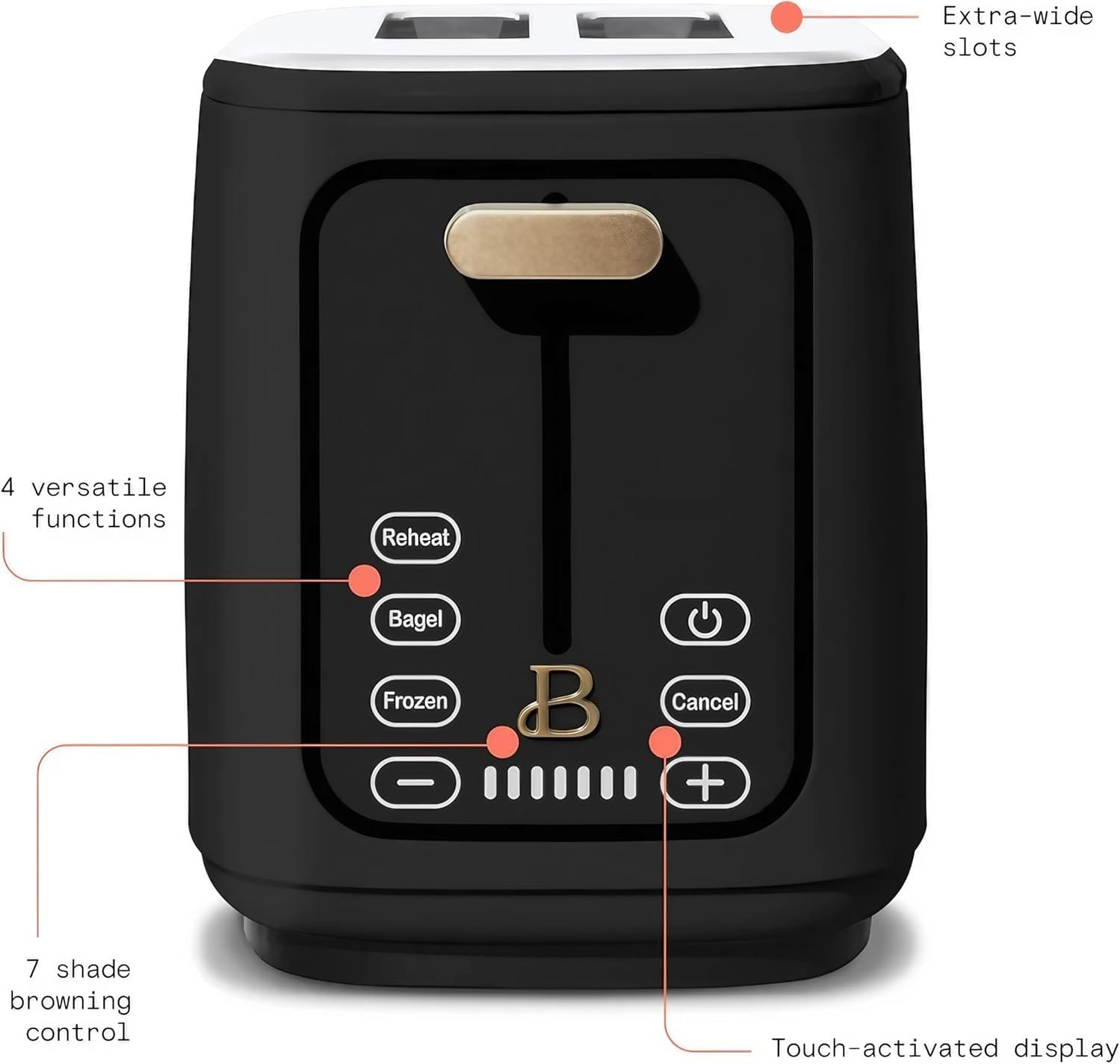
Image: The Beautiful 2-Slice Toaster with callouts indicating extra-wide slots, 4 versatile functions (Reheat, Bagel, Frozen, Cancel), 7 shade browning control, and the touch-activated display.
Controls
- Power Button: Activates the display and powers on/off the toaster.
- Shade Settings (-/+): Adjust browning level from 1 (lightest) to 7 (darkest).
- Bagel Preset: Toasts the cut side of bagels while gently warming the other.
- Frozen Preset: Adds extra time to toast frozen items.
- Reheat Preset: Warms toast without additional browning.
- Cancel Button: Stops the toasting cycle immediately.
3. Setup
Before first use, follow these steps:
- Unpack: Carefully remove all packaging materials and promotional labels from the toaster.
- Placement: Place the toaster on a stable, flat, heat-resistant surface, away from flammable materials. Ensure adequate ventilation around the toaster.
- First Use Cycle: Plug the toaster into a 120V AC electrical outlet. Run the toaster through one or two toasting cycles at the highest shade setting without bread. This will burn off any manufacturing residues and eliminate initial odors. A slight smoke or odor is normal during this process.
- Clean Crumb Tray: After the first use cycle, allow the toaster to cool, then remove and clean the crumb tray.
4. Operating Instructions
Follow these steps for optimal toasting results.
Basic Toasting
- Plug the toaster into a standard electrical outlet. The display will remain off until activated.
- Press the Power button to activate the touch display.
- Insert bread slices into the extra-wide slots.
- Use the - or + buttons to select your desired shade setting (1-7). A higher number indicates darker toast.
- Push the high-lift lever down until it locks into place. The toasting cycle will begin.
- The LED countdown will indicate the remaining toasting time.
- Once the cycle is complete, the toast will automatically pop up. Use the high-lift lever to raise smaller items for easier retrieval.
- To stop toasting at any time, press the Cancel button.
Using Presets (Bagel, Frozen, Reheat)
These functions optimize toasting for specific food types:
- Follow steps 1-3 from "Basic Toasting".
- Select your desired shade setting.
- Press the corresponding preset button: Bagel, Frozen, or Reheat. The selected preset will illuminate.
- Push the high-lift lever down to start the cycle. The toaster will automatically adjust the toasting time and heating elements for the selected preset.

Image: A hand demonstrating the use of the high-lift lever on the Beautiful 2-Slice Toaster, highlighting the gluten-free, bagel, and frozen functions for various bread types.
5. Maintenance and Cleaning
Regular cleaning ensures optimal performance and extends the life of your toaster.
Crumb Tray Cleaning
- Unplug: Always unplug the toaster from the electrical outlet and allow it to cool completely before cleaning.
- Remove Tray: Pull out the removable crumb tray located at the bottom of the toaster.
- Discard Crumbs: Shake out crumbs into a waste bin.
- Wipe Clean: Wipe the tray with a damp cloth, then dry thoroughly.
- Reinsert: Slide the crumb tray back into the toaster until it clicks into place.

Image: A hand removing the slide-out crumb tray from the Beautiful 2-Slice Toaster, illustrating the easy cleanup feature.
Exterior Cleaning
- Wipe the exterior of the toaster with a soft, damp cloth. Do not use abrasive cleaners or metal scouring pads.
- Ensure the toaster is completely dry before plugging it back in or storing.
- Never immerse the toaster in water or any other liquid.
6. Troubleshooting
Refer to this section for common issues and their solutions.
| Problem | Possible Cause | Solution |
|---|---|---|
| Toaster does not turn on. | Not plugged in; power outlet issue; internal fault. | Ensure toaster is securely plugged into a working outlet. Check household circuit breaker. If issue persists, contact customer support. |
| Toast is too light or too dark. | Incorrect shade setting; type of bread. | Adjust the shade setting using the - or + buttons. Denser breads may require a higher setting. |
| Lever does not stay down. | Toaster not plugged in; internal mechanism issue. | Ensure the toaster is plugged into a live electrical outlet. If plugged in and still not working, contact customer support. |
| Smoke coming from toaster. | Food lodged inside; excessive crumbs; first use residue. | Immediately press Cancel and unplug. Allow to cool. Remove any lodged food or clean crumb tray. If it's first use, a small amount of smoke is normal. |
7. Specifications
Technical details for the Beautiful by Drew Barrymore 2-Slice Toaster, Model 19029.
| Feature | Detail |
|---|---|
| Model Number | 19029 |
| Power | 900 Watts |
| Voltage | 120 Volts |
| Number of Slices | 2 |
| Shade Settings | 7 |
| Product Dimensions | 6.57"D x 11.06"W x 8.11"H |
| Item Weight | 2.97 pounds |
| Material | Die-Cast Metal Lever, High-Grade Plastic Housing, Stainless Steel Exterior Accents |
| Special Features | Touch-Activated LED Display, Extra-Wide Self-Adjusting Slots, High-Lift Lever, Bagel/Frozen/Reheat Presets, Removable Crumb Tray, Cord Wrap |
8. Warranty and Support
This product comes with a limited manufacturer's warranty. Please refer to the warranty card included in your product packaging for specific terms and conditions.
For technical assistance, troubleshooting not covered in this manual, or warranty claims, please contact customer support through the retailer where the product was purchased or visit the manufacturer's official website.