
1. Introduction
This manual provides essential information for the proper installation, operation, and maintenance of the BENGBUZZYQ 25mm Flat Membrane Load Cell, Model 1T-MH-25. This ultra-thin, high-precision weight sensor is designed for electronic scales, weighing systems, and various industrial applications requiring accurate and stable force measurement.
The 1T-MH-25 model features a 25mm diameter and a 1-ton (1000 kg) load capacity, offering exceptional accuracy and repeatability. Its robust construction ensures durability in harsh environments, making it suitable for a wide range of industrial settings.

Figure 1: BENGBUZZYQ 25mm Flat Membrane Load Cell (1T capacity variant).
2. Key Features
- Space-Efficient and Ultra-Thin Design: The 25mm flat membrane load cell features an ultra-thin profile, ideal for applications with limited space.
- Wide Selection of Capacities: This specific model (1T-MH-25) has a 1-ton capacity. Other 25mm versions are available from 5KG to 5T.
- Unmatched Precision and Stability: Offers exceptional accuracy and repeatability, perfect for electronic scales, automated systems, and industrial applications.
- Durability in Harsh Environments: Built with corrosion-resistant, waterproof materials to withstand extreme temperatures and mechanical stress.
- Simple Installation and Compatibility: Features standard wiring interfaces, easily integrating into a variety of weighing systems and applications.
3. Setup and Installation
3.1 Unpacking
Carefully remove the load cell from its packaging. Inspect for any visible damage that may have occurred during transit. Retain the packaging for future storage or transport.
3.2 Mounting
The load cell should be mounted on a flat, rigid surface to ensure accurate readings. Use appropriate M3 screws for secure attachment. Ensure the mounting surface is clean and free of debris. Avoid applying excessive torque during installation to prevent damage to the sensor.
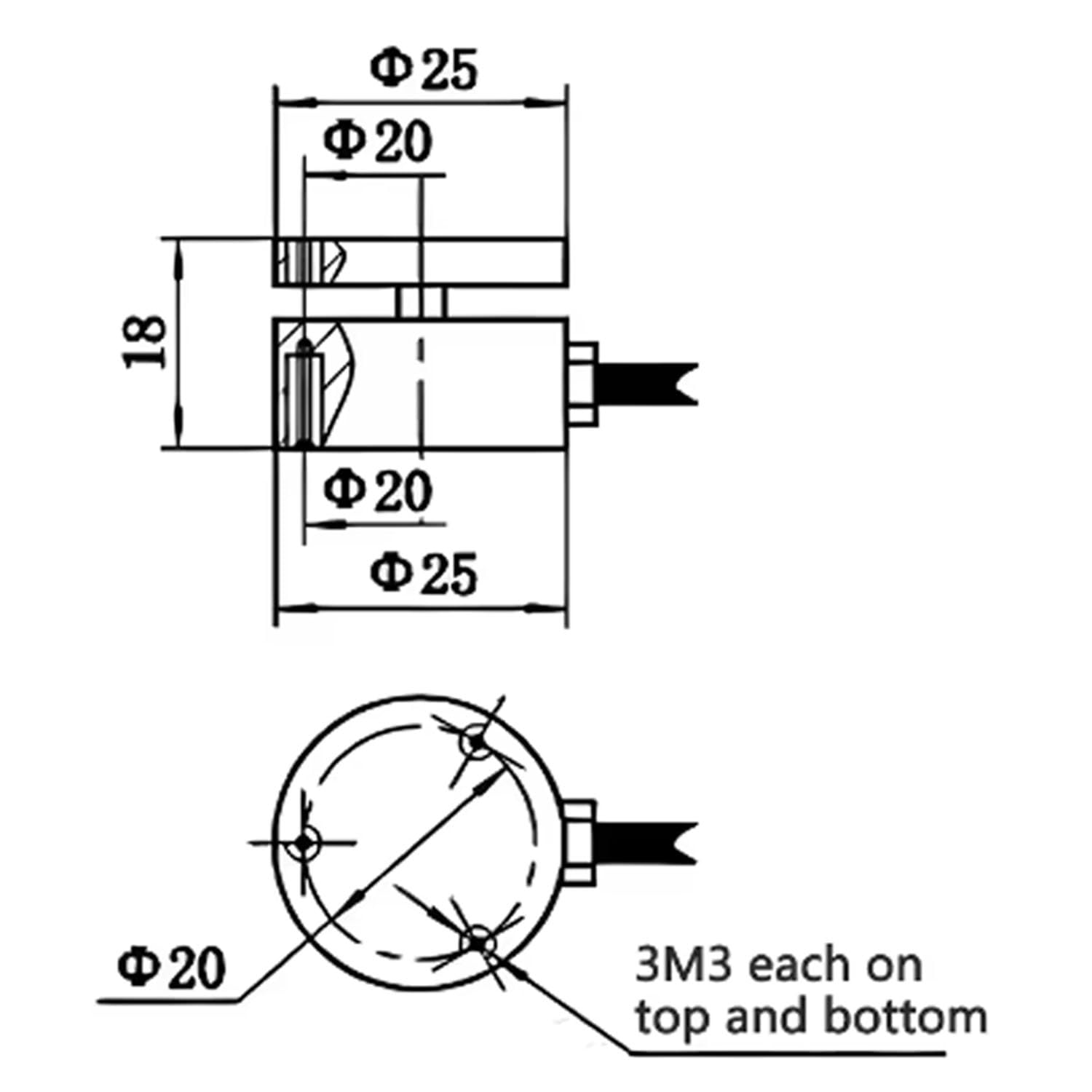
Figure 2: Dimensional drawing for the 25mm flat membrane load cell, showing mounting points and overall dimensions.
3.3 Wiring Diagram
Connect the load cell to your weighing indicator or amplifier according to the standard Wheatstone bridge configuration. The typical wiring color code is as follows:
- Red: Excitation+ (E+)
- Black: Excitation- (E-)
- Green: Signal+ (S+)
- White: Signal- (S-)
Ensure all connections are secure and properly insulated to prevent signal interference or short circuits. Refer to your weighing indicator's manual for specific wiring instructions if available.
Video 1: Demonstration of micro load cell wiring and basic functionality. This video illustrates the connection process for a flat type load cell.
4. Operating Principles
4.1 Basic Operation
The BENGBUZZYQ load cell operates on the principle of strain gauge technology. When a force is applied to the sensor, the internal strain gauges deform, causing a change in their electrical resistance. This change is converted into an electrical signal proportional to the applied force, which can then be read by a compatible weighing indicator.
4.2 Calibration
After installation, the load cell system requires calibration to ensure accurate measurements. This typically involves applying known weights (calibration standards) and adjusting the weighing indicator to match the corresponding readings. Consult your weighing indicator's manual for detailed calibration procedures. Regular calibration is recommended to maintain accuracy over time.
5. Maintenance
5.1 Cleaning
Keep the load cell and its surroundings clean. Dust, dirt, or debris can interfere with accurate measurements. Use a soft, dry cloth to wipe the sensor. Avoid using harsh chemicals or abrasive materials that could damage the housing or wiring.
5.2 Inspection
Periodically inspect the load cell for any signs of physical damage, corrosion, or wear on the cables. Ensure all mounting screws remain tight. Address any issues promptly to prevent performance degradation or failure.
6. Troubleshooting
If you encounter issues with your load cell, consider the following common problems and solutions:
- No Reading or Erratic Readings:
- Check all wiring connections for looseness or damage.
- Ensure the load cell is properly mounted and not experiencing side loads or eccentric loading.
- Verify the power supply to the weighing indicator is stable.
- Recalibrate the system.
- Inaccurate Readings:
- Perform a full system calibration with known weights.
- Check for any physical obstructions or debris affecting the load path.
- Ensure the load cell's capacity is appropriate for the applied weight.
- Verify environmental conditions (temperature, humidity) are within the sensor's operating range.
- Zero Drift:
- Allow sufficient warm-up time for the system.
- Check for temperature fluctuations in the operating environment.
- Ensure the load cell is not under constant stress when at zero.
If problems persist, contact customer support for further assistance.


