
Introduction
This manual provides detailed instructions for the installation, operation, and maintenance of your YiLaie Solar Fence Lights. These lights are designed for outdoor use, featuring solar power, adjustable lighting modes, and a durable, waterproof construction to enhance the ambiance and safety of your outdoor spaces.
Product Features
- 3 Adjustable Lighting Modes: Offers Warm White (3000K), Neutral White (4500K), and Cool White (6500K) options to suit different preferences and environments.
- Automatic Dusk-to-Dawn Operation: Equipped with integrated light sensors for automatic activation at dusk and deactivation at dawn.
- IP67 Waterproof Rating: Engineered for extreme weather conditions, providing reliable dustproof and waterproof performance year-round.
- Durable Construction: Manufactured with reinforced UV-resistant PC material, ensuring excellent resistance to weather, high temperatures, and impacts.
- Long Runtime: Features a built-in 2000mAh battery that provides 16-25 hours of continuous illumination in energy-saving mode after 6-10 hours of direct sunlight charging.
- Easy Installation: Designed for simple, wire-free setup on fences, walls, or posts, including a screw hole positioning ruler and mounting kit.
- Wide Illumination: Upgraded with 3 high-brightness LEDs and a high-transmittance lens, casting light 40% wider than standard lights and illuminating 30-45 sq ft per light.
Package Contents
- YiLaie Solar Fence Lights (6 units)
- Mounting Hardware (screws and wall anchors)
- Screw Hole Positioning Ruler
- User Manual
Installation Guide
For optimal performance, install the solar lights in a location that receives direct sunlight for 6-10 hours daily. Avoid shaded areas or locations near other strong light sources at night, as this may interfere with the automatic sensor.
- Choose Location: Select a spot on your fence, wall, or railing that receives ample direct sunlight throughout the day and is not obstructed by shadows or other artificial light sources at night.
- Apply Guide Sticker: Use the provided screw hole positioning ruler to accurately mark the drilling points. Peel off the backing and firmly press the sticker onto the desired surface.

Image: Applying the screw hole positioning ruler to mark drill points on a wall.
- Drill Holes: Using an appropriate drill bit, create holes at the marked positions.
- Secure Screws: Insert the wall anchors (if required for your mounting surface) into the drilled holes, then secure the screws, leaving a small portion exposed for the light to hang.

Image: A hand using a screwdriver to secure a screw into a wall, preparing for light installation.
- Mount Lights: Align the light's mounting slots with the exposed screws and slide the light downwards to securely fasten it in place.

Image: A solar fence light being mounted onto screws on a wall.
Important: Ensure the protective film is removed from the solar panel before first use to allow for proper charging.
Video: A demonstration of the easy installation process for the solar fence lights.
Operating Instructions
The YiLaie Solar Fence Lights feature an intelligent light-sensitive control system and multiple lighting modes.
Automatic Operation:
The lights are equipped with a light sensor. They will automatically charge during the day (6-8 hours of direct sunlight recommended) and turn on automatically at night, providing illumination for 16-25 hours depending on the mode and charge level.

Image: Diagram showing the solar panel charging during the day and lights automatically turning on at night.
Adjustable Lighting Modes:
The lights offer three adjustable color temperatures. To cycle through the modes, locate the small button on the underside of the light (near the LEDs) and press it. Each press will switch to the next mode:
- Warm White (3000K): Provides a soft, inviting glow.
- Neutral White (4500K): Offers a balanced, natural light.
- Cool White (6500K): Delivers a bright, crisp illumination.
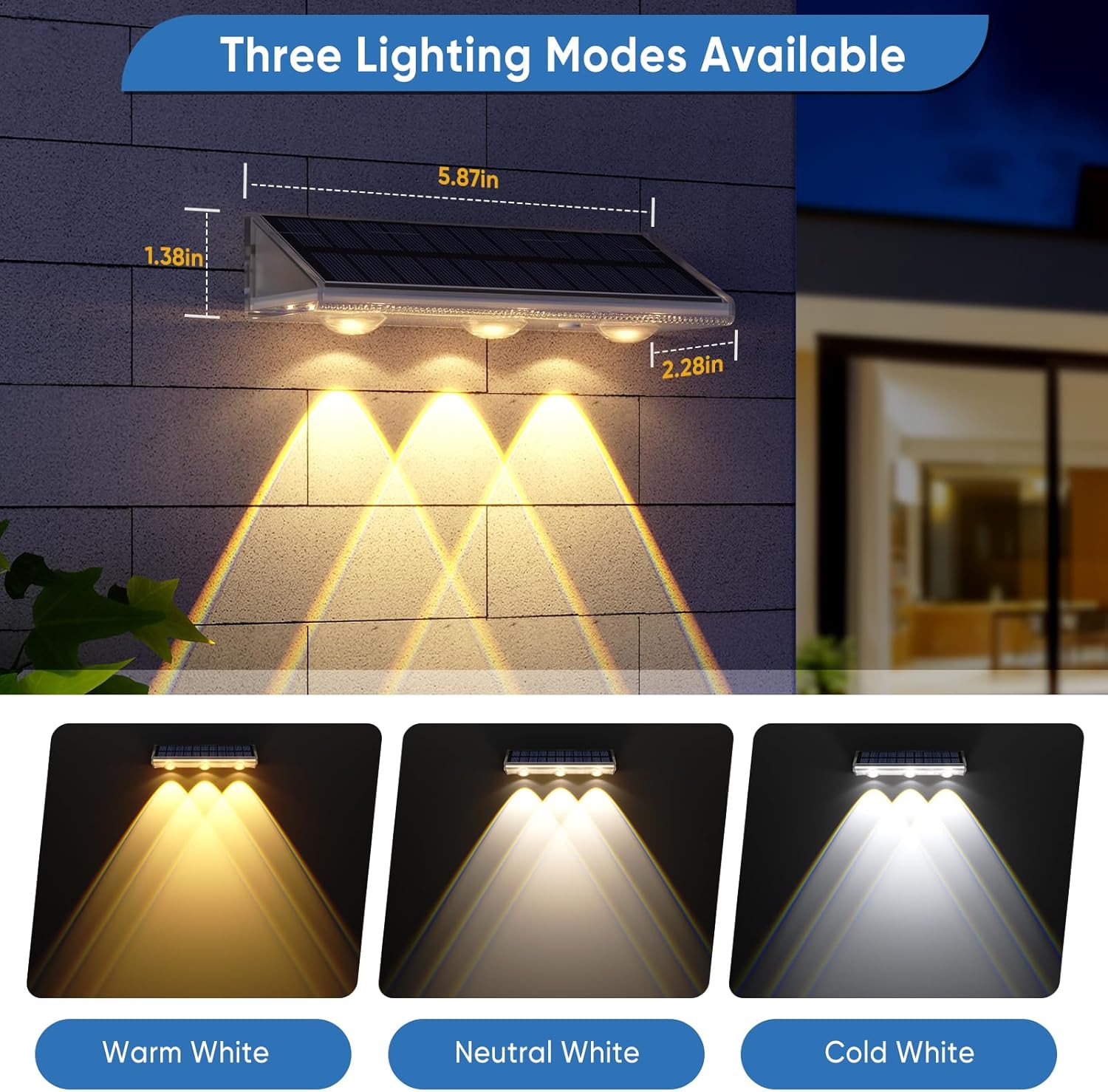
Image: Visual representation of the three available lighting modes: Warm White, Neutral White, and Cool White.
Video: A demonstration of switching between the three lighting modes by pressing the button.
Maintenance
- Clean Solar Panel: Regularly wipe the solar panel with a soft, damp cloth to remove dust, dirt, or debris. A clean panel ensures maximum sunlight absorption and efficient charging.
- Battery Replacement: The built-in battery is designed for long-term use. If the light's performance significantly degrades over time, the battery may need replacement. Refer to the product specifications for battery type.
- Environmental Factors: During prolonged periods of cloudy or rainy weather, the lights may not receive sufficient charge, leading to reduced brightness or runtime. Normal operation will resume once sufficient sunlight returns.
Troubleshooting
| Problem | Possible Cause | Solution |
|---|---|---|
| Light does not turn on at night. | Insufficient sunlight for charging. | Ensure the solar panel receives 6-10 hours of direct sunlight daily. Relocate the light if necessary to a sunnier spot. |
| Light turns off too quickly or is dim. | Battery not fully charged or aging battery. | Allow for more charging time in direct sunlight. If the issue persists after several sunny days, the battery may need replacement. |
| Light flickers. | Loose connection or low battery. | Ensure the light is securely mounted. Allow for a full charge cycle. If flickering continues, check for any physical damage. |
| Light stays on during the day. | Light sensor obstructed or faulty. | Clean the solar panel and ensure no objects are covering the light sensor. Verify there are no strong artificial light sources nearby that could trick the sensor into thinking it's daytime. |
Specifications
| Feature | Detail |
|---|---|
| Brand | YiLaie |
| Model Number | EL-SJW |
| Color Temperature Options | 3000K (Warm White), 4500K (Neutral White), 6500K (Cool White) |
| Material | Polycarbonate |
| Water Resistance Level | IP67 Waterproof |
| Power Source | Solar Powered |
| Battery Capacity | 2000mAh (1 Nonstandard Battery included) |
| Solar Charging Time | 6-10 hours (in strong direct sunlight) |
| Illumination Runtime | 16-25 hours (in energy-saving mode, after full charge) |
| Light Source Type | LED (3 high-brightness LEDs) |
| Brightness | 45 Lumens |
| Illumination Area | 30-45 sq ft per light |
| Product Dimensions | 5.8"L x 2.3"W x 1.6"H |
| Installation Type | Wall Mount, Direct Mount |
| Control Method | Touch Button |
Warranty and Support
YiLaie provides a 365-day warranty for free replacement in cases of non-human failure. For any product-related issues, technical assistance, or inquiries, please contact YiLaie customer support. You can typically find contact information on the product packaging or by visiting the official YiLaie website.