
GoAssemb F07S
WOLFBUSH×YU Xiang F07S UH-1 Huey RC Helicopter User Manual
Model: F07S
1. Introduction
Welcome to the user manual for your WOLFBUSH×YU Xiang F07S UH-1 Huey RC Helicopter. This meticulously crafted 1/34 scale replica of the iconic U.S. military helicopter is designed for both enthusiasts and collectors, offering advanced flight capabilities and a highly detailed appearance. This manual provides essential information for safe operation, setup, maintenance, and troubleshooting to ensure an optimal flying experience.

Image 1.1: The F07S UH-1 Huey RC Helicopter, a 1:34 scale model of the US Coast Guard Rescue Helicopter, showcasing its detailed design and flight capabilities.
2. Safety Precautions
Operating an RC helicopter requires attention to safety. Please read and adhere to the following guidelines to prevent injury or damage:
- Adult Supervision: This product is recommended for ages 16 and up. Younger users should always be supervised by an adult.
- Flight Environment: Fly in open, clear areas away from people, animals, buildings, and power lines. Avoid flying in strong winds (above 4-5 level winds).
- Pre-Flight Check: Always inspect the helicopter and remote control for any damage before each flight. Ensure batteries are fully charged and securely installed.
- Rotor Blades: Keep hands, face, and loose clothing away from rotating blades. Blades can cause serious injury.
- Battery Safety: Use only the specified battery and charger. Do not overcharge or short-circuit batteries. Discontinue use if batteries show signs of swelling or damage.
- Moisture: Do not expose the helicopter or remote control to water or moisture.
- Interference: Avoid flying near other radio-controlled devices or strong electromagnetic sources that could cause signal interference.
- Emergency Landing: In case of emergency, immediately cut power to the motors and perform a controlled descent if possible.
3. What's in the Box
Upon unpacking, please verify that all components listed below are present:
- Aircraft (WOLFBUSH×YU Xiang F07S UH-1 Huey RC Helicopter) x 1
- Instruction Manual x 1
- USB Charging Cable x 1
- Main Propeller x 2
- Tail Propeller x 1
- Intelligent Battery (7.4V 1200mAh LiPo) x 1
- Hex Key x 1
- Screwdriver x 1

Image 3.1: All components included in the F07S UH-1 Huey RC Helicopter package, neatly laid out and labeled for easy identification.
4. Specifications
| Feature | Detail |
|---|---|
| Item No. | F07S (UH-1 6-CH intelligent 6G flybarless scale (Huey) helicopter GPS version) |
| Material | High-strength composite engineering material |
| Rotor Diameter | 372mm |
| Fuselage Length | 350mm |
| Height | 122mm |
| Single Aircraft Weight | 228g |
| Drive Motor | 2511 1200KV brushless motor |
| Tail Lock Motor | 1204 5500KV brushless motor |
| Servo | 4.3g metal digital servo |
| Remote Controller | 2.4G remote |
| Remote Distance | >120 meters |
| Body Battery | LI-POLY smart battery 7.4V (1200MAH) 25C |
| Charger | USB charger |
| Charging Time | About 60 minutes |
| Use Time | 10-12 minutes |
| Product Dimensions (packaged) | 41.5 x 37.5 x 118cm (16.34 x 14.76 x 46.46 inches) |
| Product Weight (packaged) | 1900g (4.19 pounds) |
| Recommended Age | 16 years and up |
5. Setup
5.1 Battery Charging
- Connect the intelligent battery to the provided USB charging cable.
- Plug the USB charging cable into a compatible USB power source (e.g., computer USB port, USB wall adapter).
- The charging indicator light on the USB cable will show the charging status. Refer to the charger's specific instructions for light indications (e.g., red for charging, green for full).
- Charging typically takes about 60 minutes for a full charge. Do not leave batteries unattended while charging.
5.2 Remote Control Preparation
- Install the required batteries (not included, typically AA batteries) into the remote control's battery compartment, observing polarity.
- Power on the remote control.
5.3 Helicopter Preparation and Pairing
- Ensure the helicopter's main power switch is in the OFF position.
- Carefully insert the fully charged intelligent battery into the helicopter's battery compartment, ensuring a secure connection.
- Place the helicopter on a flat, level surface.
- Power on the helicopter. The LED lights will typically flash, indicating it's ready for pairing.
- On the remote control, perform the pairing sequence as described in the remote control's specific manual (usually involves moving the throttle stick up then down, or pressing a bind button).
- Once paired, the helicopter's LED lights will become solid, indicating a successful connection.

Image 5.1: The F07S UH-1 Huey RC Helicopter, remote control, and battery, illustrating the main components involved in the setup process.
6. Operating Instructions
6.1 Basic Controls
The 8-channel 2.4GHz transmitter provides precise control over the helicopter. Familiarize yourself with the stick movements and button functions:
- Throttle (Left Stick Up/Down): Controls the main rotor speed and altitude.
- Yaw (Left Stick Left/Right): Controls the helicopter's rotation around its vertical axis.
- Pitch (Right Stick Up/Down): Controls forward and backward movement.
- Roll (Right Stick Left/Right): Controls left and right sideways movement.
- Adjustable Throttle: The remote supports adjustable left/right-hand throttle for personalized flying preference.
6.2 Intelligent Flight Modes and Features
The F07S UH-1 Huey is equipped with advanced flight control systems for enhanced stability and ease of use:
- GPS Positioning: Utilizes GPS for accurate outdoor positioning, enabling stable hovering and precise flight paths.
- Barometric Altitude Hold: Maintains a consistent altitude automatically, simplifying flight control.
- Optical Flow Stabilization: Provides additional stability, especially in indoor environments or when GPS signal is weak.
- 6G Flybarless Stabilization: Ensures precise control and stability, suitable for both beginners and experienced pilots.
- One-Key Return: Initiates an automatic return to the takeoff point.
- Auto-Landing: Performs a controlled automatic landing.
- Low-Power Return: The helicopter will automatically return when the battery level is critically low.
- Signal-Loss Protection: In case of signal loss, the helicopter will attempt to return or land safely.
- Horizontal Figure-8 Flight: In GPS mode, a specific switch (SWA-5) can be used to record current coordinates and perform a horizontal figure-8 flight pattern based on those coordinates.

Image 6.1: The F07S UH-1 Huey RC Helicopter demonstrating its GPS Satellite Positioning features, including various return-to-home functions.

Image 6.2: The F07S UH-1 Huey RC Helicopter utilizing Optical Flow and LiDAR TOF for precise altitude hold and stable hovering.

Image 6.3: The F07S UH-1 Huey RC Helicopter executing a horizontal figure-8 flight, highlighting the remote control's clear display of flight information.
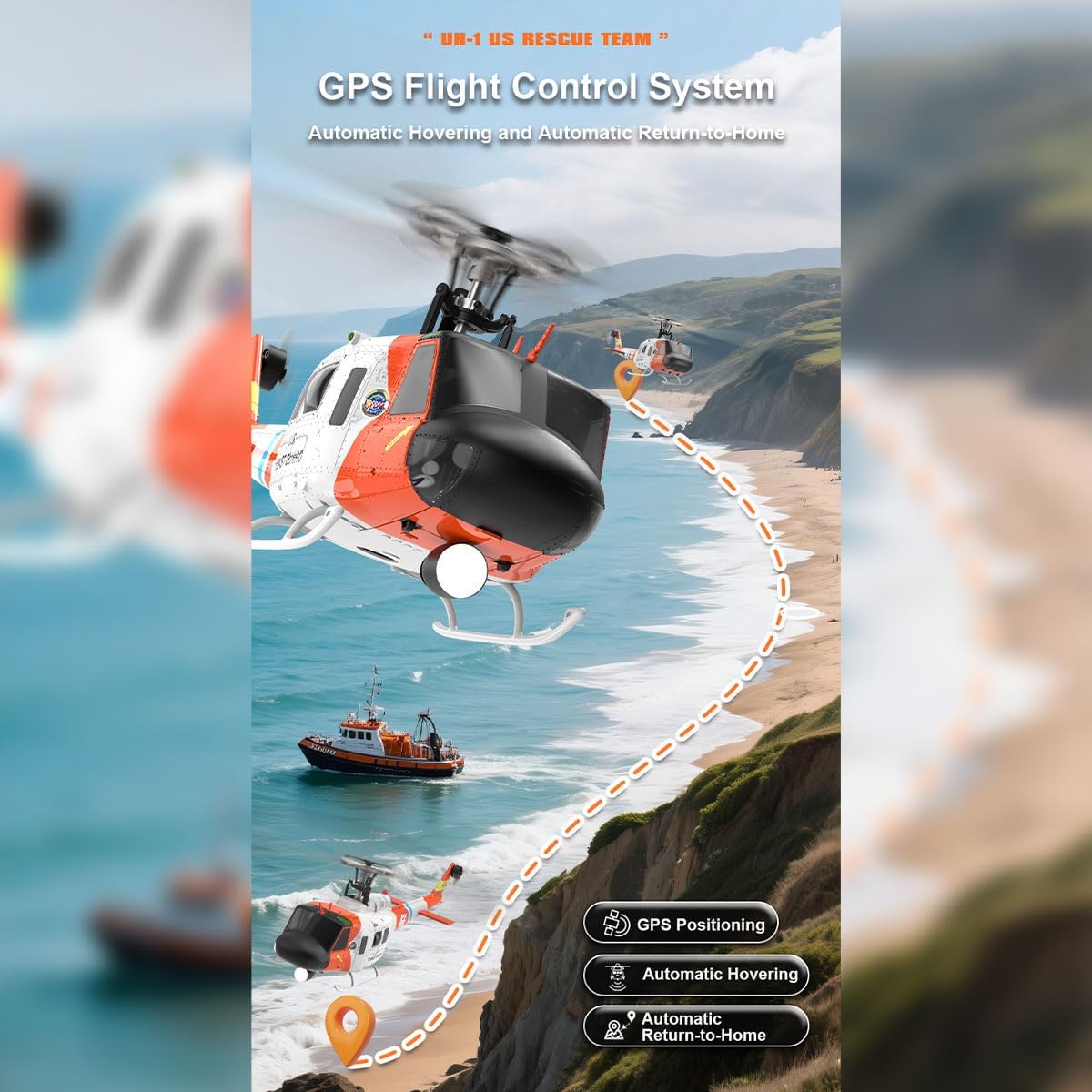
Image 6.4: The F07S UH-1 Huey RC Helicopter's GPS Flight Control System enabling automatic hovering and return-to-home functions.
6.3 First Flight Tips
- Practice in a Safe Area: Choose a large, open outdoor space free from obstacles.
- Start Slowly: Begin with gentle throttle inputs to get a feel for the helicopter's response.
- Hover Practice: Focus on maintaining a stable hover at a low altitude before attempting complex maneuvers.
- Monitor Battery: Pay attention to the remote control's telemetry for battery status. Land immediately when the low-power warning is given.
7. Maintenance
Proper maintenance will extend the lifespan of your RC helicopter:
- Cleaning: After each flight, gently wipe down the helicopter with a soft, dry cloth to remove dust and debris. Avoid using solvents or harsh chemicals.
- Blade Inspection: Regularly check the main and tail rotor blades for cracks, chips, or deformation. Replace damaged blades immediately.
- Motor and Gear Inspection: Periodically check motors for any obstructions and gears for wear. Ensure all moving parts are free and clear.
- Battery Care: Store batteries in a cool, dry place away from direct sunlight. Do not store fully charged or completely depleted batteries for extended periods. For long-term storage, charge batteries to approximately 50%.
- Screw Tightness: Occasionally check that all screws and fasteners are tight, especially after a hard landing.
- Storage: When not in use, store the helicopter and remote control in their original carrying case or a protective container to prevent damage.
8. Troubleshooting
If you encounter issues with your F07S UH-1 Huey RC Helicopter, refer to the following common problems and solutions:
| Problem | Possible Cause | Solution |
|---|---|---|
| Helicopter does not power on | Battery not charged or improperly connected; Power switch off | Ensure battery is fully charged and securely connected. Turn on the helicopter's power switch. |
| Remote control does not respond | Remote batteries low or incorrectly installed; Not paired with helicopter | Replace remote control batteries. Re-pair the remote control with the helicopter as per Section 5.3. |
| Helicopter unstable or drifts during flight | Not calibrated; Damaged blades; Strong wind conditions | Ensure helicopter is placed on a level surface for power-on/calibration. Check blades for damage and replace if necessary. Fly in calmer conditions. |
| Short flight time | Battery not fully charged; Battery degradation | Ensure battery is fully charged (approx. 60 mins). If battery life significantly decreases, consider replacing the battery. |
| Loss of signal during flight | Out of range; Interference | Fly within the specified remote distance (>120 meters). Avoid areas with strong electromagnetic interference. The helicopter has signal-loss protection. |
9. Warranty and Support
For warranty information, technical support, or replacement parts, please contact the retailer or manufacturer directly. Keep your purchase receipt as proof of purchase. For general inquiries, you may visit the GoAssemb Store on Amazon: GoAssemb Store.
Ask a question about this manual
Ask about setup, troubleshooting, compatibility, parts, safety, or missing instructions. Manuals+ will review the question and use this page’s manual context to help answer it.