
Introduction
Thank you for choosing the SZMiNiLED Full Spectrum Aquarium Light. This product is designed to provide optimal lighting for your aquatic environment, supporting plant growth and enhancing the visual appeal of your fish tank. It features advanced APP and remote control capabilities, a programmable timer, and a full spectrum of colors to create a dynamic and healthy ecosystem.
Please read this manual thoroughly before installation and operation to ensure proper use and longevity of your aquarium light.
Safety Information
- Always unplug the light from the power outlet before performing any maintenance or cleaning.
- Do not operate the light if the cord or plug is damaged.
- This product is designed for indoor use only. Do not expose to rain or moisture.
- Ensure the light is securely mounted to prevent it from falling into the water.
- Keep out of reach of children.
- Do not attempt to disassemble or modify the light. This will void the warranty.
Setup Instructions
1. Unboxing and Component Check
Carefully remove all components from the packaging. Verify that all items listed below are present and undamaged:
- SZMiNiLED Full Spectrum Aquarium Light unit
- Extendable Brackets (2 pieces)
- Remote Control
- Power Adapter
- Instruction Manual (this document)

Image: Components of the SZMiNiLED Full Spectrum Aquarium Light.
2. Installing the Extendable Brackets
The light comes with adjustable extendable brackets designed to fit various tank sizes (11-18 inches). These brackets can extend up to 2.95 inches (7.5 cm) on each side to ensure stability.
- Slide the metal brackets into the slots on both ends of the light unit.
- Place the light unit with attached brackets onto the top edges of your aquarium.
- Adjust the brackets outwards until they rest securely on the tank edges. Ensure the light is centered and stable.
- The brackets are compatible with glass thicknesses from 5mm to 15mm.

Image: Product installation diagram showing bracket attachment.

Image: Diagram showing light dimensions and bracket extension.
3. Power Connection
Connect the power adapter to the light unit, then plug the adapter into a standard electrical outlet. The light is now ready for operation.
Operating Instructions
The SZMiNiLED Aquarium Light can be controlled via a mobile application or the included remote control.
1. Mobile Application Control
Download the dedicated mobile application (available on iOS App Store and Google Play Store) to unlock full control features, including 0-100% dimming, 16 million color options, multiple preset modes, and a programmable timer.
- Scan the QR code on the product packaging or search for the app name (usually indicated on the packaging or in a quick start guide) in your device's app store.
- Install the application and follow the on-screen instructions to pair it with your aquarium light. This typically involves enabling Bluetooth on your device.
- Once connected, you can adjust brightness, change colors, select various lighting modes, and set custom schedules.

Image: Mobile application interface for light control.

Image: Smart control via mobile application.
2. Remote Control Operation
The included remote control provides convenient access to essential functions.
- Power Button: Turns the light On/Off.
- Brightness Adjustment: Use the brightness buttons to cycle through 6 levels of brightness.
- Color Selection: Choose from various preset colors (Red, Green, Blue, White, etc.).
- Mode Selection: Access different lighting modes such as flashing, fading, and gradient effects.
- Timer Presets: Use the 8H, 10H, 12H buttons for quick timer settings.

Image: Remote control and app interface for brightness and mode adjustments.
3. Full Spectrum and Color Modes
The light features full-spectrum LEDs with red and blue wavelengths optimized for photosynthesis, promoting plant growth and coral coloration. With 16 million RGB color options, you can customize the ambiance of your aquarium.
- Full Spectrum Mode: Provides balanced light for aquatic plant growth.
- Blue Light Mode: A 10% blue light setting is available for nighttime viewing, creating a calming moonlight effect and preventing fish from being startled.
- Custom Colors: Use the app to select any of 16 million colors or create themed lighting effects (e.g., Halloween orange, Christmas red-green).

Image: Planted aquarium with light, showing recommended daytime lighting duration of 7-8 hours.
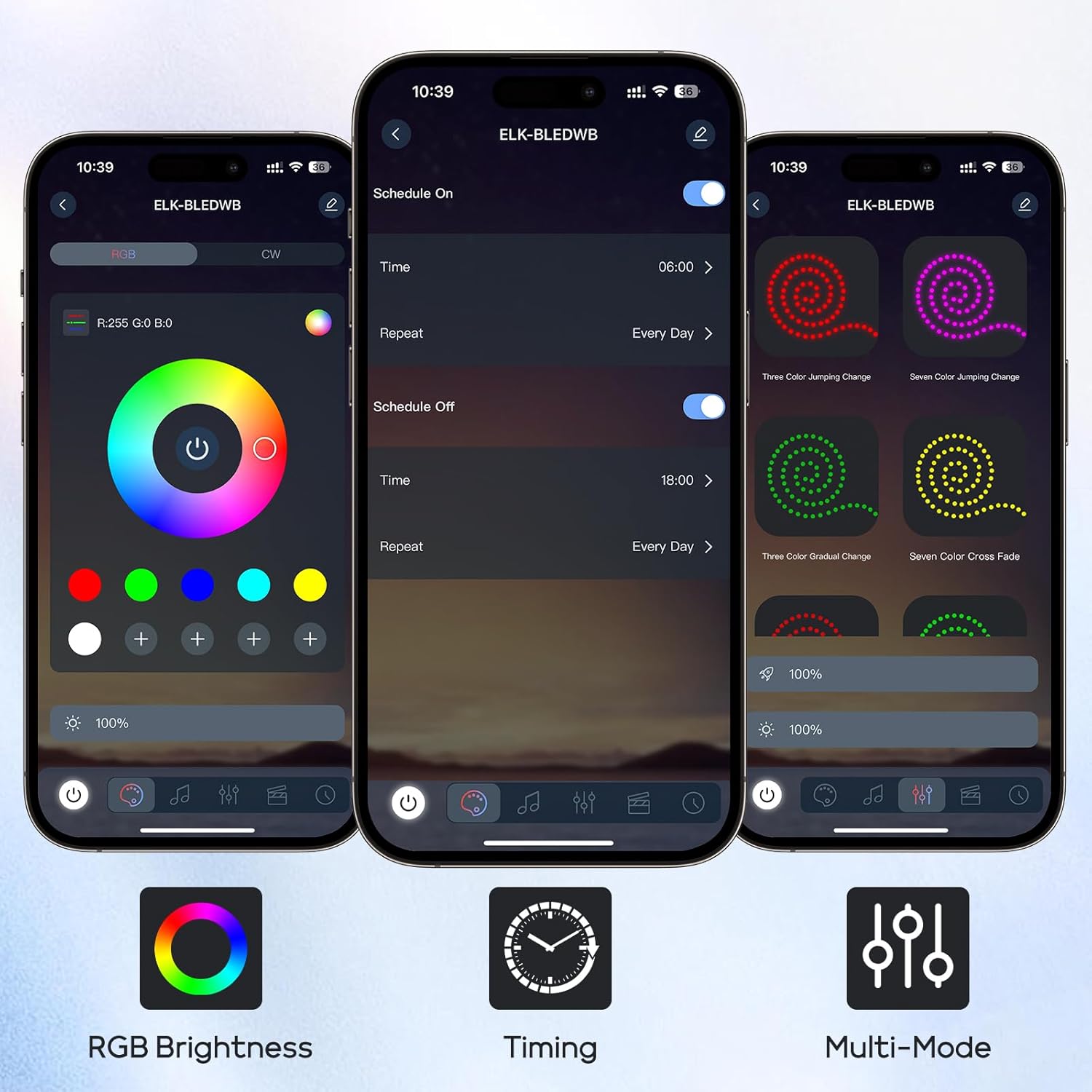
Image: Aquarium with 16 million colors, turning your home into an art exhibition.
4. Programmable Timer
The app-based timer allows for precise control over lighting schedules, ensuring consistent light cycles for your aquatic pets.
- Set specific ON/OFF times for any day of the week.
- Customize lighting duration to mimic natural day-night cycles.
- The light can automatically turn on at 6:00 AM and turn off at 6:00 PM, for example.
5. Video Demonstration
For a visual guide on using the app and remote control functions, please watch the official product video:
Video: Demonstration of the SZMiNiLED aquarium light's app and remote control functions, including color changes, brightness adjustments, and various modes.
Maintenance
1. Cleaning
Regular cleaning helps maintain optimal light output and product longevity.
- Unplug the light before cleaning.
- Wipe the light unit with a soft, damp cloth. Do not use abrasive cleaners or solvents.
- Ensure the light is completely dry before plugging it back in.
2. Storage
If storing the light for an extended period, ensure it is clean and dry. Store in a cool, dry place away from direct sunlight.
Troubleshooting
| Problem | Possible Cause | Solution |
|---|---|---|
| Light does not turn on. | No power connection. | Check if the power adapter is securely plugged into the light and the wall outlet. Test the outlet with another device. |
| Remote control not working. | Battery depleted or obstruction. | Replace the remote control battery. Ensure there is no obstruction between the remote and the light's receiver. |
| App cannot connect to the light. | Bluetooth is off or light is out of range. | Ensure Bluetooth is enabled on your mobile device. Move closer to the light. Restart the app and the light. |
| Light flickers or changes color unexpectedly. | Loose connection or power fluctuation. | Check all connections. Try plugging the light into a different outlet. |
Specifications
- Brand: SZMiNiLED
- Model Number: CS-01
- Product Dimensions: 11"D x 2.65"W x 0.39"H (for 12-18inch variant)
- Material Type: Acrylonitrile Butadiene Styrene
- Light Source Type: LED
- Power Source: Corded Electric
- Finish Type: Polished
- Color: Black
- Additional Features: APP & Remote Control, Color Changing, Dimmable (0-100%), Full Spectrum, Programmable Timer
- Installation Type: Top of tank
- Recommended Uses: Aquarium, Decoration, Fish Health, Plant Growth
- Included Components: Remote Control, Aquarium Light Set
Warranty and Support
This product comes with a manufacturer's warranty. For specific warranty details, please refer to the documentation included with your purchase or contact SZMiNiLED customer support.
If you encounter any issues or have questions regarding your SZMiNiLED Full Spectrum Aquarium Light, please contact our customer support team through the retailer where you purchased the product or visit the official SZMiNiLED website for contact information.