
1. Introduction
Thank you for choosing the Lexical LSI-1014 Steam Iron. This powerful and efficient appliance is designed to make your ironing tasks easier and faster. Featuring a 2200W motor, a ceramic soleplate, and a 220ml water tank, it provides effective steam for smooth gliding and wrinkle removal. Please read this manual carefully before first use to ensure safe and optimal operation.
2. Important Safety Instructions
- Always ensure the voltage rating on the iron matches your mains supply.
- Do not immerse the iron, power cord, or plug in water or other liquids.
- Unplug the iron from the power outlet when filling with water, emptying, or when not in use.
- Keep the iron and its cord out of reach of children.
- Do not operate the iron with a damaged cord or plug, or if the iron has been dropped or damaged.
- Place the iron on a stable, heat-resistant surface when resting.
- Never leave a hot iron unattended.
- Use distilled or demineralized water to prevent mineral buildup, especially in hard water areas.
- Do not touch hot surfaces. Use handles or knobs.
3. Product Overview
Familiarize yourself with the components of your Lexical LSI-1014 Steam Iron.
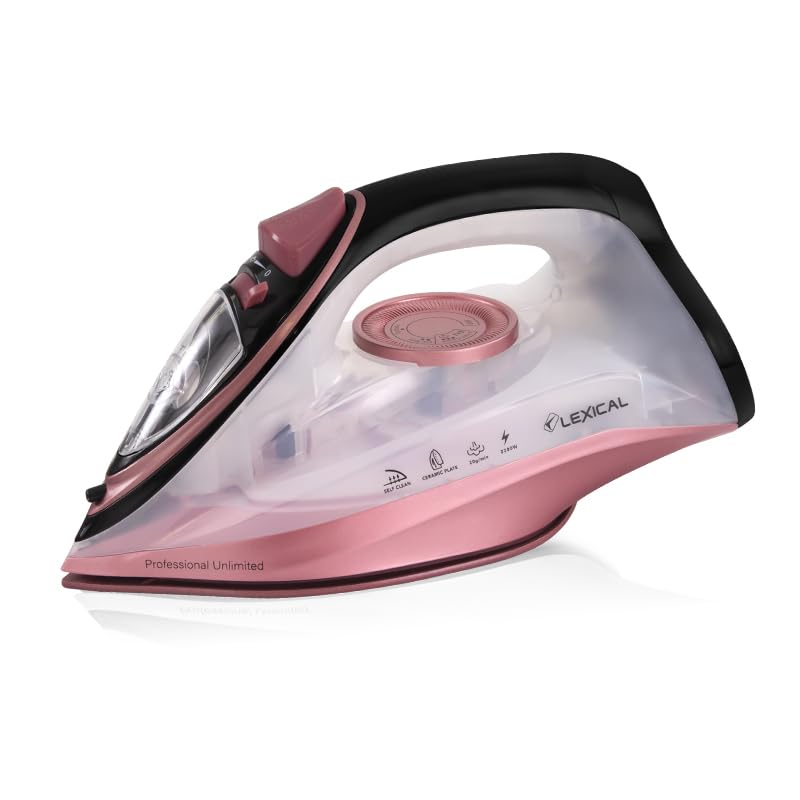
Figure 1: Full view of the Lexical LSI-1014 Steam Iron, showcasing its ergonomic design and pink and black color scheme.
- Soleplate: Ceramic-coated for smooth gliding.
- Water Tank: Transparent tank with 220ml capacity.
- Water Filling Inlet: For adding water to the tank.
- Spray Nozzle: For moistening stubborn creases.
- Steam Control Dial: Adjusts steam output (dry, low, high steam).
- Temperature Control Dial: Selects ironing temperature for different fabrics.
- Spray Button: Activates the spray function.
- Steam Burst Button: Delivers a powerful burst of steam.
- Self-Clean Button: For maintenance.
- Power Indicator Light: Illuminates when the iron is heating.
4. Setup and First Use
4.1 Before First Use
- Remove any labels or protective film from the soleplate.
- It is normal for a slight odor or smoke to occur during the first few minutes of use as manufacturing residues burn off. Ensure good ventilation.
- Test the iron on an old piece of fabric to ensure no residue is transferred to your garments.
4.2 Filling the Water Tank
- Ensure the iron is unplugged from the power outlet.
- Set the steam control dial to the 'Dry Ironing' (no steam) position.
- Open the water filling inlet cover.
- Using a measuring cup, carefully pour water into the water tank up to the 'MAX' level indicator. Do not overfill.
- Close the water filling inlet cover securely.

Figure 2: Close-up view of the water filling port, showing the open lid for adding water to the iron's tank.
5. Operating Instructions
5.1 Preparing for Ironing
- Sort laundry according to fabric type (e.g., linen, cotton, wool, silk, synthetics).
- Check garment care labels for recommended ironing temperatures.
- Plug the iron into a suitable power outlet.
5.2 Setting Temperature
- Turn the temperature control dial to the desired setting based on the fabric type.
- The power indicator light will illuminate, indicating the iron is heating.
- Once the light turns off, the iron has reached the selected temperature and is ready for use.

Figure 3: Close-up of the iron's control panel, showing the steam control dial and the spray and steam burst buttons.
5.3 Dry Ironing
- Set the steam control dial to the 'Dry Ironing' position.
- Select the desired temperature.
- Iron the garment as usual.
5.4 Steam Ironing
- Ensure the water tank is filled.
- Set the temperature control dial to the 'Steam' range (usually indicated by a steam symbol or higher temperature settings).
- Once the iron reaches temperature, adjust the steam control dial to the desired steam output (low or high).
- Iron the garment, moving the iron smoothly over the fabric.
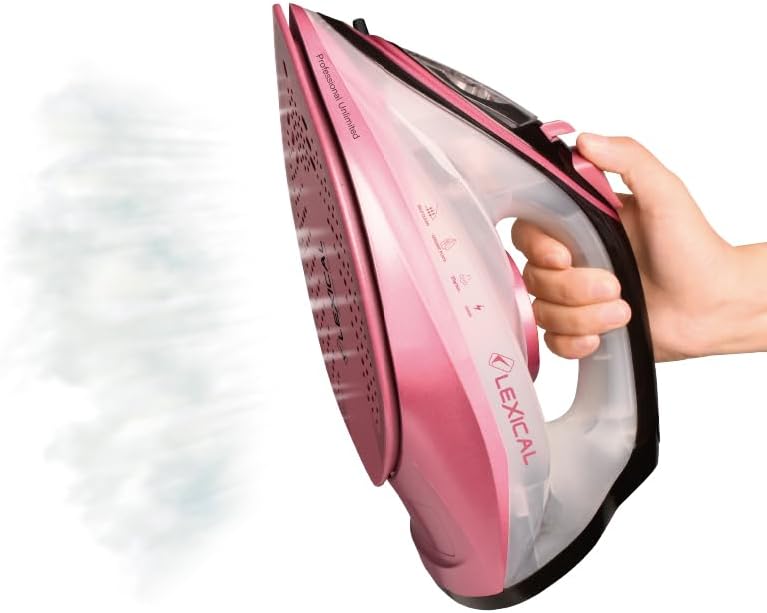
Figure 4: The Lexical LSI-1014 Steam Iron in action, showing steam being emitted from the soleplate during use.
5.5 Spray Function
- Press the spray button to release a fine mist of water onto stubborn creases.
5.6 Steam Burst Function
- For extra stubborn wrinkles, press the steam burst button. This delivers a powerful shot of steam.
- Wait a few seconds between bursts to allow the steam to regenerate.
6. Maintenance
6.1 After Use
- Unplug the iron and allow it to cool completely.
- Empty any remaining water from the tank.
- Wipe the soleplate with a damp cloth to remove any residue.
6.2 Self-Clean Function
The self-clean function helps remove mineral deposits and impurities from the steam chamber.
- Fill the water tank to the MAX level.
- Set the steam control to 'Dry Ironing' and the temperature to MAX.
- Plug in the iron and wait for the indicator light to turn off.
- Unplug the iron.
- Hold the iron horizontally over a sink.
- Press and hold the self-clean button. Hot water and steam will be expelled from the soleplate, carrying impurities.
- Gently shake the iron back and forth until the water tank is empty.
- Release the self-clean button and allow the iron to cool.
- Wipe the soleplate with a damp cloth.

Figure 5: Underside view of the iron, showing the ceramic soleplate with steam vents and a smooth surface for efficient ironing.
6.3 Storage
- Store the cooled iron upright on its heel rest to protect the soleplate.
- Do not wrap the power cord tightly around the iron.
7. Troubleshooting
| Problem | Possible Cause | Solution |
|---|---|---|
| Iron not heating | Not plugged in; power outlet fault; temperature dial set to minimum. | Check power connection; test outlet with another appliance; turn temperature dial to a higher setting. |
| No steam or insufficient steam | Water tank empty; steam control set to 'Dry Ironing'; temperature too low for steam; mineral buildup. | Fill water tank; set steam control to desired steam level; increase temperature; perform self-clean function. |
| Water leaking from soleplate | Temperature too low for steam; water tank overfilled; steam control set too high for selected temperature. | Increase temperature; do not overfill water tank; adjust steam control to match temperature setting. |
| Soleplate sticking or dirty | Residue from fabric or starch; ironed over zippers/buttons. | Clean soleplate with a damp cloth after cooling; avoid ironing over sharp objects. |
8. Specifications
| Feature | Detail |
|---|---|
| Brand | Lexical |
| Model Name | LSI-1014 |
| Special Features | Adjustable steam control, Adjustable temperature control, Self-clean function |
| Color | Pink Black |
| Power | 2200W |
| Product Dimensions (LxW) | 20cm x 12cm |
| Item Weight | 1 kg |
| Voltage | 240V |
| Frequency | 50 Hz |
| Water Tank Capacity | 220 ml |
| Included Components | Steam iron |
9. Warranty and Support
This Lexical LSI-1014 Steam Iron comes with a standard manufacturer's warranty. Please refer to the warranty card included in the product packaging for specific terms and conditions, including warranty duration and coverage details. For technical support, service, or inquiries, please contact your retailer or the Lexical customer service department. Contact information can typically be found on the product packaging or the official Lexical website.