
SXBCyan SXBCyan-1011
SXBCyan 9MP Security Camera User Manual
Model: SXBCyan-1011
Introduction
Thank you for choosing the SXBCyan 9MP Security Camera. This manual provides detailed instructions for the installation, operation, and maintenance of your new security camera. Please read this manual thoroughly before use to ensure proper functionality and to maximize the camera's features. This camera is designed for both indoor and outdoor monitoring, offering advanced features like human auto-tracking, dual-light night vision, and 8X zoom.
Product Overview and Features

Front view of the SXBCyan 9MP Security Camera, showcasing its dual-lens design and integrated antennas.
- 9MP High Definition and Gun Ball Linkage: Features a 9MP resolution (3MP+3MP+3MP) for ultra-clear footage. The unique gun-ball linkage allows one camera to monitor two areas simultaneously, effectively acting as two cameras.
- Smart Human Tracking and Alerts: Automatically detects and tracks human figures. Provides real-time motion alerts via the ICSEE App, with options for sound and light alarms to deter intruders. Advanced human shape detection minimizes false alarms.
- Dual Light Full Color Night Vision and 8X Zoom: Equipped with dual-light technology for full-color night vision. An 8X digital zoom allows for detailed focus on distant objects. The F1.4 aperture and high-performance sensor ensure clear footage in low-light conditions.
- IP66 Weatherproof and Durable: Designed with an IP66 waterproof rating, making it resistant to rain, snow, and dust. Operates reliably in temperatures ranging from -10°C to 60°C, suitable for various outdoor and indoor environments.
- Easy Setup and Flexible Storage: Supports both Wi-Fi and wired network connections for quick setup. Manage live feeds, recordings, and playback via the ICSEE App. Offers local storage with optional TF cards (32G, 64G, 128G) and cloud storage options.

Diagram illustrating the 3-lens, 2-screen functionality, showing a fixed panoramic view and a dual-lens PTZ camera with 8X zoom capability.
Specifications
| Parameter | Value |
|---|---|
| Type | Wi-Fi Cloud Billiard Camera |
| Pixel | 9MP (3MP+3MP+3MP) |
| Networking | Wi-Fi / Wired Network (LAN RJ45) |
| Night Vision Type | Dual-light Full-color |
| Focal Length | 3.6MM + 2.8MM + 12MM |
| Aperture | F1.4 |
| Zoom | 8X Digital Zoom |
| Storage Options | TF Card (32G, 64G, 128G optional) / Cloud Storage |
| Operating Temperature | -10°C to 60°C |
| Adaptable APP | ICSEE |
| Panning (Horizontal Rotation) | 360° |
| Tilt (Vertical Rotation) | 90° |
| Use Environment | Indoor and Outdoor Universal |
| Waterproof Rating | IP66 |
| Item Weight | 2.2 pounds (approx. 1000 Grams) |
| Model Number | SXBCyan-1011 |
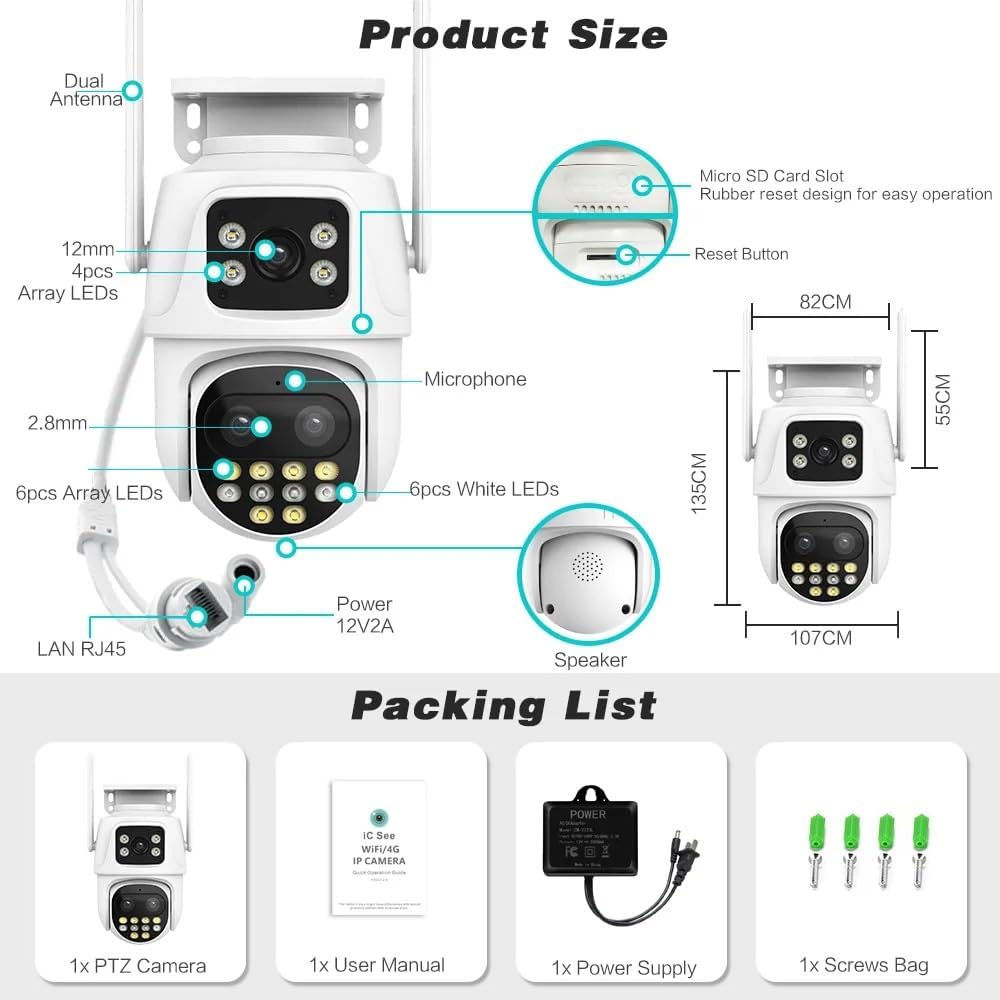
Detailed diagram showing product dimensions and key components like dual antennas, microphone, speaker, Micro SD card slot, reset button, and LAN RJ45 port.
Packing List
Please check the contents of your package upon unboxing. The standard package includes:
- 1x SXBCyan 9MP PTZ Camera
- 1x User Manual
- 1x Power Supply
- 1x Waterproof Cap
- 1x Screw Cap
- 1x Rotatable Bracket
- 1x Screws Bag (for mounting)
Visual representation of the items included in the product package.
Setup Guide
1. Secure Installation
For optimal performance and to leverage the IP66 waterproofing, secure installation is critical, especially for outdoor use. Use the included rotatable bracket and screws to firmly mount the camera in your desired location. Ensure the mounting surface is stable and can support the camera's weight.
2. Power Connection
Connect the provided power supply to the camera's power input port. Plug the power adapter into a standard electrical outlet. The camera will power on automatically.
3. Network Connection (Wi-Fi or Wired)
The camera supports both Wi-Fi and wired network connections. A stable network connection is essential for smooth live view and alerts.
- Wi-Fi Connection:
- Ensure your Wi-Fi network is stable and within range of the camera.
- Follow the in-app instructions within the ICSEE App to connect the camera to your Wi-Fi network. This typically involves scanning a QR code or entering Wi-Fi credentials.
- Wired Network Connection:
- Connect an Ethernet cable from your router or network switch to the camera's LAN RJ45 port.
- The camera should automatically obtain an IP address and connect to the network.
4. ICSEE App Installation and Setup
The ICSEE App is required for full access to tracking, alerts, and playback features.
- Download the latest version of the ICSEE App from your mobile device's app store (Google Play Store for Android or Apple App Store for iOS).
- Register for a new account or log in if you already have one.
- Add your camera to the app by following the on-screen instructions. This usually involves scanning a QR code on the camera or manually entering its ID.
- Once added, you can view live feeds, configure settings, and access recorded footage.
Operating Instructions
1. Live View and Monitoring
Open the ICSEE App and select your camera from the device list to access the live view. You can switch between the fixed panoramic view and the PTZ camera view if applicable.
2. Pan, Tilt, and Zoom (PTZ) Control
Use the controls within the ICSEE App to remotely adjust the camera's viewing angle. The camera supports 360° panning and 90° tilting. Utilize the 8X digital zoom feature to magnify specific areas of interest.

Illustration of how to manually control the camera's pan and tilt by tapping on the bullet camera's screen within the app, allowing the ball camera to quickly lock onto the clicked position.

Visual demonstrating the comprehensive protection for the camera's gimbal rotation, ensuring smooth and reliable movement, viewable and controllable via the mobile application.
3. Human Auto Tracking
When enabled in the app settings, the camera will automatically detect and track human figures within its field of view. This feature ensures that any detected person remains in the frame.

Demonstration of the camera's humanoid automatic tracking feature, where the camera follows a person's movement, keeping them centered in the view.
4. Motion Detection and Alerts
Configure motion detection sensitivity and alert preferences in the ICSEE App. When human-shaped objects are detected, the camera can send real-time push notifications to your phone and trigger sound and light alarms.

Visual representation of the human-shaped detection and alarm push feature, showing a notification on a smartphone and the camera's light alarm activating upon detecting a human figure.
5. Night Vision Modes
The camera features dual-light technology for enhanced night vision. You can select between infrared (black and white) and full-color night vision modes within the app, depending on your preference and lighting conditions.

Images demonstrating the camera's worry-free night vision with long-distance supplementary lighting, showcasing both infrared and full-color night views.
6. Storage and Playback
Insert a TF card (up to 128GB, not included unless specified in your purchase) into the camera's Micro SD card slot for local storage. Alternatively, subscribe to cloud storage services via the ICSEE App. Access recorded footage and playback options directly from the app.
Maintenance
- Cleaning: Regularly wipe the camera lens and body with a soft, damp cloth to remove dust and dirt. Do not use harsh chemicals or abrasive cleaners.
- Firmware Updates: Check the ICSEE App periodically for firmware updates. Keeping your camera's firmware updated ensures optimal performance, security, and access to new features.
- Environmental Protection: Although the camera is IP66 rated, avoid direct exposure to extreme weather conditions for prolonged periods if possible, to extend its lifespan. Ensure the waterproof cap is securely installed over the network port if using Wi-Fi.
- Cable Management: Ensure all cables are neatly routed and secured to prevent damage or tripping hazards.

Visual confirmation of the camera's IP66 waterproof rating, demonstrating its ability to withstand rainy, snowy, or windy weather conditions.
Troubleshooting
| Problem | Possible Cause / Solution |
|---|---|
| Camera offline in app. |
|
| Frequent disconnections. |
|
| Cannot connect to ICSEE App. |
|
| False motion alerts. |
|
| Night vision unclear. |
|
| SD card not recording. |
|
Warranty and Support
For warranty information and technical support, please refer to the contact details provided with your purchase documentation or visit the official SXBCyan website. Keep your purchase receipt as proof of purchase for warranty claims.
Ask a question about this manual
Ask about setup, troubleshooting, compatibility, parts, safety, or missing instructions. Manuals+ will review the question and use this page’s manual context to help answer it.