
1. Important Safety Information
Read this manual thoroughly before operating your GREATWORK M8 Electric Bike. Failure to follow instructions and safety warnings may result in serious injury or damage to the product.
- Always wear a helmet and appropriate safety gear when riding.
- Obey all local traffic laws and regulations.
- Perform a pre-ride inspection before each use, checking brakes, tires, battery, and all fasteners.
- Do not operate the e-bike under the influence of alcohol or drugs.
- Be aware of your surroundings and ride defensively.
- The e-bike is UL 2849 certified, meeting rigorous safety standards for electrical systems.
2. Package Contents
Your GREATWORK M8 Electric Bike package includes the following components:
- GREATWORK M8 Electric Bike (85% pre-assembled)
- 52V 25AH Removable Lithium Battery
- Battery Charger (3A Fast Charging)
- Tool Kit for Assembly
- User Manual
- Cargo Rack
- Kickstand
- Front and Rear Mudguards
3. Setup and Assembly
The GREATWORK M8 Electric Bike arrives 85% pre-assembled. The included tool kit contains necessary items for final assembly. An assembly video is available on the product page for visual guidance.
3.1. Unpacking
- Carefully remove the e-bike and all components from the packaging.
- Inspect for any shipping damage. Contact customer support immediately if damage is found.
3.2. Handlebar Installation
Attach the handlebars to the stem, ensuring they are centered and tightened securely. Adjust the angle for comfortable riding posture.
3.3. Front Wheel and Fender Installation
Install the front wheel and secure the front fender. Ensure the wheel is properly seated in the fork and quick-release or axle nuts are tightened.
3.4. Pedal Installation
Identify the left (L) and right (R) pedals. Thread them into the crank arms by hand, then tighten with a wrench. Note that the left pedal is reverse-threaded.
3.5. Seat Post and Saddle Adjustment
Insert the seat post into the frame and adjust the saddle height for comfortable pedaling. Ensure the quick-release lever or bolt is securely fastened. The adjustable seat accommodates most riders.
3.6. Battery Installation and Charging
Insert the removable battery into its compartment and lock it securely. Fully charge the battery before the first ride. Connect the charger to the battery and then to a power outlet. The charging indicator will show progress.

Image: The 52V 25AH removable battery, shown installed on the bike frame. It features a lock for security and is designed for easy removal for charging or storage.
4. Components Overview
Familiarize yourself with the key components of your GREATWORK M8 Electric Bike.

Image: A full view of the GREATWORK M8 Electric Bike, highlighting its robust frame, fat tires, and integrated components like the battery and display.
4.1. Dual Motors
The M8 is equipped with two 2000W (peak 2500W) high-performance motors, providing a combined peak output of 5000W and 180N·M of torque. This enables efficient climbing and all-terrain capability.
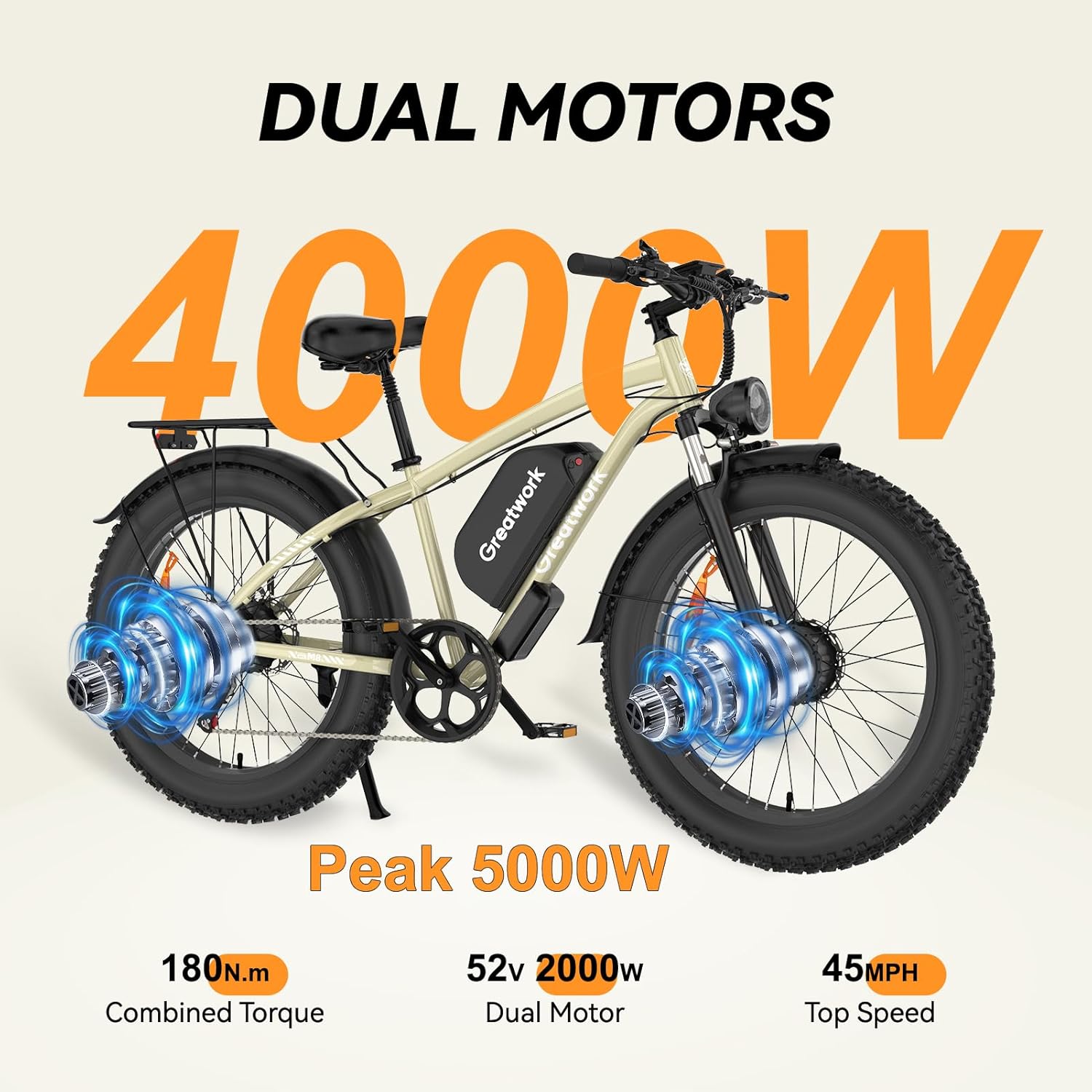
Image: Diagram illustrating the dual motor system of the GREATWORK M8, showing motors integrated into both the front and rear wheels, with specifications for power and torque.
4.2. 26" x 4.0" Fat Tires
The 26-inch by 4.0-inch fat tires provide enhanced grip and stability across various terrains, including highways, snow, mountains, beaches, and gravel roads.
4.3. Dual Suspension System
Features dual front fork shocks with 130mm of travel for superior absorption, reducing impact and enhancing ride comfort on rough surfaces.

Image: Close-up view of the front suspension forks, indicating 130mm suspension travel and the 26-inch tire diameter with 4-inch width.
4.4. Hydraulic Disc Brakes
Equipped with dual hydraulic disc brakes for reliable stopping power and precise modulation, ensuring control and safety.

Image: Detailed view of a hydraulic disc brake system on the GREATWORK M8, emphasizing enhanced stopping power and precise control.
4.5. 3.5" LCD Display
The enlarged 3.5-inch LCD smart display provides real-time metrics including speed, mileage, Pedal Assist System (PAS) level, and battery status. It also features speed limit settings, phone charging capability, auto shutoff timer, password protection, cruise control, and 3-level backlight.

Image: Graphic detailing the features of the upgraded color display, including speed limit, phone charging, auto shutoff, password, cruise control, and 3-level backlight.
4.6. Handlebar Controls
The handlebars feature various controls for easy operation:
- Light Switch: Controls the LED headlight and taillights.
- Display Control: Navigates display settings and modes.
- Thumb Shifter: Operates the 7-speed gear system.
- Rear Brake Lever: Activates the rear hydraulic disc brake.
- Turn Signal Switch: Activates left and right turn indicators.
- Single/Dual Drive Switch (Red Button): Toggles between single and dual motor modes.
- Electronic Horn: Activates the horn.
- Throttle: Provides electric power without pedaling.

Image: Diagram labeling the various controls on the GREATWORK M8 handlebar, including light switch, display control, thumb shifter, rear brake, turn signal, single/dual drive switch, electronic horn, and throttle.
5. Operating Instructions
5.1. Powering On/Off
- Press the battery power button to the "|" position.
- Hold the middle power button on the display for 3 seconds to turn on the display.
- To power off, hold the middle power button on the display for 3 seconds.
5.2. Riding Modes
The M8 offers 6 riding modes and 5 Pedal Assist System (PAS) levels:
- Normal Bike Mode: No electric assistance; ride by pedaling only.
- Pedal Assist (PAS) Mode (Levels 1-5): Electric motor provides assistance while pedaling. PAS-0 is pedal mode only. PAS levels 1-5 correspond to speeds of 12/20/28/36/45 mph respectively.
- Single Motor Electric Mode: Use the throttle for electric power with only one motor engaged.
- Dual Motor Electric Mode: Use the throttle for electric power with both motors engaged. Activate by pressing the red button on the left handlebar.
- Cruise Mode: Maintain a constant speed without holding the throttle. Refer to display manual for activation.
- Walk Mode: Provides low-speed assistance for walking the bike. Activate by holding the "-" button on the display.
5.3. Shifting Gears
Use the thumb shifter on the right handlebar to change between the 7 available gears. Shift gears smoothly to match terrain and speed, optimizing comfort and efficiency.
5.4. Braking
Apply both front and rear brake levers simultaneously for balanced and effective stopping. The hydraulic disc brakes provide reliable stopping power within 2 seconds.
6. Battery Information
6.1. Charging
- The 52V 25AH lithium battery provides a range of 40-60 miles on throttle mode and 50-100 miles with pedal assist.
- A full charge takes approximately 8-9 hours using the included 3A fast charger.
- It is normal for the charger and battery to become warm during charging. This is due to the fast charging current. Ensure the temperature remains below 130°F (54°C).
6.2. Battery Care
- Store the battery in a cool, dry place when not in use.
- Avoid fully discharging the battery regularly to prolong its lifespan.
- Charge the battery at least once every two months if not used frequently.
7. Maintenance
Regular maintenance ensures the longevity and safe operation of your e-bike.
7.1. General Checks (Before Each Ride)
- Tires: Check tire pressure (refer to tire sidewall for recommended PSI) and inspect for wear or damage.
- Brakes: Ensure brake levers are firm and brakes engage effectively.
- Battery: Check battery charge level and ensure it is securely locked.
- Fasteners: Verify all bolts and quick releases are tight.
- Lights: Confirm headlight, taillights, and turn signals are functional.
7.2. Periodic Maintenance
- Chain: Clean and lubricate the chain regularly, especially after riding in wet or dusty conditions.
- Brake Pads: Inspect brake pads for wear and replace as needed.
- Suspension: Keep suspension components clean. Refer to manufacturer guidelines for specific suspension maintenance.
- Electrical Connections: Periodically check all electrical connections for corrosion or looseness.
8. Troubleshooting
This section addresses common issues you might encounter with your GREATWORK M8 Electric Bike.
| Problem | Possible Cause | Solution |
|---|---|---|
| E-bike does not power on. | Battery not charged, battery power button off, display not activated, loose connection. | Ensure battery is charged and power button is on. Hold display power button for 3 seconds. Check all electrical connections. |
| Motor loses power or stops under heavy load/climbing. | Motor or controller overheating protection activated. | Reduce load, allow components to cool down. Avoid prolonged heavy use in high temperatures. |
| Battery not charging. | Charger not connected properly, faulty charger/battery, power outlet issue. | Verify connections. Try a different outlet. Contact customer support if issue persists. |
| Brakes feel weak. | Worn brake pads, air in hydraulic lines, misaligned calipers. | Inspect and replace brake pads. Consult a bike mechanic for hydraulic system bleeding or caliper adjustment. |
| Loose front end/handlebars. | Stem bolts loose, headset not tightened. | Tighten stem bolts and headset according to assembly instructions. |
For issues not listed here, please contact GREATWORK customer support.
9. Specifications
| Feature | Detail |
|---|---|
| Brand | GREATWORK |
| Model Name | M8 |
| Bike Type | Mountain Bike, Electric Bike |
| Motor | Dual 2000W (Peak 2500W each), Total Peak 5000W |
| Torque | 180 N·M |
| Top Speed | Up to 45 MPH |
| Battery | 52V 25AH Lithium (1300 Wh) |
| Range | 40-60 miles (Electric Mode), 50-100 miles (PAS Mode) |
| Charging Time | 8-9 hours (with 3A fast charger) |
| Tires | 26" x 4.0" Fat Tires |
| Suspension | Front Fork Suspension (130mm travel) |
| Brakes | Dual Hydraulic Disc Brakes |
| Gear System | 7-speed |
| Display | 3.5" LCD Smart Display |
| Frame Material | Aluminum |
| Item Weight | 82 Pounds |
| Maximum Weight Recommendation | 330 Pounds |
| Recommended Rider Height | 5'9" - 6'4" |
| Safety Certification | UL 2849 Certified |

Image: Diagram illustrating the key dimensions of the GREATWORK M8 Electric Bike, including total length, wheelbase, stand over height, head tube length, reach, top tube length, minimum seat height, and maximum seat height.
10. Warranty and Support
10.1. Warranty Information
The GREATWORK M8 Electric Bike comes with a 1-year warranty. This warranty covers manufacturing defects in materials and workmanship. Please retain your proof of purchase for warranty claims.
10.2. Customer Support
For technical assistance, warranty claims, or any questions regarding your GREATWORK M8 Electric Bike, please contact GREATWORK customer support. Refer to the contact information provided with your purchase or visit the official GREATWORK website.
Note: The bike will arrive mostly assembled. We provided the tools in the box and an assembly video on the detail page. For further assistance, please refer to these resources or contact support.