
Delmodes 02
Delmodes 6K 64MP Camcorder User Manual
Model: 02
Brand: Delmodes
1. Introduction
Thank you for purchasing the Delmodes 6K 64MP Camcorder. This manual provides essential information for setting up, operating, maintaining, and troubleshooting your new video camera. Please read this manual carefully before use to ensure proper operation and to maximize your experience with the device.
Important Note: This video camera is designed for amateur use and is not intended for professional applications.
2. Package Contents
Before proceeding, please verify that all items listed below are included in your package:
- 1 x Delmodes 6K Video Camera
- 1 x 64GB SD Card
- 1 x 4500 mAh Lithium Battery
- 1 x Lens Hood
- 1 x 2.4G Remote Control
- 1 x External Microphone
- 1 x USB Cable
- 1 x HDMI Cable
- 1 x User Manual (English)
- 1 x Handle Stabilizer
- 1 x Cleaning Cloth
- 1 x DV Bag
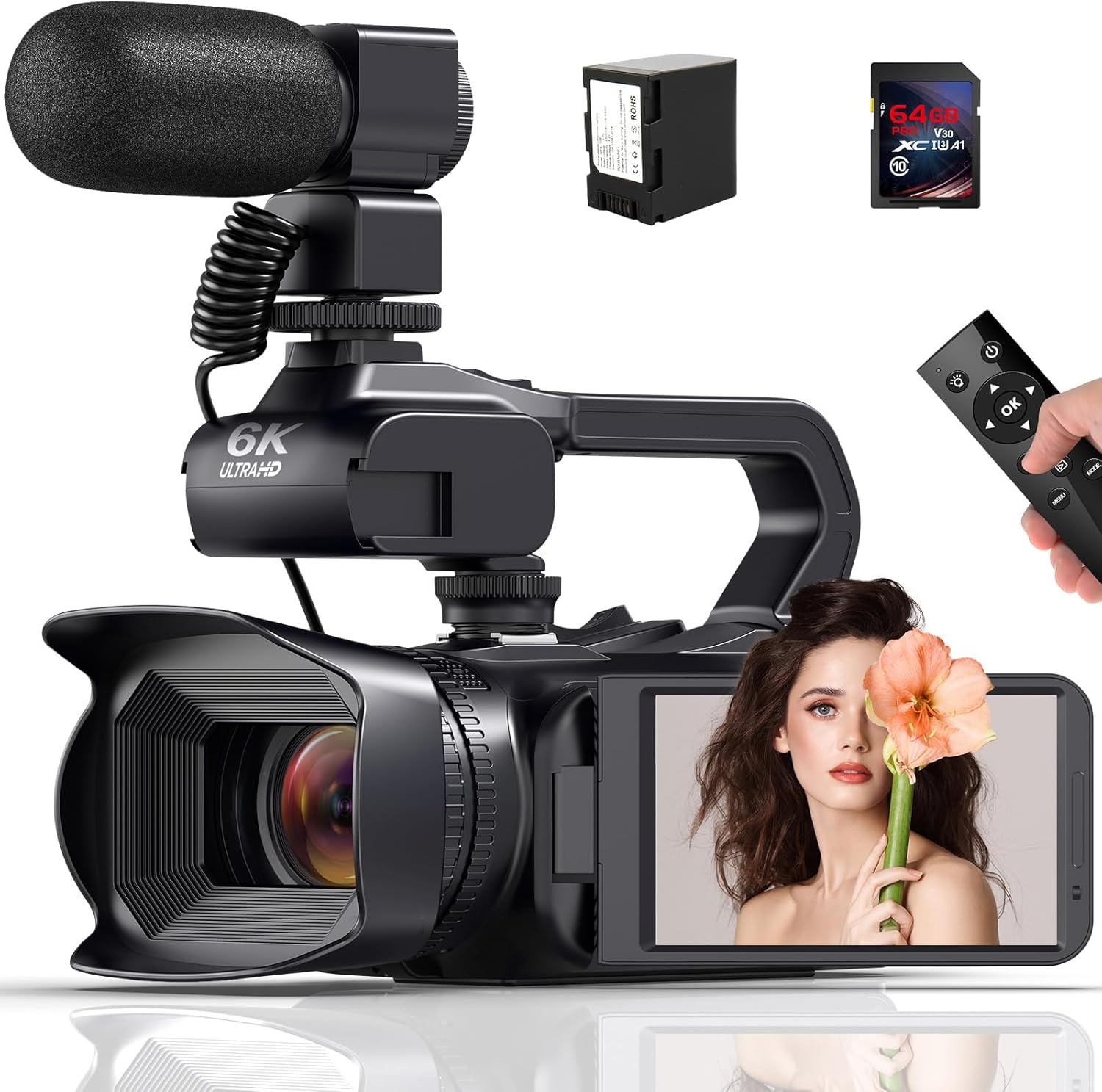
Image: The Delmodes 6K Camcorder shown with its main components and accessories, including the external microphone, battery, SD card, and remote control.
3. Setup Guide
3.1 Battery Installation
- Locate the battery compartment on the camcorder.
- Insert the 4500 mAh lithium battery, ensuring correct polarity.
- Close the battery compartment securely.
- For the 2.4G remote control, insert 2 x AAA batteries (not included) into its designated compartment.
3.2 SD Card Installation and Formatting
- Open the SD card slot cover on the camcorder.
- Insert the 64GB SD card (or another compatible SD card up to 256GB) into the slot until it clicks into place.
- Close the SD card slot cover.
- Before first use, it is crucial to format the SD card using the camcorder's menu. Navigate to the 'Settings' menu on the 4.0-inch touch screen and select 'Format SD Card'. Confirm the action.
3.3 External Microphone Attachment
- Locate the microphone hot shoe mount on top of the camcorder.
- Slide the external microphone onto the hot shoe mount until it is firmly seated.
- Connect the microphone's audio cable to the external microphone input port on the camcorder.

Image: The Delmodes 6K Camcorder with the external microphone attached, demonstrating its setup. A 360-degree wireless remote control is also visible, highlighting its functionality.
3.4 Lens Hood and Handle Stabilizer Installation
- Attach the lens hood to the front of the camcorder lens by twisting it clockwise until secure. This helps reduce glare and protect the lens.
- Mount the handle stabilizer to the bottom tripod thread of the camcorder for improved stability during handheld recording.
4. Operating Instructions
4.1 Power On/Off
Press and hold the power button located on the camcorder to turn it on or off. The 4.0-inch touch screen will illuminate upon power-on.
4.2 Basic Recording and Photography
The camcorder features a 4.0-inch touch screen that can be rotated up to 270 degrees for flexible viewing angles.
- Video Recording: Press the 'Record' button to start and stop video recording. The camcorder supports various resolutions including 6K (5760x3240p at 30FPS), 5K (5120x2880p at 30FPS), 4K (3840x2160p at 60/30FPS), and Full HD (1920x1080p at 60/30FPS).
- Photo Capture: Switch to photo mode via the menu and press the 'Shutter' button to capture still images. The camera captures photos at a maximum of 64.0 megapixels in JPEG format.
- Digital Zoom: Utilize the zoom controls on the camcorder or remote to engage the 18x digital zoom.

Image: The Delmodes 6K Camcorder in use, demonstrating its ability to capture Ultra HD 6K video at 30FPS and 64MP images, with a focus on its 4.0-inch touch screen.
4.3 Advanced Features
- Infrared Night Vision & LED Fill Light: Activate the IR night vision function for clear black and white recording in low-light conditions. The integrated LED fill light provides additional illumination when needed.
- Wi-Fi Connectivity: Download the "XDV PRO" or "Hello Cam" app on your smartphone to connect to the camcorder via Wi-Fi. This allows for remote control of the camera and easy transfer of photos and videos to your mobile device. For the "Hello Cam" app, scan the QR code provided in the image below or visit http://qr24.cn/EqyM2h.
- Webcam Function: Connect the camcorder to your computer via the USB cable to use it as a webcam. This function is compatible with Windows 7/8/10/11 and Mac operating systems.
- Recording During Charging: The camcorder supports recording while connected to a power source, ensuring uninterrupted shooting for extended periods.
- Time-Lapse & Pause Functions: Utilize these features for creative video projects. The pause function allows you to temporarily stop and resume recording within the same file.
- HDMI Output: Connect the camcorder to an HDTV or monitor using the provided HDMI cable to view your recordings on a larger screen.
- Face Detection, Motion Detection, Continuous Shooting, Anti-shake, Slow Motion, Self-timer: These functions can be accessed and configured through the camcorder's menu settings to enhance your shooting experience.

Image: A visual comparison demonstrating the effectiveness of the IR Night Vision feature, showing a scene with the function turned on and off.

Image: The camcorder display showing Wi-Fi connection information and examples of 18x digital zoom. A smartphone screen also displays the "Hello Cam" app interface.

Image: The Delmodes 6K Camcorder displayed with a series of icons illustrating its diverse functionalities, including 6K 30FPS recording, Wi-Fi, webcam mode, continuous shooting, fill light, pause function, motion detection, time-lapse, slow motion, 64MP photos, 4.0-inch touch screen, remote control, 18x digital zoom, and external microphone support.
5. Maintenance
- Cleaning: Use the provided cleaning cloth to gently wipe the camcorder body and lens. Avoid using abrasive cleaners or solvents. For stubborn smudges on the lens, use a specialized lens cleaning solution and cloth.
- Battery Care: To prolong battery life, fully charge the battery before first use. Store the battery in a cool, dry place when not in use. Avoid exposing the battery to extreme temperatures.
- Storage: When not in use, store the camcorder in the provided DV bag to protect it from dust, moisture, and physical damage.
6. Troubleshooting
If you encounter any issues with your Delmodes 6K Camcorder, please refer to the following common problems and solutions:
- Camcorder does not power on: Ensure the battery is fully charged and correctly inserted. If using the remote, check its AAA batteries.
- SD card error: Ensure the SD card is properly inserted. If the issue persists, try formatting the SD card via the camcorder's menu (note: this will erase all data). If the problem continues, try a different compatible SD card.
- Poor video/photo quality: Check lighting conditions. Ensure the lens is clean. Verify that the correct resolution settings are selected in the menu.
- Remote control not responding: Check if the remote control's AAA batteries are inserted correctly and have sufficient charge. Ensure you are within the 20-meter operating range.
- Wi-Fi connection issues: Ensure the "XDV PRO" or "Hello Cam" app is installed correctly on your smartphone. Restart both the camcorder and your smartphone. Check your phone's Wi-Fi settings.
- Audio issues with external microphone: Ensure the microphone is securely attached and its cable is properly connected to the camcorder's external microphone port. Check microphone settings in the camcorder's menu.
If the problem persists after attempting these solutions, please contact Delmodes customer support for further assistance.
7. Specifications
| Lens | F/2, f=7.62 mm |
| Focus Distance | 10 cm ~ +∞ |
| Photo Format | JPEG |
| Video Format | MP4 |
| Computer Interface | USB2.0 (High Speed) |
| Video Resolution | 6K (5760x3240p @ 30FPS), 5K (5120x2880p @ 30FPS), 4.7K (4608x2592p @ 30FPS), 4K (3840x2160p @ 60/30FPS), 2.7K (2688x1520p @ 30FPS), FHD (1920x1080p @ 60/30FPS), HD (1280x720p @ 120/60/30 FPS) |
| Photo Sensor Technology | CMOS |
| Screen Size | 4.0 Inches (Touch Screen) |
| Digital Zoom | 18x |
| Connectivity | HDMI, USB, Wi-Fi |
| Special Features | Remote Control, Wi-Fi, Infrared Night Vision, LED Fill Light, Time-Lapse, Pause Function, Face Detection, Motion Detection, Continuous Shooting, Anti-Shake, Slow Motion, Self-Timer |
| External Lens Support | 37mm standard mount (UV mirror, wide angle lens, or extender - not included) |
| Dimensions | 21 x 20.8 x 10 cm |
| Weight | 1.5 kg |
| Battery | 4500 mAh Lithium-ion (Camcorder), 2 x AAA (Remote Control - not included) |
| SD Card Support | Up to 256GB (64GB included) |
8. Warranty and Support
For information regarding product warranty, please refer to the documentation provided at the time of purchase or contact your retailer. Warranty terms and conditions may vary by region and seller.
For technical support, troubleshooting assistance beyond this manual, or inquiries about replacement parts, please contact Delmodes customer service. Please have your product model number (02) and purchase details ready when contacting support.
Ask a question about this manual
Ask about setup, troubleshooting, compatibility, parts, safety, or missing instructions. Manuals+ will review the question and use this page’s manual context to help answer it.