
1. Introduction
This manual provides detailed instructions for the installation, operation, and maintenance of your NHOPEEW Qualcomm 8-Core 4+64G 9-Inch Android 15 Car Stereo. Designed specifically for Dodge Charger models from 2011 to 2014, this advanced car radio enhances your driving experience with a suite of modern features.
Key features include a powerful Qualcomm octa-core processor, 4GB RAM, 64GB storage, a 9-inch HD IPS touchscreen (1280x720 resolution), wireless CarPlay and Android Auto, DSP audio optimization, GPS navigation, Wi-Fi connectivity, steering wheel control support, and an AHD backup camera.

Image: Overview of NHOPEEW Car Stereo features, including Carplay, WiFi, SWC, Android Auto, Backup Camera, Multiple Themes, Bluetooth, GPS, and Mirror Link.
2. What's in the Box
Please verify that all the following components are included in your package:
- Android Car Radio (Main Unit)
- Wiring Harness
- AHD Backup Camera
- Microphone
- Canbus Decoder
- GPS Antenna
- Radio Antenna
- USB Cables (Multiple)
- RCA Cables
- Installation Tool
- User Manual

Image: Visual representation of all components included in the NHOPEEW Car Stereo package, including the main unit, various cables, antennas, and tools.
3. Setup and Installation
Before beginning installation, ensure your vehicle is turned off and the battery is disconnected to prevent electrical damage. Professional installation is recommended.
3.1. Disconnect Car Battery
Locate your car battery (typically in the trunk for Dodge Charger) and disconnect the negative terminal using a 10mm socket wrench. This is a crucial safety step.
Video: This video demonstrates the process of removing the factory radio and installing a new car stereo in a Dodge Charger/Challenger. It covers dashboard panel removal and initial wiring connections.
3.2. Dashboard Panel Removal
- Using the provided plastic pry tool, carefully pry around the edges of the factory radio bezel to release the clips.
- Once the bezel is loose, gently pull it away from the dashboard.
- Disconnect any wiring harnesses attached to the bezel (e.g., hazard lights, climate controls) and set the bezel aside.
- Unscrew the bolts holding the factory radio in place and carefully pull it out. Disconnect all cables from the back of the factory radio.

Image: A visual comparison showing the dashboard of a Dodge Charger before and after the installation of the NHOPEEW 9-inch car stereo, highlighting the integrated fit.
3.3. Wiring Connections
Connect the new car stereo's wiring harness to the vehicle's factory harness. Ensure all connections are secure. Pay close attention to the following:
- Power Harness: Connect the main power harness.
- Canbus Decoder: Connect the Canbus decoder to ensure proper communication with the vehicle's systems, including steering wheel controls.
- USB Cables: Connect the provided USB cables for data transfer and charging.
- GPS Antenna: Connect the GPS antenna and mount it in a location with a clear view of the sky (e.g., on the dashboard near the windshield).
- Radio Antenna: Connect the radio antenna.
- AHD Backup Camera: Connect the AHD backup camera. Ensure the reverse trigger wire is correctly connected to activate the camera when reversing.
- Microphone: Connect the external microphone for clear hands-free calling.
- RCA Cables: Connect RCA cables for audio/video input/output as needed (e.g., for external amplifiers, subwoofers, or additional displays).

Image: A detailed diagram illustrating the wiring connections for the reversing camera, showing connections to the reverse light and the main unit.
3.4. Secure the Unit and Reassemble
Once all connections are made, carefully slide the new head unit into the dashboard opening and secure it with screws. Reattach the dashboard bezel and ensure all clips are properly engaged. Reconnect the car battery.
4. Operating Instructions
4.1. Android System and Touchscreen
The unit runs on the latest Android operating system with a Qualcomm octa-core processor, 4GB RAM, and 64GB storage for smooth performance. The 9-inch HD IPS touchscreen offers a 1280x720 resolution for vibrant visuals.

Image: Illustrates the Android system interface and the high-definition 9-inch IPS touchscreen, emphasizing the powerful processor and memory.
4.2. Wireless CarPlay and Android Auto
Connect your smartphone wirelessly via CarPlay or Android Auto to access navigation, calls, messages, and music directly from the head unit. Supports smart voice assistants for hands-free control.
Video: This video demonstrates how to connect Bluetooth, CarPlay, and Wi-Fi functionalities on the car stereo, showing the steps for pairing devices and activating features.

Image: Displays the seamless integration of Wireless CarPlay, Android Auto, and Mirror Link, allowing users to operate phone applications directly on the car's touchscreen.
4.3. GPS Navigation
The unit supports both online and offline maps, providing reliable route guidance. Utilize pre-installed navigation apps or download your preferred ones from the Play Store.

Image: Highlights the GPS navigation capabilities with online and offline map support, showing a car navigating on a digital map.
4.4. Wi-Fi and Phone Hotspot Connection
Connect to Wi-Fi or your phone's hotspot to access online content, download apps, and stream media directly on the stereo.

Image: Illustrates the Wi-Fi connection feature, showing various online applications and streaming services accessible through the car stereo.
4.5. DSP Audio Optimization
The built-in professional DSP (Digital Signal Processor) allows you to customize audio signals, adjust the sound field, and enhance clarity for an immersive listening experience. Choose from various preset equalizer modes or create your own custom settings.

Image: Shows the DSP Hi-Res audio settings interface with customizable equalizer bands and sound field adjustments.
4.6. FM/RDS Radio
Enjoy FM/RDS radio reception with 48 preset stations. Stay updated with real-time traffic, news, and music.

Image: Displays the FM/RDS radio interface with frequency tuning and preset station options.
4.7. Bluetooth 5.1
Bluetooth 5.1 technology provides stable and smooth wireless music playback and hands-free calling. Pair your device easily for seamless audio streaming and communication.

Image: Illustrates the Bluetooth 5.1 connectivity, showing hands-free calling and music streaming features.
4.8. Steering Wheel Controls (SWC)
The unit supports original car steering wheel controls, allowing you to easily adjust volume, answer calls, and control media directly from your steering wheel for enhanced convenience and safety.
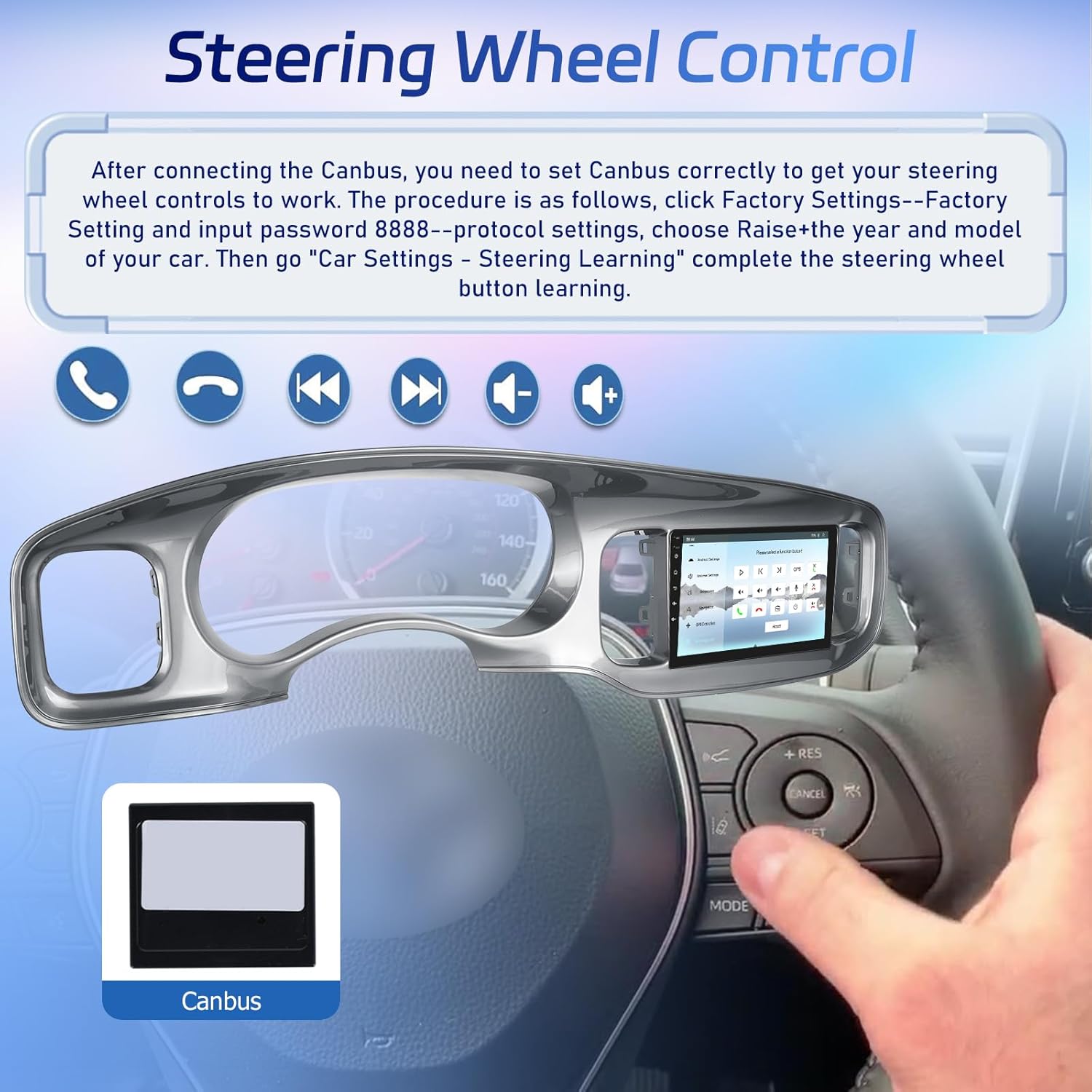
Image: Demonstrates the integration of steering wheel controls with the car stereo, showing how to configure buttons for various functions.
4.9. AHD Backup Camera
The included AHD backup camera automatically displays a clear, lag-free rear-view image on the 9-inch HD touchscreen when reversing, eliminating blind spots and making parking effortless.

Image: Highlights the features of the AHD backup camera, including HD image quality, waterproofing, night vision, and a 170-degree viewing angle.
4.10. Additional Features
- Picture-in-Picture (PIP): Display music, videos, or other content in a small window while navigating.
- Built-in Fan Cooling: Actively dissipates heat to ensure system stability during high-load operation.
- 360-degree Rotating 3D Vehicle Model Display: Customize the car model and body color on the display.
- Custom Home APP Display and UI Selection: Choose from multiple UI modes and customize settings to suit your preferences.
- Split Screen: Run two functions simultaneously, such as music and navigation.

Image: Showcases additional features like Picture-in-Picture, fan cooling settings, advanced UI topics, and 3D dynamic car effects.

Image: Illustrates the customizable home screen and UI selection options, allowing users to personalize the interface.
Image: Demonstrates the split-screen function, enabling simultaneous display of two applications like music and navigation.
5. Maintenance
- Cleaning: Use a soft, dry cloth to clean the touchscreen and unit. Avoid abrasive cleaners or solvents.
- Software Updates: Periodically check for software updates via Wi-Fi to ensure optimal performance and access to new features.
- Temperature: Avoid exposing the unit to extreme temperatures.
6. Troubleshooting
- No Power: Check all power connections and ensure the car battery is properly connected. Verify fuses.
- No Sound: Check speaker wiring connections. Ensure the volume is not muted or set too low. Verify audio settings in the DSP menu.
- Touchscreen Unresponsive: Try restarting the unit. If the issue persists, perform a factory reset (refer to System Settings).
- CarPlay/Android Auto Not Connecting: Ensure Bluetooth is enabled on both the phone and the stereo. Check the Zlink application settings and ensure background connection is enabled. Try forgetting the device on your phone and re-pairing.
- Backup Camera Not Displaying: Verify the camera's power and video signal connections. Ensure the reverse trigger wire is correctly connected.
- Steering Wheel Controls Not Working: Check Canbus connections. Access the 'Steering Learn' function in Car Settings to reconfigure the controls.
7. Specifications
| Feature | Detail |
|---|---|
| Brand | NHOPEEW |
| Model Name | NHOPEEW SmartDrive 9 |
| Operating System | Android 15 |
| Processor | Qualcomm Octa-Core |
| RAM | 4 GB |
| Memory Storage Capacity | 64 GB |
| Screen Size | 9 Inches |
| Display Resolution | 1280 x 720 IPS |
| Connectivity Technology | Bluetooth 5.1, Wi-Fi |
| Special Features | Built-In Bluetooth, Built-In Wi-Fi, DSP, GPS Navigation, Wireless Carplay and Android Auto, AHD Backup Camera, Steering Wheel Control |
| Map Type | Worldwide |
| Item Weight | 5.63 pounds |
| Package Dimensions | 35.43 x 9.45 x 3.15 inches |
| Warranty | 2 years |
8. Warranty and Support
This NHOPEEW Car Stereo comes with a 2-year warranty from the date of purchase, covering manufacturing defects. For technical support, troubleshooting assistance, or warranty claims, please contact your retailer or the NHOPEEW customer service team. Please have your product model and purchase details ready when contacting support.