
1. Introduction
Thank you for purchasing the NessiWorld Stunt Racing Acrobat Remote Control Car LH-C014B. This high-performance RC car is designed for exciting acrobatic driving experiences, featuring powerful grip wheels and a unique 360-degree rotation function. It is available in three vibrant colors: Yellow, Orange, and Green.
This manual provides essential information for safe operation, setup, maintenance, and troubleshooting to ensure you get the most out of your new stunt car.

Image: Green NessiWorld Stunt Racing Acrobat Remote Control Car with its remote control.
2. Safety Information
Please read and understand all safety warnings before operating the product. Failure to do so may result in injury or damage to the product.
- Age Recommendation: This product is suitable for children aged 3 years and above. Adult supervision is recommended for younger children.
- Battery Safety: Do not mix old and new batteries. Do not mix alkaline, standard (carbon-zinc), or rechargeable (nickel-cadmium) batteries. Always insert batteries with correct polarity (+ and -). Remove batteries if the product is not used for a long period.
- Operating Environment: Avoid operating the car in wet conditions, on public roads, or near people, pets, or obstacles. Operate on flat, clear surfaces.
- Avoid Modifications: Do not attempt to modify or disassemble the product. This may cause damage and void the warranty.
- Choking Hazard: Small parts may be present. Keep away from children under 3 years of age.
3. Package Contents
Ensure all items listed below are present in your package:
- 1 x NessiWorld Stunt Racing Acrobat Remote Control Car
- 1 x Remote Control
- 1 x USB Charging Cable
- 1 x 3.7V Li-ion Rechargeable Battery (for car)
4. Setup
4.1 Car Battery Installation & Charging
- Locate the battery compartment on the underside of the car.
- Open the battery compartment cover.
- Connect the included 3.7V / 500mA Li-ion rechargeable battery to the car's battery connector.
- Carefully place the battery inside the compartment and close the cover securely.
- To charge the car battery, connect the USB charging cable to the car's charging port and then to a USB power source (e.g., computer USB port, USB wall adapter). The charging indicator will show the charging status.
- Allow approximately 2-3 hours for a full charge. Disconnect once fully charged.
4.2 Remote Control Battery Installation
- Locate the battery compartment on the back of the remote control.
- Open the battery compartment cover.
- Insert 3 x 1.5V AA batteries (not included) into the compartment, ensuring correct polarity (+ and -).
- Close the battery compartment cover securely.
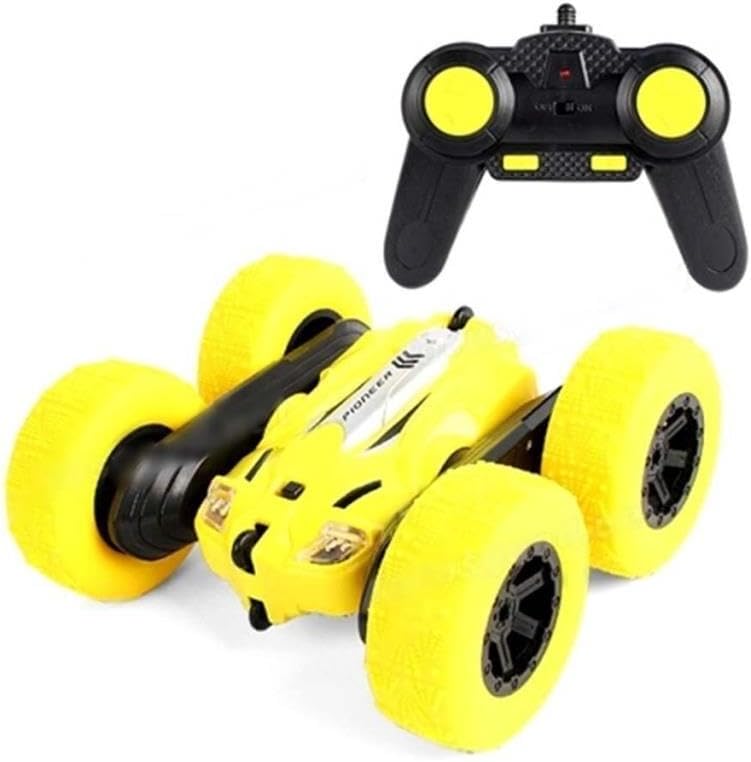
Image: Yellow NessiWorld Stunt Racing Acrobat Remote Control Car with its remote control, illustrating the components.
5. Operating Instructions
5.1 Power On and Pairing
- Ensure both the car and remote control have fresh or fully charged batteries.
- Turn on the power switch on the car (usually located on the underside or side).
- Turn on the power switch on the remote control.
- The car and remote should automatically pair. If not, turn both off and on again.
5.2 Driving Controls
Use the joysticks on the remote control to maneuver the car:
- Forward/Backward: Push the left joystick forward or backward.
- Turn Left/Right: Push the right joystick left or right.
- 360-Degree Rotation: Push both joysticks in opposite directions (e.g., one forward, one backward) to perform a 360-degree spin in place.
- Acrobatic Stunts: The car's unique design and powerful wheels allow it to perform various flips and rolls. Experiment with different control combinations to discover exciting stunts.

Image: Orange NessiWorld Stunt Racing Acrobat Remote Control Car performing a stunt on rough terrain.
6. Maintenance
- Cleaning: Wipe the car and remote control with a clean, dry cloth. Do not use water or chemical cleaners.
- Battery Care: Always fully charge the car's battery before each use for optimal performance. Remove batteries from both the car and remote control if storing for extended periods to prevent leakage.
- Storage: Store the product in a cool, dry place away from direct sunlight and extreme temperatures.
7. Troubleshooting
| Problem | Possible Cause | Solution |
|---|---|---|
| Car does not move or respond. | Low battery in car or remote; Power switches off; Not paired. | Charge car battery; Replace remote batteries; Ensure both power switches are ON; Turn both off and on again to re-pair. |
| Poor control range or interference. | Low battery in remote; Environmental interference. | Replace remote batteries; Move to an area with less electronic interference. |
| Car moves slowly. | Car battery is low. | Recharge the car battery fully. |
8. Specifications
| Feature | Detail |
|---|---|
| Model Number | LH-C014B |
| Car Length | 16 cm |
| Car Battery | 3.7V / 500mA Li-ion (Rechargeable) |
| Remote Control Battery | 3 x 1.5V AA (Not Included) |
| Material | Plastic |
| Recommended Age | 3+ Years |
| Barcode | 6920200802348 |
| Packaging Dimensions | 39.5 x 25.5 x 8.8 cm |

Image: Orange NessiWorld Stunt Racing Acrobat Remote Control Car with its approximate dimensions.
9. Warranty and Support
For warranty information or technical support, please contact the seller or retailer from whom you purchased this product. Keep your proof of purchase for any warranty claims.
For general inquiries or further assistance, please refer to the contact information provided by the seller.