
1. Product Overview
This JUDAOLE OEM-quality remote control serves as a direct replacement for your original Samsung TV remote. It is designed for seamless compatibility and immediate use with Samsung Q80, Q7F, Q7DR, and Q7C series televisions, providing full functionality without the need for complex programming.
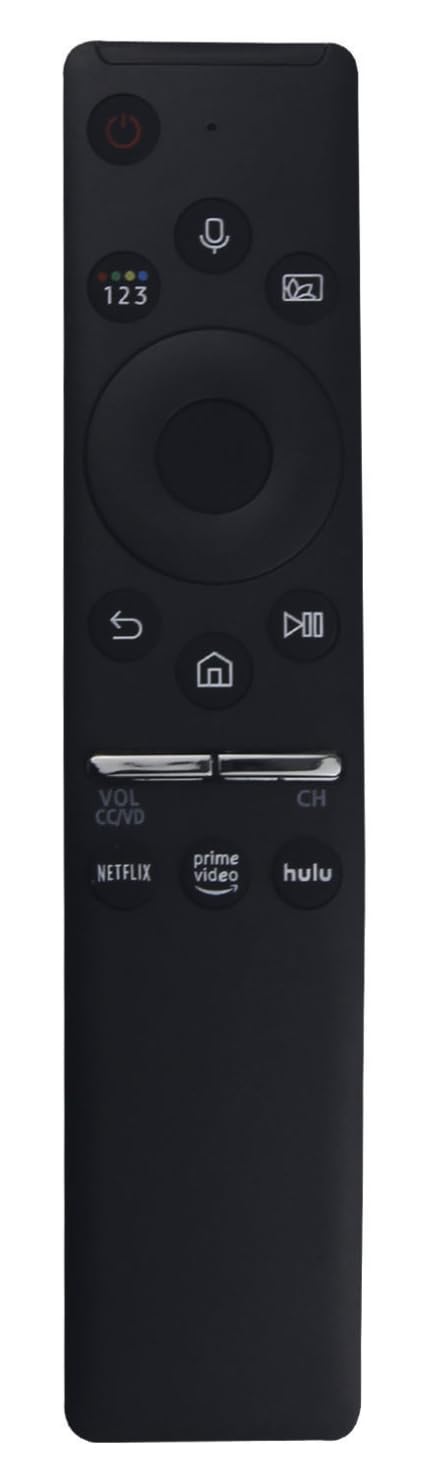
Image 1.1: The JUDAOLE remote control, showing its ergonomic design and button layout.
Key Features:
- High Compatibility: Engineered for Samsung Q80, Q7F, Q7DR, Q7C series TVs.
- Plug and Play: No programming or setup required; ready for use after battery insertion.
- Durable Build: Constructed from premium ABS material for longevity and a comfortable grip.
- Full Functionality: Access to all standard TV functions, including power, volume, channel, input, and menu navigation.
- Lightweight and Ergonomic: Designed for comfortable daily use with an intuitive button layout.
2. Setup and Battery Installation
This remote control is designed for immediate use. No complex pairing or programming steps are required. Simply install the batteries, and the remote will be ready to operate your compatible Samsung TV.
Battery Installation Steps:
- Locate the battery compartment cover on the back of the remote control.
- Slide the cover downwards or press the latch (if present) to open the compartment.
- Insert two (2) AAA batteries (not included), ensuring the positive (+) and negative (-) terminals align correctly with the markings inside the compartment.
- Replace the battery compartment cover by sliding it back into place until it clicks securely.
Note: Always use new batteries of the same type. Do not mix old and new batteries, or different types of batteries, as this can affect performance and potentially damage the remote.
3. Operating Instructions
Once batteries are installed, point the remote control directly at your Samsung TV. The remote provides access to all standard functions found on your original remote.
Basic Functions:
- Power Button: Turns the TV on or off.
- Volume Up/Down: Adjusts the audio volume.
- Channel Up/Down: Changes TV channels.
- Mute Button: Silences the TV audio.
- Input/Source Button: Cycles through available input sources (HDMI, AV, etc.).
- Navigation Pad (Up/Down/Left/Right) and Enter Button: Used to navigate menus and confirm selections.
- Menu Button: Opens the TV's main menu.
- Back/Return Button: Returns to the previous screen or menu.
- Smart Hub/Home Button: Accesses the TV's smart features or home screen.
Refer to your Samsung TV's user manual for specific functions and menu navigation details, as button labels and functions may vary slightly depending on your TV model.
4. Maintenance and Care
To ensure the longevity and optimal performance of your JUDAOLE remote control, follow these maintenance guidelines:
- Cleaning: Wipe the remote control regularly with a soft, dry cloth. For stubborn dirt, lightly dampen the cloth with water or a mild, non-abrasive cleaner. Avoid using harsh chemicals or abrasive materials.
- Battery Replacement: Replace batteries when the remote's response becomes sluggish or stops working. Remove batteries if the remote will not be used for an extended period to prevent leakage.
- Storage: Store the remote in a cool, dry place away from direct sunlight, extreme temperatures, and high humidity.
- Avoid Drops: While built with durable ABS material, excessive drops or impacts can damage internal components. Handle with care.
- Liquid Exposure: Keep the remote away from liquids. If it gets wet, remove batteries immediately and allow it to dry completely before reinserting them.
5. Troubleshooting
If you encounter issues with your remote control, try the following troubleshooting steps:
- Remote Not Responding:
- Ensure the remote is pointed directly at the TV's IR receiver.
- Check if there are any obstructions between the remote and the TV.
- Replace the batteries with fresh ones. Ensure they are inserted with correct polarity.
- Specific Buttons Not Working:
- Clean the remote's surface, especially around the problematic buttons, to remove any dirt or debris that might be obstructing them.
- If only a few buttons are unresponsive after battery replacement and cleaning, the remote may be damaged and require replacement.
- TV Not Turning On/Off:
- Verify the TV is plugged into a working power outlet.
- Try using the power button directly on the TV to confirm the TV itself is functional.
If these steps do not resolve the issue, contact JUDAOLE customer support for further assistance.
6. Specifications
| Feature | Detail |
|---|---|
| Brand | JUDAOLE |
| Compatibility | Samsung Q80, Q7F, Q7DR, Q7C Series TVs |
| Material | Premium ABS |
| Power Source | 2 x AAA Batteries (not included) |
| ASIN | B0FGVQP6WF |
| Manufacturer | JUDAOLE |
| First Available Date | July 5, 2025 |
7. Warranty and Support
This JUDAOLE remote control is designed for reliable performance. In the event of any issues, please refer to the following information:
- Return Policy: The product is eligible for a refund or replacement within 30 days of purchase, subject to the retailer's return policy.
- Manufacturer Support: For technical assistance or warranty inquiries beyond the return period, please contact JUDAOLE directly. Contact information can typically be found on the product packaging or the manufacturer's official website.
Please retain your proof of purchase for any warranty or support claims.