
1. Introduction
This manual provides essential instructions for the safe and effective use of your W & O WO1 5G Unlocked Smartphone with Built-in Projector. Please read this manual thoroughly before operating the device to ensure optimal performance and longevity. Keep this manual for future reference.
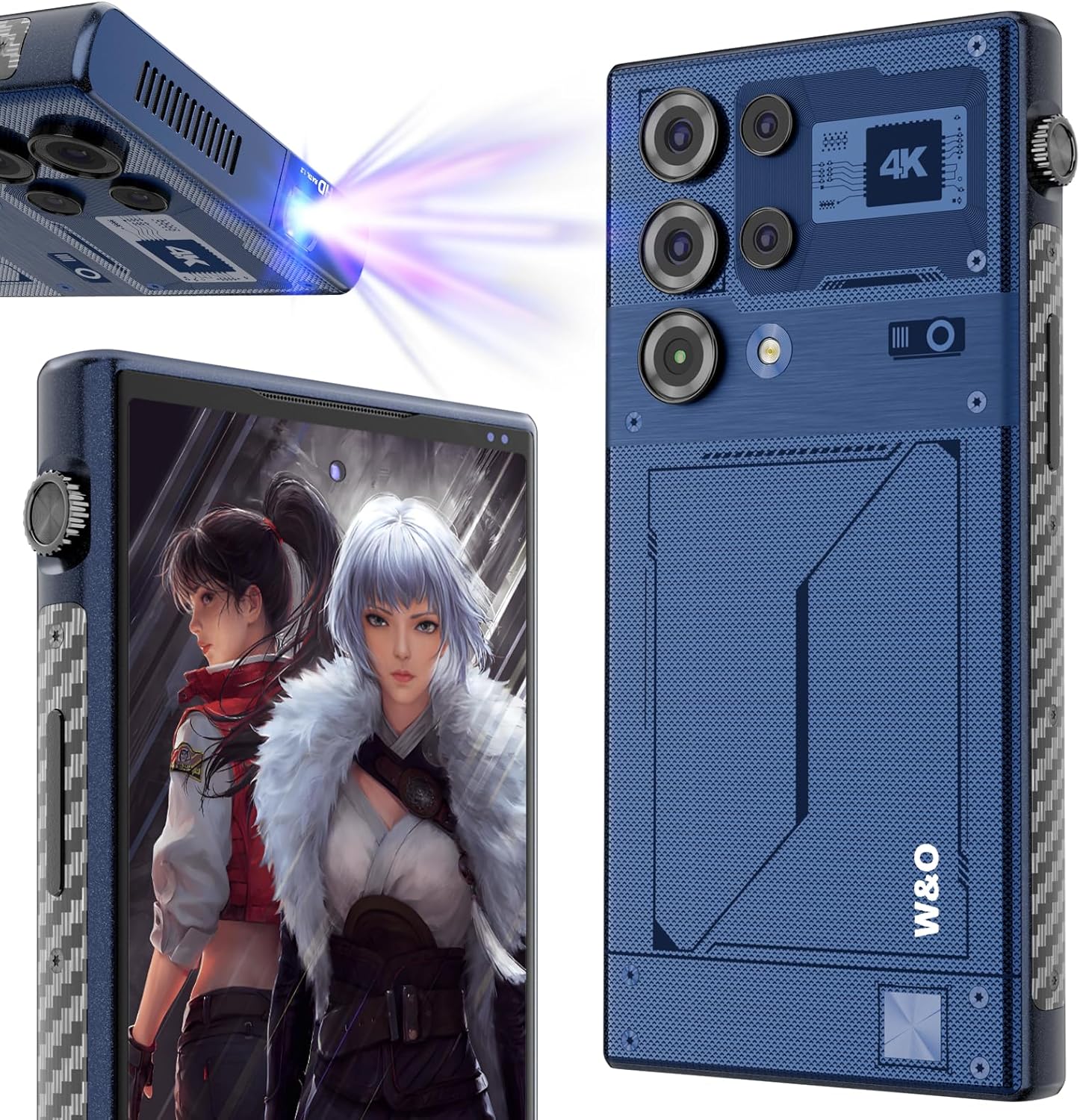
Image: The W & O WO1 smartphone, showcasing its sleek design, multi-camera system, and the integrated projector lens on the side.
2. Product Overview
2.1 Package Contents
Verify that all items are present in the package:
- 1 x W & O WO1 Projector Phone
- 1 x Phone Holder
- 1 x USB-C Cable
- 1 x Phone Case
- 1 x USB OTG Adapter

Image: A visual representation of the W & O WO1 smartphone and its included accessories: phone case, phone holder, USB-C cable, and USB OTG adapter, alongside the product packaging.
2.2 Key Features
- Built-in DLP Projector: 90 Lumens brightness, 1080*2408 resolution, with manual and laser autofocus capabilities.
- Large Battery Capacity: 8000mAh battery with OTG reverse charging support.
- High-Performance: Powered by Android 14, featuring 8GB RAM and 512GB ROM (storage capacity may vary by region).
- Advanced Camera System: Equipped with a multi-camera setup including a 108MP primary rear camera and a 20MP front camera.
- Durable Design: IP68 water and dust resistance.
- Global Connectivity: 5G network compatibility with Dual SIM support.
- Security Features: Face ID for secure unlocking.
- Navigation: Integrated GPS and compass.

Image: A visual representation of the smartphone's internal memory, highlighting 8GB RAM and 512GB ROM, indicating its storage and processing capabilities.

Image: The W & O WO1 smartphone connected to a charger, illustrating its 8000mAh battery capacity and fast charging capability, with icons for standby, music, call, and video usage times.
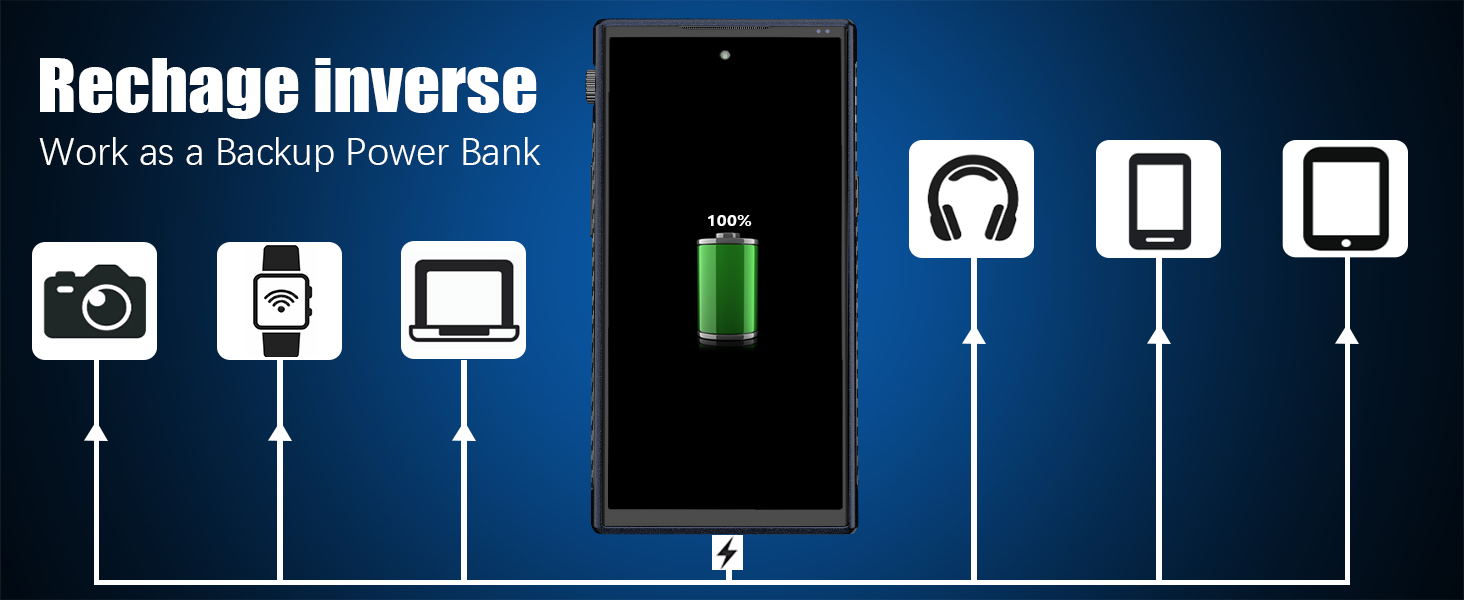
Image: The W & O WO1 smartphone acting as a power bank, demonstrating its reverse charging feature by connecting via OTG to charge other devices like cameras, smartwatches, laptops, headphones, and other phones.

Image: A scenic landscape photo, illustrating the image quality captured by the W & O WO1's 32MP main camera.

Image: A group selfie, demonstrating the clarity and wide-angle capability of the W & O WO1's 20MP front camera.
3. Setup
3.1 Initial Charging
Before first use, fully charge the device using the provided USB-C cable and a compatible power adapter. The battery indicator on the screen will show charging progress.
3.2 SIM Card and Storage Card Installation
Locate the SIM card tray on the side of the phone. Use the provided SIM ejector tool to open the tray. Insert your 5G compatible Nano-SIM card(s) and/or a microSD card (for expanded storage) into the designated slots. Ensure the cards are correctly oriented before reinserting the tray.
3.3 Powering On/Off
- To Power On: Press and hold the Power button until the W & O logo appears.
- To Power Off: Press and hold the Power button, then select 'Power off' from the options on the screen.
- To Restart: Press and hold the Power button, then select 'Restart' from the options.
3.4 Initial Setup Wizard
Upon first power-on, the device will guide you through the Android 14 setup process. This includes selecting your language, connecting to Wi-Fi, setting up your Google account, and configuring security features like Face ID.
4. Operating Instructions
4.1 Basic Phone Operations
- Calls & Messaging: Use the Phone and Messages applications for communication.
- Internet Connectivity: Connect to Wi-Fi or use your 5G mobile data for internet access.
- Applications: Download and manage applications from the Google Play Store.
4.2 Projector Usage
The W & O WO1 features an integrated DLP projector for displaying content on a larger surface.
- Activating the Projector: Locate the dedicated projector button or icon in the quick settings panel to turn on the projector.
- Focus Adjustment: The projector supports both manual and laser autofocus. For manual adjustment, use the focus wheel located near the projector lens. The laser autofocus feature will automatically adjust for clarity.
- Optimal Viewing: For best results, use the projector in a dimly lit or dark environment. Position the phone on a stable surface or use the included tripod for hands-free projection.
- Cooling System: A built-in cooling fan will automatically activate during projector use to maintain optimal operating temperature.
Video: A demonstration of the W & O WO1 smartphone's built-in projector, showing its setup, laser autofocus, manual focus adjustment, and projection of various media content onto a wall.
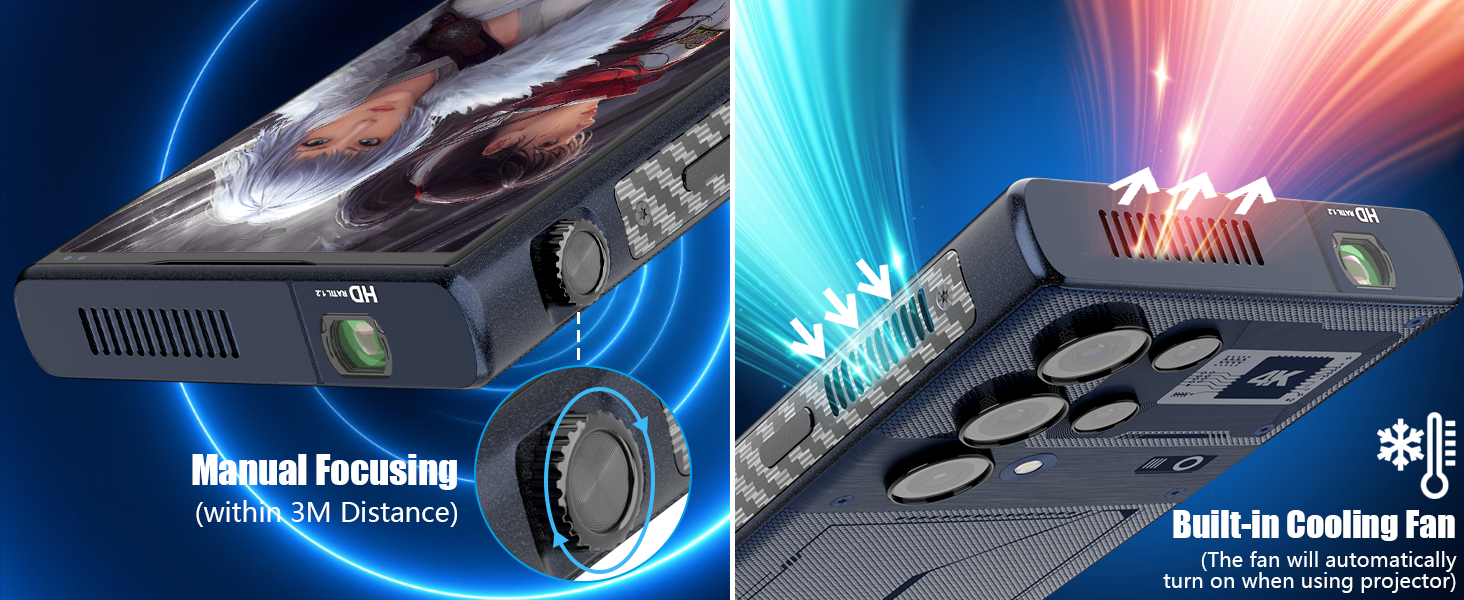
Image: Close-up views of the W & O WO1 smartphone, illustrating the manual focusing mechanism for the projector and the vents for the built-in cooling fan.
4.3 OTG Functionality
The device supports On-The-Go (OTG) functionality, allowing you to connect USB peripherals or use the phone as a power bank.
- Connecting Peripherals: Use the included USB OTG adapter to connect USB devices such as a mouse, keyboard, or flash drive.
- Reverse Charging: Connect another device via a compatible cable and the OTG adapter to use your WO1 smartphone to charge it.
4.4 Camera Usage
Access the Camera application to capture photos and videos. The device features a 108MP primary rear camera and a 20MP front camera.
- Photo Modes: Switch between various modes such as Photo, Video, Portrait, and more.
- Settings: Adjust settings like resolution, flash, and timer as needed.
5. Maintenance
- Cleaning: Use a soft, lint-free cloth to clean the screen and body of the phone. For the projector lens, use a specialized lens cleaning cloth and solution to avoid scratches.
- Battery Care: Avoid extreme temperatures. Do not fully discharge the battery regularly. For optimal battery health, keep the charge between 20% and 80%.
- Software Updates: Regularly check for and install system updates to ensure your device has the latest features and security patches.
- Water and Dust Resistance (IP68): While the device is IP68 rated for water and dust resistance, it is not waterproof. Avoid intentional submersion in water, exposure to high-pressure water, or use in extreme conditions. Ensure all ports are dry before charging.
6. Troubleshooting
- Device Not Powering On: Ensure the battery is charged. Connect the charger and wait a few minutes before attempting to power on again.
- Projector Image Blurry: Adjust the manual focus wheel. If autofocus is enabled, ensure the projector lens is clean and there are no obstructions.
- No Network Signal: Check if your SIM card is correctly inserted. Verify that mobile data is enabled and that you are within network coverage. Try restarting the device.
- Battery Draining Quickly: Close unused applications running in the background. Reduce screen brightness. Disable features like Wi-Fi, Bluetooth, or GPS when not in use.
- Device Overheating: Close demanding applications. Avoid using the device in direct sunlight or poorly ventilated areas. If using the projector for extended periods, ensure the cooling fan vents are not blocked.
7. Specifications
| Feature | Specification |
|---|---|
| Model | WO1 |
| Operating System | Android 14 |
| Display Size | 6.79 Inches |
| Display Resolution | 1080 x 2400 |
| RAM | 8 GB |
| Internal Storage | 512 GB (Note: Some specifications indicate 256GB) |
| Battery Capacity | 8000 mAh |
| Rear Camera | Up to 108 MP (Primary), Multi-lens system |
| Front Camera | 20 MP |
| Projector Brightness | 90 Lumens |
| Projector Resolution | 1080*2408 |
| Connectivity | 5G, Wi-Fi, Bluetooth |
| Durability | IP68 Water and Dust Resistant |
| Dimensions | 6.7 x 3.25 x 0.68 inches |
| Weight | 1.87 pounds |
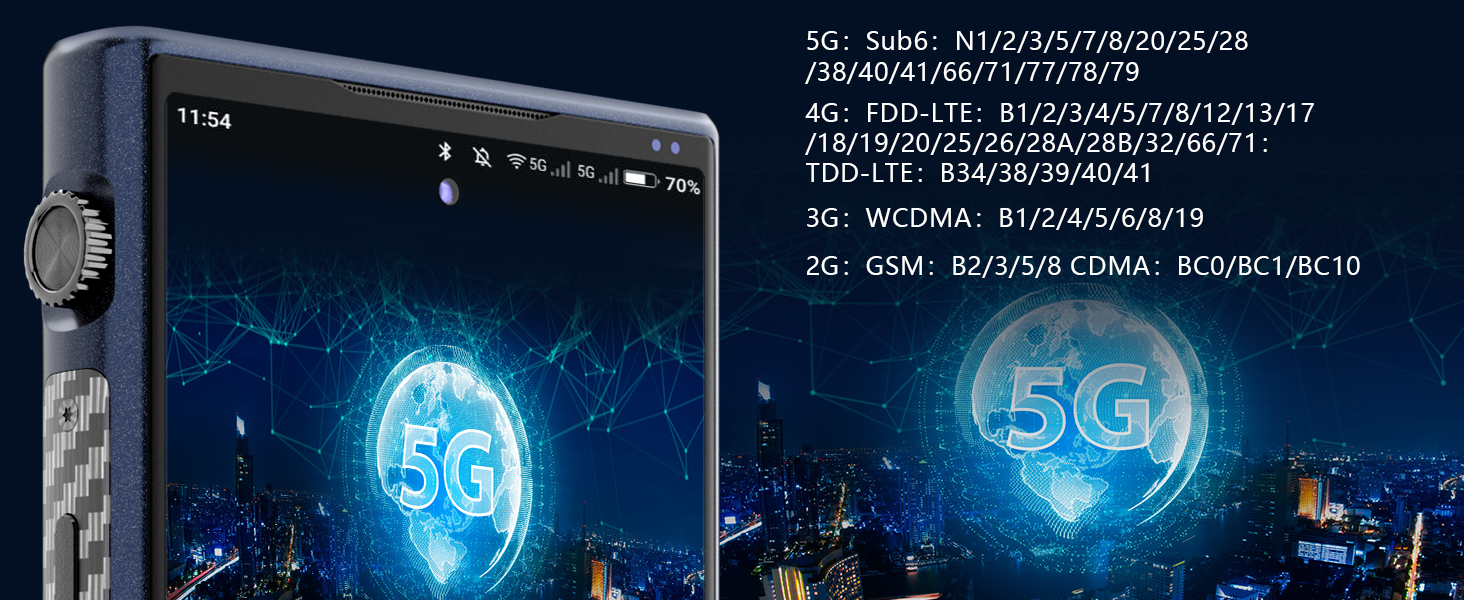
Image: A graphic illustrating the various 5G, 4G FDD-LTE, 3G WCDMA, and 2G GSM network bands supported by the W & O WO1 smartphone, ensuring global compatibility.
8. Warranty and Support
The W & O WO1 smartphone comes with a 2-year warranty. For any questions, concerns, or technical support regarding your device, please contact W & O customer service. Refer to the product packaging or the official W & O website for specific contact details.