
1. Introduction
Welcome to the Efolen Smart Bracelet user manual. This document provides detailed instructions on how to set up, operate, and maintain your new smart bracelet. Designed for comfort and functionality, this device helps you monitor various health metrics and track your fitness activities. Please read this manual thoroughly to ensure optimal use and longevity of your product.
2. Package Contents
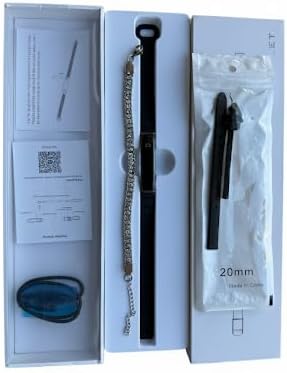
Upon unboxing your Efolen Smart Bracelet, please verify that all the following items are included:
- 1 × Efolen Smart Bracelet (main unit)
- 1 × Magnetic Strap
- 1 × Buckle-style Silicone Strap
- 1 × USB Magnetic Charger
- 1 × User Manual (this document)
- 1 × Decorative Chain Bracelet (accessory)
3. Product Overview
The Efolen Smart Bracelet is designed for both style and functionality. It features an ultralight and slim profile, making it comfortable for all-day wear.
3.1 Design and Comfort
- Ultralight: Weighing only 16.5g, the bracelet is almost imperceptible on your wrist.
- Slim Profile: With a thickness of 5.6mm, it offers a sleek and elegant appearance.
- Interchangeable Straps: Comes with both a magnetic strap and a buckle-style silicone strap, allowing you to customize its look for different occasions.

4. Setup
4.1 Charging the Device
Before initial use, fully charge your Efolen Smart Bracelet. The device uses magnetic charging for convenience.
- Connect the USB magnetic charger to a power source (e.g., computer USB port, USB wall adapter).
- Align the magnetic end of the charger with the charging contacts on the back of the smart bracelet. It will snap into place.
- The screen will indicate charging status. A full charge typically takes 2 hours.
A full charge provides 5-7 days of normal use and up to 15-20 days of standby time.

4.2 App Installation and Pairing
To unlock the full potential of your Efolen Smart Bracelet, download and install the companion app, 'NX Wear', on your smartphone.
- Scan the QR code provided in the manual or search for 'NX Wear' in your smartphone's app store (Google Play Store for Android, Apple App Store for iOS).
- Install the app and open it.
- Follow the on-screen instructions to create an account or log in.
- Enable Bluetooth on your smartphone.
- In the 'NX Wear' app, navigate to the device pairing section and select your Efolen Smart Bracelet from the list of available devices.
- Confirm the pairing on both your phone and the bracelet if prompted.
4.3 Strap Installation
Your Efolen Smart Bracelet comes with interchangeable straps. To change a strap:
- Locate the quick-release pins on the underside of the strap where it connects to the main unit.
- Gently slide the pin inwards to detach the current strap.
- Align the new strap with the main unit, insert one end of the pin into the corresponding hole, then slide the other end of the pin inwards to fit it into the opposite hole.
- Ensure both ends of the strap are securely attached before wearing.
5. Operation
Your Efolen Smart Bracelet offers a range of features to help you stay informed about your health and fitness.
5.1 Basic Navigation
The smart bracelet features a touch-sensitive screen for navigation. Tap the screen to cycle through different display modes (time, steps, heart rate, battery level, etc.).
5.2 Activity Tracking
The bracelet automatically tracks your daily activities, including steps taken, calories burned, and distance covered. View your daily progress directly on the bracelet or in the 'NX Wear' app.

5.3 Heart Rate Monitoring
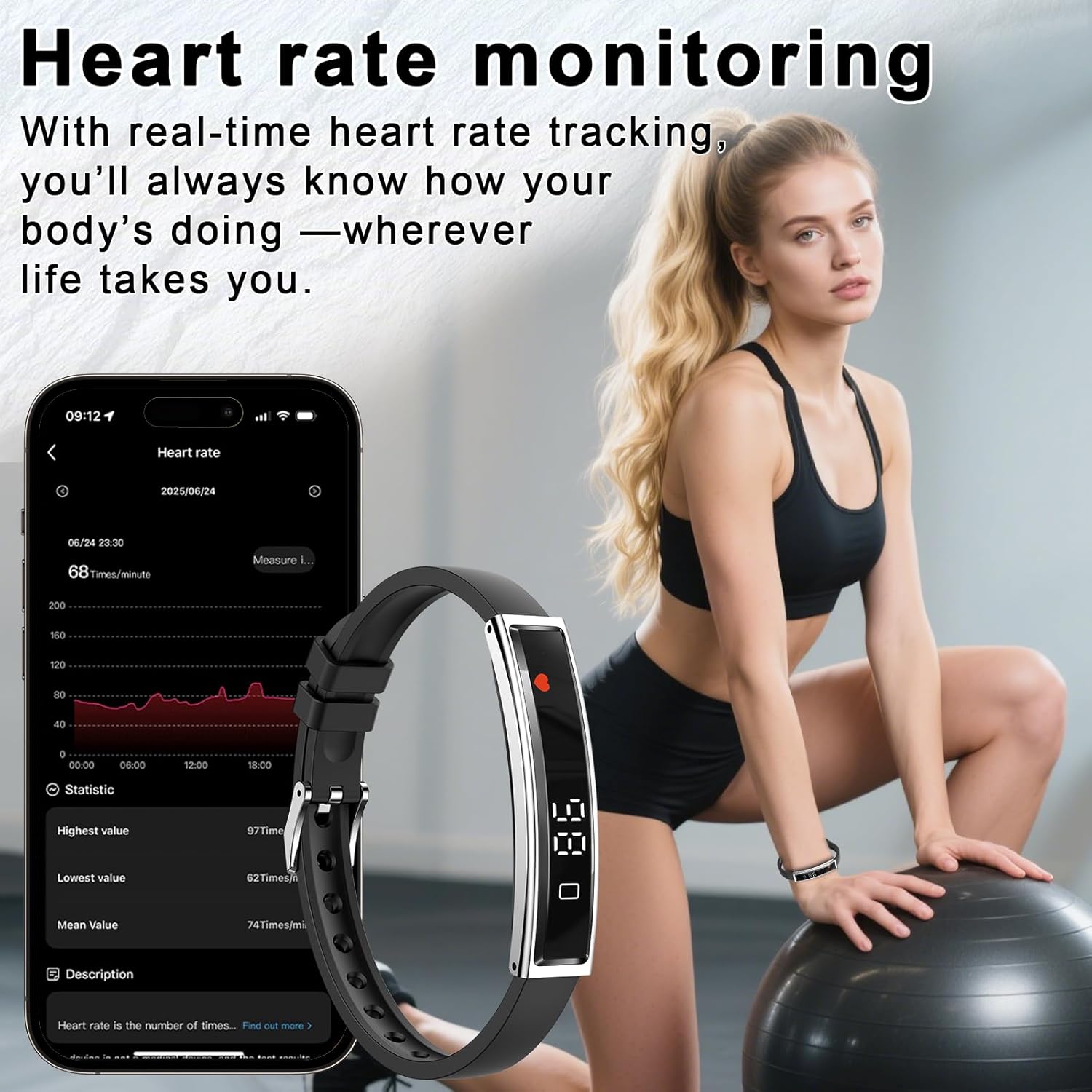
The Efolen Smart Bracelet continuously monitors your heart rate throughout the day. Access real-time heart rate data on the device or review historical trends in the 'NX Wear' app.
5.4 Blood Oxygen Monitoring
Monitor your blood oxygen saturation (SpO2) levels directly from your wrist. This feature provides valuable data for understanding your overall wellness.
5.5 Sleep Monitoring
The bracelet tracks your sleep patterns, including awake time, light sleep, and deep sleep stages. Review detailed sleep analysis in the 'NX Wear' app to improve your sleep quality.

5.6 Stress Level Monitoring
The device can help you understand your stress levels by providing real-time pulse data. Check if you are feeling relaxed, normal, medium, or high stress at any moment through the app.
5.7 Menstrual Cycle Tracking
For female users, the 'NX Wear' app offers menstrual cycle and ovulation period tracking, providing advance notifications to help you plan ahead.
5.8 Sports Modes
Select from 12 common sports modes, including running, cycling, swimming, hiking, and fitness. The bracelet records specific data for each mode, helping you monitor your performance and progress.
5.9 Notifications
Receive incoming call and message alerts directly on your wrist when connected to your smartphone, ensuring you stay connected without constantly checking your phone.
5.10 Remote Camera Control
Utilize the remote camera control feature by shaking your wrist to trigger your phone's camera shutter, making it easier to capture photos.
6. Maintenance
6.1 Water Resistance
The Efolen Smart Bracelet is designed with daily waterproofing, suitable for activities like handwashing, rainy days, and heavy sweating during exercise. It is also suitable for swimming.

6.2 Cleaning
To keep your bracelet clean and maintain skin comfort:
- Wipe the device and straps regularly with a soft, damp cloth.
- Avoid using harsh chemicals or abrasive materials, as these can damage the device.
- Ensure the device is completely dry before charging.
6.3 Battery Care
To prolong battery life:
- Avoid fully discharging the battery frequently.
- Charge the device using the provided magnetic charger.
- Store the device in a cool, dry place when not in use for extended periods.
7. Troubleshooting
If you encounter issues with your Efolen Smart Bracelet, try the following solutions:
- Device not turning on: Ensure the device is fully charged. Connect it to the charger and wait a few minutes.
- Cannot pair with app: Make sure Bluetooth is enabled on your phone and the bracelet is within range. Restart both the bracelet and your phone, then try pairing again. Ensure the 'NX Wear' app has necessary permissions.
- Inaccurate data: Ensure the bracelet is worn snugly on your wrist, not too tight or too loose. Clean the sensors on the back of the device.
- Notifications not received: Check your phone's app settings to ensure 'NX Wear' has permission to send notifications. Verify that notifications are enabled within the 'NX Wear' app settings for the bracelet.
- Short battery life: Reduce screen brightness, disable continuous heart rate monitoring if not needed, and ensure no background apps are excessively draining power.
If the issue persists, refer to the 'NX Wear' app's help section or contact customer support.
8. Specifications
| Feature | Detail |
|---|---|
| Model Number | b417c2bc-be80-48a5-a2ee-c325c268526c |
| Brand | Efolen |
| Screen Size | 1.17 Inches |
| Item Weight | 16.5g (0.58 ounces) |
| Thickness | 5.6mm |
| Operating System Compatibility | Android 4.4 and above; iOS 7.1 and above |
| Connectivity Technology | Bluetooth 5.0 |
| Special Features | Heart Rate Monitor, Blood Oxygen Monitor, Sleep Monitor, Pedometer, Stress Level Monitor, Menstrual Cycle Tracking, 12 Sports Modes, Notifications, Remote Camera Control |
| GPS | GPS Via Smartphone |
| Battery Type | Lithium Polymer (1 required, included) |
| Charging Time | Approx. 2 hours |
| Battery Life (Normal Use) | 5-7 days |
| Battery Life (Standby) | 15-20 days |
| Water Resistance | Daily waterproof (handwashing, rain, heavy sweating, swimming) |
9. Warranty and Support
For warranty information, technical support, or any product-related inquiries, please refer to the contact details provided on the product packaging or the official Efolen website. Keep your purchase receipt as proof of purchase for warranty claims.