
1. Introduction
This manual provides detailed instructions for the installation, operation, maintenance, and troubleshooting of your NINETOM 12.3-inch Ultra-Narrow Touchscreen Wireless CarPlay Android Auto Receiver. Please read this manual thoroughly before use to ensure proper functionality and to maximize your user experience.
The unit runs on a Linux system, providing stable performance without freezing or lag even during long-term use.
2. Compatibility Check
This touchscreen is compatible with Audi A3/S3 models from 2014 to 2019 that are equipped with the MIB system. It is not compatible with other systems. Please confirm your car has the MIB system before purchase.
2.1 Verify Original Dashboard
Compare your original dashboard with the image below to ensure visual compatibility.

Image: Comparison of compatible (left) and incompatible (right) Audi A3/S3 dashboards. The compatible dashboard features a smaller, integrated screen.
2.2 Confirm MIB System Type
Confirm that your original car system matches one of the following MIB system versions. The version number is typically found in the system information menu.
- MIB System: Version number starts with MSTD.
- MIB2 System: Version number starts with DEV. (Not compatible)
- MIB1 System: Version number starts with MHIG. (Not compatible)
- MIB 2 High System: Version number starts with CLUB. (Not compatible)

Image: Visual guide for checking the MIB system version. It shows examples of MIB, MIB2, MIB1, and MIB 2 High systems, indicating compatibility only with the MIB system (MSTD prefix).
3. Setup and Installation
Professional installation is recommended if you are unsure about the process. Installation will not damage original wiring or affect your factory warranty. Dashboard removal is needed for wiring.
3.1 Package Contents
Verify that all components are present in the package:

Image: A visual representation of the product accessories list, including the 12.3-inch screen, bracket, power cable, installation tools, AMI cable/screws, and user manual.
3.2 Installation Overview
The new 12.3-inch touchscreen replaces the original screen, integrating seamlessly while retaining all factory functions.
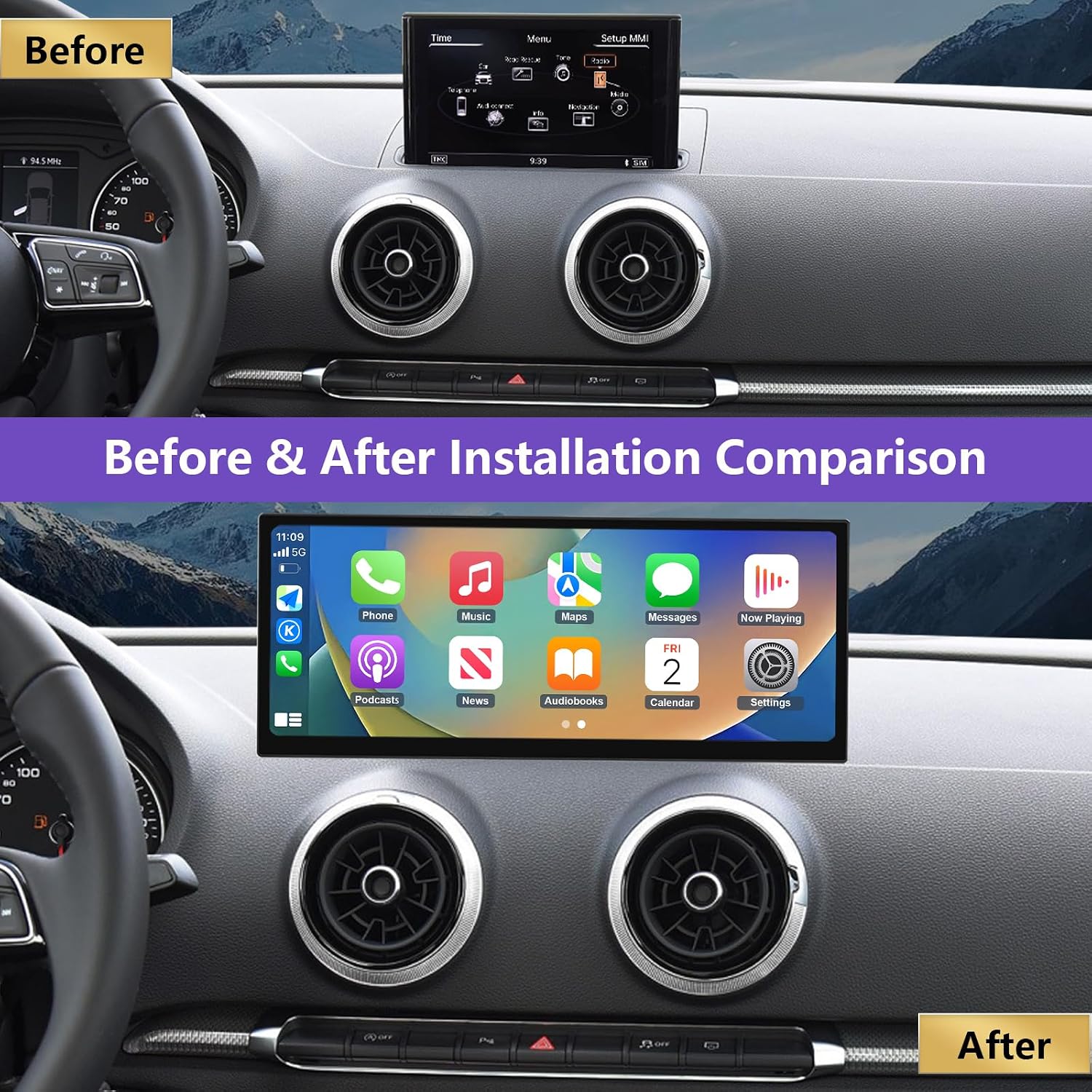
Image: A side-by-side comparison showing the original Audi A3/S3 dashboard with its smaller screen (Before) and the same dashboard with the NINETOM 12.3-inch touchscreen installed (After).

Image: A visual comparison highlighting the difference between the original car screen and the NINETOM 12.3-inch touchscreen, emphasizing the larger display and integrated features like CarPlay, Android Auto, and Linux system.
4. Operating Instructions
4.1 Touchscreen Interface
The 12.3-inch HD touchscreen features a 1920×720 IPS display with ultra-narrow bezels. The IN-CELL full lamination technology enhances clarity, and the anti-reflection layer reduces glare by up to 75%.

Image: A visual comparison demonstrating the superior clarity of the 1920x720P resolution of the NINETOM screen compared to lower resolutions (720x480P and 1280x480P).
4.2 Wireless CarPlay & Android Auto
The receiver supports both wired and wireless CarPlay and Android Auto. This allows for seamless integration of GPS navigation, calls, messages, and music from your smartphone directly onto the car display.
- Use Siri/Google Assistant for hands-free operation of navigation, contacts, and notifications.
- Supports screen mirroring (AirPlay for iPhone, Miracast for Android) for displaying videos, maps, and other smartphone features.

Image: Displays the CarPlay and Android Auto interfaces on the NINETOM screen, along with examples of screen mirroring for both iPhone (AirPlay) and Android (Miracast).

Image: Illustrates the wireless connection via Bluetooth and wired connection via USB cable for CarPlay and Android Auto, showing navigation, music, and call functions.
4.3 Dual System Switching
Easily switch between the Linux interface of the NINETOM unit and your car’s original system with one click. This allows you to access new features while retaining all factory functions.

Image: A graphic depicting the seamless switching capability between the original vehicle system and the CarPlay interface on the NINETOM touchscreen.
4.4 Retained Original Functions
The upgraded touchscreen retains all original car functions, including:
- Radio
- Amplifier
- Joystick controls
- Reversing camera
- Original stereo sound
- Original CD player
- Original steering wheel controls
- iDrive rotation control
- Gauges and alerts

Image: A collage of images demonstrating that the NINETOM touchscreen supports original car features such as the car system interface, stereo sound, reverse camera, CD player, steering wheel controls, and iDrive rotation control.

Image: Illustrates the compatibility of the NINETOM system with the original car system, wireless CarPlay, and Android Auto, showing how the new screen integrates these functionalities.
4.5 Camera Functionality
The unit supports the factory original reverse camera and parking radar. It also supports aftermarket reverse cameras and camera input. Please note that it does not support aftermarket front cameras.

Image: A view of the NINETOM touchscreen displaying a reverse camera feed with parking guidelines, demonstrating its camera function.
5. Maintenance
To ensure the longevity and optimal performance of your NINETOM touchscreen, follow these maintenance guidelines:
- Cleaning the Screen: Use a soft, lint-free cloth, slightly dampened with water or a screen-specific cleaning solution. Avoid harsh chemicals, abrasive materials, or excessive moisture.
- General Care: Keep the unit free from dust and debris. Avoid placing heavy objects on the screen or exposing it to extreme temperatures.
- Software Updates: Periodically check the manufacturer's website for any available software updates to ensure the system runs efficiently and securely.
6. Troubleshooting
If you encounter any issues with your NINETOM touchscreen, consider the following common solutions. Many issues stem from cable or setting errors.
- No Power: Ensure all power cables are securely connected. Check your vehicle's fuse box for any blown fuses related to the infotainment system.
- Screen Not Responding: Try restarting the unit by turning off your vehicle and restarting it. If the issue persists, check for loose cable connections.
- CarPlay/Android Auto Connection Issues:
- For wireless connections, ensure Bluetooth and Wi-Fi are enabled on your smartphone and the unit.
- For wired connections, try a different USB cable. Ensure the cable is MFi certified for iPhones.
- Verify that your phone's operating system is up to date.
- Sound Problems: Check the volume settings on both the unit and your vehicle's audio system. Ensure all audio cables are properly connected.
- Original Functions Not Working: Double-check all wiring connections, especially those related to the original car system integration. Ensure the system is correctly switched to the original car interface if needed.
If these steps do not resolve the issue, please contact NINETOM customer support for further assistance. Our team has extensive experience and can help diagnose and fix problems.
7. Specifications
| Feature | Detail |
|---|---|
| Brand | NINETOM |
| Model | 12.3\" Ultra-Narrow Touchscreen Wireless CarPlay Android Auto Receiver |
| Display Size | 12.3 Inches |
| Display Resolution | 1920×720 IPS |
| Operating System | Linux |
| Connectivity Technology | USB, Wireless (CarPlay, Android Auto) |
| Human Interface Input | Touchscreen |
| Control Method | Touch, Voice |
| Touch Screen Type | Capacitive |
| Display Type | LCD, LED |
| Item Weight | 5.17 pounds (2.35 Kilograms) |
| Package Dimensions | 13.46 x 7.91 x 6.18 inches |
8. Warranty and Support
Your NINETOM touchscreen comes with a 1-Year Warranty.
For any installation assistance, technical support, or warranty claims, please contact NINETOM customer service. Our team has extensive experience and can help with any questions or issues you may encounter.
Testing all functions before reassembly after installation is highly recommended.