
PhoenixCrest Nng9vbEBih6s_-880BCBYgws09
PhoenixCrest 2-in-1 Leg Press Hack Squat Machine User Manual
Model: Nng9vbEBih6s_-880BCBYgws09
1. Introduction
This manual provides essential information for the safe and effective use of your PhoenixCrest 2-in-1 Leg Press Hack Squat Machine. Please read all instructions carefully before assembly and operation. Retain this manual for future reference.
Safety Information
- Consult a physician before starting any exercise program.
- Ensure all components are securely assembled before use.
- Do not exceed the maximum weight capacity of 1400 lbs (flatbed load).
- Keep children and pets away from the machine during operation.
- Perform exercises with controlled movements.
- Regularly inspect the machine for wear and tear.
2. Product Overview
The PhoenixCrest 2-in-1 Leg Press Hack Squat Machine is designed for comprehensive lower body workouts, offering both leg press and hack squat functionalities. Key features include heavy-duty steel construction, linear bearings for smooth movement, and multiple safety adjustments.

Figure 2.1: Product components and features. This image displays the various parts of the machine, including the squat handle, handle holder, safety lock rod, weight plate loading posts, linear bearings, stopper positions, stable frame, weight plate storage holders, locking pins, resistance band holder, resistance springs, seat pad, and back pad.
Key Components:
- Frame: Heavy-duty, high-strength carbon steel construction.
- Sled/Carriage: Equipped with solid metal guide rods and built-in ball bearings for smooth operation.
- Foot Plate: Large anti-slip platform with 4 adjustable angles.
- Pads: Thick, non-slip, wear-resistant leather cushions for shoulders, back, and seat.
- Safety Features: 6 safety guard positions, 4 height-selectable safety limiters, 2 stopper positions, 90° rotating handles.
- Weight Storage: Two weight plate storage racks and two weight plate loading posts.
- Resistance Springs: Integrated to reduce vibrations and discomfort.
3. Setup and Assembly
The machine is shipped in three separate packages. Ensure all packages have arrived before beginning assembly. Installation tools are included. Follow the detailed assembly instructions provided in the separate assembly guide (not included in this document) to ensure proper and safe setup.
Pre-Assembly Checklist:
- Verify all parts are present and undamaged.
- Ensure you have adequate space for assembly and operation.
- Have the included installation tools readily available.

Figure 3.1: The machine is shipped in three packages. An instruction manual and installation tools are included.
4. Operation
This machine offers two primary workout modes: Leg Press and Hack Squat. Always ensure the machine is properly configured and safety mechanisms are engaged before starting any exercise.
4.1 Switching Between Modes

Figure 4.1: Steps to switch between workout modes. This image shows how to push the handle to the right to pop up the pin, and then insert the pin on the pad into the hole on the panel to change the configuration.
- To unlock the sled for deep squats (Hack Squat mode): Push the side rail handles (with attached safety buckle) outwards.
- To lock the sled in place for Leg Press mode: Pull both handles inwards.
- To configure for Leg Press: Place the back pad onto the bottom flat surface and lower the leg press foot pedals.
4.2 Adjustments
- Foot Plate Angle: The bottom flat plate has 4 adjustable heights/angles to accommodate different workout positions and user heights. Adjust the footplate for personalized alignment based on ergonomic principles.
- Safety Limiters: Utilize the 4 height-selectable safety limiters on both sides of the bar to prevent injuries from pressing down too deep. These are suitable for both beginners and advanced trainers.

Figure 4.2: The 4 safety limiter positions. These depth adjustment holes help prevent injuries and allow for varied muscle targeting.

Figure 4.3: Examples of exercises possible with the machine, including Leg Press, Hack Squat, Calf Raise, and Reverse Squat.
4.3 Loading Weight Plates
The machine features two weight plate loading posts. Secure weight plates using the provided weight plate locking pins to prevent them from slipping during training.
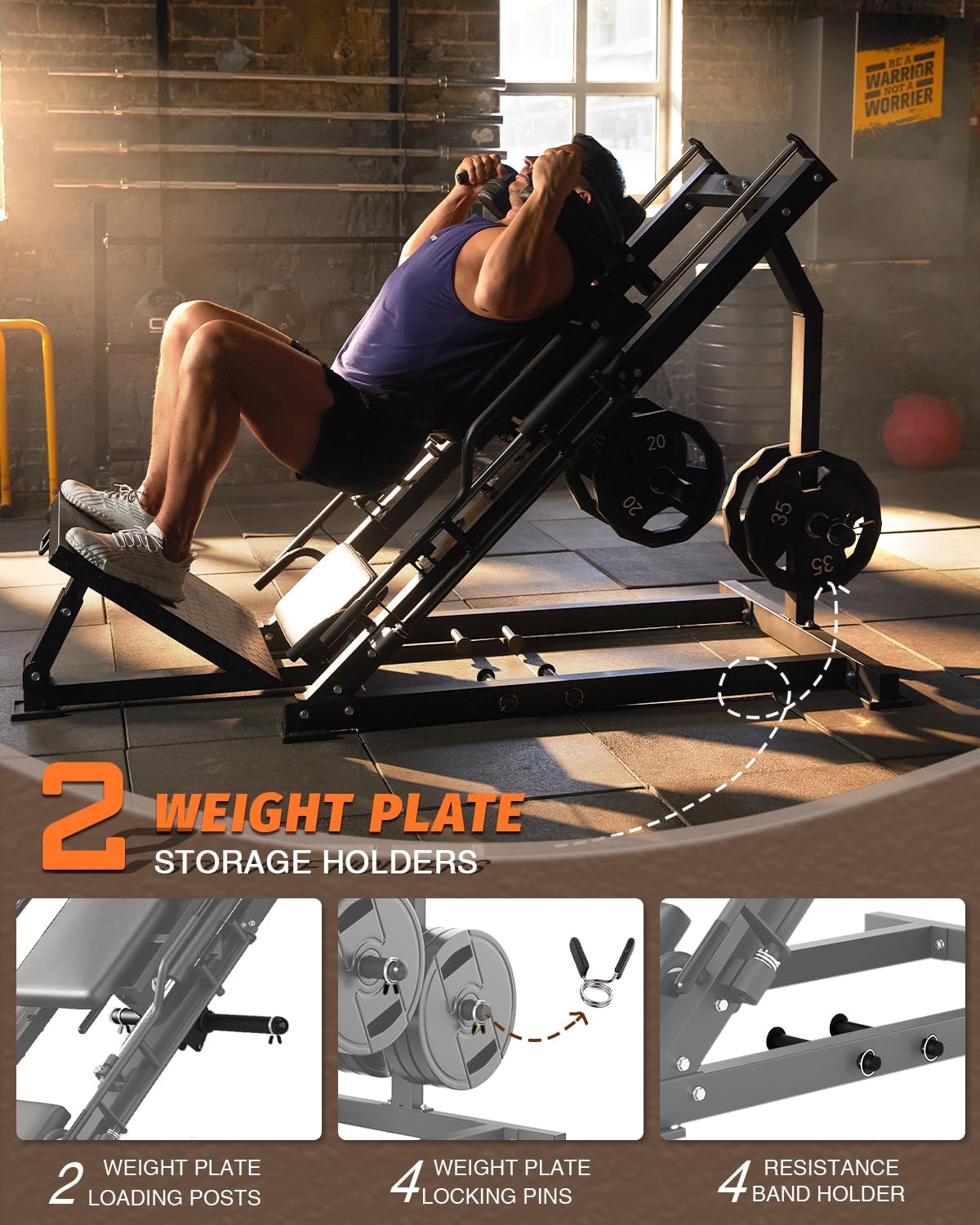
Figure 4.4: Weight plate management. This image highlights the two weight plate storage holders, two weight plate loading posts, and four weight plate locking pins.
5. Maintenance
- Cleaning: Wipe down the machine, especially the pads and handles, with a damp cloth after each use to remove sweat and dirt. Use mild soap if necessary.
- Lubrication: Periodically check the linear bearings and guide rods. Apply a silicone-based lubricant if movement becomes less smooth.
- Inspection: Regularly inspect all bolts, nuts, and moving parts for tightness and wear. Tighten any loose fasteners. Check cables (if any) for fraying or damage.
- Storage: Store the machine in a dry environment to prevent rust.
6. Troubleshooting
| Problem | Possible Cause | Solution |
|---|---|---|
| Sled movement is not smooth. | Lack of lubrication on guide rods/bearings; debris in guide rails. | Clean guide rods and linear bearings. Apply silicone lubricant. |
| Machine feels unstable during use. | Loose fasteners; uneven floor; insufficient weight on storage racks. | Check and tighten all bolts and nuts. Ensure machine is on a level surface. Utilize weight plate storage racks for added stability. |
| Difficulty switching between modes. | Mechanism obstructed or stiff. | Ensure no obstructions. Apply a small amount of lubricant to the switching mechanism if stiff. |
7. Specifications
| Feature | Detail |
|---|---|
| Model Name | Nng9vbEBih6s_-880BCBYgws09 |
| Brand | PhoenixCrest |
| Material | Carbon Steel |
| Color | Black |
| Product Dimensions (LxWxH) | 71.06" x 11.42" x 12.01" |
| Item Weight | 95.1 Pounds |
| Maximum Flatbed Load | 1400 lbs |
| Safety Guard Positions | 6 |
| Adjustable Foot Plate Heights | 4 |
| UPC | 199414847650 |

Figure 7.1: Detailed dimensions of the PhoenixCrest 2-in-1 Leg Press Hack Squat Machine.
8. Warranty and Support
Warranty: PhoenixCrest provides a 1-year after-sales service. For warranty claims or service, please refer to the contact information included in your product packaging.
Customer Support: If you encounter any problems or have questions regarding your machine, please contact PhoenixCrest customer service. Contact details are typically found in the product packaging or on the official PhoenixCrest website. We aim to provide timely and sincere service.
For additional information, you may visit the PhoenixCrest Store on Amazon.
no relevant documents
Ask a question about this manual
Ask about setup, troubleshooting, compatibility, parts, safety, or missing instructions. Manuals+ will review the question and use this page’s manual context to help answer it.