
1. Introduction
Thank you for choosing the Sanyun SW203 4.0 Computer Speakers. This manual provides detailed instructions for setting up, operating, and maintaining your speakers to ensure optimal performance and longevity. Please read this manual thoroughly before use and retain it for future reference.
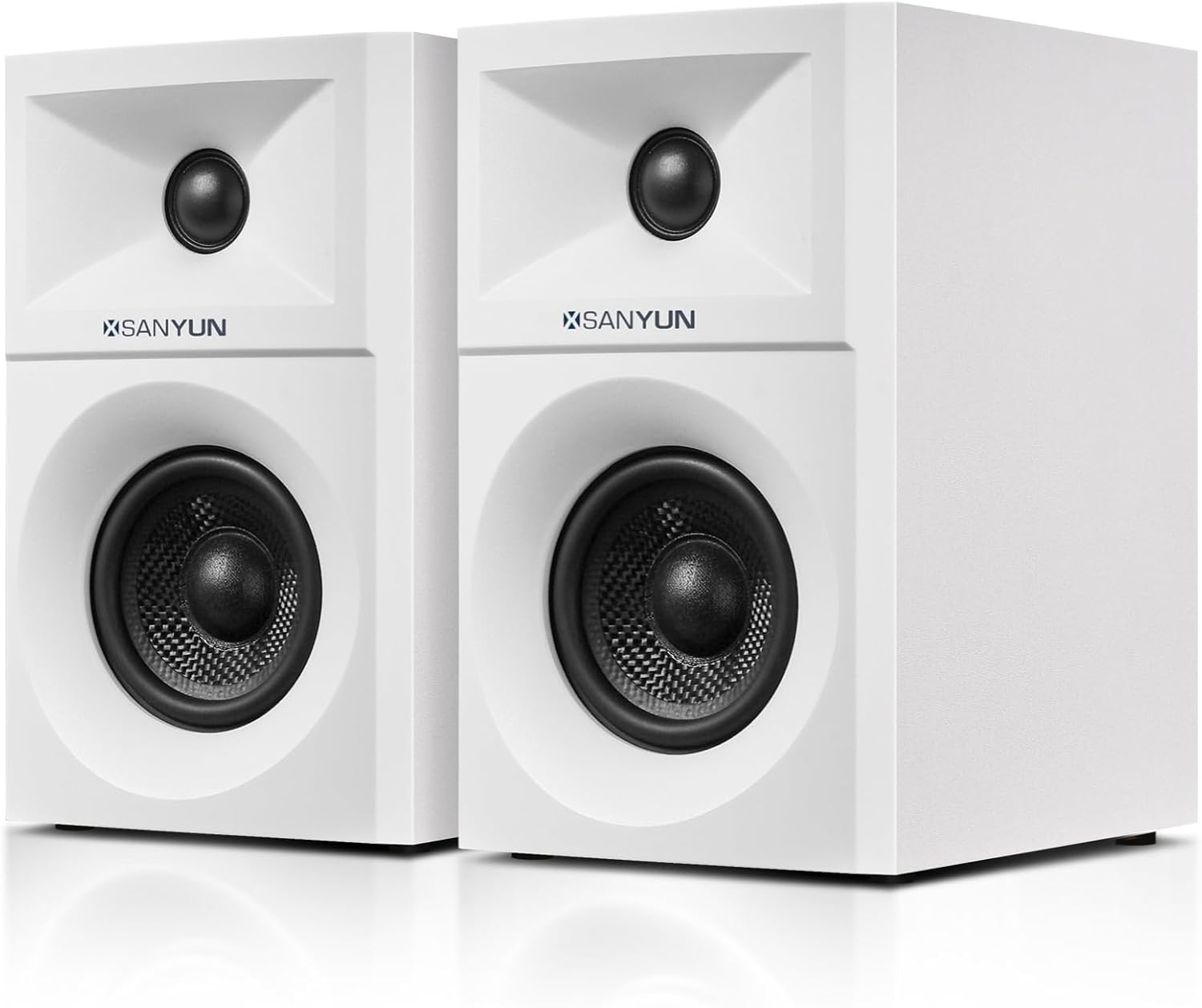
Image 1.1: Front view of the Sanyun SW203 Computer Speakers.
2. Product Overview
2.1 Key Features
- Immersive 3D Soundstage: Features a four-driver system (two per speaker) for a wide and dynamic 3D sound field.
- High-Quality Drivers: Equipped with 3-inch carbon fiber woofers for clear vocals and deep bass, and 20mm silk dome tweeters for smooth, detailed highs.
- Advanced DSP Technology: Utilizes a quad-core DSP processor with Smart Phase Calibration for precise audio and a complex 3D soundstage.
- Versatile Connectivity: Supports Bluetooth 5.4, USB DAC, and 3.5mm AUX inputs.
- Elegant Design: Crafted with high-quality MDF wood cabinets and premium PVC finishes, compact for desktop use.
- Customizable Sound: Dedicated knobs for Master Volume, Treble, and Bass adjustment on the main speaker.
2.2 What's in the Box
- 1 pair Main speaker and Secondary speaker
- 1 × AC power cable
- 1 × 3.5mm audio cable
- 1 × USB-C cable
- 1 × User manual
2.3 Speaker Dimensions

Image 2.1: Dimensions of the Sanyun SW203 speakers. Each speaker measures H19.5cm x W12cm x D16.4cm. A 2-meter cable connects the two speakers.
Each speaker measures approximately 19.5cm (H) x 12cm (W) x 16.4cm (D). The included speaker cable is 2 meters long, allowing for flexible placement.
2.4 Driver Technology

Image 2.2: Exploded view illustrating the 3-inch carbon fiber woofer and 20mm silk dome tweeter components.
The SW203 speakers incorporate a 3-inch carbon fiber woofer for robust low-frequency reproduction and a 20mm silk dome tweeter for clear high-frequency output. This combination is designed to deliver a balanced audio experience.
3. Setup
3.1 Speaker Placement
Place the main speaker (with controls) and the secondary speaker on a stable, flat surface, such as a desktop. Ensure there is adequate space around each speaker for optimal sound dispersion. The included 2-meter speaker cable connects the two units.

Image 3.1: Example of speaker placement on a desktop with a computer monitor.
3.2 Connecting the Speakers
- Connect the secondary speaker to the main speaker using the provided speaker cable. The connection port for the secondary speaker is labeled "LOUT" on the main speaker's rear panel.
- Connect the AC power cable to the main speaker's power socket and then to a power outlet.
- Turn on the power switch located on the rear panel of the main speaker.
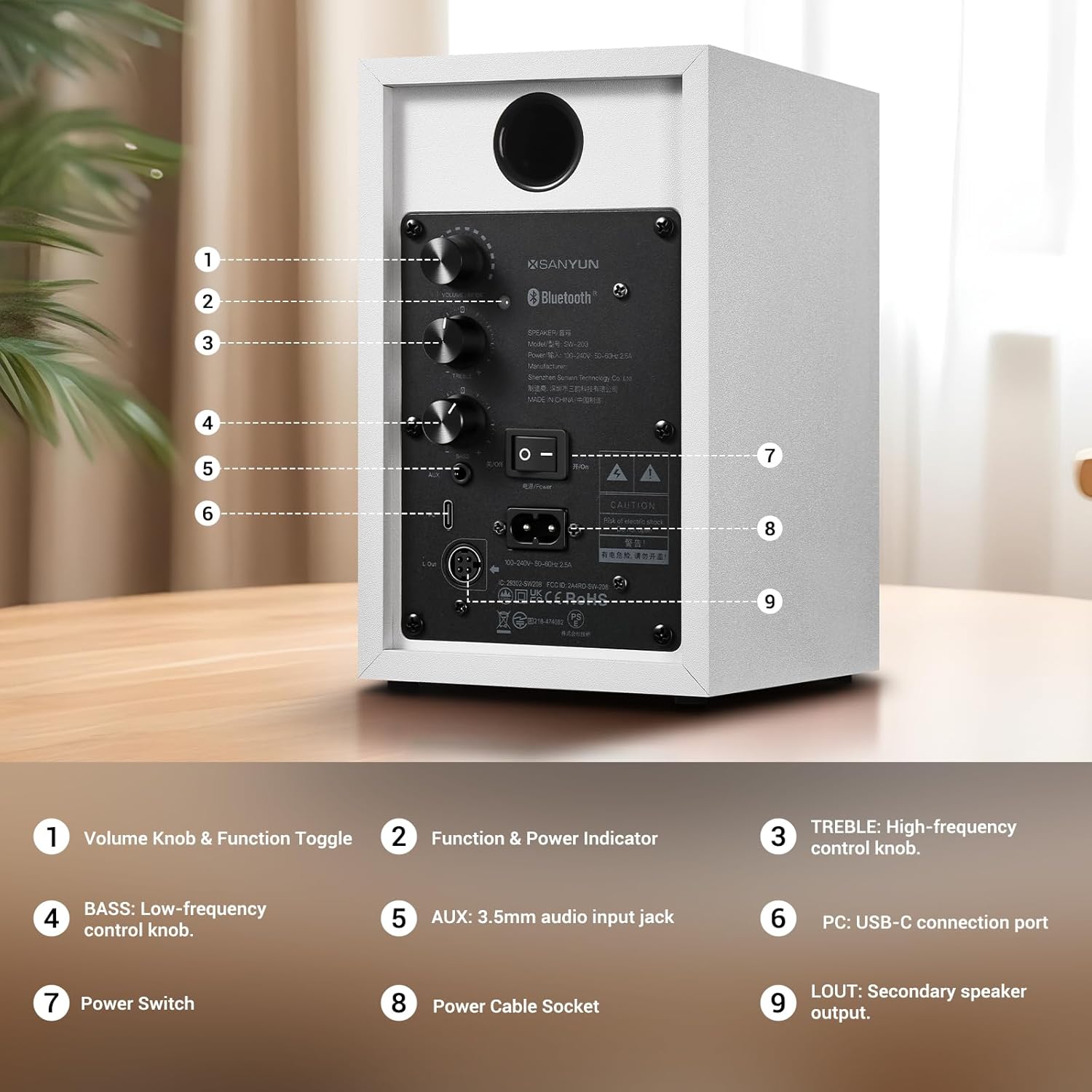
Image 3.2: Rear control panel of the main speaker, showing connection ports and controls.
Detailed view of the rear control panel:
- 1. Volume Knob & Function Toggle: Controls volume and switches input modes.
- 2. Function & Power Indicator: Displays current mode (Blue for Bluetooth, Green for AUX, Red for USB).
- 3. TREBLE: High-frequency control knob.
- 4. BASS: Low-frequency control knob.
- 5. AUX: 3.5mm audio input jack.
- 6. PC: USB-C connection port.
- 7. Power Switch: Turns the speaker on/off.
- 8. Power Cable Socket: Connects the AC power cable.
- 9. LOUT: Secondary speaker output.
4. Operating Instructions
4.1 Power On/Off and Volume Control
- To power on or off, use the power switch on the rear panel.
- Rotate the "Volume Knob & Function Toggle" to adjust the volume. Turn clockwise to increase, counter-clockwise to decrease.
4.2 Switching Input Modes
The Sanyun SW203 speakers support three input modes: Bluetooth, USB DAC, and AUX.
- Short Press: Press the "Volume Knob & Function Toggle" briefly to play or pause audio in the current mode.
- Long Press: Press and hold the "Volume Knob & Function Toggle" to cycle through the input modes. The "Function & Power Indicator" light will change color to indicate the current mode:
- Blue Light: Bluetooth Mode
- Green Light: AUX Mode
- Red Light: USB Mode
Video 4.1: Demonstration of the rear control panel, showing how to short press for play/pause, long press to switch input modes (AUX, USB, Bluetooth), and rotate knobs for volume, treble, and bass adjustments.
4.3 Bluetooth Connectivity
- Long press the "Volume Knob & Function Toggle" until the indicator light turns blue, indicating Bluetooth mode.
- On your device (e.g., smartphone, laptop), enable Bluetooth and search for available devices.
- Select "SW-203" from the list to pair. Once paired, the indicator light will remain solid blue.
- You can now stream audio wirelessly from your device to the speakers.

Image 4.1: Sanyun SW203 speakers connected wirelessly to a laptop via Bluetooth.
4.4 USB DAC Connection
- Connect your computer to the "PC" USB-C port on the main speaker using the provided USB-C cable.
- Long press the "Volume Knob & Function Toggle" until the indicator light turns red, indicating USB mode.
- Your computer should automatically recognize the speakers as an audio output device. Select "Sanyun SW203" as the output device in your computer's sound settings.
- This mode utilizes the speaker's built-in 24-bit DAC for high-fidelity audio playback.
4.5 AUX Connection
- Connect your audio source (e.g., smartphone, MP3 player, TV) to the "AUX" 3.5mm input jack on the main speaker using the provided 3.5mm audio cable.
- Long press the "Volume Knob & Function Toggle" until the indicator light turns green, indicating AUX mode.
- Ensure the volume on your audio source is set to an appropriate level.
4.6 Treble and Bass Adjustment
Use the dedicated "TREBLE" and "BASS" knobs on the rear panel to fine-tune the audio output to your preference. Rotate clockwise to increase the level, and counter-clockwise to decrease.
5. Maintenance
- Cleaning: Use a soft, dry cloth to wipe the speaker surfaces. Avoid using abrasive cleaners, solvents, or chemical sprays, as these can damage the finish.
- Placement: Keep the speakers away from direct sunlight, heat sources, and areas with high humidity or dust. Ensure proper ventilation.
- Handling: Handle the speakers with care. Avoid dropping them or subjecting them to strong impacts.
- Cables: Regularly check all cables for any signs of damage. Replace damaged cables immediately to prevent electrical hazards or performance issues.
6. Troubleshooting
| Problem | Possible Cause | Solution |
|---|---|---|
| No sound output. |
|
|
| Bluetooth pairing failed. |
|
|
| Distorted or poor sound quality. |
|
|
7. Specifications
| Feature | Detail |
|---|---|
| Brand | Sanyun |
| Model Name | SW203 |
| Speaker Type | Computer Speakers |
| Surround Sound Channel Configuration | 4.0 |
| Connectivity Technology | 24bit DAC USB, Bluetooth 5.4, 3.5mm AUX |
| Speaker Maximum Output Power | 60 Watts |
| Woofer Diameter | 3 Inches |
| Tweeter Diameter | 20 Millimeters |
| Frequency Response | 25 KHz (Note: This is likely the upper limit, not the full range.) |
| Product Dimensions (each speaker) | 6.46"D x 4.72"W x 7.68"H (16.4cm D x 12cm W x 19.5cm H) |
| Item Weight | 7.13 pounds (total for pair) |
| Material | Wood, PVC |
| Control Method | Knobs (Volume, Treble, Bass) |
| Power Source | Corded Electric |
| Compatible Devices | Desktop, Laptop, Projector, Television |
8. Warranty and Support
The Sanyun SW203 speakers come with a limited warranty. For specific warranty terms and conditions, please refer to the warranty information included with your purchase or contact Sanyun customer support.
For technical assistance, troubleshooting, or any product-related inquiries, please visit the official Sanyun website or contact their customer service department.