
1. Introduction
This manual provides detailed instructions for the installation, operation, and maintenance of your ECO-WORTHY 48V LiFePO4 Battery Monitor (Model ESM100). This device is designed to provide real-time monitoring of your LiFePO4 server rack batteries, specifically compatible with V3 version 51.2V 100Ah and 48V 50Ah batteries in off-grid solar systems.
The ESM100 features a 4.3-inch full-color capacitive touchscreen for intuitive access to essential battery performance data, including voltage, current, State of Charge (SoC), temperature, and individual cell status. It also allows for flexible configuration of BMS communication protocols and inverter parameters.
2. Safety Information
Please read and understand all safety instructions before operating the device. Failure to follow these instructions may result in electric shock, fire, or serious injury.
- Ensure the battery monitor is connected only to compatible ECO-WORTHY V3 LiFePO4 server rack batteries as specified. Connecting to incompatible batteries or systems may cause damage.
- Do not expose the device to water, moisture, or extreme temperatures outside its specified operating range (-4°F to 167°F / -20°C to 75°C).
- Do not attempt to open, disassemble, or repair the battery monitor. Refer all servicing to qualified personnel.
- Keep the device away from flammable materials and direct sunlight.
- Handle the RS232 communication cable with care to avoid damage to the connectors.
3. Package Contents
Verify that all items are present in the package:
- ECO-WORTHY 48V LiFePO4 Battery Monitor (ESM100)
- RS232 Communication Cable

Image: The ECO-WORTHY 48V LiFePO4 Battery Monitor (ESM100) with its included RS232 communication cable.
4. Product Overview
The ESM100 monitor is designed for ease of use and integration into your solar power system. Key features include:
- 4.3-inch Capacitive Touchscreen: Provides a clear and interactive display for all battery parameters.
- RS232 Interface: For stable and reliable communication with compatible ECO-WORTHY V3 server rack batteries.
- Magnetic Mounting: Allows for quick and secure attachment to the battery unit or other metallic surfaces.
- Multi-Language Support: English, Chinese, and Ukrainian languages are supported.
- Ultra-Low Power Consumption: Operates at less than 1W and has a standby consumption of less than 0.1W.
- TF Card Slot: For future firmware updates.

Image: The physical dimensions of the ESM100 battery monitor, measuring 5.49 inches in length, 3.84 inches in height, and 0.84 inches in depth.
5. Installation and Setup
5.1 Compatibility
The ESM100 monitor is specifically designed for and compatible with ECO-WORTHY V3 version 51.2V 100Ah LiFePO4 server rack batteries and 48V 50Ah server rack batteries. It is not compatible with V2 versions or other brands of server rack batteries.
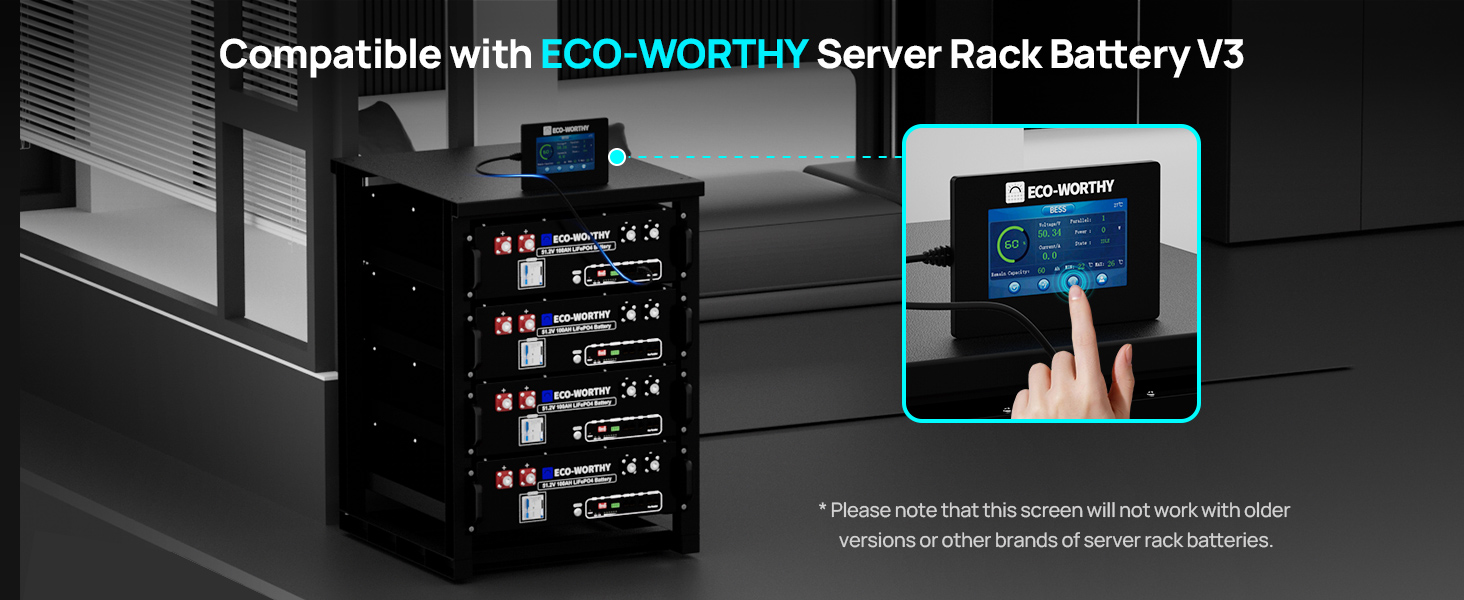
Image: The ESM100 monitor connected to an ECO-WORTHY V3 server rack battery, illustrating compatibility.
5.2 Connecting the Monitor
- Locate the RS232 communication port on your compatible ECO-WORTHY V3 server rack battery.
- Connect one end of the provided RS232 communication cable to the RS232 port on the battery.
- Connect the other end of the RS232 communication cable to the corresponding port on the ESM100 battery monitor.

Image: A visual representation of connecting the ESM100 battery monitor to a server rack battery via the RS232 cable.

Image: A close-up view of the RS232 communication cable securely connected to a server rack battery within a multi-battery rack system, ensuring stable data transmission.
5.3 Mounting the Monitor
The ESM100 monitor features a magnetic backing for easy and quick installation. Simply place the monitor on a suitable metallic surface, such as the top of your server rack battery or an adjacent metal panel. Ensure the monitor is securely attached and does not obstruct any ventilation or other connections.

Image: The ESM100 battery monitor being magnetically attached to the top surface of a server rack battery for quick and convenient setup.
6. Operating Instructions
6.1 Power On/Off and Sleep Mode
- Wake-up: The monitor will wake up from sleep mode with a simple touch on the screen.
- Auto-Sleep: To conserve power, the monitor will automatically enter sleep mode after 30 seconds of inactivity.
6.2 Real-Time Monitoring
The 4.3-inch touchscreen displays critical battery data in real-time. The main screen typically shows:
- Voltage (V)
- Current (A)
- State of Charge (SoC %)
- Power (W)
- Remaining Capacity (Ah)
- Battery State (e.g., IDLE, CHARGING, DISCHARGING)
- Minimum and Maximum Temperatures (°C or °F)

Image: The ESM100 monitor displaying live battery data, including voltage, current, SoC, and temperature, providing an immediate overview of battery status.

Image: A hand interacting with the ESM100's touchscreen, highlighting the smooth touch control and the display of key metrics like SoC, voltage, current, power, and remaining capacity.
6.3 Flexible Configuration
The monitor allows for advanced configuration options:
- BMS Communication Protocol: After a secure login, you can check the current BMS communication protocol.
- Inverter Parameters: Customize inverter-related parameters to optimize your solar DIY system.

Image: A screen capture from the ESM100 monitor showing options for flexible access and customization of communication protocols.
6.4 Language Settings
To change the display language, navigate to the settings menu on the touchscreen. You can switch between English, Chinese, and Ukrainian.

Image: The ESM100 monitor displaying options for custom sleep settings and multi-language support, including English, Chinese, and Ukrainian.
6.5 Firmware Updates
The ESM100 includes a TF card slot for convenient future firmware updates. Refer to the ECO-WORTHY website or support documentation for instructions on how to perform firmware updates when available.

Image: A close-up view of the TF card slot on the ESM100 monitor, indicating its use for future firmware upgrades.

Image: A diagram illustrating the RS232 communication interface and the TF/SD card slot on the ESM100, highlighting the ease of future firmware updates.
7. Maintenance
To ensure the longevity and optimal performance of your ECO-WORTHY ESM100 Battery Monitor, follow these maintenance guidelines:
- Cleaning: Use a soft, dry cloth to clean the screen and exterior of the monitor. Do not use abrasive cleaners, solvents, or spray directly onto the device.
- Environmental Conditions: Operate the monitor within the specified temperature range of -4°F to 167°F (-20°C to 75°C). Avoid environments with excessive dust, humidity, or corrosive gases.
- Cable Inspection: Periodically check the RS232 communication cable for any signs of wear, damage, or loose connections. Replace if necessary.
8. Troubleshooting
If you encounter issues with your ESM100 Battery Monitor, refer to the following common troubleshooting steps:
| Problem | Possible Cause | Solution |
|---|---|---|
| Monitor screen is blank or unresponsive. | No power, sleep mode, or faulty connection. | Touch the screen to wake it up. Ensure the RS232 cable is securely connected to both the monitor and the battery. Verify the battery is powered on. |
| Incorrect or no data displayed. | Loose RS232 connection, incompatible battery, or communication error. | Check RS232 cable connections. Confirm the battery is a compatible ECO-WORTHY V3 LiFePO4 server rack battery. Restart the battery and monitor. |
| Touchscreen is unresponsive. | Temporary software glitch or physical damage. | Try restarting the monitor by disconnecting and reconnecting the RS232 cable. If the issue persists, contact ECO-WORTHY support. |
| Cannot change language or settings. | Incorrect menu navigation or temporary software issue. | Ensure you are navigating the menu correctly. Try restarting the monitor. |
9. Specifications
Technical specifications for the ECO-WORTHY ESM100 Battery Monitor:
| Feature | Specification |
|---|---|
| Product Model | ECO-BM-JB001 (ESM100) |
| Operating Power | <1W |
| Standby Dissipation | <0.1W |
| Operating Temperature | -20°C to 75°C (-4°F to 167°F) |
| Communication Interface | RS232 |
| Wake-up Method | Touch Wake-up |
| Screen Specification | 4.3 inch / 480*272p Capacitive Touchscreen |
| Product Dimensions | 139.5 x 97.5 x 21.3 mm (5.49 x 3.84 x 0.84 inches) |
| Item Weight | 150g (0.33 lbs) / 8.8 ounces |
| Material | Acrylonitrile Butadiene Styrene (ABS) |
| UPC | 810198850475 |

Image: A visual representation of the product details table, summarizing the key specifications of the ESM100 battery monitor.
10. Warranty and Support
The ECO-WORTHY ESM100 Battery Monitor is backed by ECO-WORTHY's dedicated support. For warranty information, technical assistance, or any inquiries, please refer to the official ECO-WORTHY website or contact their customer service directly.


