
1. Introduction
Thank you for choosing the Halitaa Farmhouse 47-inch Executive Desk. This manual provides essential information for the safe assembly, operation, and maintenance of your new desk. Please read these instructions carefully before beginning assembly and retain them for future reference. This desk is designed to provide a functional and organized workspace for home offices and studies, featuring ample storage and an integrated charging station.
2. Safety Information
- Always assemble the desk on a soft, clean surface to prevent scratches.
- Ensure all hardware is securely tightened before use. Periodically check and re-tighten as necessary.
- Do not overload drawers or the desktop. Refer to specifications for weight limits.
- Keep small parts and packaging materials away from children and pets to prevent choking hazards.
- Use the integrated charging station only with compatible devices and ensure the power switch is off when not in use. Avoid spilling liquids near electrical components.
- Do not stand or sit on the desk.
- If any parts are missing or damaged, do not proceed with assembly. Contact customer support immediately.
3. Package Contents
Before assembly, verify that all components are present and undamaged. The package should contain:
- Desktop panel
- Side panels and support beams
- Drawer panels and slides for multiple storage drawers and one file drawer
- Drawer handles
- Integrated charging station (power strip with outlets and USB ports)
- Assembly hardware (screws, dowels, cam locks, etc.)
- Assembly instructions (separate document)
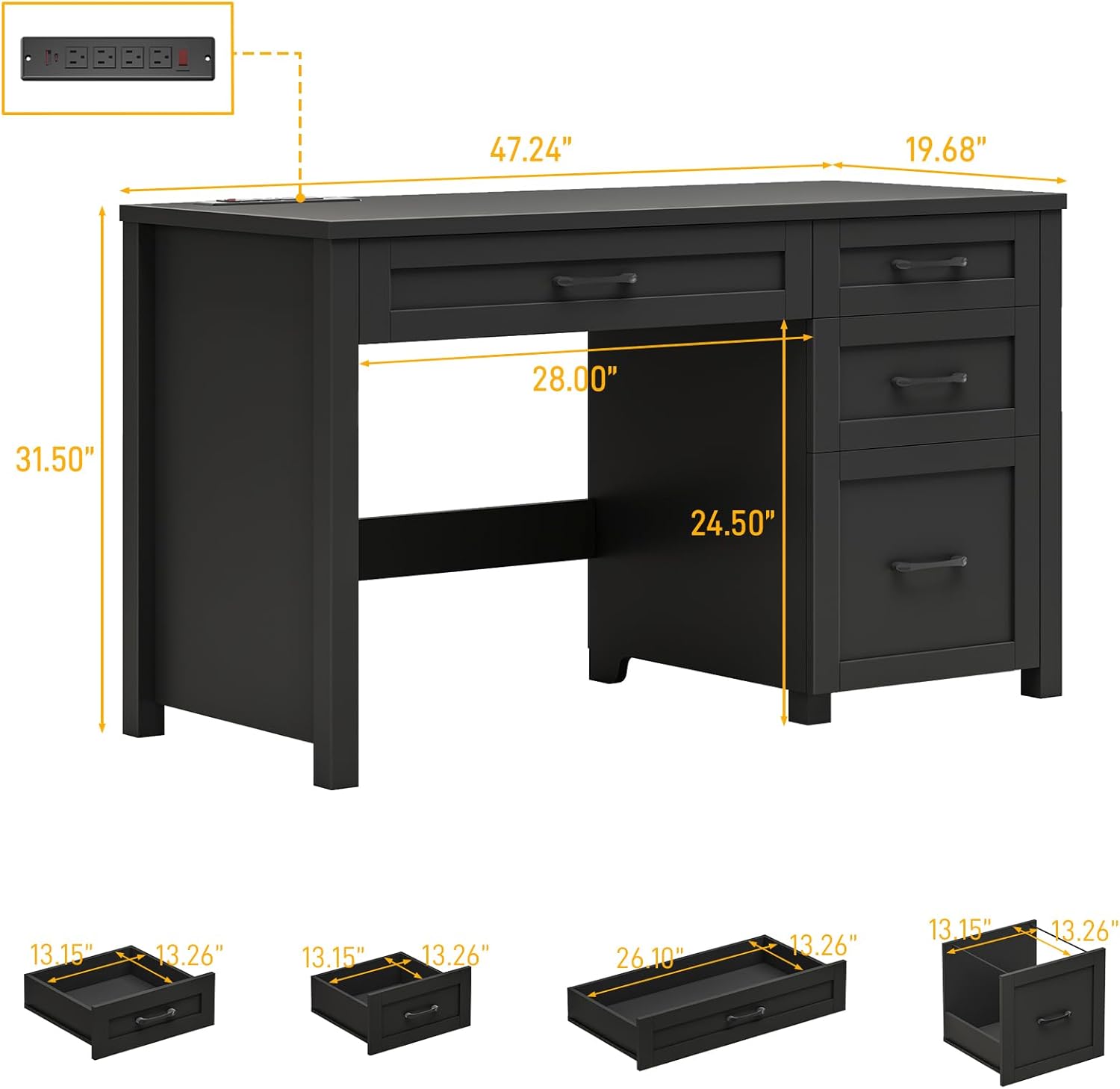
4. Setup and Assembly Instructions
Assembly of the Halitaa Executive Desk requires two people and basic household tools (e.g., screwdriver). Please refer to the detailed assembly instructions included in your package for step-by-step guidance. The following is a general overview:
- Unpack and Identify Parts: Carefully remove all components from the packaging. Lay them out on a clean, soft surface. Match each part to the corresponding label in the assembly instructions.
- Assemble the Main Frame: Attach the side panels to the desktop using the provided hardware. Ensure all connections are secure and aligned.
- Construct Drawers: Assemble the drawer boxes according to the instructions. Install the drawer slides onto the drawer boxes and the desk frame.
- Install Drawers: Carefully insert the assembled drawers into their respective slots. Test their smooth operation.
- Integrate Charging Station: Install the charging station into its designated slot on the desktop. Connect any necessary wiring as per the instructions.
- Final Checks: Ensure all screws and fasteners are tightened. Verify the desk is stable and level.

5. Operating Instructions
5.1. Charging Station
The desk is equipped with an integrated charging station for convenient power access.
- Power Outlets: The charging station includes 4 standard power outlets. Plug in your devices (laptops, monitors, lamps, etc.) as needed.
- USB Ports: Two USB ports are provided for charging smaller electronic devices such as smartphones and tablets.
- On/Off Switch: A red power switch controls the entire charging station. Press the switch to the 'ON' position to supply power and to the 'OFF' position to cut power, enhancing safety and energy efficiency.

5.2. Storage Drawers
The desk features multiple drawers for organized storage.
- Standard Storage Drawers: The desk includes three standard sliding drawers suitable for storing office supplies, accessories, and personal items.
- File Drawer: One dedicated file drawer is designed to accommodate letter-size or A4 hanging file folders. It features an adjustable metal rod to secure files.


6. Maintenance
To ensure the longevity and appearance of your Halitaa Executive Desk, follow these maintenance guidelines:
- Cleaning: Wipe surfaces with a soft, damp cloth. Avoid harsh chemicals, abrasive cleaners, or polishes that may damage the finish.
- Spills: Immediately wipe up any spills to prevent staining or damage to the engineered wood.
- Heat and Moisture: Avoid placing hot items directly on the desktop. Use coasters for drinks to prevent water rings.
- Hardware: Periodically check all screws and fasteners to ensure they remain tight. Re-tighten if necessary to maintain stability.
- Sunlight: Avoid prolonged exposure to direct sunlight, which can cause fading or discoloration.
7. Troubleshooting
If you encounter any issues with your desk, refer to the following common problems and solutions:
- Desk is Wobbly:
a. Ensure all assembly hardware is fully tightened.
b. Check that the desk is on a level surface. Adjust floor glides if present, or place shims under legs if needed. - Drawers Do Not Slide Smoothly:
a. Verify that drawer slides are correctly installed and aligned.
b. Check for any obstructions within the drawer tracks.
c. Ensure drawers are not overloaded. - Charging Station Not Working:
a. Confirm the charging station's red on/off switch is in the 'ON' position.
b. Check if the main power cord is securely plugged into a functional wall outlet.
c. Test the wall outlet with another device to ensure it has power.
d. Ensure devices are properly plugged into the outlets/USB ports. - Missing or Damaged Parts:
a. Do not attempt to force assembly with incorrect or damaged parts. Contact customer support for assistance.
8. Specifications
| Brand | Halitaa |
| Model Number | 50 |
| Color | Pure Black |
| Material | Engineered Wood |
| Product Dimensions (D x W x H) | 49.99 cm x 119.99 cm x 80.01 cm (19.68 in x 47.24 in x 31.50 in) |
| Item Weight | 37.92 kg (83.6 lbs) |
| Special Features | Integrated Charging Station (4 AC outlets, 2 USB ports), 1 File Drawer, 3 Storage Drawers |
9. Warranty and Support
Halitaa is committed to providing quality products and customer satisfaction. While specific warranty details are not provided in this manual, our dedicated support team is available to assist you with any assembly issues, missing parts, or product-related inquiries.
For assistance, please refer to the contact information provided with your purchase documentation or visit the official Halitaa website.