1. Introduction
The Creality Multi-Kilo 3D Printer Filament Dryer Box is designed to remove moisture from 3D printer filaments, which can degrade print quality. This device helps prevent common printing issues such as stringing, clogging, and weak layer adhesion by maintaining optimal filament dryness. It supports various filament types and spool sizes, offering precise temperature control for effective drying.
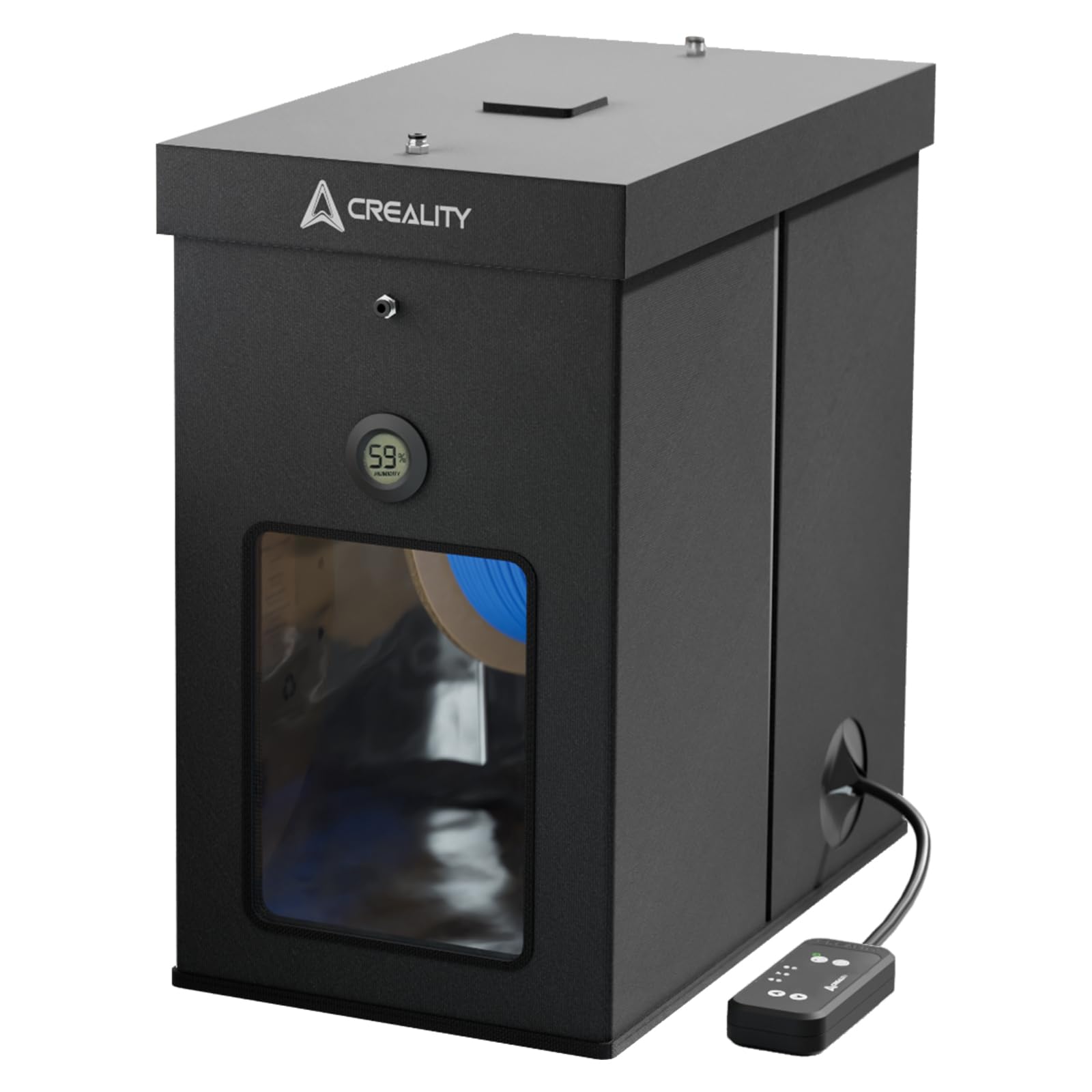
Image: The Creality Multi-Kilo Filament Dryer Box, shown with a large blue filament spool, highlighting its capacity and design.
2. Safety Information
- Read all instructions before use.
- Do not operate the device with wet hands or in damp environments.
- Ensure the power cord is not damaged and is properly connected to a grounded outlet.
- Keep the device away from flammable materials.
- Do not block ventilation openings during operation.
- The exterior Oxford fabric remains below 50°C during operation, but exercise caution around the heating element.
- Unplug the device when not in use or before cleaning.
- This device is not a toy. Keep out of reach of children.
3. Package Contents
Verify that all components are present in the package:
- Creality Multi-Kilo 3D Printer Filament Dryer Enclosure (fabric tent structure)
- Detachable Heating Module with Controller
- Filament Spool Holder Rod and Supports
- Hygrometer (requires 1x LR44 battery, not included)
- Power Adapter
- Assembly Screws (M3 and M4)
Note: An Allen key for assembly screws may not be included. Please prepare one if necessary.
4. Setup
4.1 Assembly
- Unfold the fabric enclosure and ensure it forms a stable box shape.
- Insert the support frame components into the designated slots within the enclosure. Secure with M3 and M4 screws as indicated in the assembly diagram.
- Place the filament spool holder supports inside the enclosure.
- Install the hygrometer into its designated slot on the enclosure. Insert an LR44 battery (not included) into the hygrometer.
- Attach the top cover, securing it with the Velcro strips.

Image: A visual guide demonstrating the quick installation process of the dryer box, showing the frame being inserted into the fabric enclosure.
4.2 Placing Filament
- Open the top cover of the dryer box.
- Place the filament spool onto the spool holder rod.
- Carefully lower the spool and rod onto the supports inside the dryer box. The dryer accommodates 1kg, 2kg, 3kg, and 5kg spools.
- Close the top cover securely.
- Feed the filament through one of the designated exit ports on the enclosure, leading to your 3D printer.

Image: The dryer box displayed with different filament spool sizes (1kg, 2kg, 3kg, 5kg) to illustrate its universal compatibility.
4.3 Connecting the Controller
- Connect the heating module cable to the designated port on the dryer enclosure.
- Connect the power adapter to the heating module.
- Plug the power adapter into a suitable electrical outlet.
5. Operating Instructions
5.1 Powering On/Off
Press the power button on the controller to turn the device on or off. The LCD screen will illuminate when powered on.
5.2 Setting Temperature
Use the temperature control buttons on the controller to adjust the drying temperature. The range is typically 40°C to 70°C. Refer to your filament manufacturer's recommendations for optimal drying temperatures. The device features a 400W PTC hot air heater that can reach 70°C within 5 minutes.

Image: An illustration of the dryer's internal heating mechanism, highlighting the 400W PTC heater and the controller display.
5.3 Setting Timer
Use the timer buttons on the controller to set the drying duration. The timer can be set from 1 to 48 hours. The device has a power-off memory function that resumes settings after a power interruption.
5.4 Monitoring Humidity
The integrated hygrometer displays the internal humidity level. Aim for the lowest possible humidity for effective drying. Note that the enclosure is not airtight, so humidity may return to ambient levels quickly after the heater turns off.

Image: Detailed view of the control panel and hygrometer, illustrating the unit switch, humidity display, and the dehumidification flap.
5.5 Detachable Chamber Heater Function
The heating module can be detached and used independently as a chamber heater for your 3D printer enclosure or for custom drying setups. Ensure proper placement and ventilation when using it in this configuration.

Image: A diagram illustrating the versatility of the detachable heating module, showing its use in a DIY filament dryer and a 3D printer enclosure.
6. Maintenance
6.1 Cleaning
- Ensure the device is unplugged and cooled down before cleaning.
- Wipe the exterior with a soft, dry cloth. Do not use abrasive cleaners or solvents.
- Periodically check the filament path for any debris or dust and clean as necessary.
6.2 Storage
Due to the fabric construction, the dryer is not airtight for long-term filament storage. For sensitive filaments like TPU or Nylon, it is recommended to dry them immediately before printing and keep the dryer running during printing for best results. For long-term storage, transfer dried filament to an airtight container with desiccant.
7. Troubleshooting
7.1 Filament Not Drying Effectively
- Check Temperature Settings: Ensure the temperature is set appropriately for your filament type. You may need to set the controller 5-10°C higher than your desired enclosure temperature, as the thermostat might be located within the heating element.
- Increase Drying Time: For heavily saturated filaments or larger spools, extend the drying duration.
- Verify Hygrometer Battery: Ensure the LR44 battery in the hygrometer is functional.
- Enclosure Integrity: Confirm the top cover is properly sealed with Velcro to minimize heat and moisture loss.
7.2 Controller Display Not Working
- Check Power Connection: Ensure the power adapter is securely connected to both the heating module and the power outlet.
- Power Button: Press the power button firmly to ensure it is engaged.
7.3 Spool Holder Issues
- Spool Fit: Ensure the spool is correctly seated on the rod and supports.
- Smooth Rotation: If the filament is not feeding smoothly, check for any obstructions or misalignments of the spool holder components.
8. Specifications
| Product Name | Creality Multi-Kilo 3D Printer Filament Dryer Box |
| Model Number | Multi-kilo 3D Printer Filament Dryer |
| Heating Power | 400W PTC Hot Air Heater |
| Temperature Range | 40°C - 70°C |
| Timer Settings | 1 - 48 hours |
| Filament Compatibility | 1.75mm, 2.85mm |
| Spool Capacity | 1kg, 2kg, 3kg, 5kg |
| Material | Fire-retardant internal materials, Oxford fabric exterior |
| Item Weight | 9.31 pounds |
| Package Dimensions | 17.63 x 15.47 x 9.06 inches |

Image: A side-by-side comparison of a 3D printed object, demonstrating the significant improvement in print quality after using the filament dryer.
9. Warranty & Support
For warranty information and technical support, please refer to the official Creality website or contact Creality customer service directly. Keep your purchase receipt as proof of purchase for any warranty claims.
Official Creality Website: www.creality.com