
Introduction
Thank you for choosing the JRD FKT007R Portable Air Cooler. This manual provides essential information for the safe and efficient operation, maintenance, and troubleshooting of your new air cooler. Please read this manual thoroughly before using the product and retain it for future reference.
Important Safety Instructions
- Always place the unit on a stable, level surface.
- Do not operate the unit without water in the reservoir.
- Ensure the power cord is not damaged and is properly plugged into a suitable electrical outlet.
- Keep children and pets away from the unit during operation.
- Do not block the air intake or outlet vents.
- Unplug the unit before cleaning, refilling, or performing any maintenance.
- Avoid using the unit in excessively humid environments to prevent water leakage or reduced cooling efficiency.
- Do not attempt to repair or modify the unit yourself. Contact qualified service personnel for assistance.
Product Overview
The JRD FKT007R Portable Air Cooler is designed to provide personal cooling with multiple modes and fan speeds. It features a top-fill water tank, optional ice packs for enhanced cooling, and an oscillating function for wider air distribution.
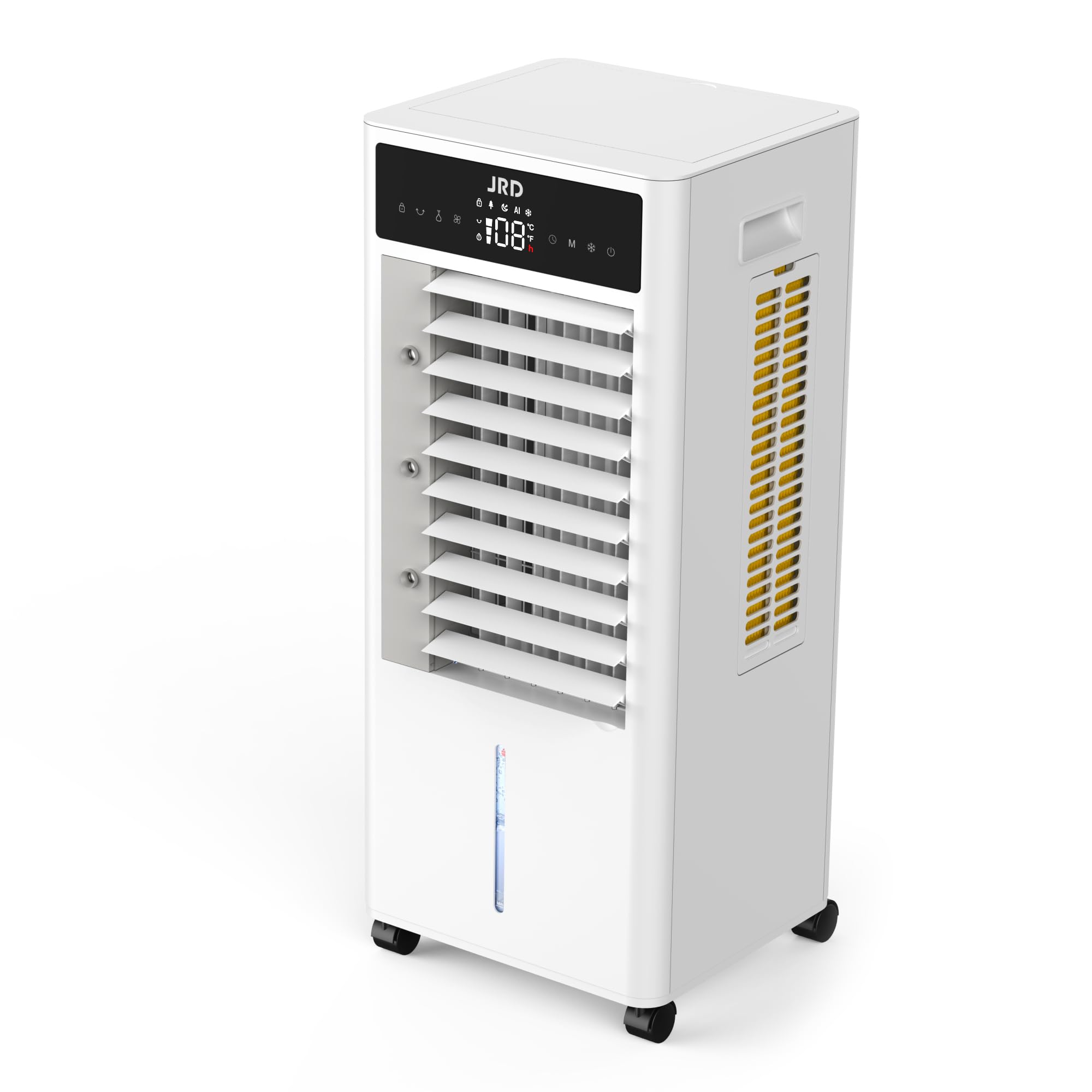
Figure 1: Front view of the JRD FKT007R Portable Air Cooler, showing the control panel and air outlet.
Setup
1. Unboxing and Placement
- Carefully remove the air cooler from its packaging.
- Place the unit on a firm, level surface. Ensure there is adequate space around the unit for proper airflow.
- Attach the wheels to the base of the unit for easy mobility, if not already installed.

Figure 2: Side view of the JRD FKT007R Portable Air Cooler, highlighting its compact design and wheels for portability.
2. Filling the Water Tank
- Open the top cover of the water tank.
- Pour clean water into the tank. Observe the water level indicator on the front of the unit to ensure the water level is between the MIN and MAX marks.
- For enhanced cooling, place the provided ice packs (after freezing) into the top tank.
- Close the top cover securely.
Operating Instructions
The JRD FKT007R features a user-friendly control panel and a remote control for convenient operation.
Control Panel Functions
- Power Button: Turns the unit ON/OFF.
- Cool Button: Activates or deactivates the evaporative cooling function.
- Mode Button: Cycles through Normal, Natural, and Sleep modes.
- Timer Button: Sets the operating timer (e.g., 0.5h, 1h, 2h, 4h).
- Swing Button: Activates or deactivates the automatic oscillation of the internal louvers for wide air distribution.
- Speed Button: Adjusts fan speed (Low, Medium, High).

Figure 3: Close-up of the JRD FKT007R control panel, showing buttons for power, cool, mode, timer, swing, and speed.
Modes of Operation
- Normal Mode: Provides a consistent airflow at the selected fan speed.
- Natural Mode: Simulates natural breeze by varying fan speeds.
- Sleep Mode: Operates at a lower, quieter fan speed and dims the display lights for undisturbed rest.
Oscillation Feature
The unit features automatic horizontal oscillation (60 degrees) and manual vertical adjustment (120 degrees) of the louvers to distribute cool air evenly across the room. Press the "Swing" button to activate or deactivate automatic oscillation. Manually adjust the vertical louvers to direct airflow as desired.
Maintenance
Regular maintenance ensures optimal performance and longevity of your air cooler.
1. Cleaning the Filter
- Unplug the air cooler from the power outlet.
- Locate the air filter at the back of the unit.
- Carefully remove the filter.
- Clean the filter with a soft brush or vacuum cleaner to remove dust and debris. For a deeper clean, rinse with water and mild detergent, then allow it to air dry completely before reinserting.
- Reinsert the dry filter back into the unit.
2. Draining and Cleaning the Water Tank
- Unplug the air cooler.
- Periodically drain any remaining water from the tank to prevent mold or mildew buildup.
- Clean the interior of the water tank with a soft cloth and mild detergent. Rinse thoroughly.
- Ensure the tank is completely dry before storing the unit or refilling.
Troubleshooting
| Problem | Possible Cause | Solution |
|---|---|---|
| Unit does not turn on. | No power, power button not pressed. | Check power cord connection. Press the Power button. |
| No cool air. | Water tank empty, Cool function not activated, high humidity. | Fill water tank. Press the Cool button. Evaporative coolers are less effective in high humidity. |
| Water leakage. | Overfilled water tank, unit not level, internal component issue. | Do not overfill past MAX line. Ensure unit is on a level surface. If leakage persists, discontinue use and contact support. |
| Weak airflow. | Blocked air filter, low fan speed. | Clean the air filter. Increase fan speed using the Speed button. |
| Unusual noise. | Obstruction in fan, unit not stable. | Check for foreign objects. Ensure unit is on a stable surface. |
Specifications
- Brand: JRD
- Model Name: FKT007R
- Material: Plastic
- Mounting Type: Floor Mount
- Reservoir Capacity: 9 Liters (approx. 2.38 Gallons)
- Form Factor: Tower
- Included Components: Portable Air Cooler, Ice Packs
- Noise Level: 30 Decibels
- Number of Speeds: 3
- Item Dimensions (D x W x H): 10"D x 8"W x 28"H
- Power Consumption: Approximately 85 Watts
Warranty
This JRD FKT007R Portable Air Cooler comes with a 1-year warranty from the date of purchase. This warranty covers manufacturing defects under normal use. It does not cover damage resulting from misuse, accident, unauthorized modification, or improper maintenance. Please retain your proof of purchase for warranty claims.
Customer Support
For any questions, technical assistance, or warranty claims, please refer to the contact information provided with your purchase or visit the official JRD website. Our customer support team is available to assist you.