
Sky-Watcher HAC125 DX
Sky-Watcher HAC125 DX 125mm f/2 Minigraph Astrograph User Manual
Brand: Sky-Watcher | Model: HAC125 DX
1. Introduction
The Sky-Watcher HAC125 DX Minigraph Astrograph is a sophisticated, high-speed catadioptric telescope designed for fast, wide-field astrophotography. Its Honders Advanced Catadioptric optical design incorporates hybrid refractive and reflective surfaces to deliver sharp, high-contrast images in a compact and lightweight package. This manual provides essential information for the setup, operation, maintenance, and troubleshooting of your HAC125 DX astrograph.
Key Features:
- 125mm Aperture and f/2 Focal Ratio: Optimized for capturing wide-field, deep-sky astrophotography with exceptional clarity and detail, allowing for faster image acquisition.
- Superior Optical Performance: Honders Advanced Catadioptric design with Radiant Aluminum Quartz coatings (94% reflectivity) ensures diffraction-limited optical quality.
- Enhanced Image Fidelity: Features a Mangin mirror and HTMC corrector coating to minimize aberrations, producing sharp, high-contrast images across a 16mm image circle, suitable for cameras like IMX533 and 585.
- Precision Focusing: Equipped with a primary mirror helical focuser for precise and smooth focus adjustments, crucial for crisp astronomical images.
- Portability: Weighing approximately 8.4 lbs (excluding accessories) and with a compact 15.7" tube length, it is designed for easy transport and setup.
2. What's in the Box
Upon unpacking, ensure all the following components are present:
- Sky-Watcher HAC125 DX 125mm f/2 Minigraph Astrograph
- Clamshell Rings with V-Style Dovetail
- Dual Finderscope Brackets
- 1.25" Adapter
- M42x0.75 Adapter

Figure 2.1: The Sky-Watcher HAC125 DX Astrograph shown with its primary components, including the main optical tube, a separate focusing unit (likely for an older model or an accessory not directly part of the main tube's rear focus), and two adapter rings (1.25" and M42x0.75).
3. Setup Guide
Follow these steps to set up your Sky-Watcher HAC125 DX astrograph for initial use.
3.1 Unpacking and Inspection
- Carefully remove all components from the packaging.
- Inspect each item for any signs of damage during transit. If any damage is found, contact your dealer immediately.
3.2 Attaching Clamshell Rings and Dovetail
The astrograph comes with clamshell rings and a V-style dovetail bar for mounting.
- Open the clamshell rings and place the astrograph tube securely within them.
- Close the rings and tighten the securing screws until the tube is held firmly but without excessive force.
- Ensure the V-style dovetail bar is properly attached to the bottom of the clamshell rings. This bar will connect to your equatorial or alt-azimuth mount.
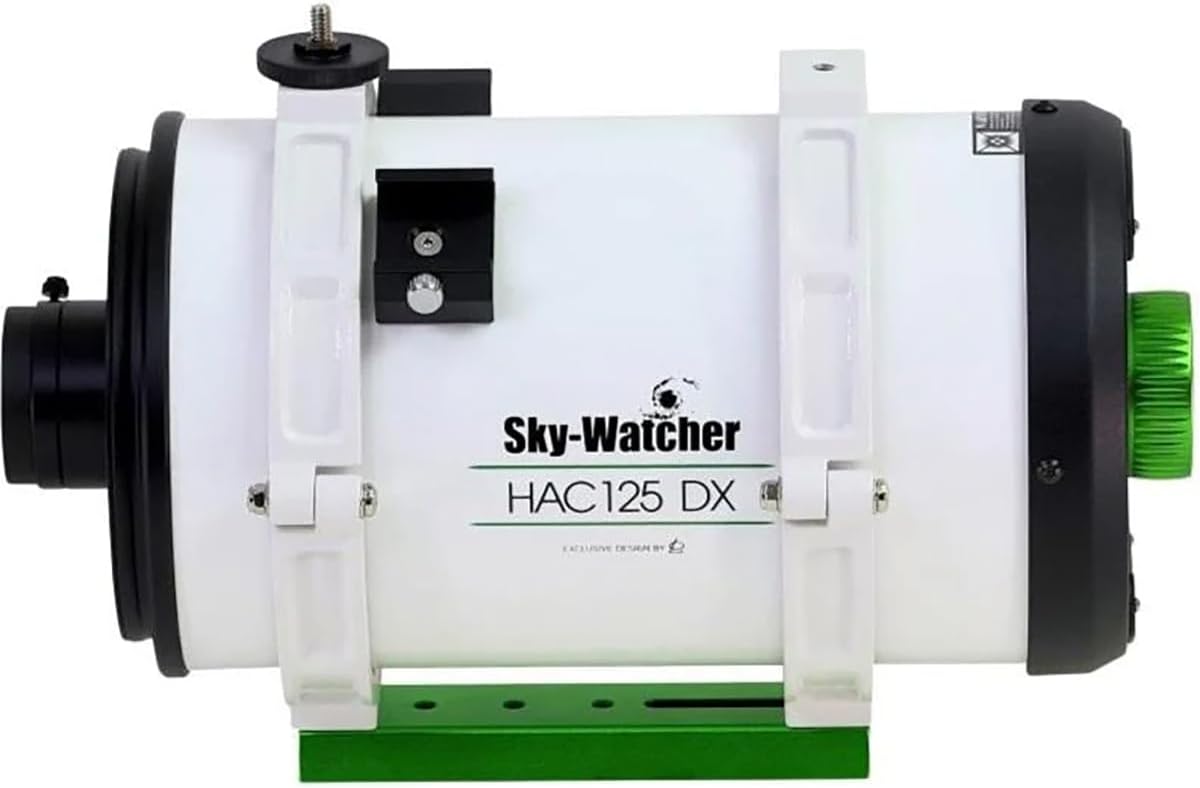
Figure 3.1: Side view of the HAC125 DX astrograph, clearly showing the white clamshell rings securely holding the optical tube and the green V-style dovetail bar attached underneath, ready for mounting.
3.3 Mounting the Astrograph
Attach the astrograph assembly to a compatible astronomical mount (e.g., equatorial or alt-azimuth mount with a Vixen-style saddle).
- Loosen the saddle clamp on your mount.
- Slide the V-style dovetail bar of the astrograph into the mount's saddle.
- Tighten the saddle clamp securely to prevent movement.

Figure 3.2: The Sky-Watcher HAC125 DX astrograph mounted on a carbon fiber tripod with an astronomical mount head, demonstrating a typical setup for astrophotography.
3.4 Attaching Finderscope Brackets and Adapters
The astrograph includes dual finderscope brackets and various adapters for camera connection.
- Attach your preferred finderscope or guide scope to the dual finderscope brackets located on the astrograph tube.
- For camera connection, use the appropriate adapter (1.25" or M42x0.75) to connect your imaging camera to the rear of the astrograph. The HAC125DX features a rear focusing mechanism on the primary mirror, which allows for a wider range of cameras to be used.

Figure 3.3: Front view of the HAC125 DX astrograph, showing the objective lens and the overall compact design. Note the "Fully Multi-Coated" label on the lens housing.
4. Operating Instructions
This section outlines the basic operation of your HAC125 DX astrograph for astrophotography.
4.1 Focusing
The HAC125 DX utilizes a primary mirror helical focuser for precise adjustments.
- Connect your imaging camera to the astrograph using the appropriate adapter.
- Use a focusing mask (e.g., Bahtinov mask) and live view or focusing software with your camera to achieve critical focus.
- Rotate the green focus knob located at the rear of the astrograph to adjust the primary mirror position until stars appear as sharp as possible.
- Due to the fast f/2 focal ratio, precise focusing is crucial. Make small, incremental adjustments.

Figure 4.1: Rear view of the HAC125 DX astrograph, highlighting the prominent green focus knob. This knob controls the primary mirror's position for precise focusing.

Figure 4.2: A closer view of the rear focusing mechanism, showing the green helical focus knob with an infinity symbol, indicating its function for achieving sharp focus.
4.2 Imaging Considerations
The HAC125 DX is designed for fast, wide-field imaging.
- Fast Focal Ratio (f/2): This allows for significantly shorter exposure times compared to slower optics, enabling you to gather more data in less time. In many cases, this speed can reduce or eliminate the need for autoguiding, depending on your mount's tracking accuracy and exposure duration.
- Image Circle: The astrograph provides a 16mm image circle, which is ideal for smaller format cameras such as those utilizing the Sony IMX533 or IMX585 sensors. Ensure your camera's sensor size is compatible with this image circle to avoid vignetting or field curvature issues.
- Camera Compatibility: The rear focusing mechanism enhances compatibility with a wider range of cameras. Ensure proper back focus distance is maintained for optimal performance with your specific camera and accessories (e.g., filter wheels, OAGs).
5. Maintenance and Care
Proper care and maintenance will ensure the longevity and optimal performance of your astrograph.
5.1 Cleaning Optics
The optical surfaces (front lens and internal mirrors) are delicate and require careful handling.
- Dust Removal: Use a soft camel hair brush or a can of compressed air (held upright to prevent propellant discharge) to gently remove loose dust particles.
- Smudges/Fingerprints: For stubborn smudges, use a specialized optical cleaning solution and lens tissue. Apply a small amount of solution to the tissue, not directly to the lens, and gently wipe in a circular motion from the center outwards. Avoid excessive pressure.
- Never touch optical surfaces with bare fingers.
- Avoid using abrasive cloths or household cleaners.
5.2 General Care and Storage
- Always replace the dust caps on both ends of the astrograph when not in use.
- Store the astrograph in a cool, dry place, away from direct sunlight and extreme temperature fluctuations.
- If moving the astrograph from a cold to a warm environment, allow it to acclimate slowly to prevent condensation. If condensation forms, let it evaporate naturally; do not wipe it.
- Keep the astrograph away from sources of vibration or impact.
6. Troubleshooting
This section addresses common issues you might encounter and their potential solutions.
| Problem | Possible Cause | Solution |
|---|---|---|
| Images are blurry or out of focus. | Incorrect focus setting. | Adjust the primary mirror helical focuser carefully. Use a Bahtinov mask or focusing software for precise focus. Ensure your camera's back focus is correctly set. |
| Vignetting (dark corners) in images. | Camera sensor larger than 16mm image circle; incorrect adapter or spacing. | Ensure your camera's sensor is compatible with the 16mm image circle. Check all adapters and spacing for proper alignment. Some vignetting may be correctable in post-processing. |
| Stars appear elongated or trailed. | Mount tracking error; insufficient polar alignment; loose mount connection. | Verify your mount's polar alignment. Ensure all mount clutches and dovetail clamps are securely tightened. Consider using autoguiding for longer exposures if necessary, though the f/2 ratio often mitigates this need. |
| Dust or spots visible in images. | Dust on camera sensor or astrograph optics. | Clean your camera sensor according to its manufacturer's instructions. Gently clean the astrograph optics as described in the Maintenance section. Take flat frames during imaging sessions to calibrate out dust spots. |
7. Specifications
Detailed technical specifications for the Sky-Watcher HAC125 DX 125mm f/2 Minigraph Astrograph.
| Feature | Detail |
|---|---|
| Brand | Sky-Watcher |
| Model | HAC125 DX |
| Objective Lens Diameter | 125 Millimeters |
| Focal Ratio | f/2 |
| Optical Design | Honders Advanced Catadioptric (HAC) |
| Image Circle | 16mm |
| Focus Type | Manual Focus (Primary Mirror Helical Focuser) |
| Product Dimensions | 15.5"D x 6.5"W x 6.5"H (15.7" tube length) |
| Item Weight | 12 Pounds (approx. 8.4 lbs for optical tube only) |
| Manufacturer | Sky-Watcher |
| UPC | 810098970648 |
8. Warranty and Support
For warranty information and technical support, please refer to the official Sky-Watcher website or contact your authorized dealer.
Sky-Watcher Official Website: www.skywatcherusa.com
It is recommended to register your product upon purchase to facilitate any future warranty claims or support requests.
Related documentsHAC125 DX


Ask a question about this manual
Ask about setup, troubleshooting, compatibility, parts, safety, or missing instructions. Manuals+ will review the question and use this page’s manual context to help answer it.