
1. Introduction
The GUEVWES ZTD39 USB Condenser Microphone is designed to provide studio-quality audio for various applications including PC gaming, podcasting, recording, singing, and streaming. This microphone features built-in noise reduction, adjustable reverb modes, real-time monitoring, and customizable RGB lighting effects. Its plug-and-play functionality ensures easy setup across multiple devices.

Image: The GUEVWES ZTD39 USB Condenser Microphone shown in different usage scenarios, highlighting its versatility for gaming, streaming, and vocal recording.
2. Package Contents
Please verify that all items listed below are included in your package:
- 1 x GUEVWES ZTD39 USB Condenser Microphone
- 1 x Pop Filter
- 1 x 2m Type-C Data Cable
- 1 x Type-C OTG Adapter
- 1 x Instruction Manual

Image: A complete overview of the GUEVWES ZTD39 USB Condenser Microphone package contents, neatly arranged.
3. Setup
- Assemble the Microphone Stand: Attach the microphone to its included desktop stand. Ensure it is securely fastened.
- Attach Pop Filter: Gently clip the pop filter onto the microphone. The pop filter helps to reduce plosive sounds (e.g., 'p' and 'b' sounds) for clearer audio.
- Connect USB-C Cable: Plug the Type-C end of the provided 2m data cable into the USB-C port at the bottom of the microphone.
- Connect to Device: Plug the other end of the USB-C cable into an available USB port on your computer (Windows/Mac), PS4/PS5, or laptop. For Android phones, use the included Type-C OTG adapter if necessary.
- Device Recognition: The microphone is plug-and-play and should be automatically recognized by your operating system without requiring additional drivers.

Image: The GUEVWES ZTD39 USB Condenser Microphone assembled with its stable base and pop filter, ready for use.
4. Operating Instructions
4.1 Basic Functions
- Mute Button: Tap the top of the microphone to instantly mute/unmute. The LED ring will indicate the mute status.
- Volume Control: Rotate the volume knob located on the microphone to adjust the audio input level.
4.2 RGB Lighting Effects
The microphone features 10 customizable RGB lighting modes. Long press the volume knob to cycle through different RGB modes, including rainbow, breathing, gradient, or solid colors (blue, pink, purple). The lights can also be turned off for a minimalist setup.

Image: The GUEVWES ZTD39 USB Condenser Microphone displaying its various RGB lighting options.
4.3 Noise Reduction
Activate the built-in noise reduction feature by long pressing the designated button. A green LED will illuminate to indicate that the noise filter is active, providing crisp and clear vocals by minimizing background noise.

Image: The GUEVWES ZTD39 USB Condenser Microphone highlighting its noise reduction feature with a green LED indicator.
4.4 Reverb Modes
The microphone offers 3 adjustable reverb modes to enhance your audio. Switch between these modes to find the perfect effect for your podcasting, recording, gaming, or karaoke needs. A blue light indicates when the echo effect is off.
4.5 Real-time Monitoring
Utilize the real-time monitoring feature by plugging headphones into the dedicated port on the microphone. This allows you to hear your voice with zero delay, ensuring optimal audio quality during live sessions or recordings.
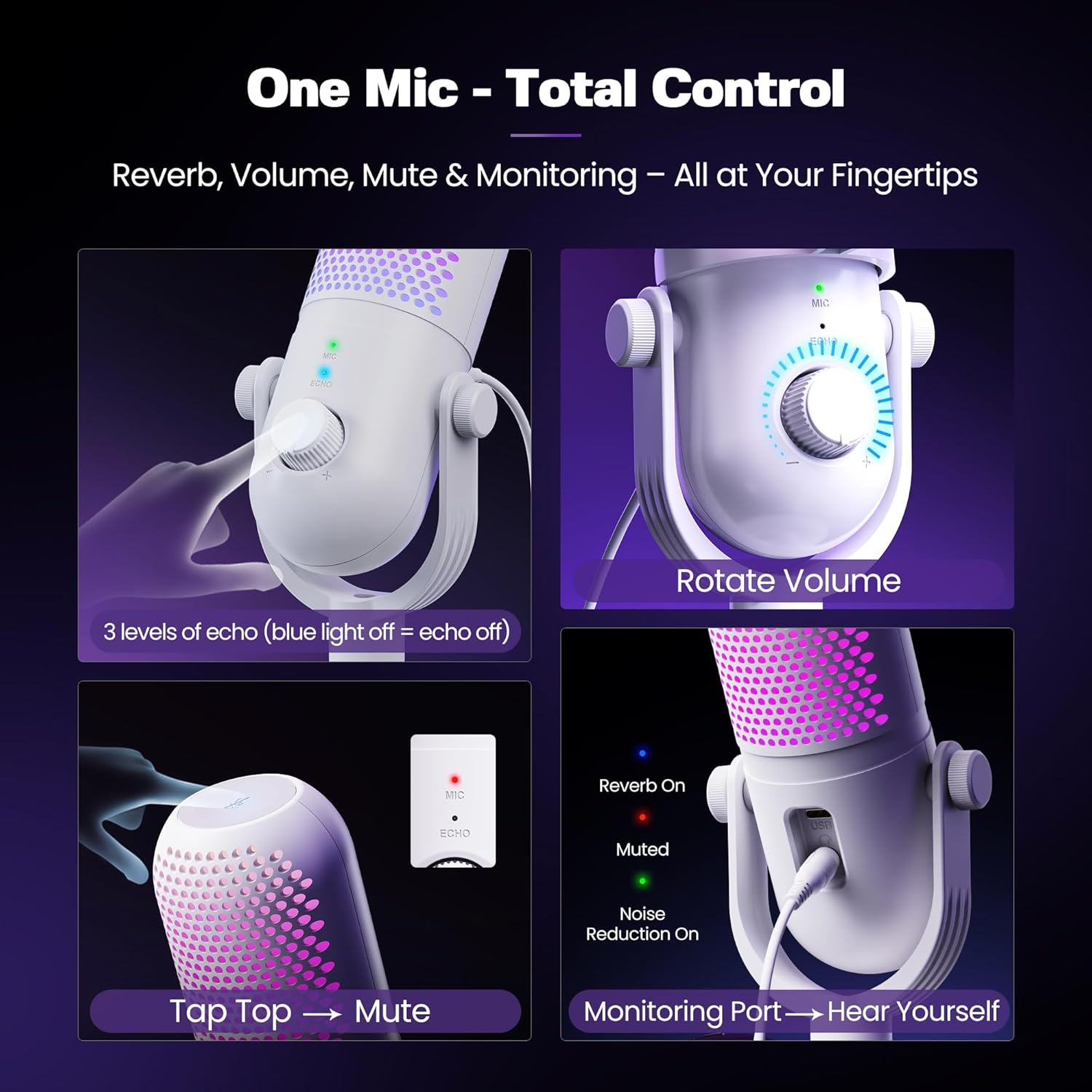
Image: Detailed view of the microphone's controls for mute, volume, reverb, and the real-time monitoring port.
5. Connectivity & Compatibility
The GUEVWES ZTD39 microphone offers broad compatibility and plug-and-play functionality, eliminating the need for driver installation.
- Connectivity: USB Type-C
- Compatible Devices: Windows PCs (10/11), Mac, PS4, PS5, Laptops, and Android phones.
- Note: Some Android phones may require the included Type-C OTG adapter for full functionality.

Image: The GUEVWES ZTD39 USB Condenser Microphone connected to a desktop setup, highlighting its compatibility with various operating systems and devices.
6. Maintenance
To ensure the longevity and optimal performance of your GUEVWES ZTD39 microphone, follow these maintenance guidelines:
- Cleaning: Use a soft, dry cloth to wipe the microphone's exterior. Avoid using liquid cleaners or abrasive materials.
- Pop Filter: The pop filter can be gently cleaned with a damp cloth if necessary. Ensure it is completely dry before reattaching.
- Storage: Store the microphone in a cool, dry place away from direct sunlight and extreme temperatures when not in use.
- Handling: Handle the microphone with care to avoid dropping or impacting it, which could damage internal components.
7. Troubleshooting
If you encounter issues with your GUEVWES ZTD39 microphone, please refer to the following common solutions:
- Microphone Not Recognized:
- Ensure the USB-C cable is securely connected to both the microphone and your device.
- Try connecting to a different USB port on your device.
- Restart your computer or device.
- Verify your device's sound settings to ensure the GUEVWES microphone is selected as the input device.
- Poor Sound Quality / Background Noise:
- Ensure the pop filter is correctly attached to reduce plosive sounds.
- Activate the noise reduction feature (long press button, green LED).
- Adjust the microphone's volume knob to an appropriate level. Avoid setting it too high, which can pick up excessive background noise.
- Position the microphone 6-12 inches away from your mouth for optimal sound capture.
- RGB Lights Not Working:
- Ensure the microphone is properly connected and powered on.
- Long press the volume knob to cycle through RGB modes; ensure it's not set to the 'off' mode.
8. Specifications
| Feature | Detail |
|---|---|
| Material | Plastic |
| Signal-to-Noise Ratio | 96 dB |
| Number of Channels | 8 |
| Item Weight | 1.06 pounds (480 Grams) |
| Product Dimensions (L x W x H) | 3.86 x 3.86 x 9.06 inches |
| Item Model Number | ZTD39 |
| Connectivity Technology | USB |
| Connector Type | USB Type-C |
| Special Feature | 1-Touch Recording |
| Compatible Devices | MAC, PS4/5, Windows |
| Color | White |
9. Warranty & Support
GUEVWES offers a Free Warranty Extension to 36 Months for your ZTD39 microphone. To register for the extended warranty:
- Get your order number on Amazon (look for 3 numbers-7 numbers).
- Send the order number to our service team.
- We will register your extended warranty within 48 hours.
For product specialists assistance and free technical support, please contact us at: SERVICE@GUEVWES.COM
10. Official Product Video
Watch this video for a detailed review and demonstration of the GUEVWES ZTD39 USB Condenser Microphone's features and sound quality.
Video: A comprehensive review of the GUEVWES ZTD39 USB Condenser Microphone, demonstrating its capabilities and sound performance.