
1. About This Product
The TEMAI 15W MagSafe Wireless Car Charger and Phone Holder is specifically designed for the Tesla Model 3 (2024-2025 Highland). It integrates a secure magnetic attachment with 15W Qi2 wireless charging, enhancing your driving experience with convenience and safety.
Key features include a driver-side air vent mount with sliding adjustment for optimal viewing, a strong magnetic hold to keep your phone stable, and silicone pads to prevent scratches. It supports iPhone 12-16 series directly and other Qi-compatible phones with the included magnetic ring. Powered by USB-C, it offers fast 15W Qi2 charging for uninterrupted navigation, calls, and music.
2. Package Contents

Image 2.1: Complete mounting kit showing the MagSafe mount, flexible base, USB-C cable, and two magnetic rings.
- 1 × Wireless Charging Phone Mount
- 1 × USB-C Charging Cable
- 2 × Magnetic Ring
3. Setup and Installation
Follow these steps to correctly install your TEMAI Wireless Charging Phone Mount:
- Prepare the Mount: Take out the magnetic ring and the base from the package. Insert the nut onto the magnetic ring and tighten it securely.
- Attach to Screen: Press the mounting clip onto the screen edge of your Tesla Model 3 Highland. While holding it in place, tighten the nut clockwise until the mount is firmly secured.
- Adjust Viewing Angle: Loosen the swivel arm nut, adjust the magnetic head to your desired viewing angle, then tighten the nut securely to lock it in place.
- Connect Power: Connect the provided USB-C charging cable from your Tesla's USB port to the mount.
- Phone Attachment: For iPhone 12-16 series, simply snap your MagSafe-compatible phone onto the magnetic mount. For Android and other phones, attach one of the included magnetic rings to your phone or phone case before mounting.

Image 3.1: Step-by-step visual guide for the easy, tool-free installation of the mount and connecting the USB-C power.
Video 3.1: A detailed video demonstrating the installation process of the Tesla phone holder, including attaching the magnetic ring, securing the base, and adjusting the viewing angle.
4. Operating Instructions
The TEMAI phone mount offers flexible positioning and reliable charging:
- Magnetic Attachment: Simply bring your MagSafe-compatible phone (or phone with magnetic ring) close to the mount, and it will securely snap into place.
- Wireless Charging: Once attached and powered, the mount will automatically begin 15W Qi2 wireless fast charging. The LED ring will light up to indicate active charging.
- Flexible Positioning: Utilize the slideable design to move your phone left or right along the vent rail, allowing for optimal driver or passenger viewing. Remember to avoid placing the mount at the extreme ends of the vent (leave about 4 inches from either edge) for best stability.
- LED Ring: The charging status ring lights up when active and dims automatically at night to prevent glare, providing an ambient glow.

Image 4.1: The phone mount installed on the Tesla dashboard, illustrating how the phone can be positioned for the driver's view.
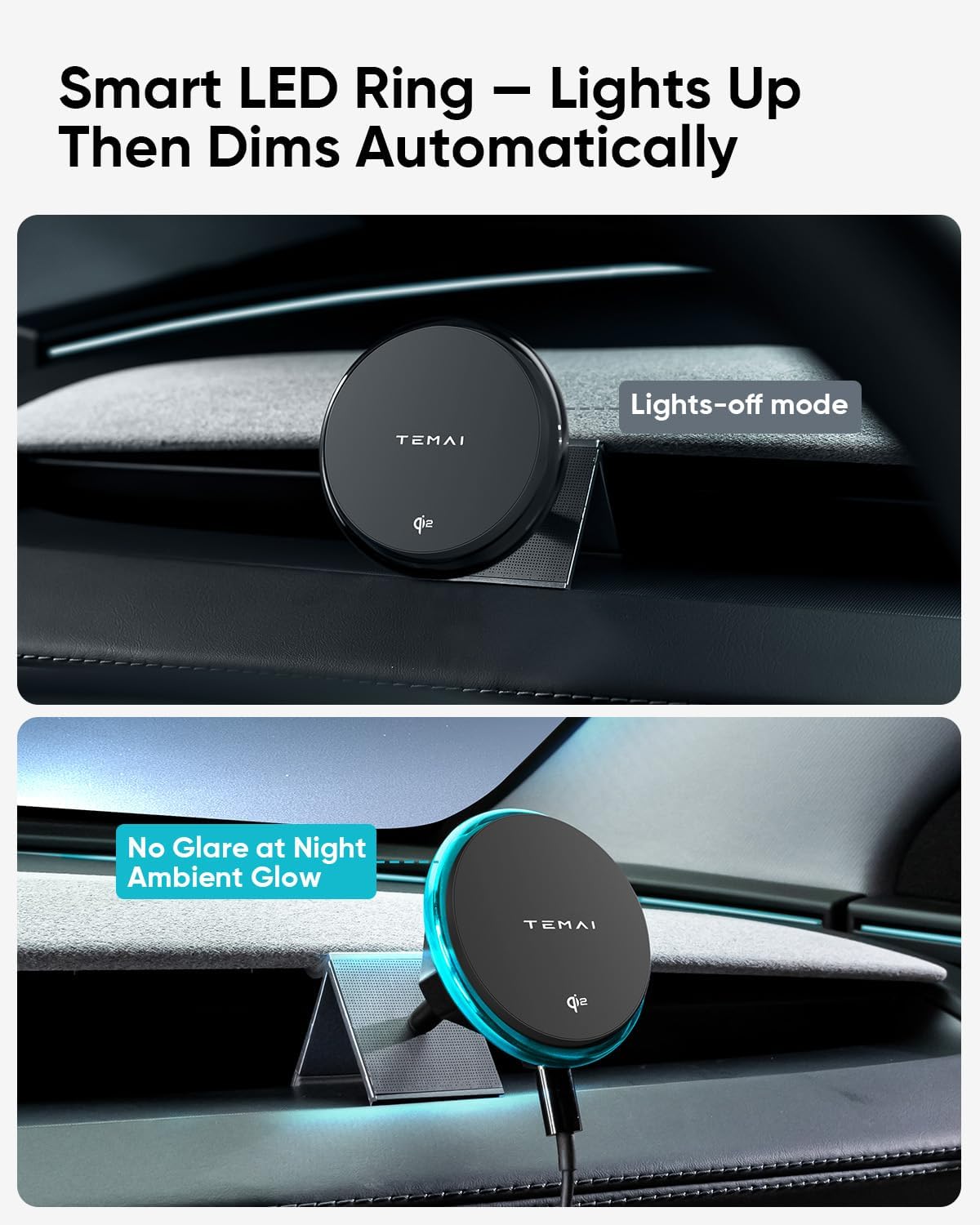
Image 4.2: The mount's slideable design allows for easy adjustment across the vent rail, catering to both driver and passenger viewing preferences.
Video 4.1: This video illustrates how to use the three switches to adjust the phone holder for optimal positioning and stability.
5. Key Features
- Custom-fit Design: Engineered specifically for Tesla Model 3 2024 & 2025 (Highland), attaching seamlessly to the horizontal dash vent without blocking airflow or damaging trim.
- 15W Wireless Fast Charging: Supports Qi2-certified 15W wireless charging. MagSafe-compatible with iPhone 12–15 series. For other phones, use with a magnetic case or metal ring (2Pcs included).
- Slideable Mount for Flexible Positioning: Slide the mount left or right across the vent rail to suit driver or passenger viewing. Ideal for navigation or co-pilot screen experience.
- Strong Magnetic Hold: Securely locks your phone in place with powerful built-in magnets. One-hand snap-on/snap-off design ensures easy and safe use while driving.
- Scratch-Free Protection: Anti-slip silicone pads on the clamp and phone surface prevent scratches and protect your Tesla’s interior finish.
- USB-C Powered with Included Cable: Comes with a USB-C charging cable that connects from your Tesla’s USB port to the mount. Installs quickly without affecting screen visibility or vent function.
- LED Ring with Smart Auto-Off & Cooling Vent Design: Charging status ring lights up when active and dims automatically. 36 rear vents enhance heat dissipation and keep charging stable even on long drives.

Image 5.1: The smart LED ring illuminates when charging and automatically dims at night for a subtle ambient glow.

Image 5.2: The mount features 36 cooling vents to ensure stable and efficient charging, even during extended use.

Image 5.3: The silicone-padded clamp ensures a secure grip without scratching your Tesla's interior or causing rattles.
6. Specifications
| Mount Type | Slideable Air Vent Mount |
| Charging Output | 15W Qi2 Wireless Fast Charging |
| Input | USB-C |
| Compatible Devices | Magnetic phones (iPhone 12-16 series) or other Qi-compatible smartphones with adhesive magnetic rings. |
| Material | ABS + Silicone Protection Pads |
| Item Weight | 5.9 ounces |
| Package Dimensions | 6.06 x 3.46 x 2.2 inches |
7. Maintenance
To ensure the longevity and optimal performance of your TEMAI Wireless Charging Phone Mount, please follow these maintenance guidelines:
- Cleaning: Wipe the mount and silicone pads with a soft, damp cloth. Avoid using harsh chemicals or abrasive cleaners, as these can damage the materials.
- Cable Care: Handle the USB-C charging cable gently. Avoid sharp bends or excessive pulling, which can damage the cable or connectors.
- Magnetic Ring (if applicable): If using adhesive magnetic rings, ensure they are securely attached to your phone or case. Replace if they show signs of wear or reduced adhesion.
- Storage: If removing the mount for an extended period, store it in a cool, dry place away from direct sunlight and extreme temperatures.
8. Troubleshooting
If you encounter any issues with your TEMAI Wireless Charging Phone Mount, please refer to the following common troubleshooting tips:
- Phone Not Charging:
- Ensure the USB-C cable is securely connected to both the mount and your Tesla's USB port.
- Verify that your phone is correctly aligned with the magnetic charging area on the mount.
- If using a non-MagSafe phone, confirm the magnetic ring is properly attached and aligned for wireless charging.
- Check if your phone case is too thick or contains metal that interferes with wireless charging.
- Mount Feels Loose:
- Re-tighten the nuts on the mounting clip and swivel arm to ensure a firm grip on the screen edge and desired viewing angle.
- Ensure the mount is not positioned at the extreme ends of the vent where stability might be reduced.
- Phone Not Holding Securely:
- Confirm your phone or case is MagSafe-compatible or has a securely attached magnetic ring.
- Clean the magnetic surface of the mount and your phone/ring to ensure no debris is interfering with the magnetic connection.
- LED Ring Not Lighting Up:
- Check the power connection of the USB-C cable.
- Ensure your phone is properly placed on the mount and charging is initiated.
If these steps do not resolve the issue, please contact TEMAI customer support for further assistance.
9. Warranty and Support
TEMAI products are designed for quality and durability. For information regarding warranty coverage, product registration, or technical support, please refer to the warranty card included in your package or visit the official TEMAI website.
For direct assistance, you may contact TEMAI customer service through the contact information provided on the product packaging or the brand's official online store. Please have your product model number (TEMAI-TeslaPhoneMount-Model3) and purchase date ready when contacting support.
Online Support: Visit the TEMAI Store on Amazon