
1. Introduction
The Cleyver DECT Office Duo is an ideal headset for professionals seeking comfort, sound quality, and freedom of movement. Its dual-ear design with leatherette ear cushions ensures effective passive isolation and a comfortable fit for all-day wear. Thanks to the noise-cancelling microphone and wideband audio technology, calls remain clear even in noisy environments.
This headset features a wireless range of up to 150 meters and up to 8 hours of talk time, supporting your workday without interruptions. Intuitive controls (volume, answer/end call, mute) are directly accessible on the headset or the base. Compatible with most desk phones on the market and Electronic Hook Switch (EHS) systems, it integrates easily into a business environment.
2. Package Contents
Please check the package for the following items:
- Cleyver DECT Office Duo Headset
- Base Station
- Connection Cable (e.g., power adapter, phone connection cable)
3. Product Overview
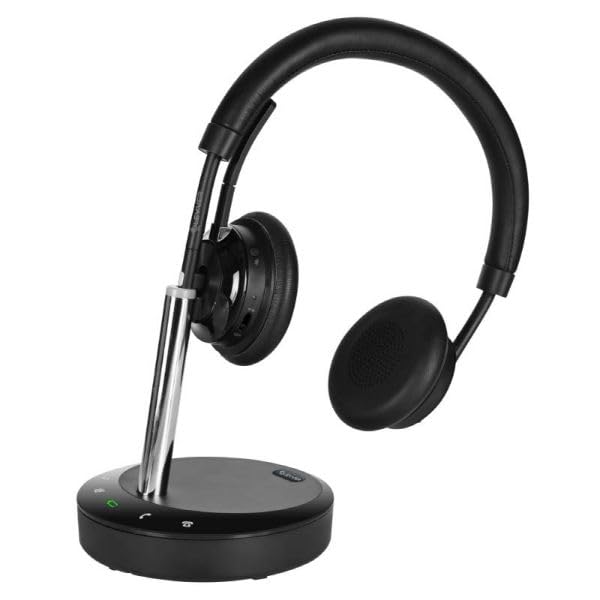
Figure 1: Cleyver DECT Office Duo Headset. This image shows the complete headset with its dual earcups, adjustable headband, and microphone boom arm.
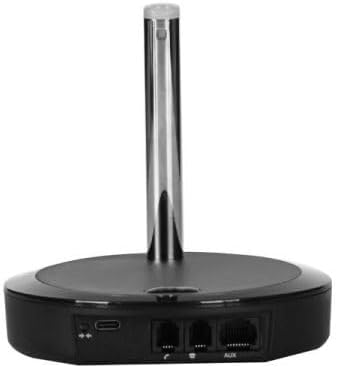
Figure 2: Cleyver DECT Office Duo Base Station. This image displays the rear view of the base station, highlighting the various connection ports for power and telephone lines.
Key Features:
- Comfortable Dual-Ear Headset: Soft headband and leatherette ear cushions for comfortable all-day wear.
- HD Stereo Audio: Wideband audio and noise-cancelling microphone for clear conversations, even in open-plan offices.
- Direct Controls: Answer/end call, volume, and mute accessible from the headset or base for seamless use.
- Wireless Range up to 150m: Move freely within your premises while staying connected.
- Compatible with Desk Phones and EHS: Works with most desktop phones and Electronic Hook Switch systems.
4. Setup
- Connect the Base Station: Connect the power adapter to the base station and plug it into a power outlet.
- Connect to Telephone: Use the provided telephone cable to connect the base station to your desk phone. Refer to your phone's manual for specific port locations. For EHS compatibility, ensure proper EHS cable connection if applicable.
- Charge the Headset: Place the headset onto the base station's charging cradle. Ensure the charging indicator light on the base station illuminates, indicating proper contact. Allow the headset to fully charge before first use (approximately 2-3 hours).
- Pairing (if necessary): The headset and base are usually pre-paired. If pairing is required, consult the base station's pairing button instructions.
5. Operating Instructions
5.1 Basic Call Functions
- Answer/End Call: Press the dedicated call control button on the headset or base station.
- Adjust Volume: Use the volume up/down buttons on the headset or the volume controls on the base station.
- Mute Microphone: Press the mute button on the headset or base station to temporarily disable the microphone. Press again to unmute.
5.2 Wearing the Headset
- Adjust the headband for a comfortable fit over your head.
- Position the microphone boom arm approximately two fingers' width from your mouth for optimal voice pickup.
6. Maintenance
- Cleaning: Use a soft, dry cloth to clean the headset and base station. Do not use liquid cleaners or aerosols.
- Storage: When not in use, store the headset on its base station to ensure it remains charged and ready.
- Battery Care: To prolong battery life, avoid fully discharging the headset frequently. Charge it regularly.
7. Troubleshooting
- No Audio/Poor Sound Quality:
- Ensure the headset is charged and properly seated on the base.
- Check all cable connections between the base and the phone.
- Verify the headset is within the operational range of the base station (up to 150m).
- Adjust the volume on both the headset and your desk phone.
- Headset Not Pairing:
- Refer to the pairing instructions in Section 4.
- Ensure no other DECT devices are causing interference.
- Microphone Not Working:
- Check if the microphone is muted.
- Ensure the microphone boom arm is correctly positioned.
8. Specifications
| Feature | Specification |
|---|---|
| Brand | Cleyver |
| Model Name | ODHW25V2 |
| Connectivity Technology | Wireless (DECT) |
| Form Factor | On-ear |
| Noise Control | Environmental Noise Cancellation |
| Color | Black |
| Wireless Range | Up to 150 meters |
| Talk Time | Up to 8 hours |
| Included Components | Cable |
| Age Range (description) | Adults |
| Number of items | 1 |
9. Warranty and Support
This product comes with a standard manufacturer's warranty. For specific warranty terms and conditions, please refer to the documentation provided with your purchase or contact Cleyver customer support.
For technical assistance, troubleshooting, or further inquiries, please visit the official Cleyver website or contact their customer service department. Keep your purchase receipt and model number (ODHW25V2) handy when seeking support.