
Introduction
This manual provides detailed instructions for the installation, operation, and maintenance of your CANEST Smart Toilet FC-001P. Please read this manual thoroughly before installation and use to ensure proper function and safety. Keep this manual for future reference.
Safety Precautions
Always follow basic safety precautions when using electrical products, especially when children are present. To reduce the risk of electrocution, fire, or injury, please observe the following:
- Do not handle the electrical plug with wet hands.
- Do not immerse the product in water or other liquids.
- Unplug the product from the outlet when not in use or before cleaning.
- Do not allow children to play with the appliance.
- Ensure proper grounding for electrical connections.
- Do not attempt to repair or modify the product yourself. Contact qualified service personnel for assistance.
Product Overview
The CANEST Smart Toilet FC-001P is designed to provide enhanced comfort and hygiene with its integrated bidet features and smart functionalities. Key components include:
- Integrated Bidet with adjustable warm water and self-cleaning nozzle.
- Heated Seat with adjustable temperature settings.
- Foot Sensor for touchless flushing.
- Dual-Flush System (1.1/1.6 GPF) for water efficiency.
- Night Light for gentle illumination in the dark.
- Wireless Remote Control for convenient operation.
- Automatic Deodorization system.
- Soft-Close Lid and Seat.
- ADA Comfort Height (17 inches).
- Built-in Tank for zero water pressure flushing.

Figure 1: CANEST Smart Toilet FC-001P with its wireless remote control and foot sensor feature highlighted.
Setup and Installation
Installation should be performed by a qualified professional to ensure compliance with local plumbing and electrical codes. The product includes an instruction manual and mounting kits for installation.
Pre-Installation Checklist:
- Verify rough-in dimensions (12 inches recommended).
- Ensure a 120V electrical outlet is available near the installation area.
- Confirm water supply line is accessible.
Included Components:
- One CANEST Smart Toilet unit
- Instruction Manual
- Mounting Kits
- Remote Control
- Angle Valve
- Wax Ring
- Spare Battery Box

Figure 2: Product dimensions and a list of included installation components.
Operating Instructions
Your CANEST Smart Toilet offers a variety of features for a comfortable and hygienic experience. All functions can be controlled via the wireless remote or integrated sensors.
1. Foot Sensor Operation
The toilet features a touchless foot sensor for flushing. Simply tap the sensor with your foot to activate the flush. This enhances hygiene by eliminating the need to touch the toilet directly.

Figure 3: Illustration of foot sensor flushing and off-seat auto flushing.
2. Bidet Functions
The integrated bidet offers multiple wash modes with adjustable warm water. Use the remote control to select your preferred settings.
- Rear Wash: For posterior cleansing.
- Lady Wash: Gentle wash for feminine hygiene.
- Oscillating Cleanse: Nozzle moves back and forth for wider coverage.
- Adjustable Water Temperature: Select from various warm water settings (e.g., 86°F to 104°F).
- Self-Cleaning Nozzle: The nozzle automatically cleans itself before and after each use. The nozzle is also removable for manual cleaning.
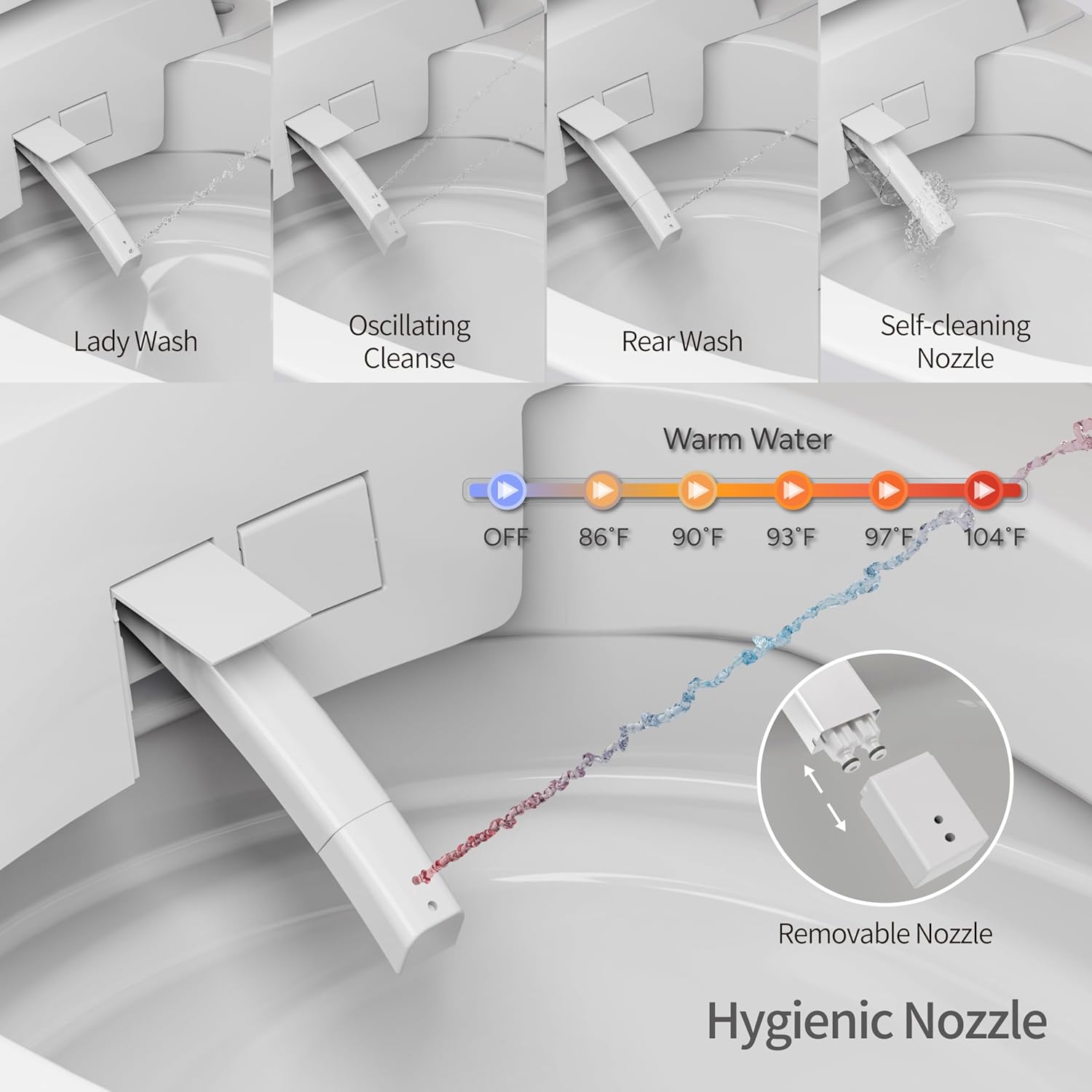
Figure 4: Bidet nozzle functions and warm water temperature options.
3. Heated Seat
The seat can be heated to your desired comfort level. Adjust the seat temperature using the remote control.

Figure 5: The elongated heated seat with temperature controls.
4. Warm Air Dryer
After washing, use the warm air dryer function to complete your cleansing experience. Temperature is adjustable.

Figure 6: Warm air dryer mechanism and temperature options.
5. Dual Auto Flush Options
The toilet offers both single flush (1.28 GPF) and dual flush (1.6/1.1 GPF) options to optimize water usage. The system automatically detects usage and flushes accordingly, or you can select full or half flush via the remote.

Figure 7: The 1000g MaP flushing score, indicating powerful and efficient flushing.
6. Night Light
A built-in night light provides soft illumination, guiding you in the dark without needing to turn on bright bathroom lights.

Figure 8: The night light feature providing gentle illumination.
7. Automatic Deodorization
The smart toilet includes an automatic deodorization system that activates after each use, keeping your bathroom fresh.

Figure 9: Automatic deodorization system in action.
8. Remote Control
The wireless remote control allows you to manage all features, including water temperature, seat temperature, wash modes, and flush options. The LED display on the toilet provides real-time information.

Figure 10: Wireless remote control and LED display for function management.
9. ADA Comfort Height
With a 17-inch ADA compliant comfort height seat, this toilet is designed for ease of use for all individuals, including seniors and those with mobility challenges.
Figure 11: ADA compliant comfort height for improved accessibility.
10. Zero Water Pressure Flushing
Equipped with a built-in tank, the CANEST Smart Toilet can operate effectively even with zero water pressure, making it suitable for households with low water pressure.

Figure 12: Built-in tank for zero water pressure flushing.
11. Blackout Flushing System
The toilet is designed with a blackout flushing system, ensuring it can still flush during power outages.

Figure 13: Blackout flushing system for continued operation during power interruptions.
12. SIAA Antibacterial Seat
The toilet features an SIAA antibacterial seat with an ultra-smooth base glaze and silver ionized composite glaze, promoting a healthy and sanitary bathroom environment.
Figure 14: SIAA antibacterial seat for enhanced hygiene.
Official Product Videos:
Video 1: Overview of the CANEST Smart Toilet's features, including the auto-opening lid, remote control, and temperature display. This video demonstrates the product's ease of use and various smart functions.
Video 2: Demonstration of the CANEST Smart Toilet's foot sensor flushing and remote control operation. This video highlights the touchless convenience and powerful flushing capabilities.
Maintenance
Regular cleaning and maintenance will ensure the longevity and optimal performance of your CANEST Smart Toilet.
- Cleaning: Use mild, non-abrasive cleaners. Avoid harsh chemicals, bleach, or abrasive pads that can damage the ceramic or plastic surfaces.
- Nozzle Cleaning: The bidet nozzle is self-cleaning. For deeper cleaning, it can be removed as shown in Figure 4.
- Filter Maintenance: Periodically check and clean the water inlet filter to prevent blockages and maintain water flow.
- Power Off: Always unplug the toilet from the power outlet before performing any maintenance or cleaning.
Troubleshooting
If you encounter any issues with your CANEST Smart Toilet, refer to the following common troubleshooting steps:
| Problem | Possible Cause | Solution |
|---|---|---|
| No power/display off | Power cord unplugged, circuit breaker tripped. | Check power connection, reset circuit breaker. |
| Bidet not spraying water | Water supply valve closed, nozzle blocked, water filter clogged. | Open water supply valve, clean nozzle, clean water filter. |
| Heated seat not working | Temperature setting too low, power saving mode active. | Adjust seat temperature via remote, disable power saving mode. |
| Flushing issues | Low water pressure (unlikely with built-in tank), sensor obstruction. | Ensure foot sensor is clear, check water supply. |
| Remote control not responding | Batteries low or dead, remote out of range. | Replace batteries, ensure remote is within operating range. |
If the problem persists after attempting these solutions, please contact CANEST customer support.
Specifications
| Feature | Detail |
|---|---|
| Brand | CANEST |
| Model Number | FC-001P |
| Product Dimensions | 28"D x 16.7"W x 19.9"H |
| Material | Ceramic (Toilet), Polypropylene (PP) (Seat) |
| Item Weight | 96 Pounds |
| Installation Type | Floor Mounted |
| Shape | Oval |
| Flushing Mode | Siphonic Jet |
| Drainage Method | Down-drain |
| Dual Flush Options | 1.28 GPF (Single), 1.6/1.1 GPF (Dual) |
| MaP Flush Score | 1000g |
| Comfort Height | 17 inches (ADA Compliant) |
| Rated Voltage | 120V |
| Certifications | UL, CUPC Listed |
Warranty and Support
CANEST provides a 1-year warranty on all mechanical parts and the bidet seat. For any issues regarding installation, function, or quality, please contact CANEST customer support. We aim to respond within 24 hours and offer free replacement for damaged or defective units (proof such as photos, videos, and product barcode may be required for faster service).
For further assistance, please visit the CANEST Store on Amazon.

