
1. Introduction
Thank you for choosing the SCS Sentinel WaterProg Outdoor Irrigation Timer. This device is designed to automate your garden or lawn watering, ensuring efficient water usage and healthy plant growth. Please read this manual carefully before installation and operation to ensure proper use and to maximize the lifespan of your product.
2. Safety Precautions
- This device is designed for outdoor use with cold water only. Do not use with hot water or other liquids.
- Ensure all connections are tight to prevent leaks and water damage.
- Do not immerse the timer in water. While weather-resistant (IP55 rated), it is not submersible.
- Keep out of reach of children.
- Replace batteries with new ones of the correct type (2 x AA 1.5V) when indicated by the low battery icon. Do not mix old and new batteries or different battery types.
- Dispose of used batteries responsibly according to local regulations.
3. Product Overview
The SCS Sentinel WaterProg is a compact, automatic irrigation timer designed for easy installation and efficient water management. Its robust, weather-resistant casing makes it ideal for various outdoor environments.
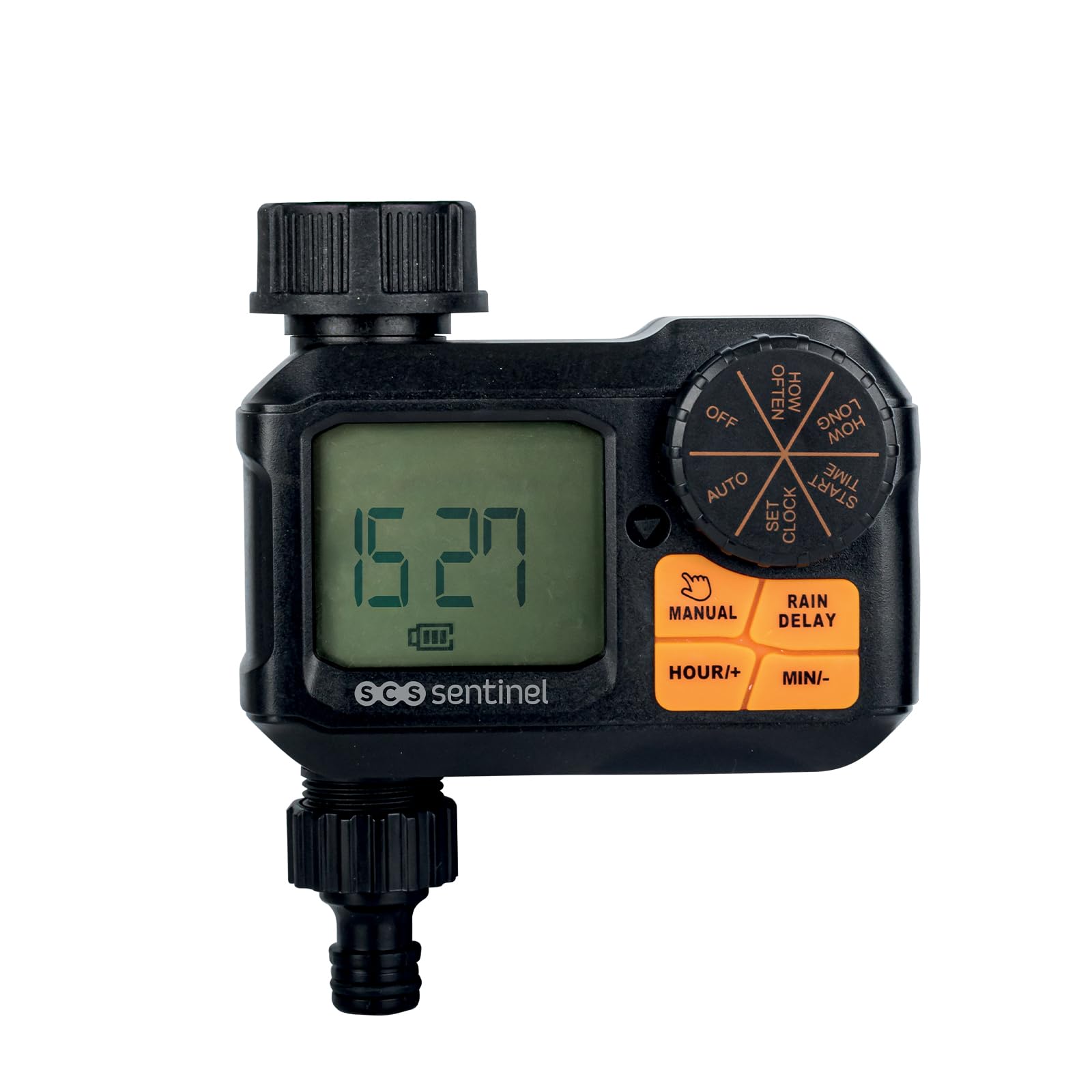
Figure 1: Front view of the SCS Sentinel WaterProg timer, showing the digital display, rotary dial, and control buttons.
Key Features:
- Compact Design: Dimensions of 122x64.9x118 mm for easy installation on faucets or hoses.
- Outdoor Use: IP55 rated, weather-resistant casing for durable performance.
- Cold Water Only: Specifically designed for traditional cold water irrigation systems.
- Automatic Programming: Customizable watering cycles to minimize water waste and ensure optimal plant health.
- Easy Installation: Tool-free setup directly onto a faucet.
4. Package Contents
Upon unpacking, please ensure all items are present and undamaged:
- 1 x SCS Sentinel WaterProg Irrigation Timer (Model HCN0087)
- 1 x User Manual (this document)
- Additional connectors/seals (if included, refer to packaging)

Figure 2: The SCS Sentinel WaterProg timer shown in its retail box, indicating typical package contents.
5. Setup
5.1 Battery Installation
The WaterProg timer requires two (2) AA 1.5V batteries (not included).
- Locate the battery compartment cover on the back of the timer.
- Slide or unscrew the cover to open it.
- Insert two new AA 1.5V alkaline batteries, ensuring correct polarity (+/-) as indicated inside the compartment.
- Securely close the battery compartment cover.

Figure 3: Rear view of the timer, highlighting the battery compartment and product specifications.
5.2 Connecting the Timer
The timer is designed for tool-free installation.
- Screw the timer directly onto your outdoor faucet. Ensure the connection is hand-tight to prevent leaks.
- Connect your garden hose to the outlet at the bottom of the timer. Again, hand-tighten for a secure fit.

Figure 4: The WaterProg timer installed on an outdoor faucet, ready for use.
6. Operating Instructions
The WaterProg timer features a rotary dial and several buttons for easy programming.
6.1 Setting the Clock
- Turn the rotary dial to SET CLOCK.
- Use the HOUR+/MINI- buttons to set the current time. Press HOUR+ to increase hours and MINI- to decrease minutes.
- Once the correct time is set, turn the dial to the next desired setting or to AUTO to save.
6.2 Programming Watering Cycles
The timer allows you to set a start time, duration, and frequency for watering.
- SET START TIME: Turn the dial to START TIME. Use HOUR+/MINI- buttons to set the desired start time for watering.
- HOW LONG: Turn the dial to HOW LONG. Use HOUR+/MINI- buttons to set the duration of each watering cycle (e.g., 10 minutes, 30 minutes).
- HOW OFTEN: Turn the dial to HOW OFTEN. Use HOUR+/MINI- buttons to set the frequency (e.g., every 12 hours, every 24 hours, every 2 days).
6.3 Automatic Mode
After programming your watering cycles, turn the dial to AUTO. The timer will now operate according to your set schedule.
6.4 Manual Watering
To water manually outside of the programmed schedule:
- Press the MANUAL button.
- Use the HOUR+/MINI- buttons to set the desired manual watering duration.
- Press MANUAL again to start watering. The timer will automatically stop after the set duration.
- To stop manual watering early, press MANUAL again.
6.5 Rain Delay Function
To pause watering for a period due to rain:
- Press the RAIN DELAY button.
- Use the HOUR+/MINI- buttons to set the delay duration (e.g., 24 hours, 48 hours).
- Press RAIN DELAY again to activate the delay. Watering will resume automatically after the delay period.
- To cancel the rain delay, press RAIN DELAY again.
6.6 Turning Off the Timer
To completely stop all watering functions, turn the rotary dial to OFF.
7. Maintenance
- Cleaning: Wipe the timer with a damp cloth. Do not use abrasive cleaners or solvents.
- Battery Replacement: When the low battery indicator appears on the display, replace both AA batteries promptly to ensure continuous operation.
- Winter Storage: Before the first frost, disconnect the timer from the faucet and hose. Remove the batteries and store the timer indoors in a dry, frost-free location.
8. Troubleshooting
| Problem | Possible Cause | Solution |
|---|---|---|
| Timer does not turn on / Display is blank. | Dead or incorrectly installed batteries. | Replace batteries with new AA 1.5V batteries, ensuring correct polarity. |
| Water does not flow. | Faucet is off; Timer is in OFF mode; Low water pressure; Clogged filter. | Ensure faucet is fully open; Turn dial to AUTO or MANUAL; Check water pressure; Clean the filter washer inside the timer inlet. |
| Timer leaks at connections. | Loose connections; Damaged washer. | Tighten connections by hand; Check and replace rubber washers if damaged. |
| Watering schedule is incorrect. | Incorrect programming; Rain Delay active. | Re-program START TIME, HOW LONG, and HOW OFTEN settings; Check if Rain Delay is active and cancel if necessary. |
9. Specifications
- Model: HCN0087
- Dimensions: 12.2P x 12.2l x 12.2H centimeters (122 x 64.9 x 118 mm)
- Power Supply: 2 x AA 1.5V batteries
- Material: Acrylonitrile Butadiene Styrene (ABS), Plastic
- Color: White (main body is black, but product listing specifies white)
- Weight: 35 Grams
- Water Type: Cold water only
- Ingress Protection: IP55 (Dust protected and protected against low pressure water jets from any direction)
10. Warranty and Support
SCS Sentinel offers a 2-year availability of spare parts within the EU for this product.
For further assistance, troubleshooting, or to download the full user manual, please visit the official SCS Sentinel website:

Figure 5: The timer displayed alongside a document showing a QR code and link for manual downloads.
Official Downloads Page: https://www.scs-sentinel.com/downloads