
1. Introduction
Thank you for choosing the Lefitus Smart Watch for Women (Model US-i180). This device is designed to enhance your daily life by providing comprehensive health monitoring, fitness tracking, and smart communication features directly from your wrist. Please read this manual carefully to ensure proper setup and optimal use of your smartwatch.

Image: The Lefitus Smart Watch in rose gold, featuring a vibrant floral watch face. Two smaller watch images show call and message functions.
2. Package Contents
Upon opening your Lefitus Smart Watch package, you should find the following items:
- Smartwatch x 1
- Charging Cable x 1
- User Manual x 1
- Gold Steel Band x 1
- Burgundy Strap x 1
- Light Purple Strap x 1
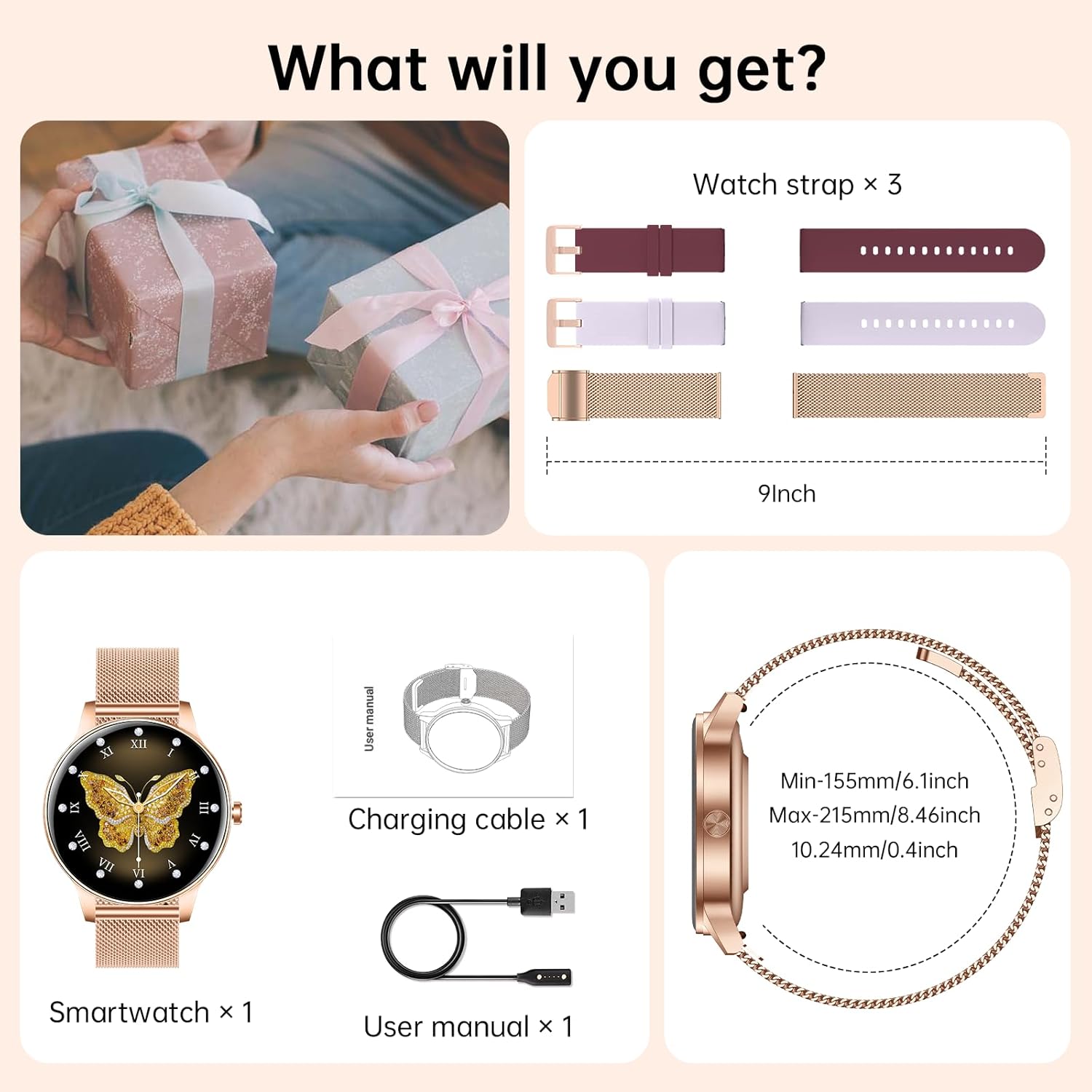
Image: A visual representation of the package contents, showing the smartwatch, three different watch straps, a charging cable, and the user manual.
3. Setup Guide
3.1 Charging the Smart Watch
Before initial use, fully charge your smartwatch. Connect the magnetic charging cable to the charging points on the back of the watch and plug the USB end into a compatible power adapter (not included) or computer USB port. A full charge typically takes approximately 2 hours.
3.2 App Installation and Pairing
To unlock the full functionality of your Lefitus Smart Watch, you need to install the companion application on your smartphone. The specific app name is usually found in the included user manual or by scanning a QR code on the watch screen during initial setup.
- Download the App: Search for the designated app in your smartphone's app store (App Store for iOS, Google Play Store for Android) or scan the QR code provided in the manual or on the watch screen.
- Create an Account: Open the app and follow the on-screen instructions to create a new user account or log in if you already have one.
- Pair the Watch:
- Ensure your watch is charged and powered on.
- Enable Bluetooth on your smartphone.
- In the app, navigate to the device pairing section (often labeled "Add Device" or "My Device").
- Select your Lefitus Smart Watch from the list of available Bluetooth devices.
- Confirm the pairing request on both your phone and the watch if prompted.
- Grant Permissions: Allow the app necessary permissions (e.g., notifications, location, contacts) for full functionality.
4. Operating Instructions
4.1 Power On/Off and Basic Navigation
- Power On: Press and hold the side button until the screen illuminates.
- Power Off: Press and hold the side button, then select the power off option on the screen.
- Screen Wake: Raise your wrist or press the side button.
- Navigation: Swipe left/right, up/down on the touchscreen to access different functions and menus. Tap to select.
4.2 Call and Message Notifications
The smartwatch supports Bluetooth calls and displays real-time notifications from your connected smartphone.
- Answering/Making Calls: With the watch paired via Bluetooth, you can answer incoming calls directly from your wrist using the built-in speaker and microphone. You can also dial numbers or access your phonebook from the watch.
- Message Reception: Receive notifications from various apps (e.g., WhatsApp, Telegram, Facebook) directly on the watch screen. Swipe down from the top of the watch face to view recent notifications.

Image: The smartwatch screen showing options for dial pad, incoming calls, and phonebook. Below, message notifications from various apps are displayed.
4.3 Customizable Watch Faces
Personalize your watch with over 200 watch face options available through the companion app's "dial library." You can also upload your own photos to create a unique watch face.

Image: The smartwatch showcasing its 1.27" HD display with several watch face designs, including options for custom photo backgrounds.
4.4 Voice Control
Activate your phone's voice assistant directly from your watch to make calls, search the web, or handle other tasks hands-free. Simply tap the voice assistant icon on your watch and speak your command.

Image: A user interacting with the voice control feature on her smartwatch, asking "Siri, How's the weather tomorrow?" and "Siri, Set an alarm for 7 o'clock."
4.5 Other Useful Functions
The Lefitus Smart Watch includes a variety of additional features for convenience:
- Alarm Clock
- Stopwatch
- Flashlight
- Water Reminder
- Music Control
- Camera Control
- Weather Forecast
- Find Mobile Phone
- Sedentary Reminder
- Breathing Training

Image: The smartwatch interface showing icons for multiple functions including call records, body temperature, alarm clock, music control, find phone, and more.
5. Health Tracking
The smartwatch features a built-in optical sensor for continuous health monitoring, providing insights into your well-being.
5.1 Heart Rate Monitoring
Monitor your heart rate continuously throughout the day. The watch provides real-time data and historical trends through the companion app, helping you understand your heart health during rest and activity.

Image: A woman doing a yoga pose, with an overlay showing a heart rate graph from the smartwatch.
5.2 Sleep Quality Monitoring
The watch automatically tracks your sleep patterns, recording deep sleep, light sleep, and awake times. Review detailed sleep analysis in the app to help improve your sleep habits.
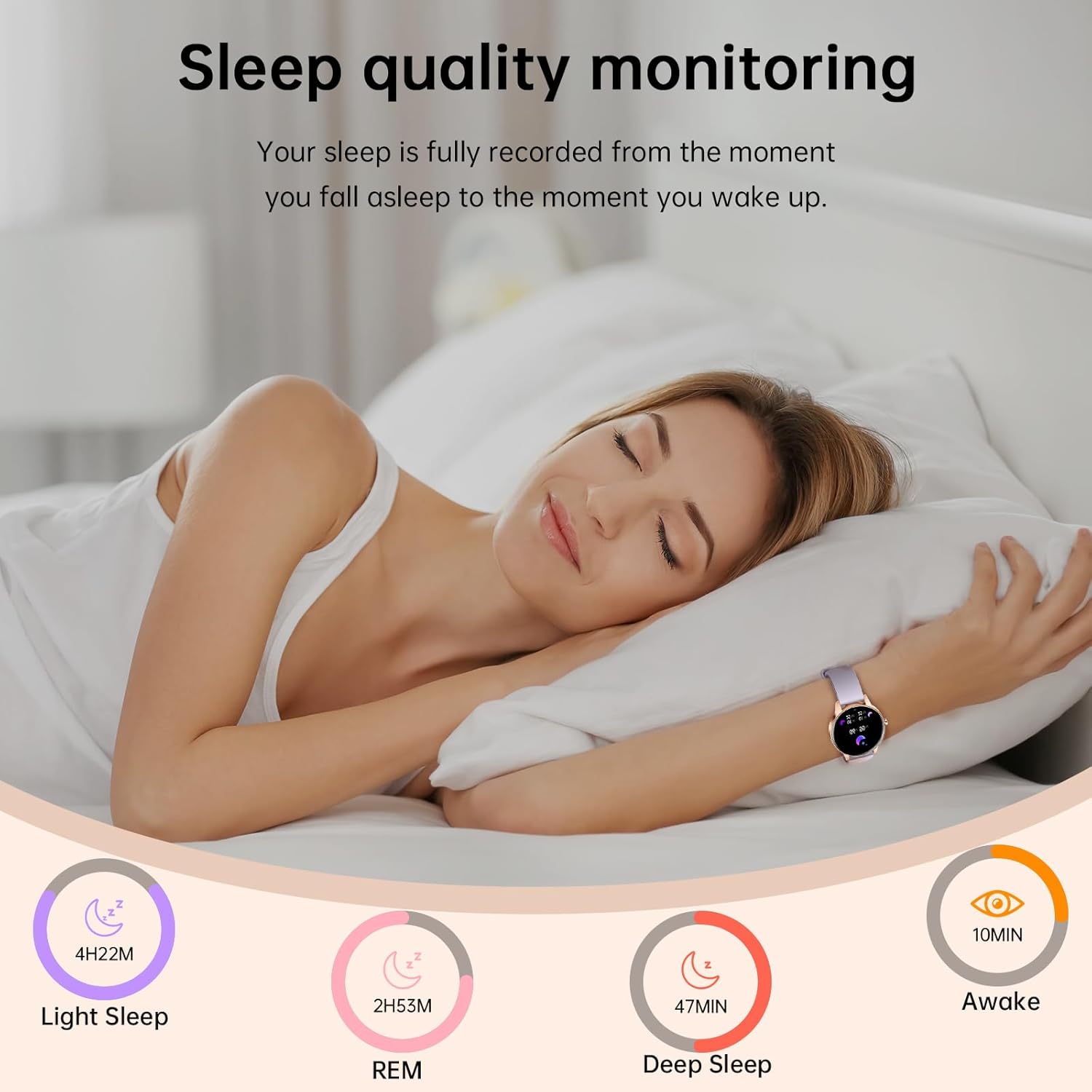
Image: A woman sleeping peacefully, accompanied by a graphic illustrating the smartwatch's sleep quality monitoring, showing durations for light sleep, REM, deep sleep, and awake time.
5.3 Blood Oxygen and Stress Monitoring
The watch can monitor your blood oxygen levels and stress, providing a more comprehensive view of your physiological state. Consult the app for detailed readings and trends.
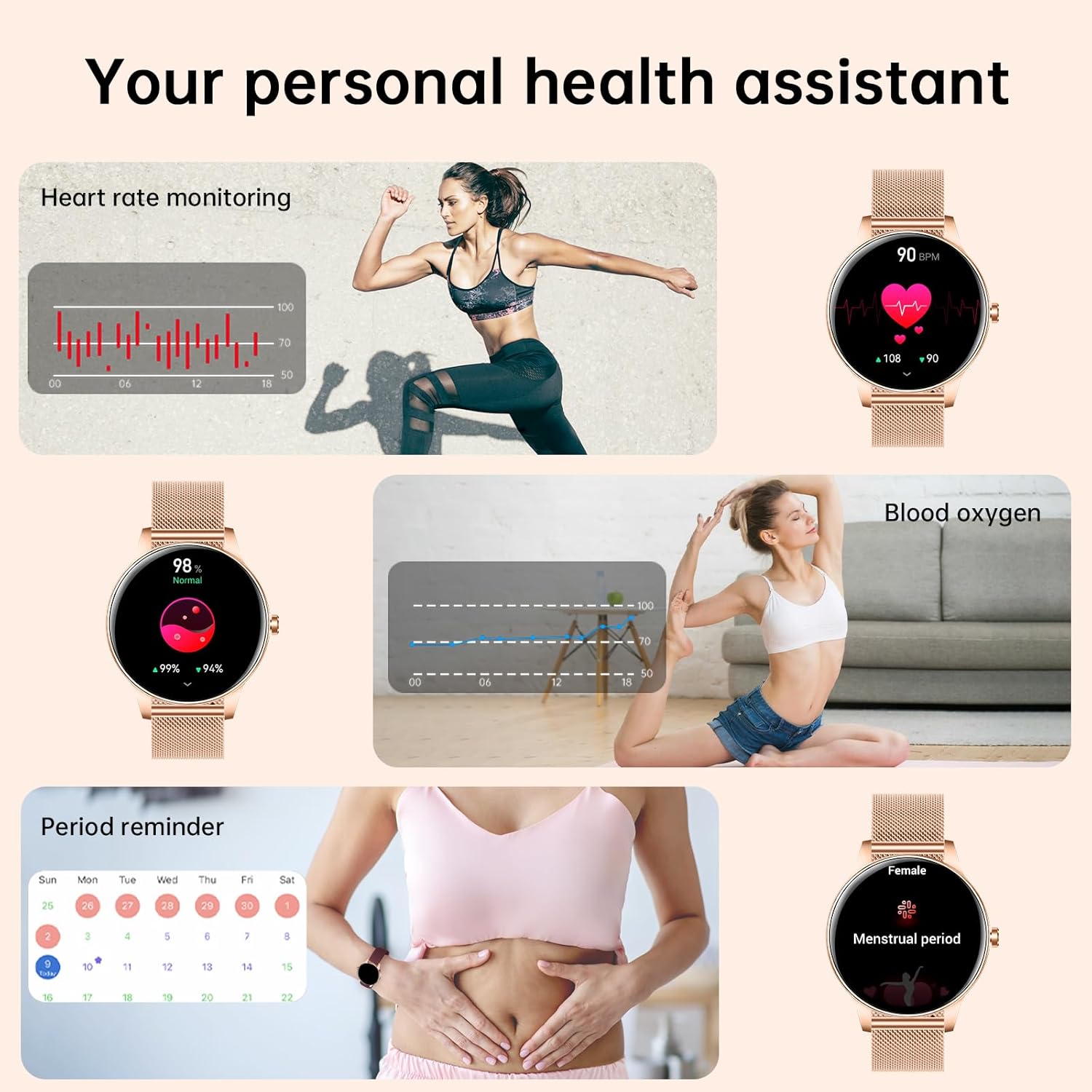
Image: A collage showing the smartwatch monitoring heart rate, blood oxygen levels, and a calendar for period reminders, highlighting its personal health assistant capabilities.
5.4 Menstrual Period Tracking
For women, the smartwatch offers a feature to track menstrual cycles, providing reminders and predictions to help manage personal health.

Image: A woman enjoying a drink, with a calendar graphic overlay demonstrating the smartwatch's feature for tracking and predicting menstrual and ovulation cycles.
6. Sport Modes
The Lefitus Smart Watch offers over 130 sport modes to accurately track your physical activities. Whether you're exercising indoors or outdoors, the watch monitors real-time statistics such as calories burned, distance covered, and duration of activity.

Image: A woman stretching before a workout, with an illustration of the smartwatch displaying activity data like heart rate, duration, and steps, alongside icons for over 130 sport modes.
7. Battery Life and Waterproof Rating
7.1 Battery Life and Charging
Equipped with a 300mAh high-capacity battery, the smartwatch provides extended usage. A full charge takes approximately 2 hours, offering up to 7-10 days of normal use and 20 days of standby time.
7.2 IP68 Waterproof Rating
The watch has an IP68 waterproof rating, meaning it is resistant to dust and can withstand immersion in water up to 1.5 meters for 30 minutes. It is suitable for daily activities like hand washing, showering, and swimming. However, it is not recommended for hot water activities, diving, or prolonged submersion.
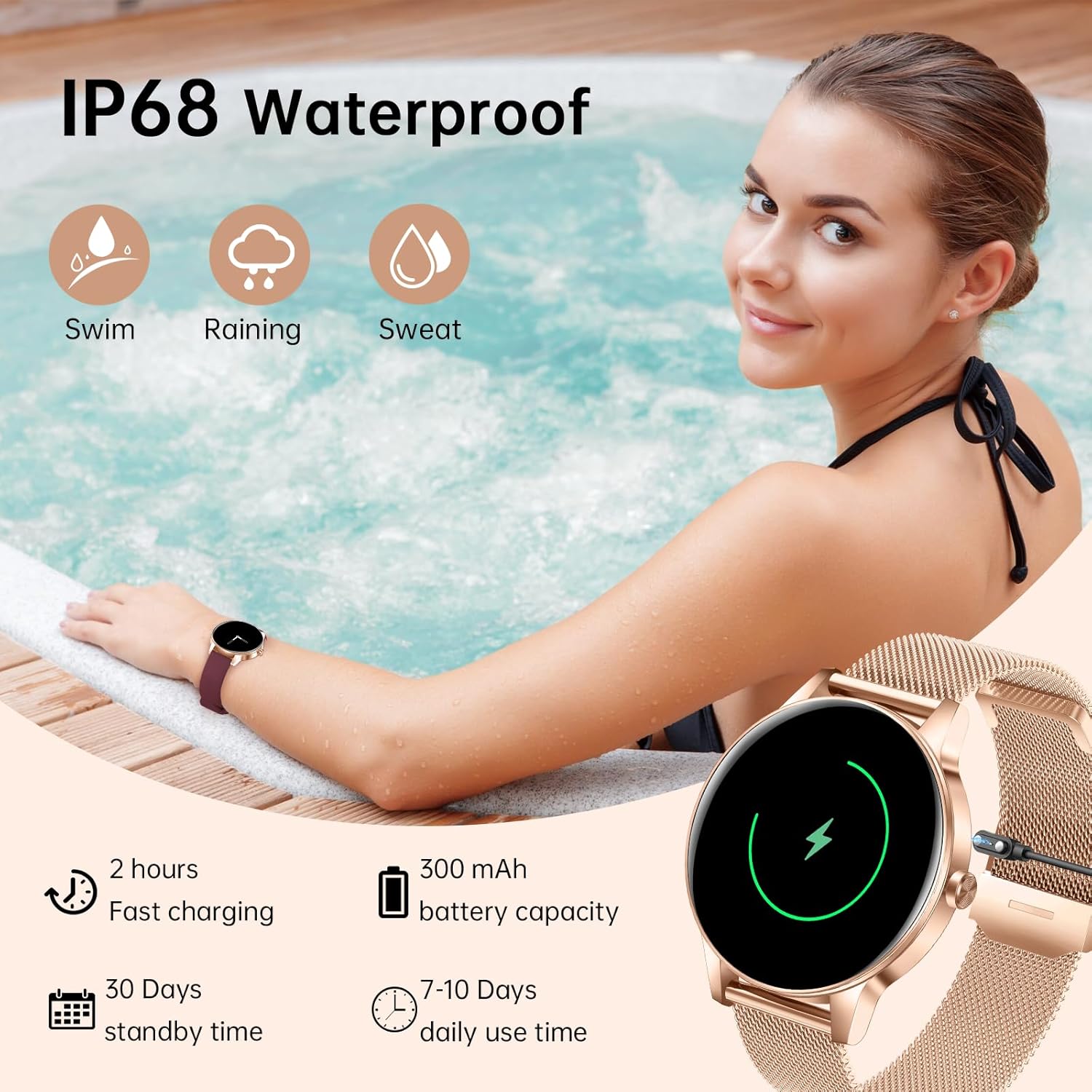
Image: A woman in a pool wearing the smartwatch, with icons indicating its suitability for swimming, rain, and sweat. Battery life and charging details are also shown.
8. Specifications
| Feature | Detail |
|---|---|
| Brand | Lefitus |
| Model Number | US-i180 |
| Screen Size | 1.27 Inches HD |
| Item Weight | 17.8 Grams (0.628 ounces) |
| Battery Capacity | 300 mAh |
| Connectivity Technology | Bluetooth |
| Waterproof Rating | IP68 |
| Memory Storage Capacity | 128 GB |
| GPS | Via Smartphone |
| Special Features | Activity Tracker, Music Player, Sedentary Reminder, Voice Control, Gold Steel Band, Burgundy Strap, Light Purple Strap |
9. Troubleshooting
If you encounter any issues with your Lefitus Smart Watch, please consider the following general troubleshooting steps:
- Watch Not Turning On: Ensure the watch is fully charged. Connect it to the charging cable and a power source for at least 30 minutes.
- Cannot Pair with Phone:
- Make sure Bluetooth is enabled on your phone.
- Ensure the watch is within Bluetooth range of your phone.
- Restart both your phone and the watch.
- Check if the app has all necessary permissions granted.
- Try unpairing and re-pairing the device through the app.
- Notifications Not Appearing:
- Verify that notification permissions are enabled for the app on your phone.
- Ensure the app is running in the background.
- Check the app's settings to confirm which app notifications are enabled for the watch.
- Inaccurate Health Data: Ensure the watch is worn snugly on your wrist, about one finger's width from your wrist bone. Clean the sensor regularly.
- Short Battery Life: Reduce screen brightness, disable unnecessary notifications, or limit continuous heart rate monitoring if not needed.
For more specific issues or persistent problems, refer to the help section within the companion app or contact customer support.
10. Warranty and Customer Support
Lefitus offers a one-year warranty for your smartwatch. If you have any questions regarding the product's use, functionality, or require technical assistance, please do not hesitate to contact our customer support team.
How to Contact Support:
- If purchased through Amazon, click on your Amazon order and select "Contact Seller."
- Refer to the included user manual for additional contact methods, such as email or website support.

Image: A graphic detailing Lefitus customer support policies, including 24-hour email service, a 30-day return policy, and a 1-year free replacement warranty.
