
Introduction
The Sofirn SC28 is a high-performance, rechargeable LED flashlight designed for everyday carry (EDC), emergency situations, camping, and outdoor activities. It features a powerful 2800 lumen output, a tactical tail switch, and two distinct user interfaces (UI) to suit various needs. This manual provides detailed instructions for safe and effective operation of your SC28 flashlight.
Safety Instructions
- Do not shine the flashlight directly into eyes. The powerful beam can cause temporary vision impairment.
- Keep out of reach of children.
- Do not disassemble the flashlight head or battery compartment unless specifically instructed. This may damage the device and void the warranty.
- Use only the recommended battery type and charging methods.
- Avoid exposing the flashlight to extreme temperatures or direct sunlight for prolonged periods.
Package Contents
Verify that all items are present in your package:
- 1x Sofirn SC28 Flashlight (with battery installed)
- 1x USB-C Charging Cable
- 2x Spare O-rings
- 1x Lanyard
- 1x User Manual
- 1x Belt Clip
Setup
Product Overview
The Sofirn SC28 features a robust design with a tactical tail switch and a side-mounted USB-C charging port. The body is constructed from aircraft-grade aluminum alloy, ensuring durability.

Image: The Sofirn SC28 Pocket Flashlight, showcasing its compact design and tail switch. An inset image shows the flashlight held in a gloved hand for scale.
Battery Installation
The SC28 flashlight comes with a battery pre-installed. To access the battery compartment or replace the battery, unscrew the tail cap. Ensure the positive (+) end of the battery faces towards the flashlight head when inserting.
Charging Instructions
The SC28 features a built-in USB-C charging port for convenience. To charge the flashlight:
- Locate the USB-C port on the side of the flashlight, usually covered by a rubber flap.
- Open the rubber flap.
- Connect the provided USB-C charging cable to the port and plug the other end into a USB power source (e.g., wall adapter, power bank, computer).
- The indicator light will show the charging status.

Image: The Sofirn SC28 flashlight connected to a power bank via its USB-C port, with a red indicator light visible, signifying charging in progress.

Image: A visual representation of the charging indicator lights on the Sofirn SC28. A red light indicates 'Charging', and a green light indicates 'Fully Charged'.
Power Indicator
After turning on the SC28, the indicator light will display the power status for 5 seconds:
- Solid Green: 50% - 100% battery remaining
- Solid Red: 25% - 50% battery remaining
- Flashing Red: Less than 25% battery remaining

Image: The Sofirn SC28 flashlight resting on a rock, with its green power indicator light illuminated, demonstrating the battery status display.
Operating Instructions
The SC28 features a tactical tail switch and two user interfaces: Default (EDC) and Advanced Tactical.
Tail Switch Operation
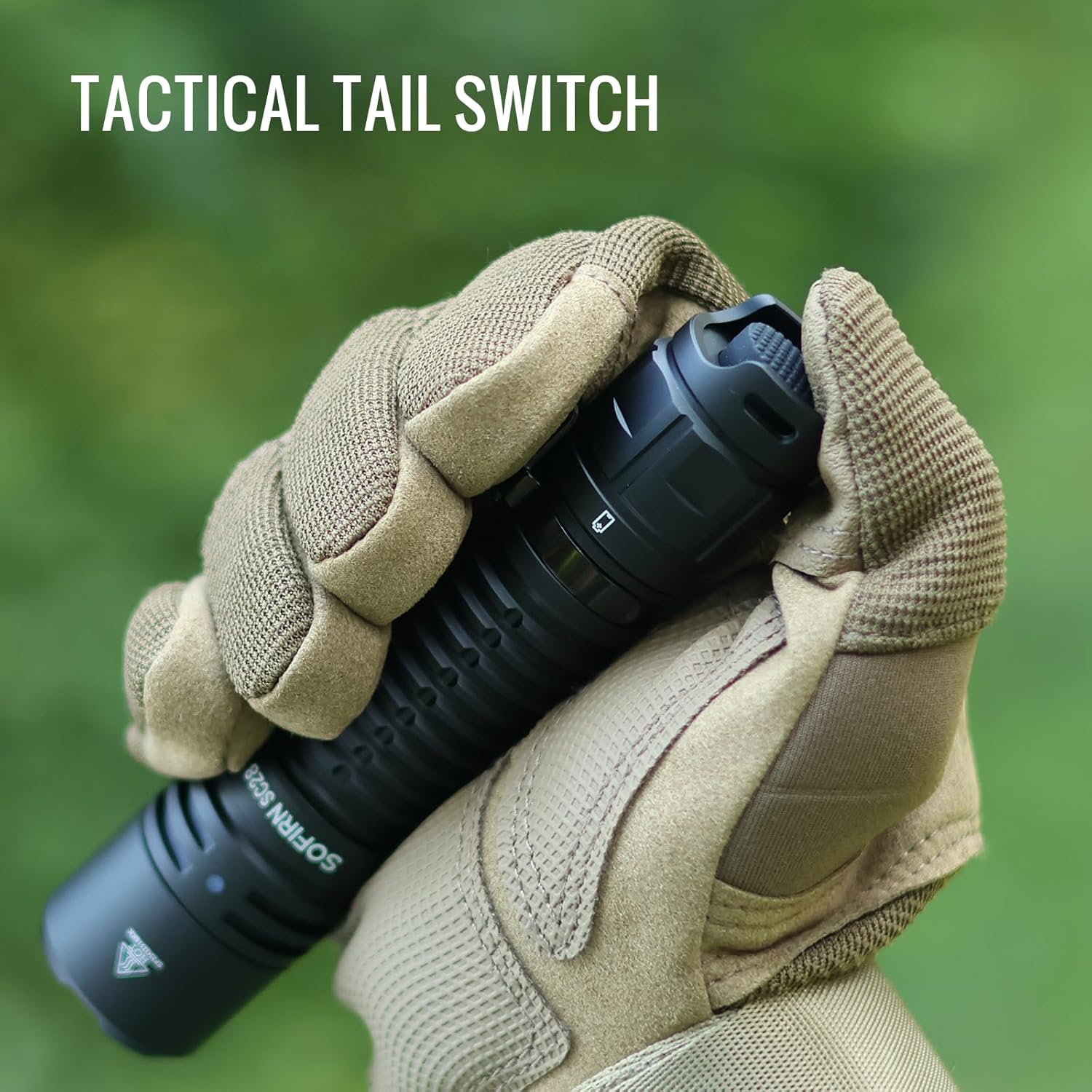
Image: A gloved hand operating the tactical tail switch of the Sofirn SC28 flashlight, highlighting its ergonomic design for quick activation.
- From OFF: Single click to turn ON.
- From ON: Single click to turn OFF.
- Momentary ON: Tap and hold the tail switch for momentary illumination. Release to turn OFF.
User Interfaces (UI)
The SC28 offers two distinct UIs. The default UI is designed for everyday carry, while the advanced tactical UI provides simplified access to high output and strobe.
Default UI (EDC Use)
This is the factory default mode, offering 5 brightness levels:
- Moonlight: 1 Lumen
- Low: 100 Lumens
- Medium: 350 Lumens
- High: 1200 Lumens
- Turbo: 2800 Lumens
To cycle through modes (Moonlight-Low-Medium-High-Turbo), double-click the tail switch from the ON state.
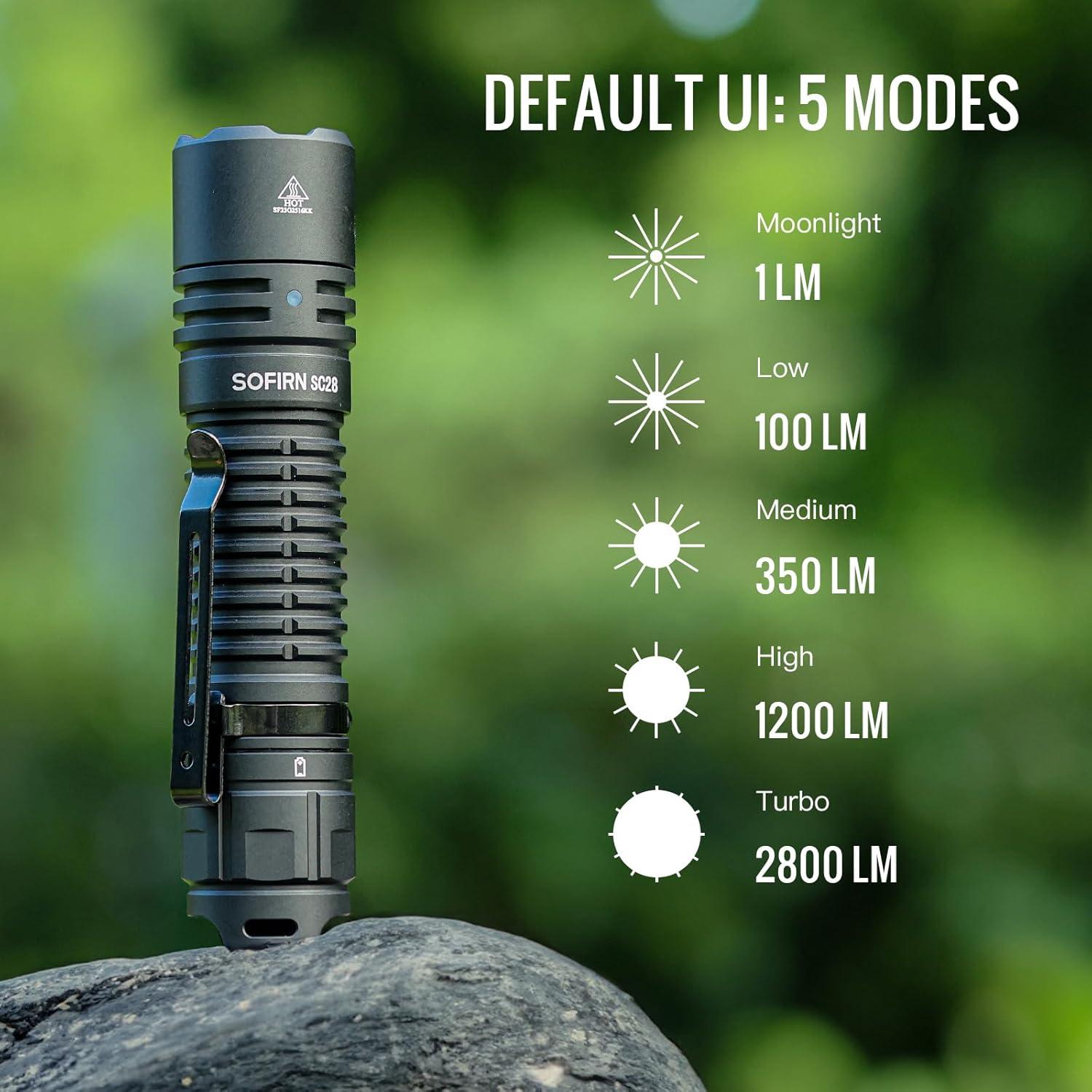
Image: The Sofirn SC28 flashlight standing upright, with an illustration detailing the five brightness modes of the Default UI: Moonlight (1LM), Low (100LM), Medium (350LM), High (1200LM), and Turbo (2800LM).
Advanced Tactical UI
For advanced tactical needs, you can switch to the Tactical UI. This UI typically offers a simplified set of modes, often focusing on immediate high output and strobe.
To switch to the Tactical UI:
- Turn on the flashlight.
- Unscrew the flashlight head to expose the driver board.
- Locate the small micro switch on the driver board.
- Toggle this micro switch to change between the Default (DEF) and Tactical (TAC) UIs.

Image: A close-up view of the Sofirn SC28 flashlight with its head unscrewed, revealing the internal driver board and a micro switch labeled 'TAC' and 'DEF' for switching between user interfaces.

Image: A detailed view of the Sofirn SC28's internal driver board, showing the micro switch that allows users to select between 'TAC' (Tactical) and 'NORMAL' (Default) user interfaces.
In Tactical UI, modes typically include:
- Turbo: Maximum output.
- Strobe: Disorienting flashing light.
- Medium: A moderate brightness level.

Image: A flowchart illustrating the operation of the Sofirn SC28, showing how the tactical tail switch controls ON/OFF, momentary ON, and output selection. It also details how to switch between the Default group (Moonlight, Low, Medium, High, Turbo) and the Tactical group (Turbo, Strobe, Medium) via the micro switch on the driver board.
Brightness and Range

Image: A person standing in a dark, outdoor environment, illuminating a distant hillside with the powerful beam of the Sofirn SC28 flashlight, demonstrating its 2800 lumens and 731 feet (223 meters) throw distance.
The SC28 delivers an ultra-bright 2800 lumens, capable of reaching up to 730 feet (223 meters), providing ample illumination for various scenarios.
Video: A demonstration of the Sofirn SC28 tactical flashlight, highlighting its high lumen output and rechargeable features. This video is provided by the seller, 77 Outdoor Shop.
Maintenance
Cleaning
Wipe the flashlight with a clean, soft cloth. For stubborn dirt, use a slightly damp cloth. Do not use abrasive cleaners or solvents.
Water Resistance
The SC28 is rated IPX8 waterproof, meaning it can be submerged in water up to 2 meters for 30 minutes. Ensure the USB-C port cover is securely closed before exposing the flashlight to water. Regularly check and lubricate the O-rings to maintain water resistance.

Image: The Sofirn SC28 flashlight lying on a wet, mossy surface, with water droplets visible, illustrating its IPX8 waterproof rating and readiness for all weather conditions.
Battery Care
To prolong battery life, charge the battery regularly and avoid fully discharging it. If storing the flashlight for an extended period, remove the battery or ensure it is partially charged.

Image: The Sofirn SC28 flashlight illuminating a small patch of moss in a dark environment, with text indicating its long-lasting capability of 41 days in moonlight mode.
Troubleshooting
| Problem | Possible Cause | Solution |
|---|---|---|
| Flashlight does not turn on | Low battery; Battery incorrectly inserted; Loose tail cap | Charge battery; Reinsert battery with correct polarity; Tighten tail cap |
| Light output is dim or flickers | Low battery; Dirty contacts | Charge battery; Clean battery and flashlight contacts with a clean cloth |
| Flashlight gets hot quickly | Operating in Turbo mode for extended periods | This is normal for high-output flashlights. Reduce brightness to a lower mode. The flashlight has built-in thermal regulation to prevent overheating. |
| Water ingress after exposure | USB-C port cover not sealed; Damaged O-rings | Ensure USB-C cover is fully closed; Replace O-rings if damaged. |
Specifications
| Feature | Detail |
|---|---|
| Model | SC28 |
| Light Source | LED |
| Maximum Brightness | 2800 Lumens |
| Maximum Beam Distance | 223 meters (730 feet) |
| Power Source | Battery Powered (1x 9V battery included) |
| Charging | USB-C Rechargeable |
| Material | Aircraft-grade Aluminum Alloy |
| Water Resistance | IPX8 (up to 2 meters submersible) |
| Dimensions | Length: 5 inches, Head Diameter: 1.1 inches |
| Weight | Approximately 4.7 oz (0.34 Kilograms) |
| User Interfaces | Default (EDC) and Advanced Tactical |
Warranty and Support
For warranty information or technical support, please refer to the contact details provided with your purchase or visit the official Sofirn website. Keep your purchase receipt as proof of purchase for warranty claims.


