
Introduction
Thank you for choosing the NinPeen 63-inch TV Stand with Mount and LED Lights. This manual provides detailed instructions for assembly, operation, maintenance, and troubleshooting to ensure safe and optimal use of your new entertainment center. Please read all instructions carefully before beginning assembly and retain this manual for future reference.
Safety Information
WARNING: Always assemble according to the instructions. Keep the product away from children to prevent tip-over risks and be careful around sharp edges.
- Ensure all parts are present and undamaged before assembly. Do not use if any parts are missing or broken.
- Follow the assembly steps precisely. Incorrect assembly can lead to instability and potential injury.
- Do not overload the shelves or TV mount beyond their specified weight capacities.
- Place the TV stand on a level and stable surface to prevent tipping.
- Use the anti-tip hardware provided to secure the TV stand to a wall, especially if children or pets are present.
- Keep electrical components (power outlet, LED lights) away from water and moisture.
- Ensure proper ventilation around electronic devices placed on the stand.
Package Contents
Please verify that all components listed in your product's parts list are included before starting assembly. Refer to the included assembly diagram for identification of each part and hardware piece.
Assembly Instructions
For a visual guide to the TV mount installation, please watch the video below. Detailed steps for the entire stand assembly are provided in the printed manual included with your product.
Video demonstrating the assembly process for the NinPeen TV stand mount.
Key Assembly Steps for TV Mount
- Attach Mount Brackets to TV:
Carefully place your TV face down on a soft, clean surface. Remove any existing screws or covers from the VESA mounting holes on the back of your TV. Select the appropriate screws, washers, and spacers from the hardware kit that fit your TV's VESA pattern. Attach the vertical mounting brackets to the back of your TV, ensuring they are securely fastened.

Image showing the NinPeen TV Stand with a mounted television, highlighting the overall setup with pink LED backlighting.
- Assemble the TV Stand Frame:
Follow the step-by-step diagrams in your printed manual to assemble the main frame of the TV stand. This typically involves connecting the side panels, shelves, and central support structure using the provided hardware. Ensure all connections are tight and stable.
- Install the TV Mount Column:
Attach the TV mount column to the designated area on the back of the TV stand frame. Secure it firmly using the provided bolts and tools. Ensure the column is vertical and stable.

This image details the features of the TV mount, including its height adjustability, safety lock mechanism, integrated cable management, and anti-drop design for secure TV placement.
- Mount the TV onto the Stand:
With assistance, carefully lift your TV and hook the attached brackets onto the TV mount column. Ensure the brackets are properly seated and engage the safety locks to prevent accidental dislodging. Adjust the TV height as desired using the height adjustment mechanism on the mount.
- Install Fabric Drawers and Adjustable Feet:
Insert the fabric drawers into their designated compartments. Attach the adjustable feet to the bottom of the stand and adjust them to level the unit on uneven floors.

This diagram highlights the waterproof surface, integrated charging station, fabric drawers for storage, and adjustable feet for stability on the NinPeen TV stand.
Operating Instructions
LED Lights
The integrated LED lights offer various modes and colors to enhance your viewing experience. Use the included remote control or a compatible mobile application (if available) to:
- Change between 60,000 colors.
- Select different modes: Mic Mode (lights react to sound), Music Mode (lights sync with music), Timing Mode (set schedules), Dynamic Mode (pre-set light patterns).
- Adjust brightness levels.
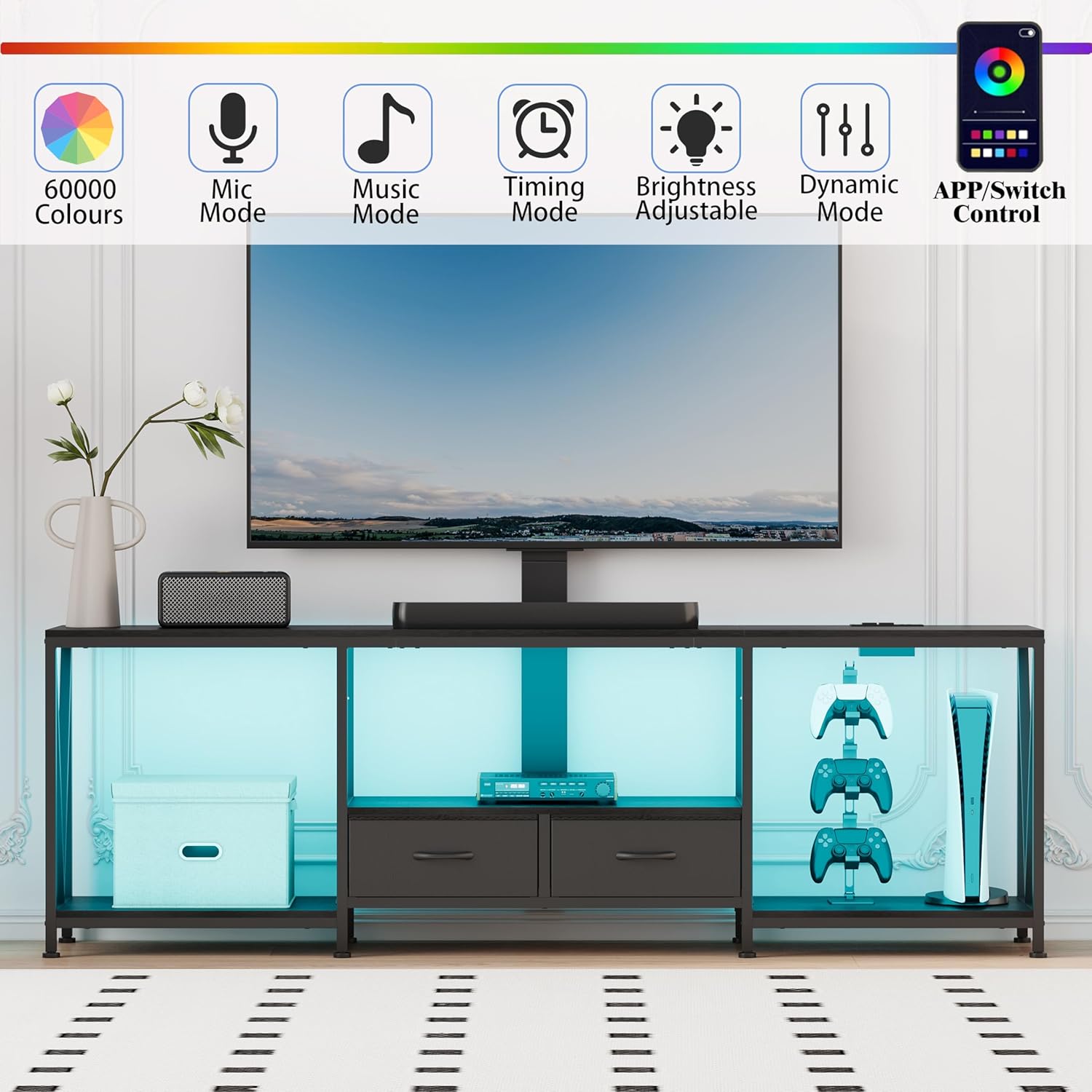
The TV stand illuminated with blue LED lights, demonstrating the various control options for the lighting system.
Power Outlet
The TV stand features a built-in power outlet for convenient charging and powering of your electronic devices.
- It includes two AC outlets (120V/12A) and two USB ports (5V/2A).
- Plug your TV, soundbar, gaming consoles, or charging cables directly into the integrated power strip.
- Ensure the total power consumption of connected devices does not exceed the outlet's maximum capacity.

A close-up view of the integrated power strip, detailing the specifications of the AC outlets and USB ports.
Maintenance
- Cleaning: Wipe surfaces with a soft, damp cloth. Avoid harsh chemicals or abrasive cleaners that may damage the finish.
- Dusting: Regularly dust the stand and electronic components to prevent dust buildup.
- Fasteners: Periodically check all screws and bolts to ensure they remain tight. Re-tighten if necessary.
- Cable Management: Keep cables organized using the built-in cable management features to prevent tangles and damage.
Troubleshooting
- Issue: TV appears unstable or leans to one side.
- Solution: Ensure all mounting screws for the TV and the stand's mount column are securely tightened. Verify that the adjustable feet are properly leveled on the floor. If using a very large TV (e.g., 75 inches), ensure the TV's weight is within the mount's capacity and consider using additional wall anchoring for enhanced stability.
- Issue: LED lights are not working.
- Solution: Check if the LED light strip is properly connected to its power source. Ensure the power outlet is functioning and the remote control batteries are not depleted. Refer to the LED light specific instructions for pairing or resetting.
- Issue: Devices not charging via power outlet.
- Solution: Confirm the TV stand's main power cord is securely plugged into a working wall outlet. Test the power outlet with another device. Ensure the devices you are trying to charge are compatible with the outlet's voltage and amperage.
Specifications
| Feature | Detail |
|---|---|
| Model Number | NP00203 |
| Material | Engineered Wood |
| Color | Black |
| Size | 63"W |
| Product Dimensions | 11.42 x 62.99 x 47.24 inches (L x W x H) |
| Item Weight | 40.4 pounds |
| Number of Drawers | 2 (Fabric) |
| Special Feature | Adjustable Feet, Integrated Power Outlet, LED Lights |
| Power Outlet | 2 AC Outlets (120V/12A), 2 USB Ports (5V/2A) |

Detailed dimensions of the NinPeen 63-inch TV Stand, including measurements for various TV sizes it can accommodate.
Warranty and Support
For warranty information, product support, or to purchase replacement parts, please contact NinPeen customer service through the retailer where you purchased the product or visit the official NinPeen website. Please have your model number (NP00203) and purchase date available when contacting support.