1. Introduction
This manual provides essential information for the setup, operation, and maintenance of your Samsung QN83S95FAEXZA 83 Inch OLED HDR Pro 4K Smart TV. Please read this manual thoroughly before using your television to ensure safe and optimal performance. Keep this manual for future reference.

Figure 1.1: Front view of the Samsung QN83S95FAEXZA 83 Inch OLED HDR Pro 4K Smart TV.
The Samsung QN83S95FAEXZA combines cutting-edge OLED technology with HDR Pro for stunning visuals. Powered by the NQ4 AI Gen3 Processor, it delivers an enhanced 4K experience for all your entertainment needs. This model also features a Glare Free screen and Motion Xcelerator 165Hz for smooth, clear viewing.
Video 1.1: An overview of the Samsung S95F Series TV, highlighting its key features and design.
2. Setup
2.1 Unboxing and Initial Placement
Carefully remove the TV from its packaging. It is recommended to have at least two people for safe handling due to the size and weight of the 83-inch model. Place the TV on a stable, flat surface or mount it securely to a wall using a VESA 400mm x 400mm compatible mount (sold separately).
2.2 Connecting Devices
Connect your external devices such as cable boxes, Blu-ray players, or gaming consoles to the TV's input ports. This TV features 4 HDMI ports, including HDMI 2.1 for high-speed connections, 3 USB-A ports, and 1 USB-C port.

Figure 2.1: Rear view of the TV with various input ports, including HDMI, USB, LAN, and optical audio.
The bundle includes a WireLogic Ruby 8ft Ultra High Speed 4K-8K-10K HDMI Cable. This cable supports a 48Gbps data rate, transferring up to 10K Ultra HD video, including 8K/60 and 4K/120. Its solid long-grain copper conductors are direction-controlled to effectively drain induced RF noise.

Figure 2.2: The included WireLogic Ruby 8ft Ultra High Speed HDMI Cable.
2.3 Power Connection
Plug the power cord into the TV's power input, then into a wall outlet. The TV is Energy Star Compliant, ensuring efficient power usage.
3. Operating Your TV
3.1 Smart TV Interface (Tizen OS)
Your Samsung Smart TV runs on the Tizen operating system, providing access to a wide range of streaming services such as Netflix, Prime Video, Disney+, Hulu, Apple TV, YouTube, HBO Max, Peacock, and Sling. Navigate the interface using the included BT SolarCell Remote.
3.2 Picture Modes and Settings
The TV offers various picture modes to optimize viewing for different content. Adjust settings like brightness, contrast, color, and sharpness to suit your preferences. The NQ4 AI Gen3 Processor automatically enhances picture quality and optimizes sound.
3.3 Sound Features
Experience immersive audio with Dolby Atmos and OTS+ (Object Tracking Sound+). Q-Symphony Pro allows the TV speakers to synchronize with compatible Samsung soundbars for an enhanced audio experience. Bluetooth Audio and 360 Audio features are also supported.
3.4 Gaming Experience
For gamers, the TV supports a 120Hz refresh rate, with up to 165Hz available for PC-connected games that support such specifications. Motion Xcelerator 165Hz ensures smooth motion, while features like Auto HDR Remastering and Real Depth Enhancer optimize your gaming visuals.
4. Key Features
4.1 NQ4 AI Gen3 Processor
The NQ4 AI Gen3 Processor, powered by 128 neural networks, delivers AI-enhanced picture and optimized sound. This results in an exceptional 4K experience for streaming, gaming, live sports, and more, with features like 4K AI Upscaling Pro and Color Booster Pro.

Figure 4.1: The NQ4 AI Gen3 Processor enhances picture and sound.
Video 4.1: A short overview of the S90F's features, including the NQ4 AI Gen3 Processor.
4.2 Glare Free Display
The Glare Free screen allows you to watch everything you love without distracting reflections, even in brightly lit rooms. This technology ensures you can get lost in your content without interference from ambient light.
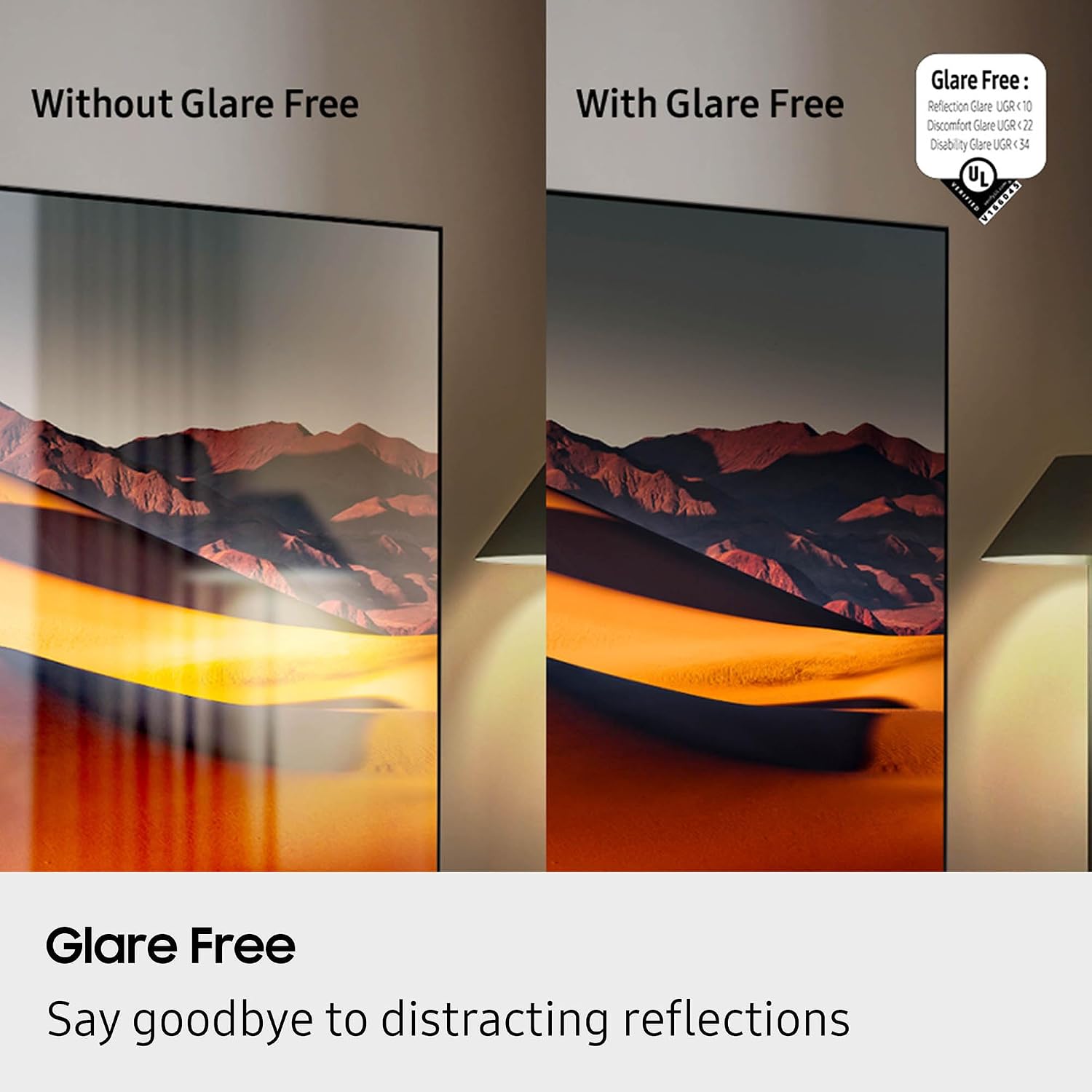
Figure 4.2: Visual comparison demonstrating the effectiveness of the Glare Free display.
4.3 OLED HDR Pro
OLED HDR Pro brings new details and highlights to life, making them pop off the screen. This advanced HDR technology enhances contrast and color accuracy, providing a more vibrant and realistic viewing experience.

Figure 4.3: A scene comparison highlighting the enhanced brightness and richer contrast of OLED HDR Pro.
4.4 Motion Xcelerator 165Hz
Motion Xcelerator 165Hz ensures smooth motion for sports and virtually tear-free gaming. This high refresh rate is particularly beneficial for fast-paced content, reducing blur and ghosting for a clearer picture.
5. Maintenance
5.1 Cleaning Your TV
To clean the screen, gently wipe it with a soft, dry microfiber cloth. For stubborn smudges, lightly dampen the cloth with water or a screen-safe cleaning solution. Avoid using harsh chemicals or abrasive materials. Clean the frame and stand with a soft, damp cloth.
5.2 Software Updates
Ensure your TV's software is up to date for optimal performance and access to the latest features. You can check for updates through the TV's settings menu under 'Support' or 'Software Update'.
6. Troubleshooting
6.1 No Power
- Check if the power cord is securely plugged into both the TV and the wall outlet.
- Ensure the wall outlet is functioning by plugging in another device.
- Try a different power outlet.
6.2 No Picture or Distorted Picture
- Verify that the correct input source is selected (e.g., HDMI 1, HDMI 2).
- Check all cable connections between the TV and external devices. Try re-seating or replacing cables.
- If using a gaming console or PC, ensure the resolution and refresh rate settings are compatible with the TV.
6.3 Remote Control Not Working
- Ensure there are no obstructions between the remote and the TV.
- Check the battery level of the BT SolarCell Remote. Recharge if necessary.
- Try re-pairing the remote with the TV according to the on-screen instructions.
7. Specifications
| Brand | Samsung |
| Model Name | QN83S95FAEXZA |
| Screen Size | 83 Inches |
| Display Technology | OLED |
| Resolution | 4K |
| Refresh Rate | 120 Hz (Up to 165Hz) |
| Processor | NQ4 AI Gen3 Processor |
| Special Features | Glare Free, OLED HDR Pro, Motion Xcelerator 165Hz, 4K AI Upscaling Pro, Dolby Atmos, OTS+, Q-Symphony Pro, Tizen Smart TV |
| Connectivity | 4 x HDMI, 3 x USB-A, 1 x USB-C, Wi-Fi 5, Bluetooth Audio |
| Supported Internet Services | Netflix, Prime Video, Disney+, Hulu, Apple TV, YouTube, HBO Max, Peacock, Sling, and More |
| Product Dimensions | 12"D x 72.6"W x 44.2"H |
| Item Weight | 114.4 Pounds |
| Color | Graphite Black |
| Energy Efficiency | Energy Star Compliant |
8. Warranty & Support
Your Samsung QN83S95FAEXZA 83 Inch OLED HDR Pro 4K Smart TV is covered by a manufacturer's warranty. Please refer to the warranty card included in your product packaging for specific terms and conditions. For technical support, service, or additional information, please visit the official Samsung support website or contact their customer service helpline.