
COOLECH JDAC69R
COOLECH JDAC69R Portable Evaporative Air Cooler User Manual
Model: JDAC69R
1. Important Safety Information
Please read this manual thoroughly before operating your COOLECH JDAC69R Portable Evaporative Air Cooler. Keep this manual for future reference.
- Ensure the unit is placed on a stable, level surface to prevent tipping.
- Do not immerse the unit, cord, or plug in water or other liquids.
- Unplug the unit from the power outlet before filling, cleaning, or performing any maintenance.
- Keep children and pets away from the unit during operation.
- Do not block air inlets or outlets. Maintain at least 8 inches of clear space around the unit.
- Use only with a properly grounded 120V AC power outlet.
- If the power cord is damaged, it must be replaced by the manufacturer, its service agent, or similarly qualified persons to avoid a hazard.
- This appliance is not intended for use by persons (including children) with reduced physical, sensory or mental capabilities, or lack of experience and knowledge, unless they have been given supervision or instruction concerning use of the appliance by a person responsible for their safety.
2. Product Overview
2.1 Package Contents
- 1 x COOLECH JDAC69R Portable Evaporative Air Cooler
- 1 x Remote Control
- 2 x Ice Packs (contains powdered gel; add water and shake to activate)
- 1 x User Manual
2.2 Key Features
- 3-in-1 Functionality: Operates as a fan, humidifier, and air cooler.
- Waterless Alert System: Beeps and flashes to indicate low water levels, preventing damage and ensuring safe operation. Automatically switches to Natural Wind Mode when water is depleted.
- Multiple Modes & Speeds: 4 operating modes (Normal, Natural, Sleep, Cooling) and 3 wind speeds (Low, Medium, High) for customized comfort.
- Advanced Cooling Technology: Features a high-performance motor, innovative air duct design, and high-density cooling pad for efficient cooling.
- 12-Hour Timer: Allows for preset operation and automatic shut-off for energy saving.
- Quiet Operation: Operates at approximately 40 dB, suitable for undisturbed sleep or work.
- Large Water Tank: 2.4-gallon detachable water tank provides up to 20 hours of continuous cooling. Features a visible water level indicator.
- Wide Oscillation: 70° wide-angle oscillation with 1320 CFM airflow covers areas up to 250 sq.ft.
- Dual Control: User-friendly LED touch panel and a remote control with a 20ft range.
- Energy Efficient: Operates at 65W, consuming significantly less electricity than traditional air conditioners.
- Portable Design: Built-in handle and 4 x 360° swivel wheels for easy movement. No hose or window installation required.
- Safety Features: ETL listed, bladeless design, fused safety plug, and safety grid for enhanced user protection.
2.3 Product Diagram
Refer to the image below for a visual representation of the COOLECH JDAC69R and its components.

Figure 2.3.1: COOLECH JDAC69R Portable Evaporative Air Cooler with remote control and two ice packs, showcasing the 2.4-gallon water tank.
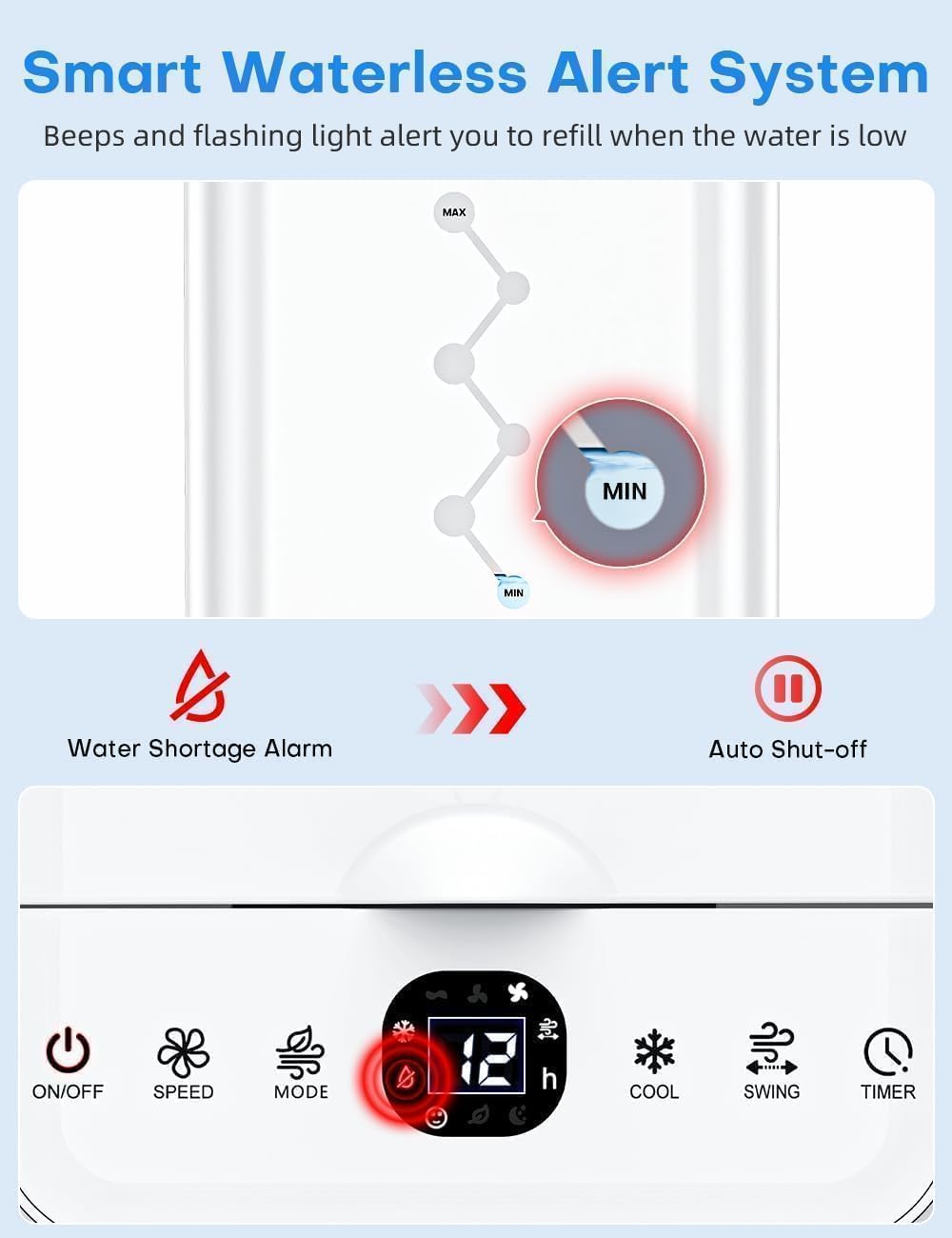
Figure 2.3.2: Front view of the COOLECH JDAC69R, highlighting the water tank capacity and included ice packs.
3. Setup Instructions
3.1 Unpacking and Placement
- Carefully remove the air cooler and all accessories from the packaging.
- Place the unit on a firm, level surface. Ensure there is at least 8 inches of clear space around the unit for proper airflow.
- The unit is designed for freestanding use and does not require window installation or an exhaust hose.
3.2 Preparing Ice Packs (Optional for Enhanced Cooling)
For optimal cooling performance, use the included ice packs:
- Open the ice pack cap and fill with water. Shake gently to mix with the powdered gel inside.
- Place the filled ice packs in a freezer for at least 6 hours until completely frozen.
- Once frozen, place the ice packs into the water tank of the air cooler.

Figure 3.2.1: Step-by-step instructions for preparing and adding ice packs to the water tank.
3.3 Filling the Water Tank
The COOLECH JDAC69R features a convenient top-fill design and a detachable bottom tank.
- Ensure the unit is unplugged before filling.
- Open the top cover of the unit.
- Pour clean water directly into the top opening. Observe the visible water level indicator on the side of the tank. Do not exceed the 'MAX' line.
- Alternatively, the entire bottom water tank can be detached for filling or cleaning.
- Close the top cover securely after filling.

Figure 3.3.1: Illustration of the top-fill design and the large capacity bottom water tank.
3.4 Power Connection
Plug the power cord into a standard 120V AC grounded electrical outlet.
4. Operating Instructions
4.1 Control Panel and Remote Control
The unit can be operated using the LED touch control panel on top of the unit or the included remote control.

Figure 4.1.1: Overview of the LED touch control panel and remote control functions.
4.2 Basic Operation
- Power ON/OFF: Press the ON/OFF button to turn the unit on or off.
- Speed Adjustment: Press the SPEED button to cycle through Low, Medium, and High wind speeds.
- Mode Selection: Press the MODE button to select between Normal, Natural, Sleep, and Cooling modes.
- Cooling Function: Press the COOL button to activate or deactivate the evaporative cooling function. This mode requires water in the tank.
- Oscillation: Press the SWING button to activate or deactivate the 70° automatic oscillation.
- Timer Setting: Press the TIMER button to set the auto-off timer from 1 to 12 hours. Each press increases the timer by one hour.

Figure 4.2.1: Visual representation of the 4 modes and 3 speed settings.
4.3 Waterless Alert System
The unit is equipped with a waterless alert system. When the water level in the tank is low, the unit will emit a beep and a flashing indicator light will appear on the control panel. It will then automatically switch to Natural Wind Mode to prevent damage.

Figure 4.3.1: The waterless alert system indicating low water level and automatic mode change.
5. Maintenance
Regular cleaning and maintenance will ensure optimal performance and extend the lifespan of your air cooler.
5.1 General Cleaning
- Always unplug the unit before cleaning.
- Wipe the exterior of the unit with a soft, damp cloth. Do not use abrasive cleaners or solvents.
- Ensure no water enters the control panel or other electrical components.
5.2 Cleaning the Water Tank
The detachable bottom water tank makes cleaning easy.
- Unplug the unit.
- Carefully detach the bottom water tank from the main unit.
- Empty any remaining water.
- Clean the tank with mild soap and water. Rinse thoroughly to remove all soap residue.
- Allow the tank to air dry completely before reattaching it to the unit.

Figure 5.2.1: Instructions for detaching and cleaning the water tank.
5.3 Cleaning the Cooling Pad
The removable cooling pad should be cleaned periodically.
- Unplug the unit.
- Remove the cooling pad from its compartment (refer to the product diagram for location).
- Rinse the cooling pad under running water to remove dust and mineral deposits. For stubborn buildup, soak in a mild descaling solution (e.g., vinegar and water) before rinsing.
- Allow the cooling pad to air dry completely before reinserting it into the unit.

Figure 5.3.1: Illustration of how to remove and clean the cooling pad and water tank.
6. Troubleshooting
If you encounter any issues with your COOLECH JDAC69R, please refer to the following table before contacting support.
| Problem | Possible Cause | Solution |
|---|---|---|
| Unit does not turn on | No power supply; Power cord not properly plugged in. | Check power outlet; Ensure power cord is securely plugged in. |
| No cooling effect | Water tank is empty; Cooling mode not activated; Cooling pad is dry or dirty. | Fill water tank; Activate Cooling mode; Clean or moisten cooling pad; Add frozen ice packs. |
| Waterless alert is active | Water level is below the 'MIN' line. | Refill the water tank to above the 'MIN' line. |
| Weak airflow | Air inlets/outlets blocked; Fan speed set too low. | Clear any obstructions; Increase fan speed. |
| Unusual noise | Unit not on a level surface; Foreign object inside. | Place unit on a stable, level surface; Unplug and check for obstructions. |
7. Specifications
| Feature | Specification |
|---|---|
| Brand | COOLECH |
| Model Name | JDAC69R |
| Product Dimensions (D x W x H) | 23.9" x 9.3" x 10.2" |
| Item Weight | 8.9 pounds |
| Voltage | 120 Volts |
| Power Consumption | 65W |
| Noise Level | 40 dB |
| Reservoir Capacity | 2.4 Gallons |
| Air Flow Capacity | 1320 Cubic Feet Per Minute (CFM) |
| Max Wind Speed | 22 ft/s |
| Coverage Area | Up to 250 sq.ft |
| Oscillation | 70° Automatic |
| Control Type | Smart LED Touch Control & Remote Control |
| Material Type | Plastic |
8. Warranty and Support
COOLECH products are manufactured to high-quality standards. For specific warranty details, please refer to the warranty card included with your purchase or contact customer support.
If you have any questions, require technical assistance, or need to report an issue with your COOLECH JDAC69R Portable Evaporative Air Cooler, please contact us:
- Via Amazon: Use the messaging system on the Amazon product page or your order history.
- Refer to Manual: Additional contact information may be provided within this user manual.
Our customer support team aims to respond to inquiries within 24 hours.
no relevant documents
Ask a question about this manual
Ask about setup, troubleshooting, compatibility, parts, safety, or missing instructions. Manuals+ will review the question and use this page’s manual context to help answer it.