
BURAQ BL-10V
BURAQ BL-10V Floating Fish Tank User Manual
Model: BL-10V
Introduction
Thank you for choosing the BURQA BL-10V Floating Fish Tank. This compact acrylic aquarium is designed to provide a unique aquatic display with its transparent vertical dome, allowing fish to swim above the water line. This manual provides essential information for the safe and efficient setup, operation, and maintenance of your new aquarium. Please read all instructions carefully before use.
Important Safety Information
- Always unplug all electrical components (filter, light) before performing any maintenance or cleaning.
- Ensure the aquarium is placed on a stable, level surface capable of supporting its full weight when filled with water.
- Do not immerse the filter or LED light power adapters in water.
- Keep electrical cords away from water and ensure they are not pinched or damaged.
- This product is for indoor use only.
- Do not use abrasive cleaners or solvents on the acrylic tank, as they can cause damage and clouding.
- Keep out of reach of children and pets to prevent accidental damage or injury.
Package Contents
Please check that all items are present and in good condition:
- Acrylic Aquarium Tank with Floating Dome
- WRGB N6 LED Light (2.5W)
- Hang-On Filter (3W, 180 L/H)
- User Manual (this document)
Setup Instructions
- Placement: Choose a stable, level surface away from direct sunlight, heat sources, and drafts. Ensure there is an electrical outlet nearby.

Image: The Buraq Floating Fish Tank shown in different environments like a living room, bedroom, and office, demonstrating its compact size and versatility. It is also shown being held by hand to illustrate its portability.
- Rinse the Tank: Rinse the acrylic tank thoroughly with clean water. Do not use soap or detergents, as residues can be harmful to fish.
- Add Substrate and Decorations: If desired, add a thin layer of aquarium-safe gravel or sand, and any decorations. Rinse these items thoroughly before placing them in the tank.
- Install the Filter: Attach the hang-on filter to the back rim of the aquarium. Ensure the intake tube is submerged in the water and the filter is level.
- Fill with Water: Slowly fill the aquarium with dechlorinated water to the recommended level. Ensure the water level is high enough for the filter to operate correctly and for the floating dome to function.
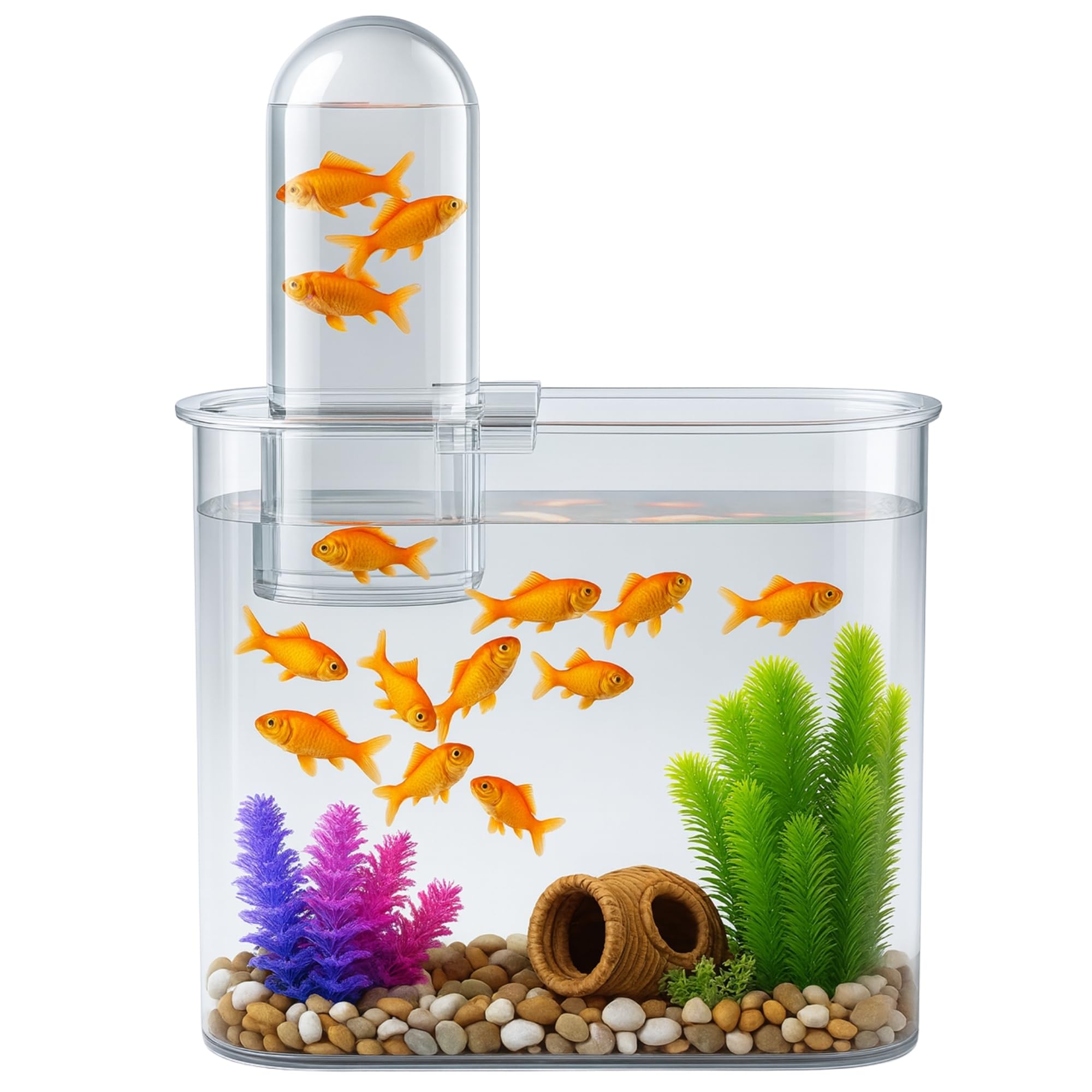
Image: A Buraq Floating Fish Tank showcasing its unique elevated transparent dome where fish can swim above the main water level, providing 360-degree visibility and an interactive environment.
- Install the LED Light: Secure the N6 LED light to the rim of the tank. Position it to provide optimal illumination for your fish and any aquatic plants.
- Connect Power: Plug in the filter and LED light power adapters to a suitable electrical outlet.
- Water Cycling: Allow the filter to run for at least 24-48 hours before introducing fish. This helps establish beneficial bacteria. For a new aquarium, it is recommended to perform a proper aquarium nitrogen cycle before adding fish.
Operating Instructions
Floating Dome Functionality
The unique floating dome allows fish to swim into an elevated section, creating an interesting visual effect. This is achieved through water displacement and does not require any special operation. Fish will naturally explore and utilize this space.
LED Light Operation
The N6 LED light provides illumination for your aquarium. Plug it into a power source to turn it on. Unplug to turn it off. Consider using a timer for consistent light cycles (8-10 hours per day is generally recommended for most fish and plants).
Hang-On Filter Operation
The hang-on filter continuously circulates and cleans the aquarium water. Ensure the water level is maintained above the minimum line for proper operation. The filter should run 24/7 to maintain water quality.
Maintenance
Weekly Maintenance (5-Minute Cleaning)
- Water Change: Perform a 25% water change weekly. Use a gravel vacuum to remove debris from the substrate while siphoning out water. Replace with dechlorinated water of a similar temperature.
- Filter Cleaning: Rinse the filter media (sponge) in old aquarium water (removed during the water change) to preserve beneficial bacteria. Do not rinse under tap water, as chlorine can kill these bacteria. Replace filter cartridges as recommended by the manufacturer (typically every 2-4 weeks).
- Wipe Down Tank: Use an aquarium-safe cleaning pad or soft cloth to wipe down the inside and outside surfaces of the acrylic tank to remove algae and water spots.

Image: A hand demonstrating the ease of cleaning the Buraq Floating Fish Tank, emphasizing its wide top access, smooth curved corners, and easy rinse design for quick weekly maintenance.
Acrylic Care
The tank is made from durable acrylic. To maintain its clarity:
- Only use soft cloths or sponges specifically designed for acrylic.
- Avoid abrasive materials or harsh chemicals, which can scratch or cloud the acrylic.
- Minor scratches can sometimes be buffed out with specialized acrylic polishing kits.

Image: A visual comparison illustrating the superior clarity and scratch resistance of an acrylic tank (left) compared to a standard plastic tank (right), which often appears hazy and scratches easily.
Troubleshooting
| Problem | Possible Cause | Solution |
|---|---|---|
| Filter not running | Not plugged in; power outage; impeller jammed; water level too low. | Check power connection; ensure water level is adequate; clean impeller. |
| Water cloudy | New tank syndrome; overfeeding; insufficient filtration; infrequent water changes. | Perform water changes; reduce feeding; check filter media; ensure proper cycling. |
| Algae growth | Excessive light; high nutrients; infrequent cleaning. | Reduce light duration; perform water changes; clean tank surfaces. |
| Fish not using floating dome | Fish are shy; new to environment; water parameters. | Give fish time to adjust; ensure water quality is good. |
Specifications
| Feature | Detail |
|---|---|
| Brand | BURAQ |
| Model | BL-10V |
| Material | Acrylic |
| Product Dimensions (L x W x H) | 32L x 14.5W x 45H Centimeters |
| Item Weight | 1.36 Kilograms |
| Special Feature | Lightweight, Durable, Floating Dome Design |
| LED Light Power | 2.5W (N6 WRGB) |
| Hang-On Filter Power | 3W (180 L/H) |
| Target Species | Fish (e.g., Betta, Goldfish, Guppies, Mollies, Tetras) |
| Specific Uses | Indoor Aquarium |

Image: A diagram illustrating the precise dimensions of the Buraq Floating Fish Tank, including its length, width, and height, along with the height of the elevated dome.
Warranty and Support
For warranty information or technical support, please contact BURQA customer service. Keep your purchase receipt as proof of purchase.
Visit the official BURQA store on Amazon for more products and support: BURAQ Store
Related Documents - BL-10V
 |
Philips CoralCare Controller Gen2 User Manual and Setup Guide Comprehensive guide for setting up and using the Philips CoralCare Controller Gen2, including installation, connectivity options (0-10V interface, PC application, mobile app), and operational details. |
 |
Panasonic Network Camera BL-VT164/BL-VP100 Series Operating Instructions Detailed operating instructions for Panasonic BL-VT164 Series and BL-VP100 Series network cameras. Covers setup, configuration, monitoring, and maintenance. |
 |
HIOS Brushless Driver BL Series Operation Manual Comprehensive operation manual for HIOS BL Series Brushless Drivers, covering specifications, parts identification, accessories, operating procedures, torque adjustment, and troubleshooting for models like BL-2000, BL-3000, BL-5000, and BL-7000. |
 |
NICREW HyperReef Controller Instruction Manual: Setup, Programming, and Operation This instruction manual provides detailed guidance for setting up, programming, and operating the NICREW HyperReef Controller for aquarium lighting. Includes safety precautions, box contents, navigation, manual and program modes, and warranty information. |
 |
HIOS Brushless Driver BL Series Operation Manual This operation manual provides detailed information on the HIOS Brushless Driver BL Series, including models BL-2000, BL-3000, BL-5000, and BL-7000. It covers parts identification, specifications, accessories, power supplies, operating procedures, torque adjustment, and troubleshooting. |
 |
Juniper JOT Desk U-Shape Workstation Installation Guide This document provides a comprehensive installation guide for the Juniper JOT Desk U-Shape Workstation, covering various configurations, add-ons, and assembly steps. |
Ask a question about this manual
Ask about setup, troubleshooting, compatibility, parts, safety, or missing instructions. Manuals+ will review the question and use this page’s manual context to help answer it.