
1. Introduction
The YPMart ST-5810 is a versatile signal level meter designed for the installation and analysis of various digital television signals. It supports a wide range of global digital TV standards, including Satellite (DVB-S/S2), Cable (DVB-C/C2 or J.83 A/B/C), and Terrestrial (DVB-T/T2 or ISDB-T or ISDB-S or ISDB-C or ATSC 1.0/3.0). This device provides real-time signal analysis, spectrum analysis, demodulation parameters, and constellation diagrams, making it an essential tool for TV broadcasting installations.
Equipped with a high-resolution TFT LCD screen and a capacitive touch panel, the ST-5810 offers an intuitive graphical user interface for ease of operation. Its robust design and high-capacity lithium battery ensure reliable performance in various field conditions.
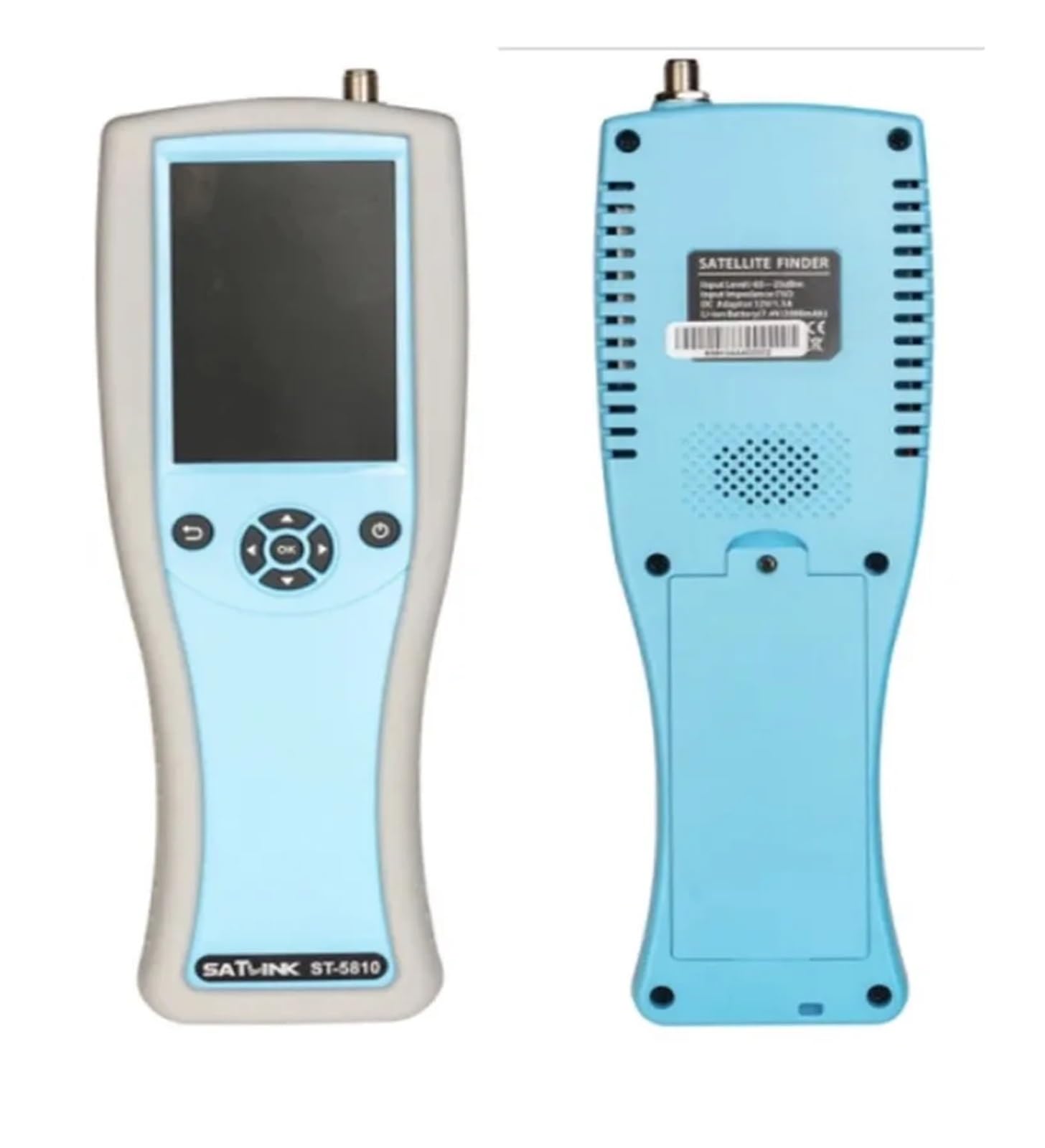
Image 1.1: The YPMart ST-5810 Signal Level Meter, highlighting its real-time spectrum analysis capability.
2. Key Features
- Universal Digital TV Standards Support: Compatible with DVB-S/S2, DVB-T/T2, ISDB-T/S/C, ATSC 1.0/3.0, DVB-C/C2, and J.83 A/B/C.
- Fast and Reliable Signal Processing: Ensures quick and accurate data analysis.
- Patented Dual-Frequency Spectrum Scan: Provides precise spectrum analysis across all frequency ranges.
- Comprehensive Measurement Statistics: Offers detailed channel quality metrics and constellation diagrams.
- Antenna/LNB Angle Calculation: Assists in precise antenna alignment.
- DiSEqC and dCSS MDU Support: Facilitates control of satellite motor and MDU applications.
- LNB Power Compensation: Ensures optimal LNB performance.
- Audible Tone: Provides an audio indicator for signal strength.
- High-Resolution LCD Display: 3.95-inch TFT LCD with 16-bit color for clear visuals.
- Capacitive Touch Panel: Enables intuitive multi-touch operation.
- User-Friendly Interface: Intuitive graphical user interface for easy navigation.
- Long Battery Life: High-capacity lithium battery for extended operation.
- USB Interface: For firmware upgrades and file transfers.
- Pre-loaded Parameters: Built-in parameters for global satellites and transmitters.

Image 2.1: A visual representation of the ST-5810's key features, including multi-standard compatibility and advanced analysis functions.
3. Product Components
Familiarize yourself with the main components of the ST-5810 device:

Image 3.1: Front panel diagram of the ST-5810, indicating the location of key controls and display.
- RF F Connector: Located at the top, this is the input for signal connection (antenna, LNB, or cable).
- LCD Display: A 3.95-inch, 480 x 320, 16-bit color LCD with bright backlight and capacitive touch functionality.
- Back Key: Used to return to the previous menu or screen.
- Navigation Keys & OK Button: A directional pad for menu navigation and selection.
- Power On/Off Button: Controls the device's power state.


Image 3.2: Front and back views of the ST-5810 device, showing its ergonomic design and rear ventilation.
4. Setup
- Charging the Device: Before first use, fully charge the ST-5810 using the provided power adapter. The charging indicator will show the status.
- Power On: Press and hold the Power On/Off button until the screen illuminates.
- Language Selection: Upon initial power-on, you may be prompted to select your preferred language. Use the navigation keys or touch screen to select and confirm.
- Connecting the Signal Source: Connect your antenna, LNB, or cable directly to the RF F connector at the top of the device. Ensure a secure connection.
5. Operating Instructions
The ST-5810 features an intuitive interface accessible via its capacitive touch screen and physical navigation buttons.
5.1. Main Menu Navigation
- From the main screen, tap on the desired icon or use the navigation keys to select a function (e.g., Measurement, Constellation, Spectrum, System Setup).
- The 'Back' key allows you to return to the previous screen or menu.
5.2. Selecting TV Standards
The device supports multiple TV standards. To select the appropriate standard for your measurement:
- Navigate to the 'System Setup' or 'Measurement' menu.
- Select the 'Standard' option and choose from DVB-S/S2, DVB-T/T2, ATSC 1.0/3.0, ISDB-T, DVB-C/C2, etc.
- Confirm your selection.
5.3. Performing Measurements
Once the standard is selected and the signal source is connected, you can perform various measurements:
- Measurement: Displays key signal parameters such as signal strength, quality, BER (Bit Error Rate), and MER (Modulation Error Ratio).
- Constellation: Provides a visual representation of the signal's modulation, useful for diagnosing signal integrity issues.
- Spectrum: Shows the frequency spectrum of the signal, allowing for identification of interference or signal shape issues.
- SNR Monitor: Monitors the Signal-to-Noise Ratio over time.
- Multi-Channel Scan: Scans and displays information for multiple channels within a selected frequency range.

Image 5.1: Examples of the ST-5810's user interface for different TV standards, showing measurement, constellation, and spectrum options.
5.4. Advanced Functions
- DiSEqC Test: For configuring and testing DiSEqC switches and motors in satellite systems.
- Motor Test: Specifically for testing satellite dish motors.
- Angle Calculation: Helps determine the correct elevation and azimuth angles for antenna/dish alignment.
- Channel Editor: Allows for managing and customizing channel lists.
- Report List: View and manage saved measurement reports.

Image 5.2: Detailed measurement screens showing parameters for ATSC 3.0 and DVB-S/S2 signals, including frequency, bandwidth, SNR, and MER.
6. Maintenance
- Cleaning: Use a soft, dry cloth to clean the device. For stubborn dirt, a slightly damp cloth with mild detergent can be used, ensuring no liquid enters the device. Do not use abrasive cleaners or solvents.
- Battery Care: To prolong battery life, avoid fully discharging the device frequently. If storing for an extended period, charge the battery to approximately 50% and recharge every few months.
- Storage: Store the device in a cool, dry place away from direct sunlight and extreme temperatures.
- Firmware Updates: Periodically check the manufacturer's website for firmware updates. Updates can be performed via the USB interface to ensure optimal performance and access to new features.
7. Troubleshooting
- Device does not power on: Ensure the battery is charged. Connect the power adapter and try again. If the issue persists, contact support.
- No signal detected: Verify that the RF F connector is securely attached to the signal source. Check the antenna, LNB, or cable connection for any damage. Ensure the correct TV standard is selected in the device settings.
- Inaccurate readings: Confirm that the device is configured for the correct signal type and parameters. Ensure there is no external interference affecting the signal.
- Touch screen unresponsive: Try restarting the device. If the problem continues, ensure the screen is clean and free of debris.
- Firmware update issues: Ensure the USB connection is stable and the correct firmware file is being used. Follow the update instructions precisely.
8. Specifications
| Feature | Specification |
|---|---|
| Model | ST-5810 |
| Supported Standards | DVB-S/S2, DVB-C/C2, J.83 A/B/C, DVB-T/T2, ISDB-T/S/C, ATSC 1.0/3.0 |
| Display | 3.95" High Definition TFT LCD, 480 x 320, 16-bit Color, Capacitive Touch Panel |
| Connectivity | USB Interface for firmware upgrade and file transfer |
| Battery | High capacity lithium battery |
| Item Weight | 900 Grams |
| Number of Pieces | 1 |
9. Warranty and Support
For warranty information, please refer to the documentation provided with your purchase or contact your retailer. For technical support, assistance with troubleshooting, or inquiries regarding firmware updates, please contact YPMart customer service through their official channels. Keep your purchase receipt or proof of purchase handy when seeking support.