
1. Introduction
The MUCAR 632 is an advanced AI-assisted OBD2 diagnostic tool designed for comprehensive vehicle analysis and maintenance. This device integrates intelligent features to simplify troubleshooting, offering a wide range of diagnostic and reset services for various vehicle systems. It is equipped with a user-friendly interface and robust hardware to provide efficient and accurate vehicle data.
Key features include AI-powered fault code analysis, bi-directional control, 15+ reset services, 4-system diagnostics (Engine, ABS, SRS, Transmission), CAN FD protocol support, and FCA SGW AutoAuth compatibility. The device also benefits from lifetime free software updates via Wi-Fi.
2. Setup
2.1. Device Overview
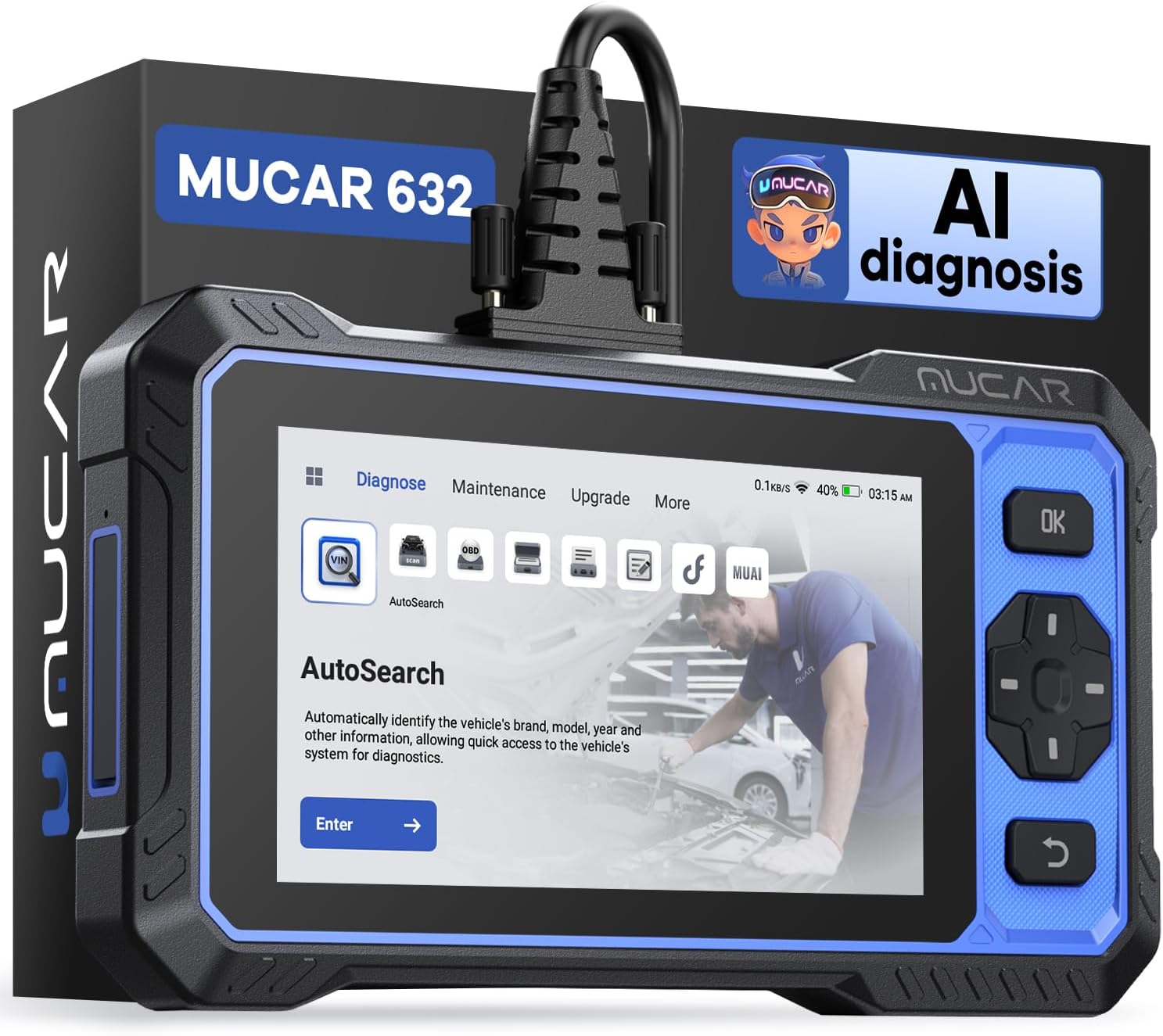
Image: MUCAR 632 OBD2 Scanner displaying its main menu with AutoSearch function.
2.2. Initial Power-Up and Charging
Before first use, ensure the MUCAR 632 is fully charged. Connect the device to a power source using the provided Type-C cable. The charging indicator will show the charging status.
2.3. Wi-Fi Connection and Software Updates
- Power on the device.
- Navigate to the 'Settings' or 'More' menu.
- Select 'Wi-Fi' and connect to an available network.
- Once connected, go to the 'Upgrade' section.
- Perform a one-click update to ensure all software, vehicle parameters, and functionalities are current. This process may take some time depending on your internet speed.
2.4. Connecting to Vehicle
- Ensure the vehicle's ignition is turned off.
- Locate the vehicle's OBD2 port, typically found under the dashboard on the driver's side.
- Plug the diagnostic cable from the MUCAR 632 into the vehicle's OBD2 port.
- Turn the vehicle's ignition to the 'ON' position (do not start the engine).
- The MUCAR 632 will automatically establish a connection with the vehicle.
3. Operating Instructions
3.1. AI-Assisted Analysis & Q&A
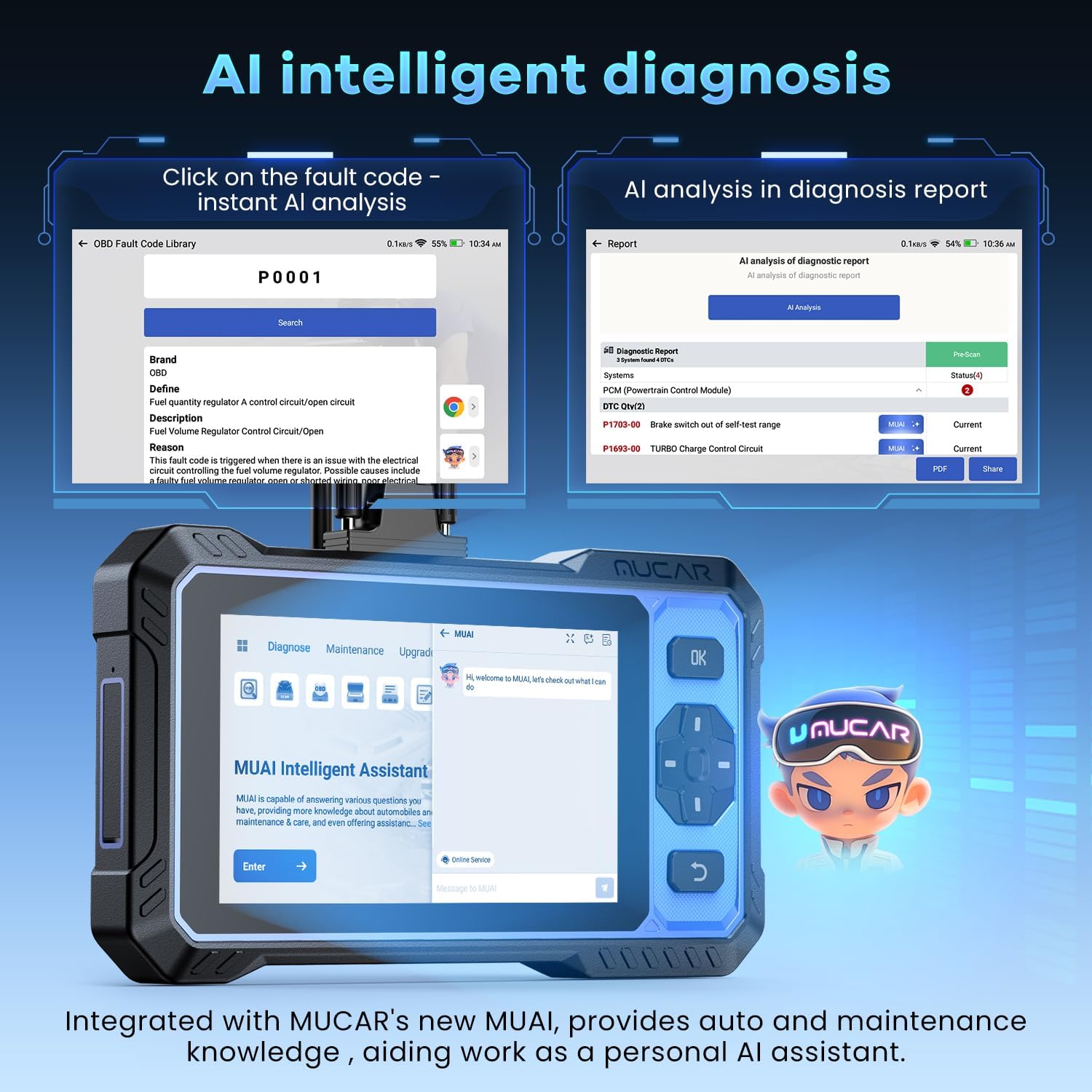
Image: MUCAR 632 demonstrating AI intelligent diagnosis features, including instant analysis of fault codes and AI integration in diagnosis reports.
The MUCAR 632 features an AI-powered system to enhance diagnostic capabilities:
- Instant AI Analysis: When a fault code is detected, select it on the screen to receive an immediate AI analysis of its potential cause and suggested repair steps.
- AI-Integrated Diagnosis Reports: Diagnosis reports include AI insights, providing clearer explanations for complex Diagnostic Trouble Codes (DTCs).
- MUAI Intelligent Assistant: Access the independent MUAI portal to ask direct questions regarding repairs, vehicle systems, or tool operations, functioning as a virtual mechanic advisor.
3.2. 15+ Reset Services

Image: MUCAR 632 displaying a selection of its 15+ maintenance service functions, such as ABS Bleeding, SAS Reset, Oil Reset, and DPF Regeneration.
The MUCAR 632 provides over 15 common maintenance reset services. Navigate to the 'Maintenance' menu to access these functions. Examples include:
- Oil Reset: Resets the oil life reminder after an oil change.
- Brake Reset (EPB): Resets the electronic parking brake system after brake pad replacement.
- TPMS Reset: Resets the Tire Pressure Monitoring System.
- Throttle Adaptation: Relearns throttle body position.
- SAS Reset: Resets the Steering Angle Sensor.
- BMS Reset: Resets the Battery Management System after battery replacement.
- ABS Bleeding: Performs ABS brake bleeding procedures.
- DPF Regeneration: Initiates Diesel Particulate Filter regeneration.
- Injector Coding: Codes new injector numbers into the ECU.
3.3. 4 Systems Diagnostic & Bi-directional Control
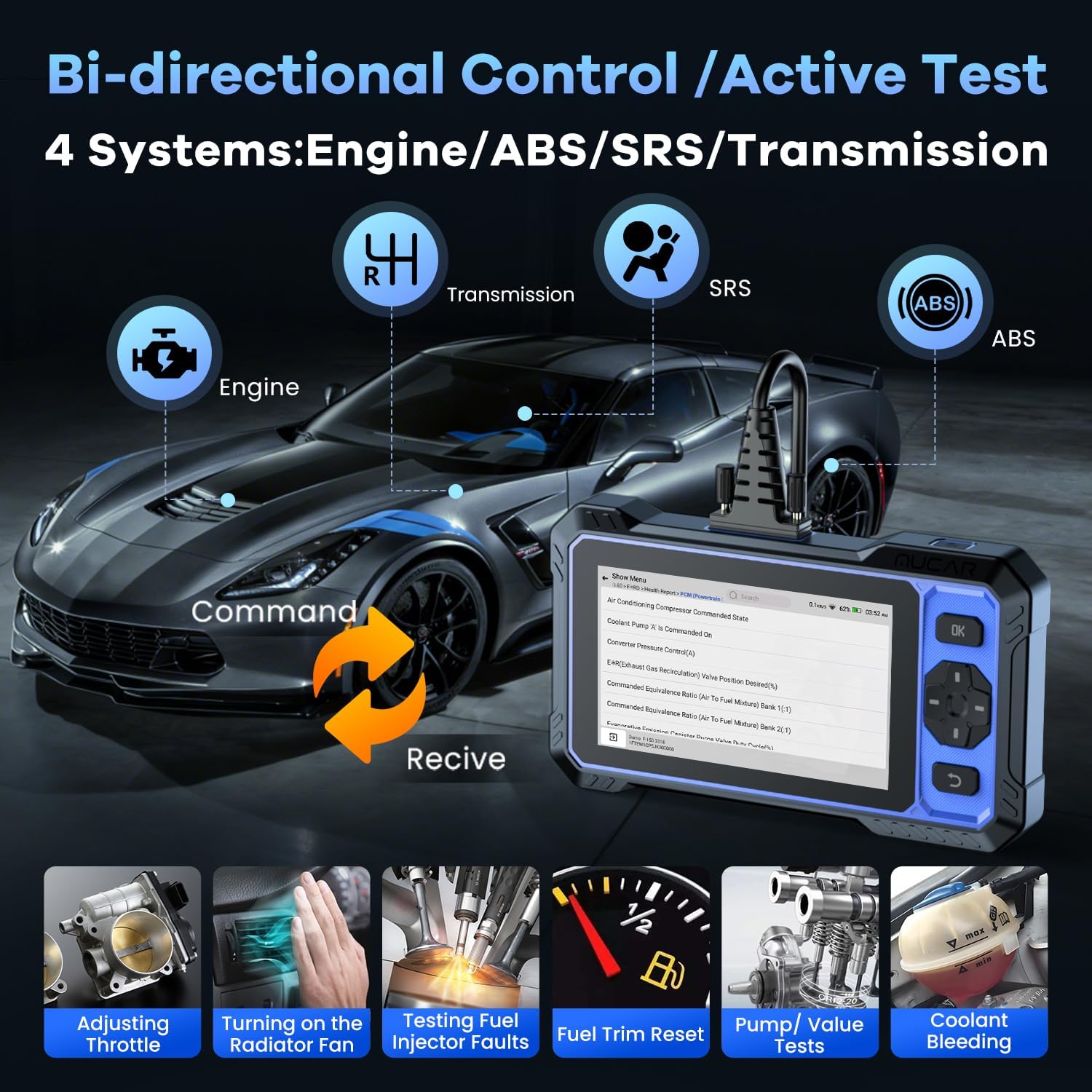
Image: MUCAR 632 illustrating bi-directional control and active test capabilities across Engine, ABS, SRS, and Transmission systems, with examples like adjusting throttle and testing fuel injectors.
The MUCAR 632 supports in-depth diagnostics for four core vehicle systems:
- Engine System: Reads and clears engine fault codes, views live data.
- ABS (Anti-lock Braking System): Diagnoses ABS issues, performs ABS bleeding.
- SRS (Supplemental Restraint System/Airbag): Checks airbag system status and clears related codes.
- Transmission System: Diagnoses transmission problems and views live data.
Bi-directional Control (Active Test): This function allows the tool to send commands to vehicle components to test their functionality, such as turning on the radiator fan, adjusting the throttle, or testing fuel injectors. This helps in pinpointing issues more accurately.
3.4. Vehicle Information and Compatibility

Image: MUCAR 632 showcasing its extensive compatibility with over 150 vehicle brands and support for 28+ languages, including CAN-FD protocol and FCA AutoAuth.
- Auto V.I.N: Automatically identifies the vehicle's VIN for quick access to diagnostic functions.
- Wide Vehicle Coverage: Supports over 150 vehicle brands and 10,000+ models, primarily after 1996.
- CAN FD Protocol: Compatible with newer vehicles utilizing the CAN FD protocol (e.g., 2019+ GM models).
- FCA SGW AutoAuth: Supports AutoAuth for FCA SGW vehicles (e.g., 2018-2024 Chrysler, Dodge, Fiat, Alfa Romeo, Jeep). An FCA account may be required.
- Multi-Language Support: Equipped with 28 languages, including English, French, German, Italian, Spanish, Portuguese, Japanese, Russian, Polish, Dutch, Hungarian, Slovak, Greek, Slovenian, Korean, Chinese Traditional, Swedish, Turkish, Czech, and Indonesian.
3.5. Diagnostic Functions
- Read Codes: Retrieves current, pending, and permanent Diagnostic Trouble Codes (DTCs).
- Erase Codes: Clears DTCs and turns off the Check Engine Light (MIL).
- Live Data Stream: Displays real-time data parameters from the vehicle's sensors and modules.
- Realtime Curve: Presents live data in a graphical format for easier analysis of parameter changes over time.
- View Freeze Frame: Captures a snapshot of vehicle operating conditions at the moment a fault code was set.
- I/M Readiness: Checks the status of emission-related monitors to determine if the vehicle is ready for an emissions test.
- DTC Lookup: Provides definitions for retrieved fault codes directly on the device.
4. Maintenance
To ensure optimal performance and longevity of your MUCAR 632, follow these maintenance guidelines:
- Software Updates: Regularly connect the device to Wi-Fi and perform one-click lifetime updates to ensure you have the latest software, vehicle coverage, and bug fixes.
- Cleaning: Use a soft, dry cloth to clean the device. Avoid using abrasive cleaners or solvents.
- Storage: Store the device in a cool, dry place away from direct sunlight and extreme temperatures.
- Battery Care: For prolonged storage, ensure the battery is charged to approximately 50-70% to maintain battery health.
5. Troubleshooting
If you encounter issues with your MUCAR 632, consider the following:
- Device Not Powering On: Ensure the device is fully charged or connected to a power source. Check the diagnostic cable connection to the vehicle's OBD2 port.
- No Communication with Vehicle: Verify the ignition is in the 'ON' position (engine off). Check the OBD2 cable connection. Ensure the vehicle is compatible with the MUCAR 632.
- Inaccurate Readings or Functions: Perform a software update to ensure the latest vehicle data and functions are installed.
- Complex Fault Codes: Utilize the AI-assisted analysis feature for detailed explanations and repair suggestions for specific DTCs.
- General Issues: Refer to the MUAI Intelligent Assistant portal for direct questions and support.
6. Specifications

Image: MUCAR 632 highlighting its superior hardware components, including the 6.2-inch touchscreen, Android 8.1 OS, 4-Core 1.8GHz CPU, 4150mAh battery, and 2+32GB memory.
| Feature | Specification |
|---|---|
| Model | MUCAR 632 |
| Operating System | Android 8.1 |
| CPU | 4-Core 1.8GHz |
| Memory | 2GB RAM + 32GB ROM |
| Screen | 6.2-inch Touch Screen (1024P) |
| Battery | 4150mAh |
| Connectivity | Wi-Fi, Bluetooth |
| Dimensions | 22.4 x 3.2 x 12.9 cm |
| Item Weight | 989 g |
| Power Source | Corded Electric (via OBD2) |
7. Package Contents
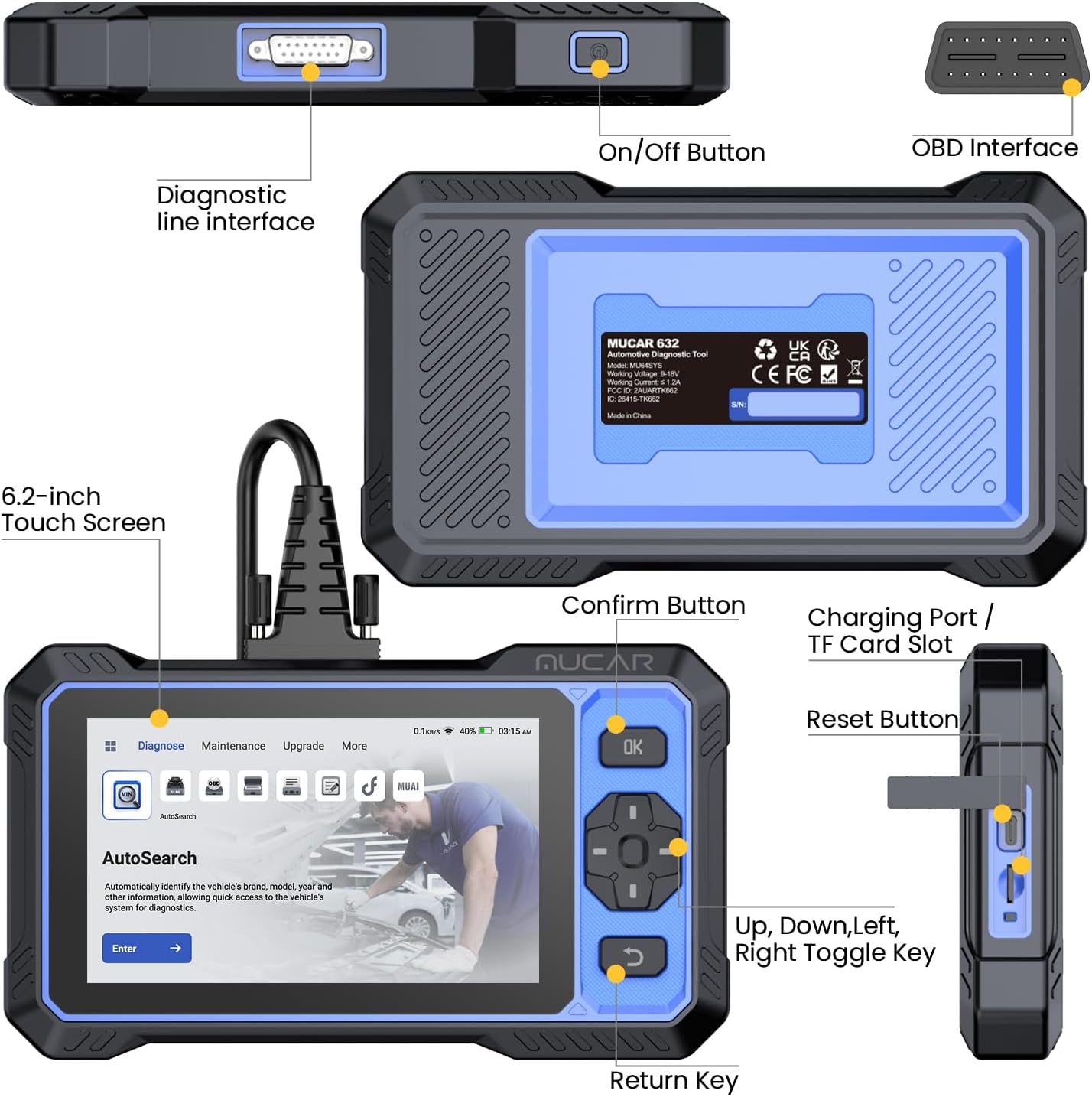
Image: MUCAR 632 package contents, including the MUCAR 632 Scanner, Diagnostic Cable, and Type-C Cable.
The MUCAR 632 package typically includes the following items:
- MUCAR 632 Scanner Unit
- Diagnostic Cable (OBD2 connector)
- Type-C USB Cable
- Quick Start Guide (physical or digital)
8. Warranty and Support
MUCAR provides professional engineer support for its products. For any technical assistance, warranty inquiries, or service-related questions, please contact MUCAR customer support.
Contact Email: service@mucarco.com
Please retain your purchase receipt for warranty purposes.


