
1. Introduction
Thank you for choosing the SHOPVAMI Wireless Earphones, Model AY-4. These earphones are designed to provide a high-definition audio experience with the convenience of Bluetooth connectivity. This manual will guide you through the setup, operation, maintenance, and troubleshooting to ensure optimal performance and longevity of your device.
2. Package Contents
Please verify that all items are present in your package:
- 1 x SHOPVAMI Wireless Earphones (Model AY-4)
- 1 x Charging Cable (Type C, if applicable, based on product model name discrepancy)
- User Manual (this document)
3. Product Overview
Familiarize yourself with the components of your SHOPVAMI Wireless Earphones.
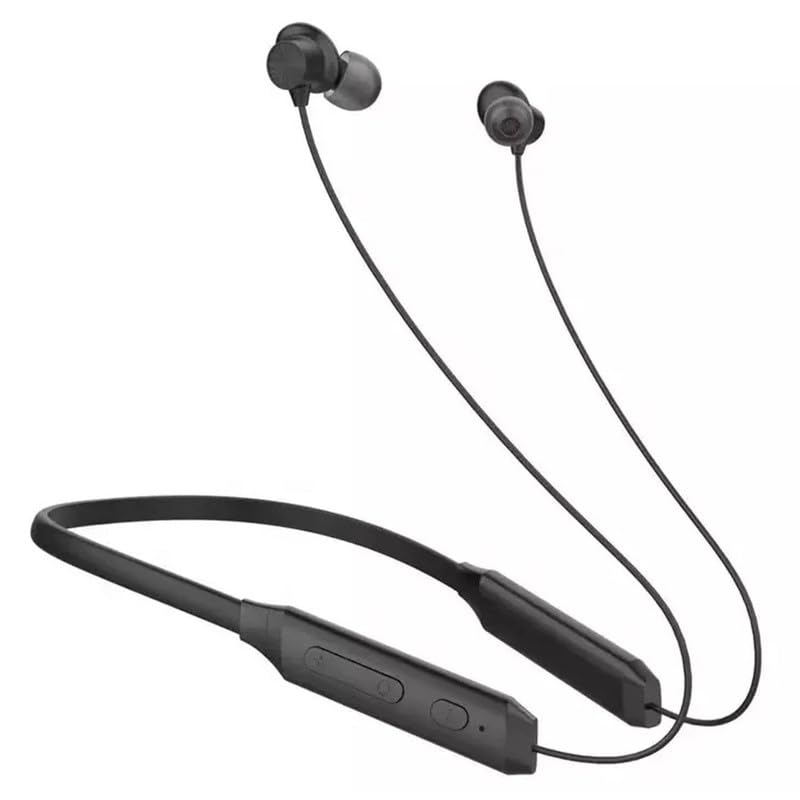
Figure 3.1: Overview of the SHOPVAMI Wireless Earphones (Model AY-4). This image displays the black neckband-style earphones with in-ear buds and the integrated control module.
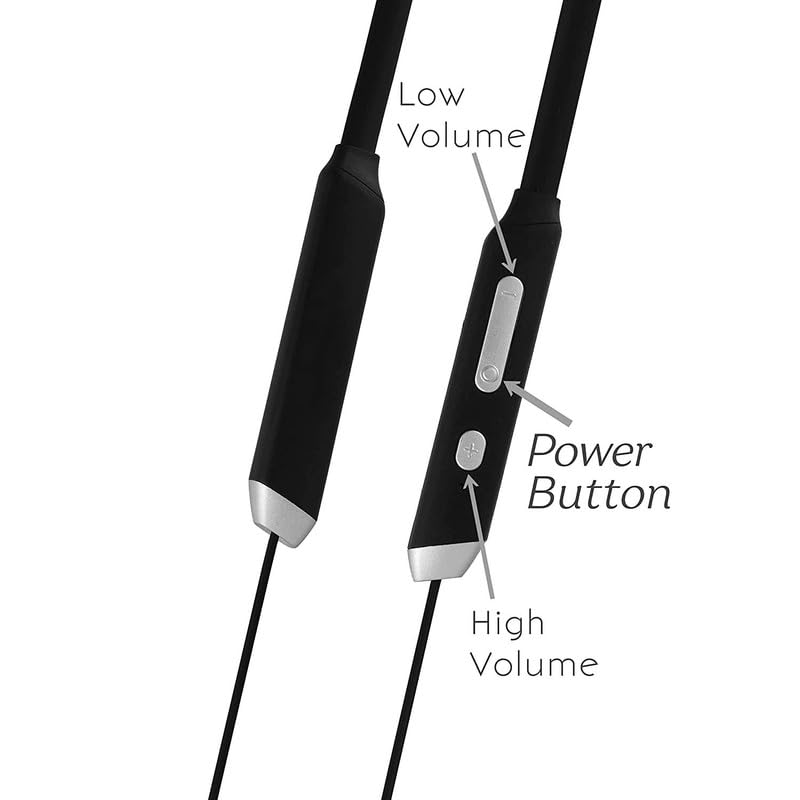
Figure 3.2: Close-up of the control panel. This image highlights the 'Low Volume' button, 'Power Button', and 'High Volume' button on the earphone's control module.
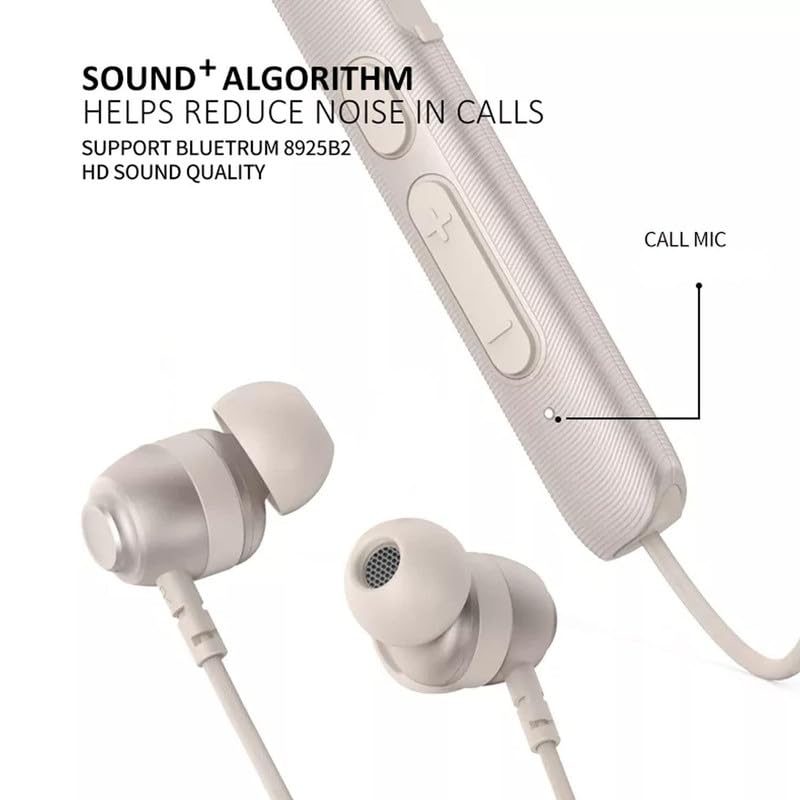
Figure 3.3: Location of the Call Microphone. This image shows the integrated microphone on the earphone's control module, essential for hands-free communication.
4. Setup
4.1 Charging the Earphones
Before first use, fully charge your earphones. Connect the charging cable to the charging port on the control module and plug the other end into a USB power source. The indicator light will typically show red during charging and turn off or blue when fully charged. A full charge provides approximately 6-7 hours of music playtime or 3 hours of talk time, with up to 100 hours of standby time.
4.2 Bluetooth Pairing
- Power On: Press and hold the Power Button (refer to Figure 3.2) for a few seconds until the indicator light flashes, usually blue and red, indicating pairing mode.
- Activate Bluetooth: On your smartphone or device, go to the Bluetooth settings and ensure Bluetooth is enabled.
- Select Device: Look for 'SHOPVAMI AY-4' or a similar name in the list of available devices and select it to connect.
- Confirmation: Once successfully paired, the indicator light on the earphones will typically flash blue slowly or turn off, and you may hear an audible confirmation.
These earphones support dual pairing, allowing connection to two devices simultaneously.

Figure 4.1: Dual Pairing Capability. This image illustrates the earphones connected to two different smartphones, demonstrating the dual pairing feature for seamless switching between devices.
5. Operating Instructions
5.1 Power On/Off
- Power On: Press and hold the Power Button for approximately 3 seconds.
- Power Off: Press and hold the Power Button for approximately 5 seconds.
5.2 Music Playback
- Play/Pause: Press the Power Button once.
- Next Track: Press and hold the 'High Volume' button.
- Previous Track: Press and hold the 'Low Volume' button.
5.3 Call Management
- Answer/End Call: Press the Power Button once.
- Reject Call: Press and hold the Power Button for approximately 2 seconds.
- Redial Last Number: Double-press the Power Button.
5.4 Volume Control
- Increase Volume: Press the 'High Volume' button.
- Decrease Volume: Press the 'Low Volume' button.
6. Maintenance
6.1 Cleaning
- Gently wipe the earphones with a soft, dry, lint-free cloth.
- Do not use harsh chemicals, cleaning solvents, or strong detergents.
- Remove ear tips and clean them separately with mild soap and water if necessary, ensuring they are completely dry before reattaching.
6.2 Storage
- Store the earphones in a cool, dry place away from direct sunlight and extreme temperatures.
- Avoid tangling the cables to prevent damage.
The earphones are sweat-proof and splash-proof, making them suitable for sports activities. However, they are not designed for submersion in water.
7. Troubleshooting
If you encounter issues with your earphones, refer to the following common problems and solutions:
- No Power: Ensure the earphones are fully charged. Connect them to a power source and check the charging indicator.
- Cannot Pair:
- Ensure the earphones are in pairing mode (flashing blue/red light).
- Turn off and on Bluetooth on your device.
- Delete previous pairings from your device's Bluetooth list and try pairing again.
- Ensure the earphones are within the effective Bluetooth range (up to 30 feet).
- No Sound/Poor Sound Quality:
- Check the volume levels on both the earphones and your connected device.
- Ensure the earphones are properly connected to your device.
- Move closer to your device to avoid interference.
- Try playing audio from a different source or application.
- Ensure ear tips are clean and properly seated in your ears for optimal sound.
- Microphone Not Working:
- Ensure the earphones are properly connected and selected as the audio input device on your phone.
- Check for any obstructions around the microphone (refer to Figure 3.3).
8. Specifications
Technical specifications for the SHOPVAMI Wireless Earphones (Model AY-4):
| Feature | Detail |
|---|---|
| Brand | SHOPVAMI |
| Model | AY-4 |
| Connectivity | Bluetooth |
| Music Playtime | Approximately 6-7 hours |
| Talk Time | Approximately 3 hours |
| Standby Time | Approximately 100 hours |
| Special Features | Sweat Proof, Splash Proof, Hands-Free Calling, Noise Cancelling Technology (for crisp sound) |
| Weight | 70 g |
| Material | Plastic |
| Included Components | 1 Bluetooth Earphone |

Figure 8.1: Battery Performance. This image illustrates the approximate music playing time (18 hours, though product description states 6-7 hours) and call duration (15 hours, though product description states 3 hours) for the earphones, along with a 180mAh battery capacity. Please refer to the text specifications for the most accurate battery life estimates.
9. Warranty Information
SHOPVAMI products are manufactured with quality and care. This product may be covered by a limited warranty from the date of purchase. Please retain your proof of purchase for any warranty claims. For specific warranty terms and conditions, refer to the documentation provided at the time of purchase or contact your retailer.
10. Support
If you require further assistance or have questions not covered in this manual, please contact the retailer where you purchased the product or refer to the manufacturer's official support channels. Please have your product model (AY-4) and proof of purchase ready when seeking support.