
1. Introduction
Thank you for choosing the HYPERLITE 8 Foot LED Linear Strip Light Fixture. This manual provides essential information for the safe installation, operation, and maintenance of your new lighting fixture. Please read these instructions thoroughly before installation and retain them for future reference.

Image 1.1: Overview of the HYPERLITE 8 Foot LED Linear Strip Light Fixture.
2. Safety Information
WARNING: Risk of electric shock. Disconnect power before installation or servicing.
- Installation should be performed by a qualified electrician in accordance with national and local electrical codes.
- Ensure the supply voltage is compatible with the fixture's requirements (120-277V).
- Do not handle the fixture with wet hands or when standing on wet surfaces.
- Do not modify the fixture in any way. Unauthorized modifications may void the warranty and create safety hazards.
- Ensure all connections are secure and properly insulated.
- This fixture is designed for indoor use only.
3. Package Contents
Verify that all components are present before beginning installation:
- HYPERLITE 8 Foot LED Linear Strip Light Fixture (Quantity as per pack size)
- Instruction Manual (this document)
- J-box adapters (x2)
- Safety Ropes (x2)
- Screws (x6 total for mounting)
- Anchors (x4)
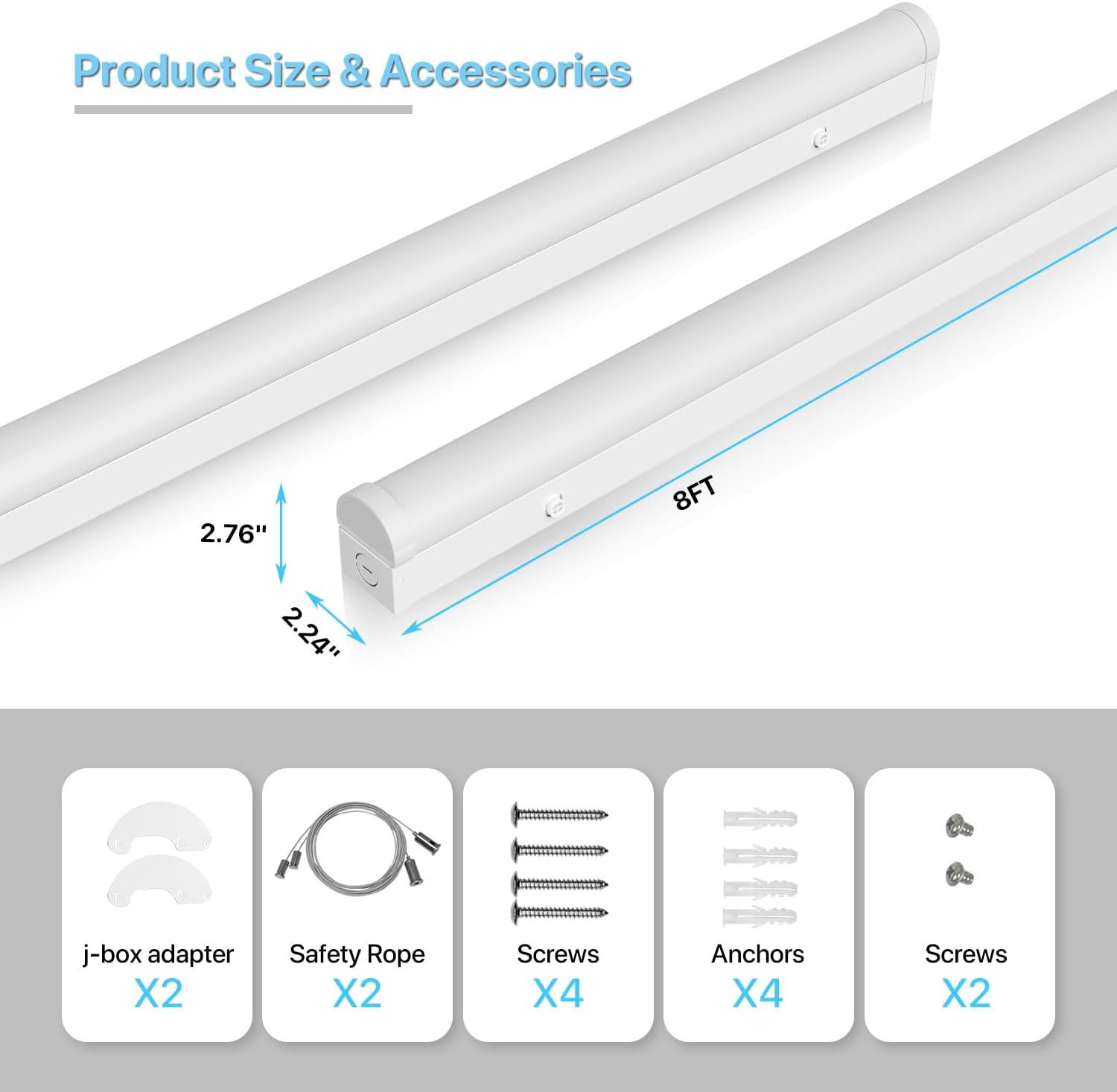
Image 3.1: Included accessories and fixture dimensions.
4. Product Features
- Adjustable Wattage: Select between 60W, 70W, or 80W to optimize energy consumption and light output.
- Selectable Color Temperature (CCT): Choose from 3500K (Warm White), 4000K (Cool White), or 5000K (Daylight) to suit your environment.
- High Efficiency: Delivers up to 10400 lumens with an efficiency of 130 lumens per watt.
- 1-10V Dimmable: Compatible with 1-10V dimmers for adjustable brightness from 10% to 100%.
- Long Lifespan: Rated for 50,000 hours of operation, reducing maintenance and replacement costs.
- Durable Construction: Made from aluminum for robust performance.
- UL Certified: Meets high safety and performance standards.
- Versatile Installation: Supports both surface mount and suspended mount methods.
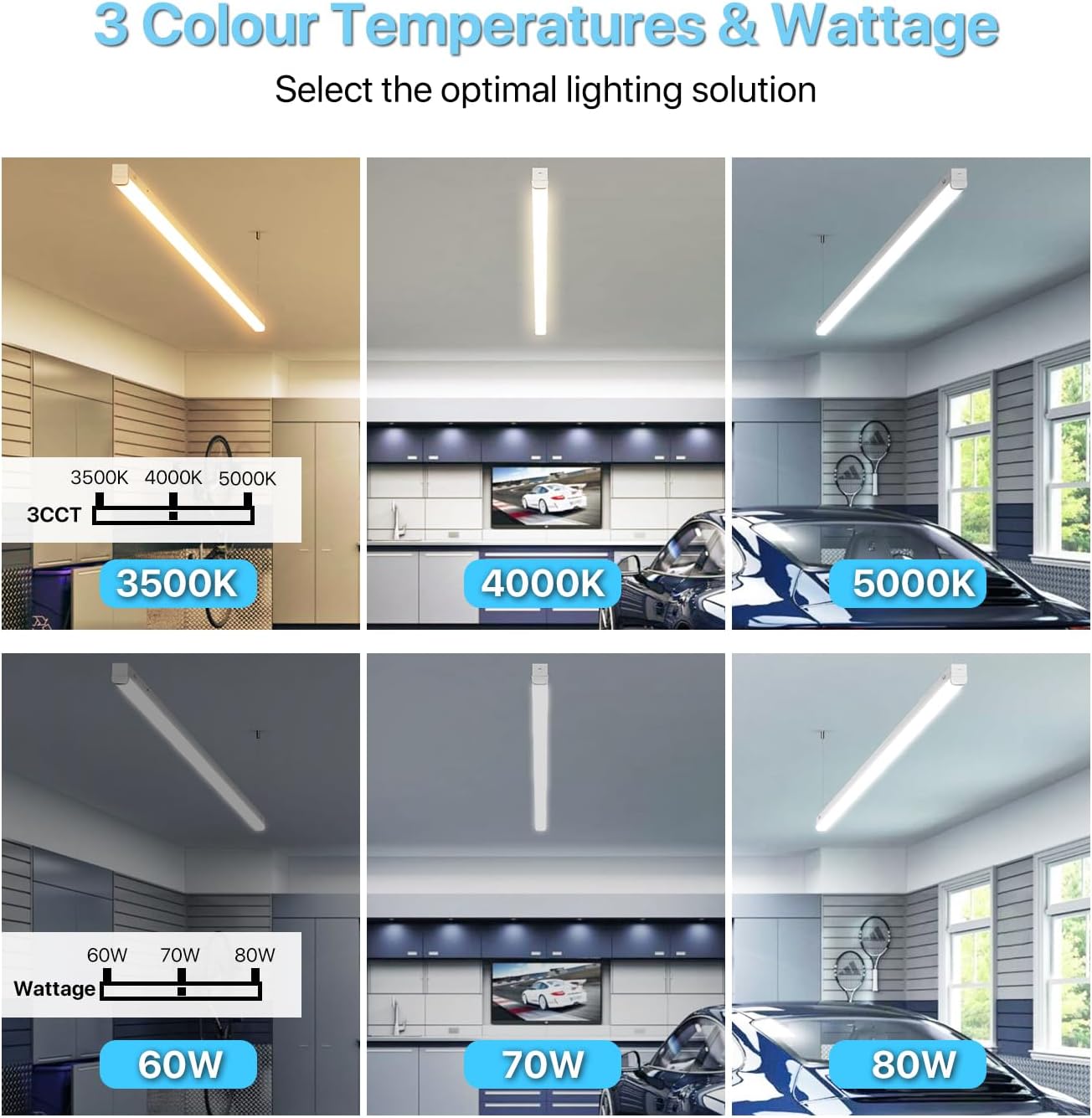
Image 4.1: Visual representation of selectable color temperatures and wattage settings.

Image 4.2: Details on the screw-lock mechanism for stable suspension and the unique button/buckle design for easy cover removal.
5. Installation Instructions
Before installation, ensure the power supply is turned off at the circuit breaker.
5.1. Surface Mount Installation
- Prepare the Mounting Surface: Identify the desired location for the fixture. Mark the drilling points for the mounting screws.
- Drill Holes: Drill pilot holes at the marked locations. Insert anchors if mounting into drywall or other soft materials.
- Attach J-box Adapters: Secure the J-box adapters to the ceiling or wall using the provided screws.
- Wire the Fixture: Connect the fixture's electrical wires to the building's wiring (Live to Live, Neutral to Neutral, Ground to Ground). Ensure all connections are secure and insulated.
- Mount the Fixture: Align the fixture with the J-box adapters and secure it in place with the remaining screws.
5.2. Suspended Mount Installation
- Prepare the Mounting Surface: Identify the desired location for the fixture. Mark the drilling points for the suspension hardware.
- Install Suspension Hardware: Secure the ceiling hooks or other suspension hardware (not included, but compatible with safety ropes) into the ceiling structure.
- Attach Safety Ropes: Connect the safety ropes to the fixture's designated attachment points. The screw-lock mechanism ensures stable suspension.
- Adjust Height: Adjust the length of the safety ropes to achieve the desired hanging height.
- Wire the Fixture: Connect the fixture's electrical wires to the building's wiring (Live to Live, Neutral to Neutral, Ground to Ground). Ensure all connections are secure and insulated.

Image 5.1: Illustration of the two available installation methods: Surface Mount and Suspended Mount.
6. Operating Instructions
The HYPERLITE LED Linear Strip Light Fixture features external switches for adjusting wattage and color temperature (CCT).
6.1. Adjusting Wattage and Color Temperature
The CCT and wattage switches are located on the fixture's housing. These can be adjusted without disassembling the fixture.
- Locate Switches: Identify the small toggle switches on the side of the fixture. One switch controls wattage (60W, 70W, 80W) and the other controls CCT (3500K, 4000K, 5000K).
- Select Desired Setting: Use a small tool (e.g., a screwdriver) to slide the switches to your preferred wattage and color temperature.
- Power On: Restore power to the fixture to see the changes.
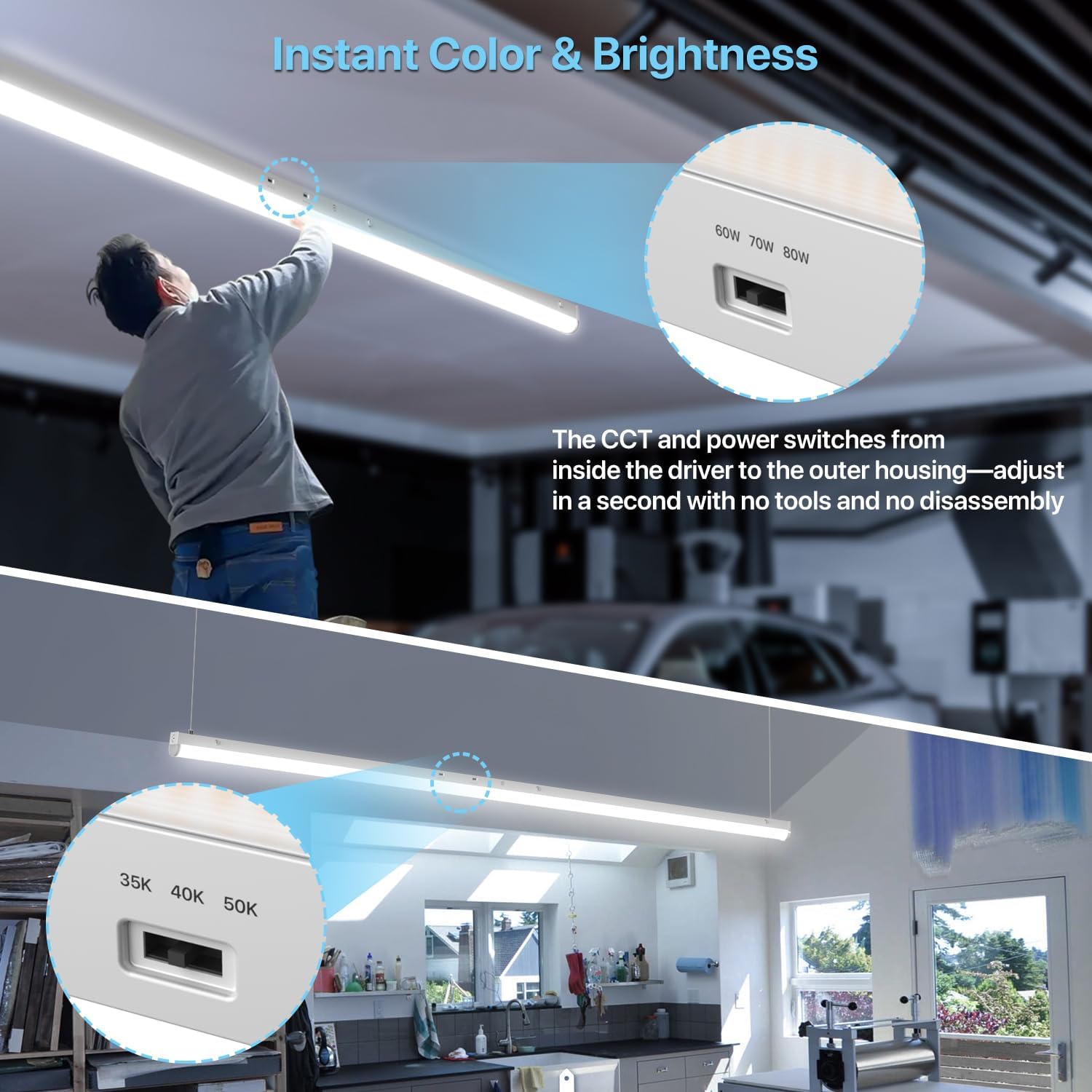
Image 6.1: Location and operation of the CCT and wattage selection switches.
6.2. Dimming Function (1-10V)
This fixture supports 1-10V dimming. To utilize this feature, you will need a compatible 1-10V dimmer switch (not included) wired into your electrical system.
- Install 1-10V Dimmer: Have a qualified electrician install a 1-10V dimmer switch according to its instructions and local electrical codes.
- Connect Dimming Wires: Connect the fixture's dimming wires to the corresponding wires from the 1-10V dimmer.
- Adjust Brightness: Use the 1-10V dimmer to adjust the light output from 10% to 100%.

Image 6.2: Visual demonstration of the 1-10V dimming range from 10% to 100% brightness.
7. Maintenance
The HYPERLITE LED Linear Strip Light Fixture requires minimal maintenance.
- Cleaning: Ensure the power is off before cleaning. Wipe the fixture with a soft, dry, or slightly damp cloth. Do not use harsh chemicals, abrasive cleaners, or solvents.
- Inspection: Periodically inspect the fixture for any signs of damage, loose connections, or wear. If any issues are found, disconnect power and contact a qualified electrician or HYPERLITE support.
- LEDs: The LEDs are integrated and not user-replaceable. The long lifespan of the LEDs means replacement should not be necessary under normal operating conditions.
8. Troubleshooting
If you encounter issues with your fixture, refer to the following common problems and solutions:
| Problem | Possible Cause | Solution |
|---|---|---|
| Fixture does not light up | No power supply Loose wiring connection Faulty fixture | Check circuit breaker and wall switch. Verify all wire connections are secure (ensure power is off first). Contact HYPERLITE support if power is confirmed and connections are good. |
| Light output is too dim or too bright | Incorrect wattage setting Dimmer setting too low/high | Adjust the wattage switch on the fixture. Adjust the 1-10V dimmer to the desired brightness level. |
| Color temperature is not as expected | Incorrect CCT setting | Adjust the CCT switch on the fixture to 3500K, 4000K, or 5000K. |
| Flickering light | Incompatible dimmer Loose wiring Voltage fluctuations | Ensure a 1-10V dimmer is used. If not, replace with a compatible dimmer. Check all wiring connections (with power off). Consult an electrician to check power supply stability. |
9. Specifications
| Feature | Specification |
|---|---|
| Model Number | HP-SP-BF02 |
| Dimensions (L x W x H) | 96" x 2.09" x 2.59" |
| Wattage | 60W / 70W / 80W (Selectable) |
| Lumen Output | Up to 10400 Lumens (at 80W) |
| Efficacy | 130 lm/W |
| Color Temperature (CCT) | 3500K / 4000K / 5000K (Selectable) |
| Dimmability | 1-10V Dimming (10%-100%) |
| Input Voltage | 120-277V AC |
| Lifespan | 50,000 hours |
| Material | Aluminum |
| Certifications | UL Listed |
| Indoor/Outdoor Usage | Indoor Use Only |
| Item Weight (8-pack) | 49.9 pounds |
10. Warranty and Support
10.1. Warranty Information
This HYPERLITE LED Linear Strip Light Fixture is covered by a 5-year warranty from the date of purchase. This warranty covers defects in materials and workmanship under normal use. It does not cover damage caused by improper installation, misuse, abuse, accidents, or unauthorized modifications.
Please retain your proof of purchase for warranty claims.
10.2. Customer Support
For technical assistance, warranty claims, or any questions regarding your HYPERLITE product, please contact our customer support team. Refer to the contact information provided with your purchase or visit the official HYPERLITE website.
When contacting support, please have your model number (HP-SP-BF02) and purchase date ready.
