
1. Introduction
The Generic DC118W is a solar-powered wireless wind, sun, and rain sensor designed to automatically control motorized awnings and shutters. It integrates solar power and battery operation, eliminating the need for an external AC power supply. This sensor detects environmental conditions such as wind speed, sunlight intensity, and rainfall, and transmits signals wirelessly to compatible receivers to adjust your awnings or shutters accordingly. This manual provides essential information for the proper installation, operation, and maintenance of your DC118W sensor.
2. Product Overview
The DC118W sensor features a compact design with integrated components for environmental detection and wireless communication. Its solar panel ensures continuous power, while the wind cups measure wind speed, and the rain sensor detects precipitation. The device also includes an LCD display and control buttons for configuration.

Figure 2.1: Top view of the DC118W sensor, highlighting the integrated solar panel for power generation.

Figure 2.2: Side view of the DC118W sensor, showing the LCD display, 'M' (Menu), 'A' (Adjust), 'P2' (Pairing/Program), 'Set', 'Up' buttons, and a 'Reset' button. Wind cups and rain sensor are also visible.
3. Features
- Solar Powered: Integrated solar panel and battery for independent operation without external AC power.
- Wireless Control: Operates on a 433.9 MHz radio frequency, compatible with bi-directional systems like DD118H.
- Environmental Detection: Accurately detects wind speed, sunlight intensity, and rainfall.
- Automated Awning/Shutter Control: Automatically controls motorized awnings and shutters based on detected environmental conditions.
- Adjustable Wind Sensitivity: Offers 3 different wind-force grades for customized response.
- Adjustable Light Sensitivity: Provides 4 different light intensity grades for sun detection.
- Extended Range: Effective wireless range of up to 200 meters in outdoor environments.
- Compact Dimensions: Measures approximately 260mm x 104mm x 30mm.
4. Specifications
| Specification | Detail |
|---|---|
| Model Number | DC118W |
| Power Source | Solar / Battery (Integrated) |
| Radio Frequency | 433.9 MHz |
| Wind Force Grades | 3 levels |
| Light Intensity Grades | 4 levels |
| Outdoor Range | Up to 200 meters |
| Dimensions (L x W x H) | 260mm x 104mm x 30mm |
| Usage | Wind Sun Rain Sensor for Awnings/Shutters |

Figure 4.1: Dimensions of the DC118W sensor, showing approximate length of 30cm and width of 12cm.
5. Setup and Installation
Proper installation is crucial for the optimal performance of your DC118W sensor. Ensure the sensor is mounted in a location that receives ample sunlight and is exposed to wind and rain without obstruction.
5.1 Choosing a Mounting Location
- Select a location that is high enough to be free from ground-level obstructions that could block wind or sun.
- Ensure the solar panel faces the direction that receives the most direct sunlight throughout the day.
- Avoid mounting near large structures, trees, or other objects that could create wind shadows or block rain.
- The sensor should be within the 200-meter wireless range of the compatible receiver (e.g., DC1600 or tubular motor with built-in receiver).
5.2 Mounting the Sensor
- Use appropriate screws and anchors (not included) to securely fasten the sensor's mounting bracket to a stable surface.
- Ensure the sensor is level to allow for accurate rain detection and proper rotation of the wind cups.
- Once mounted, verify that the wind cups can rotate freely and the rain sensor area is clear.
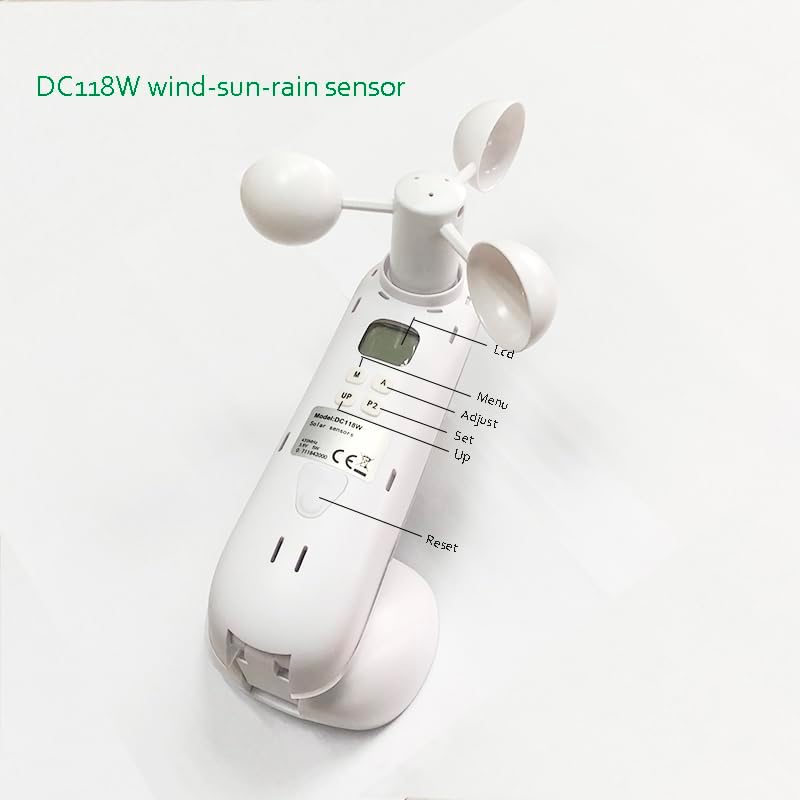
Figure 5.1: Conceptual diagram illustrating the DC118W sensor's wireless communication with a tubular motor and a remote control (DC1600) for awning operation.
5.3 Pairing with Receiver
Refer to the instructions for your specific motorized awning/shutter receiver (e.g., tubular motor with built-in receiver or external receiver like DC1600) for detailed pairing procedures. Generally, this involves putting the receiver into pairing mode and then activating the sensor's pairing function (often using a 'P2' button or a combination of buttons as shown in Figure 2.2).

Figure 5.2: Compatibility diagram showing the DC118W sensor can be used with DC1600 emitters and various types of tubular motors (Radio, Electronic, Standard with outside receiver).
6. Operation
Once installed and paired, the DC118W sensor operates automatically, detecting environmental changes and sending commands to your motorized awnings or shutters. You can customize its sensitivity settings.
6.1 Adjusting Wind Force Grades
The sensor allows you to set 3 different wind-force grades. A higher grade means the awning/shutter will retract/close at a stronger wind speed. Use the 'M' (Menu) and 'A' (Adjust) or 'Up'/'Set' buttons (refer to Figure 2.2) to navigate the settings on the LCD display and select your desired wind sensitivity level. Consult the specific instructions for your receiver for detailed programming steps.
6.2 Adjusting Light Intensity Grades
The sensor offers 4 different light intensity grades. This setting determines how much sunlight is required to trigger the awning/shutter to extend/open. Use the control buttons to access the light intensity settings via the LCD display and choose the appropriate level for your needs.
6.3 Rain Detection
The rain sensor automatically detects precipitation. Upon detecting rain, the sensor will send a signal to retract awnings or close shutters to protect them from water damage. This feature is typically not adjustable in terms of sensitivity.
7. Maintenance
Regular maintenance ensures the longevity and accurate operation of your DC118W sensor.
- Clean Solar Panel: Periodically clean the solar panel surface with a soft, damp cloth to remove dust, dirt, or debris that may reduce charging efficiency.
- Clear Wind Cups: Ensure the wind cups are free from obstructions (e.g., leaves, spiderwebs) and can rotate smoothly.
- Inspect Rain Sensor: Keep the rain sensor area clean and free of blockages to ensure accurate rain detection.
- Check Mounting: Periodically check that the sensor is securely mounted and has not become loose due to weather conditions.
- Battery Life: As the sensor is solar-powered, ensure it receives adequate sunlight. If performance degrades, check for prolonged periods of low light or obstructions.
8. Troubleshooting
If you experience issues with your DC118W sensor, consider the following troubleshooting steps:
- Sensor Not Responding:
- Check if the solar panel is clean and receiving sufficient sunlight.
- Ensure the sensor is within the operational range of the receiver.
- Verify that the sensor is properly paired with the receiver. Re-pair if necessary.
- Inaccurate Wind/Sun/Rain Detection:
- Inspect the wind cups and rain sensor for any physical obstructions or damage.
- Ensure the sensor is mounted in an unobstructed location.
- Check the sensitivity settings for wind and sun; they might be set too high or too low for your environment.
- Awning/Shutter Not Moving:
- Confirm that the motorized awning/shutter itself is functioning correctly and receiving power.
- Check the connection between the receiver and the motor.
- Ensure there are no manual overrides active on the awning/shutter system.
- Resetting the Sensor: If the sensor behaves erratically, you may try pressing the 'Reset' button (refer to Figure 2.2) to restore default settings. You may need to re-pair the sensor after a reset.
9. Warranty and Support
Specific warranty information and detailed support contacts are not provided in the product details. For warranty claims or technical assistance, please refer to the retailer or manufacturer's official website where you purchased the Generic DC118W sensor. Keep your proof of purchase for any warranty-related inquiries.